




Tell
Members
-
Joined
-
Last visited
Everything posted by Tell
-
Or last out to connected services in your next car. You get the firmware updates without paying for connected services. They come free. Radio logos can get updated after a firmware update so Im told. But to save waiting you can use MartiniBs links. Satnav updates come over the air if you pay or use the links. Just leaves traffic reports which is subscription via connected services to the head. I'd probably cough up and do incremental updates on the rest where I found they were not being done. Android Automotive has that market place to add a new dimension of subscription services for where you need to subscribe. Listening to streamed services on the move I reckon is problematic but some do. I suppose that one advantage of the closure of TMC is you don't get "your route is changing" as you turn into Lidl. Always Lidl.😂
-
There were only two TMC providers in the UK. Both have pulled out now. The VAG / Here Maps traffic offering is only available through connected services.
-
One solution or grin and bear it. Generally I checked the route if its long distance before setting off. TMC was handy in that it gave you similar information as the boards they use to have up in motorway service stations. In urban areas when you hit a jam you just follow the people ahead who are all taking the same google maps merry go round then filter back on when required. Works for me. Connected Vag cars all come with traffic data built in assembled by Here Maps. Keep your contract going for that and map updates. What I'll be doing when I get a new car, till then check for traffic before starting off and at worst tag onto the Google Maps car conga at a diversion. Alternatively on these connected cars or mib2s / 3s use Android Auto or Car Play. Android Automotive being deployed in the latest Vag cars use Here Maps, have the traffic reports if you take the contract out or plug in your phone if that takes your fancy. That covers all bases except external satnavs that always fell down off the window for me. I like them built in with no messing, trailing wires or over heating phones.
-
Yes they pulled the plug for good but we did get three more extra years by swapping over from Traffic Master to Inrix. It was useful like yesterday long queues at road works in a rural area. Inrix would have told you and marked up the area.
-
-
I don't think you need VCDS or Obdeleven Pro for the toolbox. There is a code clearing algorithm in it which does clear the marker for a firmware change although the unit will run happily with that "error" just a marker that the firmware is changed. So I dont bother clearing that now. If the toolbox does say clear errors before installing it ?. It would be a good idea. I keep out of the esoteric back end screen if I can help it. The green menu where the toolbox gets installed does have some engineering screens so does the developers menu. I have turned off the sat groups in the past to see whether its using the Chinese satellites. Mine doesn't. Russian and US. New mib2 standard do. Sees over 20 mine sees about 11 max. Reasonable number but wondered what the difference was. 2016 mib2 high. Pass on what test mode is but that's in the developers menu, not the green one where the toolbox goes. The navigation in the green menu up and down does slightly vary by whether its the older mib2 high front screen or newer. There are videos of the use of the green menu and its just slightly different key presses dependent on the layout. Put one person off. Example video on installing the toolbox but you should read the documentation before: https://m.youtube.com/watch?v=oQaE-uaMRZY Navigation up and down the guy uses the right hand button, turning... that can vary as I recall on the front screen fitted that. Its back up, then patch and addFeCs. Then reboot, but you take a screen shot before and after of the FeCs installed. Then search on the SD card for the file it up loaded and then add that Skoda navigation FeC to the list. Then addFeCs again, you have to read the documentation to see whether you need to delete the FeCs before the second addFeCs command. Been 5 years since I did it. Reboot, photograph and check the new one is added. Then all should be good for map update.... assuming the developers wrote the module for your firmware release. That will be listed in the documentation and the software installed will indicate that it hasn't if that's the case.
-
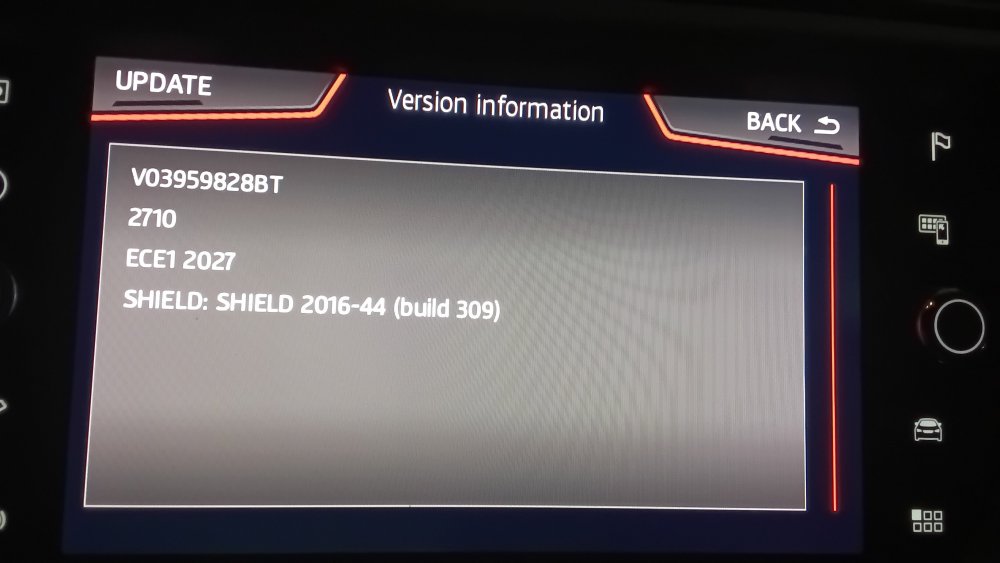
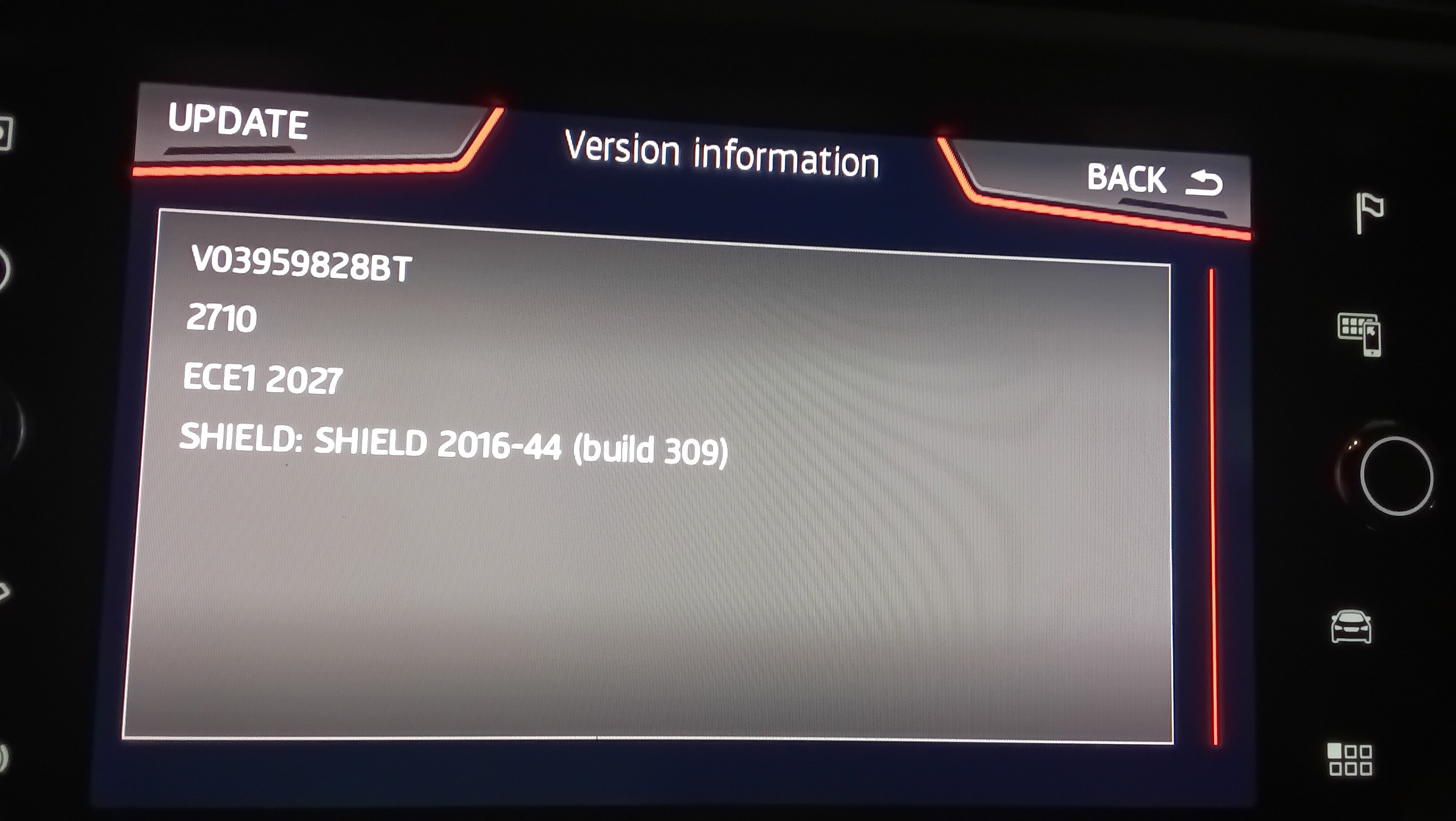
Well I put your software train as per the picture into mib helper and it says it is indeed a mib2 high. Went on a search of mib2 high and 450 navigation and it gives you the second post on this thread: https://www.briskoda.net/forums/topic/537850-columbus-map-update-2026-2027-mib2-high/#findComment-5996496 Which says it doesn't work with Seat or VW without a change in navigation FeC. This was the guy that found the file so they know what they are talking about. To get it working on a mib2 high you need to add the Skoda or Audi navigation FeC (either will do) to the end of the addFeC file that it uses. You first install the mib2 high Mr Bonk toolkit in the green menu of an SD card. You do a back up using the commands. Then you have to look on the SD card for the file it is using with the FeCs on it. Then you add the Skoda life long navigation FeC and do the addFeC command. Reboot the unit. Check installed FeCs and you should see in addition the FeC you added. Running SWDL that F will appear as T and you are good to go. Some people had issues with deleting the back up and generated another one in the github project. You only back up once. That is what one guy was stumbling on so the addFeC menu didn't work. Difficult on posts to work out what people are actually saying but I reckon that was the issue. They tried to backup twice and found they couldn't. Other people have had success first time. The toolbox you only use once then forget about it but I did get help from the people familiar with it at the time since the module had not been written for my release, so they wrote it for me. The documentation will tell you whether your firmware is covered. Another Seat poster update the firmware to All in One (AIO) because theirs was to old, then used the toolbox to do the FeC addition. Now I'm assuming that the VW firmware is like the Seat one and can handle many navigation FeCs. Thus it tries VW navigation FeC and failing that the Skoda one you added. Mine has been working happily like this since February and prior that 5 years before why I was already setup. The link to the toolkit is this: https://github.com/Mr-MIBonk/M.I.B._More-Incredible-Bash Additional reading: https://www.seatcupra.net/forums/threads/updating-the-inbuilt-mib2-satnav-mib2-tricks-and-mib1.388586/page-163#post-5097617 Read on beyond and you will see people using the toolbox with success. The other way if you dont feel comfortable with using the Toolbox is to find a reliable retrofitter to do it for you.
-
From the screen above, sure it's not a mib1 high ?. You shouldn't get ERR on the other attributes. A few issues gives you an N but not ERR on the other stuff. If it is a mib1 high you wouldn't have needed vcds coding to unlock the developers menu. That got locked down in mib2. Another litmus test.
-
Fat 32. I'd enable developers menu as I said above. This has to be done via vcds or obdeleven Pro then you hold the menu key, keep holding then a second menu with swdl will appear. You tap that with the SD card in. Eventually by tapping around with the SWDL menu you will see the entities against each of the navigation attributes they should all show Y which means yes, N no, can't be done. If the navigation FeC is no good it will show an N on navdb. If it can't read the card swdl won't go on to try to import the file. Swdl is the backend menu which covers all backend files that can be imported via the front end but shows you what is going on.
-
They go into a Seat high with Skoda life long navigation FeCs using the github mib2 high toolbox to enter the FeC. Audi people have it working. It's linked from the VW site so it should work without issue. Either way reading those files is very precise so if they don't unzip correctly it will refuse to unzip them / load them in the car. The built in windows 11 unzip works fine. Drag and drop. Mac's have that Mac issue. You must use Cleanmydrive after copying it to an SD. I always use 32gb Fat 32 card. I do it with swdl where if you had a FeC issue it would shown an N against the navdb attribute. What it does on a Seat Mib2 high if you don't add the Skoda navigation FeC. Enabling swdl with obdeleven pro or vcds may be your other exploration to see those attributes. Either here or the Seat side someone had done that so seeing the N meant no can do till the FeC is sorted. So yes there are people who got it working on Skodas, Audi and Seat with the right FeC pass on VW where its suppose to.
-
-
Problem with mib3 map files they can sit there doing nothing with the wrong adapter. Music USB you go... hmm no sound with the wrong cable. Hence people prefer the reversible USBs for updating mib3 units. It was a £15 SanDisk Ultra Dual Drive Go USB flash drive 64 GB USB Type-A / USB Type-C 3.2 Gen 1 (3.1 Gen 1) Black I got from Amazon. Reasonable price to take out an unknown variable. If its mib2 you can still buy those USB studs called ultra fit / mini fit. They are on Amazon. Studs takes up less room. Run a bit hot though. I use SD cards on my mib2. 128gb. You can buy usb sd adapters if you don't have an SD slot on your laptop / PC.
-
No for 450 see this post: https://www.seatcupra.net/forums/threads/updating-the-inbuilt-mib2-satnav-mib2-tricks-and-mib1.388586/page-163#post-5097617 The 083... FeC in that post needs to be added to the unit via the github project or a retrofitter. Basically you can throw a list of navigation FeCs at it and it picks the one that works. Thus my unit has both the Seat and Skoda navigation FeC in it. I added the Skoda one in it last time support was pulled several years back, then next release it was added, now pulled again. It will probably I guess stay like this now.
-
I have written a Seat mib2 navigation resource https://www.seatcupra.net/forums/resources/updating-the-inbuilt-mib2-satnav-mib2-tricks-and-mib1.60/ Read from "Mib2 High / Seat Plus Map Update" Unlike VW and Skoda, Seats did not come with life long navigation FeCs so you need to read your FeC and compare with that table. The previous release 430 links you will find on boards but if your FeC doesn't allow it wont work. How to do that check is on the link. There were some late Seat mib2 highs that had life long FeCs they finished in ee. If it doesn't you would in anycase use the toolbox mentioned or get a retrofitter to add the Seat life long navigation FeC plus the Skoda one if you want 450 maps. Or just for 430 maps only Seat lifelong FeC. I'm assuming you do know that your unit is a mib2 high / Seat Plus unit. No navigation card its a mib2 high. Mib3 I talk about that. Test is on that link.
-
For Seat you use the mib2 high tool box to add the Skoda navigation FeC you add it to the Seat FeC list that you find in the software using a plain notepad editor observing how the original file terminated. See the posts of page 1 above. Install the toolbox in the green menu. You take a back up, then at that stage edit the FeC list you find on the SD card you are using for the software. Then add FeCs command. Reboot the unit. Take a photo of the FeC list before and after. You should see the additional FeC added. If it hasn't added it then you aren't in business. One poster was having issues taking a second back up. They said they had to rename the first. I suspect they didnt need to take a second backup. I only took the original one then did the addfec. The github software works with specific firmware installed in the car. I think that is now generalised. Certainly for late models. For very early Seat mib2 highs you might have to use 1447AIO then the github project. The github project should list which one it works with. The people associated with the project wrote the module for mine which was 1337 or 1349 something like that. Now as said I believe they have probably written the stuff for 1xxx. You can check the read me on the project. Reckon being a late models you will be fine to use the project.
-
Apparently some of the adapters are not fully "wired" so people who try to update their mib3 maps offline and software find nothing happens. Bit of a lucky dip when you buy them. Where @MartiniB reversible USB comes in as above. I bought a natty SanDisk "Dual Drive Go" since I wanted to test out the pseudo surround ambience sound processor in a Cupra Raval. £15 for a 64gb one from Amazon. I did have an adapter but lost it 😕. Added to my box of sticks.
-
Well it's not my car I update the mib2 standard maps on I'd get an earful if I messed it up. Workaround does me since it's low risk... zero risk in fact.
- 24 replies
-
- amudsen
- discover media
- mib2
- maps
-
Tagged with:
-
@viper42 Bit more than a few years, Exciter aka Stefan did it in 2017. Used a piece of software that opens the path out. Called something or other. Impressed Seat board members at the time and got christianed as "the workaround" found on all Seat board across Europe now. Shuffle one nds file and that's your lot. Exciter takes the credit. Toolbox CID Off why bother when the workaround is so easy. One comes across people from time to time trying to do it that way not knowing what they are doing. A card with a CID isn't that expensive then you just use the workaround. That's if you want two cards. So you hear muttering of expensive SD cards but against that fiddling with the firmware. Retrofitter were quick to flog their solution but a waste of money. Just needs file copy skills. I keep the file in the directory path and just do a replace, my crib sheet method. We also found after people kept loosing that overall.nds file that any previous release to the original would work but not anything after. So one solution for those who deleted the file. Sort of a function of Mapcare, you can install old maps but nothing ahead. Moving that file gives the unit a kick up the backside and generates the navigation FeC for the new map but also generates a flag to say its got more than one navigation FeCs that you can't remove via normal coding. Still thousands of cars are happily running around with this flag set across Europe thanks to Exciter. That didnt come out till later. But not an issue. Mapcare in mib2 is only something that Seat and Audi have to worry about.
- 24 replies
-
-

- 1
-
-
- amudsen
- discover media
- mib2
- maps
-
Tagged with:
-
Needs the "workaround" on a Seat although some of the other boards neglected to tell you that. Seat was snotty with mapcare unlike VW and Skoda. Workaround is easy enough. One file is retained from the original SD card and overwritten on the new release and Bob's your Uncle. There were a few 2019 models where Seat gave up with mapcare failing that the workaround or the mib2 standard toolkit but that's much more problematic. Every body does the workaround except those that like to risk it. Had the 32gb all Europe and EU1 working for the 16gb cards.
- 24 replies
-
-
- 1
-
-
- amudsen
- discover media
- mib2
- maps
-
Tagged with:
-
- 24 replies
-
-
- 1
-
-
- amudsen
- discover media
- mib2
- maps
-
Tagged with:
Well I download and unzipped in 7zip and didnt get any reports of SLI.NDS error, ditto the built in unzipping program of Windows 11. Suspect its the original download that got corrupted so every time you unzip it, it trips at the same spot.Use the Vag suggested one. 7zip. The windows built in one's dont always unzip everything. Also update any old copies of 7zip.Had another check this afternoon.... nothing. So yes I agree... however we did have the good times for an additional three more years.One solution or @pcbbc comment 😉 https://www.ttforum.co.uk/threads/fixed-rds-tmc-no-longer-working-in-uk.2032197/?nested_view=1 I just use the built in and if its a long journey check using Google Maps then if their is a road jam and everybody is turning off... just follow them till you are back on the route 😂. It works. TMC traffic reports via Inrix were similar to the old motorway service boards. Gives who is doing the work, gas pipes etc. Narrow lanes etc. Actually more on Inrix than Trafficmaster. Inrix being the Highway Agency system so they knew what was going on and Inrix analysis. Never any traffic round here. Only driving in England where hold ups occur. An English thing 😉. If it is closed down it was going to happen one day as people move to connected cars and use the built in maps and traffic reports or Luddites that stick with what they know, Car Play and Android Auto 🤣. Vag use their own system now supported by Here Maps but data trading with Inrix one can assume.

Important Information
Welcome to BRISKODA. Please note the following important links Terms of Use. We have a comprehensive Privacy Policy. We have placed cookies on your device to help make this website better. You can adjust your cookie settings, otherwise we'll assume you're okay to continue.