Tell
Members
-
Joined
-
Last visited
Everything posted by Tell
-
All good. 👍(you get the Seat part number on it in a Seat obviously also has the Seat FeC in it unlike that release once) Leave MartiniB to sniff out the RoW one.
- 155 replies
-
-

-

- 2
-
-
- columbus
- discover pro
- maps
- mib
-
Tagged with:
-
Feels like the card then. I always unzip to SSD then copy across. You get a lot of traffic during the unzip why it's better to unzip to the HD / SSD then just copy across. Still watching our delayed 1PM news will try installing it after. In the car is looking good. Read the SLA1 signature and passed validation. I use the SWDL command so it's seeing the correct map attributes to update and started off. Should have results in 40 minutes or so.
- 155 replies
-
- columbus
- discover pro
- maps
- mib
-
Tagged with:
-
Feels like the card then. I always unzip to SSD then copy across. You get a lot of traffic during the unzip why it's better to unzip to the HD / SSD then just copy across. Still watching our delayed 1PM news will try installing it after.
- 155 replies
-
- columbus
- discover pro
- maps
- mib
-
Tagged with:
-
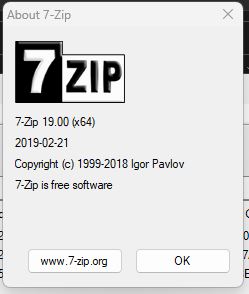
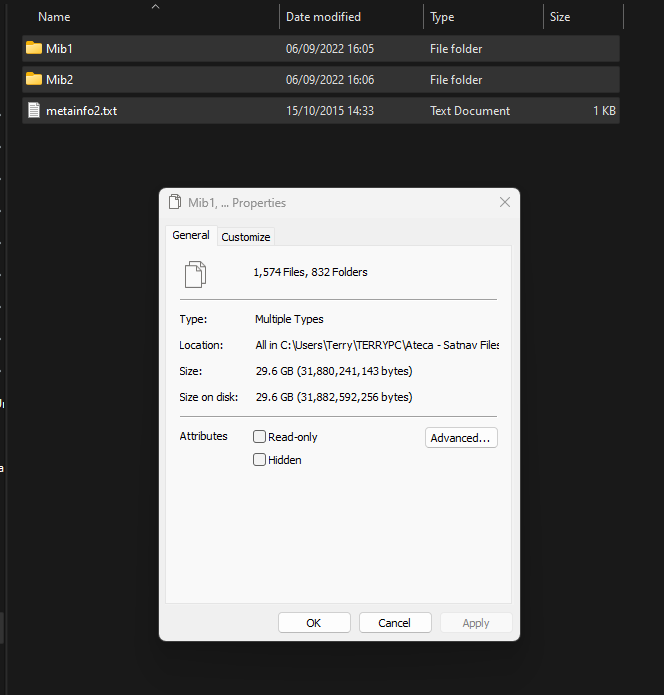
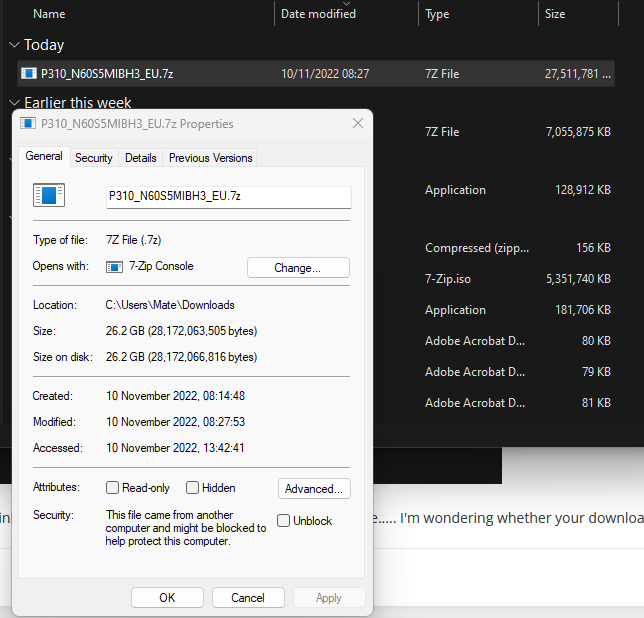
I got mine unpacked without errors but haven't tried installing it yet. This version of 7zip I did use use the Russian link but I think that's all the same http://map.audi-mib.ru/ Right clicking on the unzipped three items gives this... check the bytes with what you have MartiniB. I just did the drag and drop. Well I unzipped it with WinRAR and got no errors like 7zip. Check above is the same..... I'm wondering whether your download went wrong MartiniB... yet to check it in the car. Property check on the original zip file:
- 155 replies
-
-
- 1
-
-
- columbus
- discover pro
- maps
- mib
-
Tagged with:
-
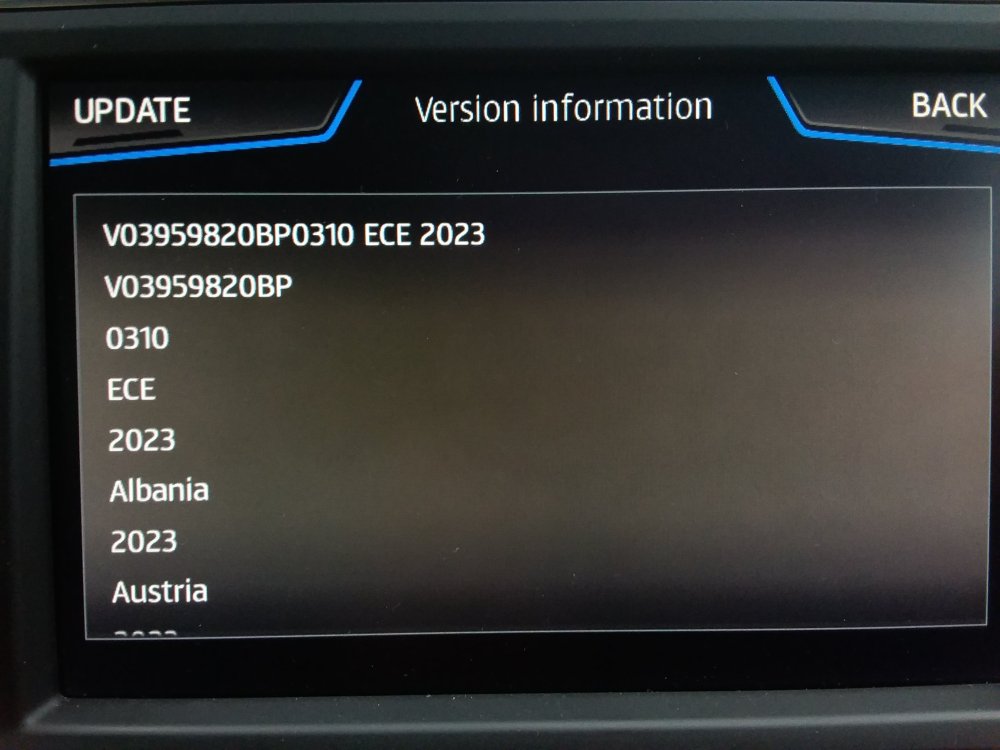
I see the production date was September 2022 feels about right. I'll try it in my Seat later. Let you know.
- 155 replies
-
-
- 1
-
-
- columbus
- discover pro
- maps
- mib
-
Tagged with:
-
Yes VAG changed the referencing of the files between mib2 standard and mib2 high a few years back which wasn't helpful. The November release was called the year ahead, like 2023 whilst the June release they would call on a split year, 2022/2023 teasing you with that. Then they screwed up the naming convention. Old name would be 2023 for November 2022. Makes Googling tricky looking for new releases. I stick to serial release number when describing the files so if you see the release number higher than yours it's newer, hence these are the newest 😉. Common release across VAG brand but not commonly released at the same time. Skoda and Seat drag their feat so the VW brand feels more special 🤣. Probably a resource thing with Seat whilst Skoda hold back the release since they may be told to. Causes confusion since the files wrapped up in their web pages are different to the best available which MartiniB publishes here which can be used.
-
Probably been found then unless its a beta one out for testing. Changed the series release numbering thou which is kind of interesting. Inside the zip you would expect to see those preperation dates as MartiniB publishes several months before so if that feels right it is probably the release unless its an internal beta 🙄. I see the guy is showing the Audi navigation FeC series so he probably knows what he's doing... have a look when I get up. He's probably part of the Mib collective as I call them, the enthusiast not for profit telegram collective guys that pull mib apart and publish helpful stuff. Probably been testing a wider file range. 🤔
- 155 replies
-
- columbus
- discover pro
- maps
- mib
-
Tagged with:
-
Interesting... calling MartiniB. As I understand it MatiniB has or had a set-top box like the Humax programmed to probe thru a series range but if it goes out of the series range set up it wont find it. That's how the guys find these files. The odd numbers in the sequences are quarters. They only release six monthly. In the past Seat have release a different quarter on factory fitted delivered ones to the main six monthly one. When up if nobody beats me I'll Google the actual file in that link against the website and see where it appears. In the past they pop up on the Drive2 site where MartiniB also posts.
- 155 replies
-
- columbus
- discover pro
- maps
- mib
-
Tagged with:
-
I keep checking MartiniBs posts and trying the website 😉. Reckon it will be 199 as the ID everything else the same. You know those CSE exams when they were doing O'level maths but CSE's set those weird series tests but were not anything to do with maths but morphological analysis but you didn't know that at the time 🤔. Could have just been set theory or what was called new algebra and nobody knew what that was. Included set theory. We are actually using heuristics for anyone into decision theory... MartiniB uses range testing method, brute force.... called something but forgotten it's name, a crypto method. What tends to happen is the German IT people load it up at the end of the week and go home. The weekend starts at noon in Germany on a Friday so will probably turn up on a Thursday night. Could be tomorrow night, weekends are a good time to check. I did notice from their webpage they mentioned December in the published range of dates now, not just week xxx. The same map source is used in mib3 so they might give priority to that over mib2 high. Ps. America called it New maths https://en.m.wikipedia.org/wiki/New_Math So there you go deployed that 🤣... those series test.
- 155 replies
-
- columbus
- discover pro
- maps
- mib
-
Tagged with:
-
Well done MartiniB I'd been busy looking for the mib2 high one thinking that it would come out before the standard, normal form. Normally they do it at the end of the week and go home.
-
Seat people have murder with the registration for connect services. They loose the primary user, get guest etc. Get screwed up car play. The car position doesn't tally with the map that effects the mobile phone as well. They get undertake prevention when over taking... the list goes on. I'm waiting till 2030 and then will go EV if not dead by then 🙄. Anyhow it does appear that you can use the download file then from what you said. I'm making do with mib2 and 5 years of old maps to 2030 🤗. 2025 probably being the last year of mib2 maps updates. All the VAG mib3 issues are the same across the brand's. Then you have common platform issues on the MQB Evo platform on the systems not working correctly. The SOS system banging the audio. The left / right business of whether the car thinks it's driving on the left or right is an MQB Evo issue. House numbers in fields is an mib3 issue. That's been corrected with a map update. You still find people with it with old maps. VW rolls out the firmware fixes faster than Seat, not sure of Skoda. https://en.m.wikipedia.org/wiki/Volkswagen_Group_MQB_platform
-
So the answer is you got the USB map update to work when out of the connected services contract ?. Seat people I have suggested that to, try using the Seat Mib3 update site and don't manage to do that. Also read that the download is provided for countries that don't have connected services eg. parts of East Europe and it doesn't work on cars with connected services... perhaps you need to be out of contract for that to work ?.
-
It hasn't broken the 32gb barrier yet if the card is formatted in Fat32. The clever souls that like NTFS a few years back found it wont fit. No NTFS has bigger overheads than Fat32. They were never suppose to format 32gb SD cards in NTFS for this purpose, only Fat32. German Skoda board that were moaning about it a few years back. May be at some stage it will pop the 32gb Fat cards but not yet. Got one 64gb card ready for when it does.
- 155 replies
-
-
- 1
-
-
- columbus
- discover pro
- maps
- mib
-
Tagged with:
-
Yeah the example could have been an over air one if they were still in contract not the USB in the socket. Not persuaded that, that example is real. They come with a one year free contract then you have to cough up. Someone needs to try that out of contract.
- 155 replies
-
- columbus
- discover pro
- maps
- mib
-
Tagged with:
-
May be that way does work but in the early days it didn't so was concluded and said on boards that download is for East Europe who don't have connected service. Disabled in West Europe. No Seat folk have got that to work. If it did you could avoid paying up for connect services. Cunning disabling it. We await the Mib collective working out mib3.
- 155 replies
-
- columbus
- discover pro
- maps
- mib
-
Tagged with:
-
I do a broken record on using 32gb SD class 10 card and above.... chose not to play it today 😂. It is the recommended way of doing it. Skoda people go off piste but best to stick to the recommended way else you end up ruling stuff out. 32gb SD class 10 or above 😉. Cheap enough.
- 155 replies
-
- columbus
- discover pro
- maps
- mib
-
Tagged with:
-
Ah... does it itself. What people do to force it is to pick a route through areas of interest, then it works out you need an update. So you could pick a route to Berlin say from home and it will pull back overtime the map update. Unlike mib2 high which has all of Europe in one big file it has the maps stored as fragments. 60 or so it's in the download file on the VW site but nobody to my knowledge knows what to do with that download. Suppose to be for the East Europe market where connect services are not supported. ($) So basically you can check what release you are on off the infotainment screen then if you fancy an update just plot a route to where you are going. That's how Seat people tell me how to force a mib3 map update. Can take a day or so to come down over the 4g service. ($) you can load up in mib2 high countries of interest via the backend menu SWDL but nobody does it that way. Useful for testing the maps.... Iceland is really small :). My FeC test.
- 155 replies
-
- columbus
- discover pro
- maps
- mib
-
Tagged with:
-
There is a slight delay whilst it does an SLA1 signature check then will start off or blow a raspberry if it fails the signature check. Normally you take out any other cards and just have it in SD1. People have reported issues before. I'd always assumed you pop out the other card, I always do. if using a MAC use CleanMyDrive on the SD card to removed Mac rubbish that causes the SLA1 check to fail. MartiniB I reckon will be finding the November release anytime soon.
- 155 replies
-
- columbus
- discover pro
- maps
- mib
-
Tagged with:
-
I wish ask one or perhaps two of the mib tools people I know on another board to look at the post. You can also chase people up on the Audiworld board on that thread.
- 155 replies
-
- columbus
- discover pro
- maps
- mib
-
Tagged with:
-
BTW did you use this one: https://github.com/Mr-MIBonk/M.I.B._More-Incredible-Bash/releases/tag/V3.4.0 Claims to fix NAR which I reckon is where the rest of the world goes. So that one is the latest. Possible if you didn't use that release might be your issue. I thought I'd study it. The documentation isn't always the greatest... I get got at by Mib Wiki when I point that out 😂. Wanted to check how much it had changed since when I last used it. So yes it has been changed from when I used it. You don't get to see the specific files it pastes in against your firmware. --- So I'd revert the install from the backup check you got your original navigation FeC back. If you haven't got the fixed release above, install that. Then I'd edit the FeC 023100EE into the two other FeC files the one for Europe and China just in case it's picking up the wrong one, so you got 023100EE in all three files. Then do the patch and Addfec. Reboot the system and check the FeCs to see whether you got 023100EE now. Also it seems the patches are also in M.I.B_Patches_20220625.7z I'm not sure how they fit in with the rest. Whether it's all automated these dates and generates these itself. But in those files is also the addfec and you can put those patches into the addfec directory of patches - I think. So that's the next level of experimentation after forcing 023100EE into all three areas. Best of luck.
- 155 replies
-
- columbus
- discover pro
- maps
- mib
-
Tagged with:
-
BTW did you use this one: https://github.com/Mr-MIBonk/M.I.B._More-Incredible-Bash/releases/tag/V3.4.0 Claims to fix NAR which I reckon is where the rest of the world goes. So that one is the latest. Possible if you didn't use that release might be your issue. I thought I'd study it. The documentation isn't always the greatest... I get got at by Mib Wiki when I point that out 😂. Wanted to check how much it had changed since when I last used it. So yes it has been changed from when I used it. You don't get to see the specific files it pastes in against your firmware.
- 155 replies
-
- columbus
- discover pro
- maps
- mib
-
Tagged with:
-
Question of finding where it picks up the addFeCs file. After you have hit that command you must do the long press on the on / off to get a proper reboot since you won't see the refreshed FeCs without that. I was given a module by one of the programmers when they were perfecting the patch. Certainly you can delete all the FeCs we did that at one stage when he hadn't given me the correct patch. I reinstalled the previous patch and got them back. Somebody else where a retrofitter had messed their FeCs up the team corrected that for them. The FeCs it actually uses are in the patch folders. So by studying your firmware serial number you should see the patch folder it used. You could edit that and reverse the backup / restore. Mind you the original back up is the one to use. Reverse that. Then do the process again but with the rest of the world FeC in the patch folder which you have edited. If you have the original backup, restoring that will give you your original FeCs. Edit the patch folder that you have identified to match the firmware in your car and start again. Failing that you need the programming experts on it. That's how it worked last year since they had edited in the Skoda FeC into every Seat patch folder that matched the firmware release when VAG didn't offer a Seat map release. Doing the edit yourself for the Audi rest of the world map reversing the original backup if you still have it, and start again should fix it....
- 155 replies
-
- columbus
- discover pro
- maps
- mib
-
Tagged with:
-
Although the software may have changed from when I used it. Did you do a backup. Did it say whether it recognised your firmware ?. If it didn't recognise your firmware then the patch can't be done and if it's not patched you can't change the FeCs. That's the first stage. Then you have to get the patch written to change the FeCs. Your advised not to try to write your own dummy patch. Did you use Mib Tool in the first place or some other variant. Also is the unit a genuine fitted unit for the Australian market or an import that was designed for another market. Has a bearing on the firmware. I note there is a Mr Fixit Audi Mib tool YouTube video you can check that for comments. You really need a board where the experts on Mib tool hang out. They can dig you out of holes. Mib-wiki the self appointed administrator of the hobbyist group is active on Audiworld from a Google. I would chase him down there. Other members of the group probably post there as well helping people out. So suggest you follow up any talk on Mib Tool there. Mib Wiki maintains the mibsolution website... might even be "Mr Bonk". Saying that they do tend to push you to change the firmware to AIO rather than use Mib Tool. AIO installs mib tool at the end for the final bit after the firmware update, where people abort the process and wonder why they didn't get the FeC update. https://www.google.com/search?client=firefox-b-m&sxsrf=ALiCzsYSE5C-BZeAYkZ5vKSpv0pwkOBGkQ%3A1667030167086&q=mib-wiki+audiworld&oq=mib-wiki+audiworld&aqs=heirloom-srp..
- 155 replies
-
- columbus
- discover pro
- maps
- mib
-
Tagged with:
-
It reads them all in if in the correct place. The unit actions all of them.
- 155 replies
-
- columbus
- discover pro
- maps
- mib
-
Tagged with:
-
I believe the addfecs goes in that directory. Mine went into the Seat directory of that and it picked it up from there. Just one directory. in there ER for Europe. I don't believe the MIB2 high unit for Seat is shipped outside Europe why it doesn't have the sub divisions. For Audi you have that choice. If you look at the attached document FEC List.pdf it shows a choice of three, yours would be 023100EE (the NAR) 023000EE Audi EU Maps - Lifetime x 023100EE Audi NAR Maps - Lifetime x 023200EE Audi China Maps - Lifetime x Mean's yours must go in on the US list. The only thing is whether your car was shipped from Europe as an import rather than designated for Australia. If it's got European firmware on it then the patch will be picked up as European then you want to addfec slotting in the NAR FEC in the European directory assuming they have written a patch for it... if you see what I mean. If it's the NAR firmware then the table pre-prepared would be fine. Quite a few expats take their cars with them so it may have European firmware in it. The joys of packages. On a website with Mib Tool experts hanging about you can get answers. Basically you run the package taking a backup. It tells you whether a patch has been written. If not you are invited to submit the module it's extracted to the mibsolutions website. The guys can either write you a dummy patch or the full patch. They wrote me a dummy patch which I then did the addfec with. They also wrote a patch and added it to the list where the Seat 1338 originated. So the question is whether a patch is already within the list. Eyeballing you can see them from your software but it will automatically find the patch if one exists and tell you if it doesn't. Question of whether the car has NAR firmware or European firmware. Using the NAR Fec on European firmware should work to give NAR maps... I reckon. Clear as mud. That's how the software worked last year. You might need one of their Bash programmers if it doesn't recognise your software. On an Audi site you might find a band of Bash programmers familiar with Mib Tool. FEC List.pdf
- 155 replies
-
- columbus
- discover pro
- maps
- mib
-
Tagged with: