Tell
Members
-
Joined
-
Last visited
Everything posted by Tell
-
Sure Skoda aren't playing their six month delay trick. Re-heated old bread. It should show release 310 once loaded up if 197 the June 2022 release when they gave the release before 🤣.
- 101 replies
-
- columbus
- discover pro
- maps
- mib
-
Tagged with:
-
Yep some downloads have them on, others don't. The idea being that the checksum is published differently from the file so the user runs their finger across the md5 file and says yes this file I got on here tallies after working out the md5 of the file. You can generate the md5 yourself and compare. 7zip has a capability of doing that as I recall in a module you off to install or the utility mentioned here. MD5 & SHA Checksum Utility. I use ether. https://infosecscout.com/generate-md5-file-checksum/ So that's the md5 file v the one computed. Just a simple check but given it comes from VAG it's going to be right. Non believers don't believe the VW, Skoda and Seat release for the same period are identical. We tell people they are.... The technical check for non believers is to run them through the sla1 check but then they wouldn't know what that is so continue to believe they can't all be the same file 😂. The firmware is different but the same source code slightly adjusted. Some people manage to get Skoda infotainment firmware on Seats which causes some constellation with those people that play with mib firmware telling people they got the wrong code in the car, but for map files, pois, radio stations etc all interchangeable for mib2. Errant Seat Cupra moderator here.
-
Pretty fast. That will be a comparison for next year since I've got this one loaded up. I could downgrade using the SWDL menu then upgrade back or wait. Think I'll wait than mess about. I've already got that card above and give that a whirl in June. But if any one wants to try that feel free. In terms of units mine is a mib2 high fitted in 2016 not anything newer. Takes about 40 minutes using SWDL in one go on a regular Class 10 of the old design DanElec SDHC Proline 200x Fat32 - think that has a read speed of 30MBps. The SanDisk mentioned read speed is quoted as 170 MBps (SanDisk Extreme PRO 64GB SDXC Memory Card up to 170MB/s, UHS-1, Class 10, U3, V30, Black). USB2 is said to be 60 MBps from my previous Googling. Think the timings between SWDL backend menu and the normal way of doing it are similar. On paper the SanDisk one would be faster than USB if the components aren't holding it up. If I get the urge to test before, I might do. Like to keep one old map on a card and the new one. Feels like I need two cards 🤣.
- 101 replies
-
- columbus
- discover pro
- maps
- mib
-
Tagged with:
-
On the speed comparison USB2 runs at 60MBps and Class 10 SD cards 10MBps. So one needs a better spec card above Class 10 to out perform USB2 assuming the chipset in the unit can manage it. The SanDisk Extreme PRO 64GB SDXC Memory Card up to 170MB/s, UHS-1, Class 10, U3, V30 manages a 170MB/s which is better 60. Would suggest one of these is better than USB would ever be in the unit. I'll stick with my card I got ready 😉. Probably some limiting factor of the unit which will never get to these speeds like the bus speed of the unit. A lot of early hardware was limited to 100MB/s. Quess it's hovering around there. The other variable.
- 101 replies
-
- columbus
- discover pro
- maps
- mib
-
Tagged with:
-
Probably what we'll all be using next year or USB sticks. What we dont really know is how much spare user memory there is in these units above 32gb for maps. I'm sure the technical programming enthusiasts know who are into firmware. Memory allocation table within the unit. The spare memory is used for the Jukebox / some but how much more can the maps go beyond 32gb once loaded. Maps + Juke box = ?. VAG might have to start releasing zoned areas if there is a cap that doesn't let them go much further in the life of Mib2 high updates.
- 101 replies
-
- columbus
- discover pro
- maps
- mib
-
Tagged with:
-
Suspect the Mac dross that CleanMyDrive removes was the critical difference if yours was a PC and Freelunch was Mac. All things being equal the dross that CleanMyDrive removes pushed it over. Macs add extra Mac stuff that can mount up so I'm told which can be quite sizeable. You can't see it on a Mac. Bit caught out if so.
- 101 replies
-
- columbus
- discover pro
- maps
- mib
-
Tagged with:
-
I can guarantee you it will fail the SLA1 signature check. Unlike the Mib2 standard you can't hack what is inside the Mib2 high files. The Mib2 high map material is in the Mib1 directory as well as the Mib2. I spent a long time in the past try to adjust those files by varies means but the bottom line is you can't. They are sealed with those encryption signatures which stop you fiddling with the contents. I went into all of that above. It's impossible to resign the file without knowing the Vag master key. Uses two keys, master key and the public key. The latter is used to unlock. That's public domain not the master key. Too sign you are into encryption algorithms plus recompiling the checksums. Latter can be done but not the signature unless you have the Vag key. Signed with an SLA1 encryption signature. You could try CleanMyDrive on the SD card before the copy incase there is hidden Mac stuff you csn get rid off. Failing that your best bet is to buy 64 card or use a USB exfat or ntfs. For background reading: https://www.google.com/search?client=firefox-b-d&sxsrf=ALiCzsYhBUj1XLh1wR0IhL_pmsOJYfUmTA:1669469927936&q=sha1+signature+encryption&sa=X&ved=2ahUKEwjn8pGQ_Mv7AhWYRsAKHTrmBbAQ7xYoAHoECAoQAQ&biw=1920&bih=891&dpr=1 The good Mib enthusiasts have a way of bypassing the signature key check covered above, but you still need to recompute a lot of checksums so not worth the effort. Almost certain with the next release that even the 32gb cards it now fits on it won't next year. Have a class 10 64GB exfat card ready for that. Debating whether to splash out into a USB, I'm not sure of the bus speed of the USB v the internal SD reader - anyone. Previously, fast speeds have been quoted with a USB. May be the fastes USB3 you can get might be the order of the day but capped by the USB2 speed in use. A like little SanDisk Ultra Flair 128 GB USB 3.0 Flash Drive, Upto 150MB/s read... got one already.
- 101 replies
-
-

- 1
-
-
- columbus
- discover pro
- maps
- mib
-
Tagged with:
-
Well we thought you made them 😇.. you check the location then they move sometimes why people start moaning that it's not there.... you'd need the master key to lock them if you made them. Don't think anybody has that but all Vag files whethere they are firmware or software are locked with the same key. For another hell of it activity I ran the manual way of doing the Sla1 signature check I found the mib public key online, someone had extracted it from a unit (popped it as they say). You could then pretend you were the unit and do the signature check using the algorithm used for it. Covered that on the Seat board. I was given some help by a crypto fan site. It's your pure mathematics (do have two maths degrees so thought I'd give it a whirl... didn't cover cryptography in those days). Cryptology for SLA1 uses a feature of pure mathematics that makes it a bit tricky to work backwards. Eigenvalues I recall.... never liked them. Err... you can get an MSc in Cryptology now... give that a miss. Being able to do the signature check doesn't help if you want to alter the files since you need to re sign them using the primary key. But I did check the firmware files as well to see whether the same public key was the same. Actually you would expect them to use the same public key else the units would have to use a different algorithm, they don't. The mib collective people as I call them use a backdoor that was discovered by dummying up a POI import then slapping all their code without sla1 signatures after the POI import signature. That's how they do the AIO firmware. Clever stuff. The unit keeps reading anything after the last sla1 signature. A design over sight but VAG will known that by now for sure. That's sort of like 100 people slipping behind the automated ticket gates when one person passes. A slight oversight.
- 101 replies
-
- columbus
- discover pro
- maps
- mib
-
Tagged with:
-
MartiniB will tell you they are all the same its just they are stored on different servers. You can use file comparison software if you get the urge but you can look at the signature on the metainfo2.txt files in the main directory and mib1 and mib2. That signature at the end SLA1 signs those files. Pretty impossible to change what's in those files once signed. So if all signatures tally between the two it's identical. You can look at the byte size but ofcourse could tally. Dont save those files once opened, just cancell to get out. Boots and braces check. Another is to use 7zip CRC SLA1 highlighting the three entities. That generates the SLA1 checksum on the three entities. If it's different between the two release sets the files are different. These are the checks you do if you think the brand releases are different. They are not. Why its a waste of time to refuse to use a different brand release to another since all brand releases are the same. Some are more available than others. They will be identical since we trust MartiniB.
- 101 replies
-
-

- 1
-
-
- columbus
- discover pro
- maps
- mib
-
Tagged with:
-
Yes with a 16gb original map card pick a zone from above to fit on. If you want all of Europe buy a 32gb VAG card from an e seller. Decent one based on reviews. As said the mib2 standard uses a special navigation card that is identified by the CID. All of the VAG branded cards VW, Skoda and Seat are interchangeable. You can be enterprising and write the CID yourself but works out more expensive since the cards with writeable CIDs are more expensive and you need to use a special program for that, have the SD writer on the motherboard and be running Linux or associated software. Did it once for the hell of it. Followed this and a tutorial on making my laptop bootable to Linux. https://richard.burtons.org/2016/07/01/changing-the-cid-on-an-sd-card/ The cards cost you twice as much than a VAG branded card... but educational thou. You clone your existing card. How I got three maps cards, the Seat 16gb, Skoda 32gb and a Samsung Evo 32gb. There might by Chinese clones coming in now which is why you need to be careful with esellers. Original question. Just delete what is on it, don't format since that's been known to mess the card up then copy one on MartiniBs post 1 zones on it. You are then bang up to date.
-
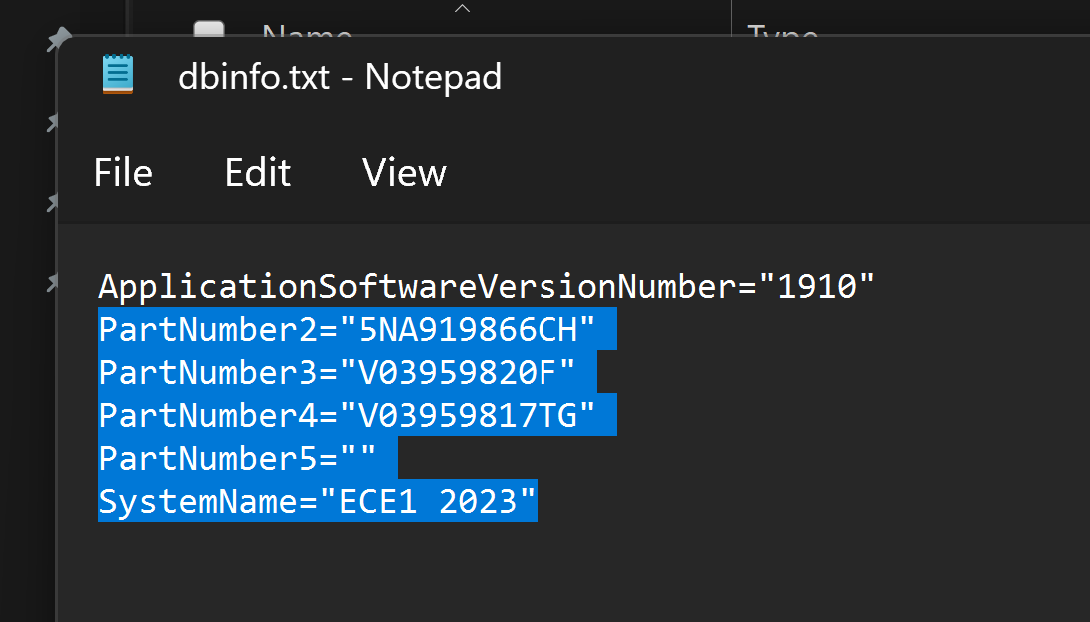
Transient. Ah well those in the know, know that the map files are identical across the VAG brands.... you can needlessly wait till it's wrapped in the brand website or take the one off the server waiting to be wrapped in a brand's webpage but containing a bit for bit identical file. As we know it reads the part number generated from the units brand firmware release to allocate the brand identity on the map information screen as per the dbinfo files above. eg. all the same file released across the brands.
-
Yes they are running to their 6 month behind VW release. It is confusing but it is what they do. It all happened when a six month release got scuppered by VAG. VW put the next release out to schedule, Skoda didn't so they slipped six months back. It has stayed like that. I quip that it's to make VW customers feel special but it's based on the processing failure that VAG had with their map files a few years back and Skoda never caught up.... may be to make VW customers feel special. 🤣
-
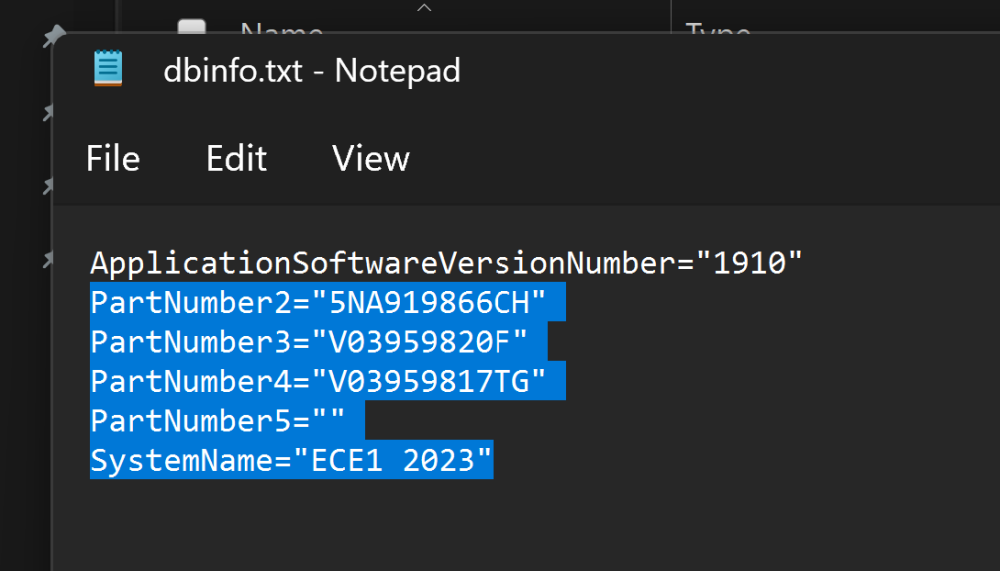
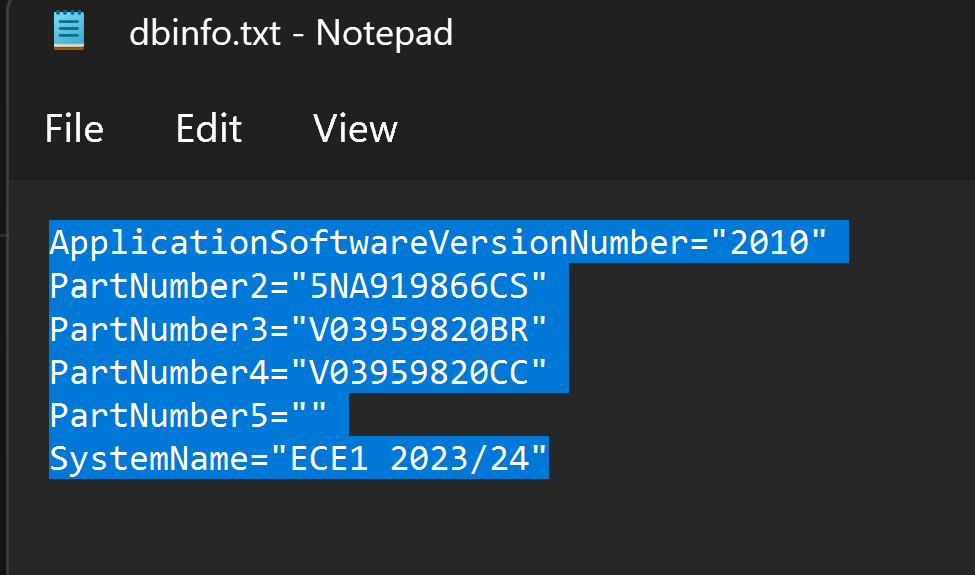
Although it shows that it's currently giving this file as the download: STD2_1910_EU1_202245.zip Previous release. Open it up STD2_1910_EU1_202245.zip\maps\00\nds As opposed to MartiniB's link Put another way they are linking to the old stuff. Use MartiniB's VW link
-
It isn't the most recent thou, release "2010" is. When I checked your update portal link last night it was 1910. So you can still get on the November 2022 release ahead of Skoda making it available by using the VW links MartiniB provided above. Skoda portal runs about 6 months behind. It's to make VW owners feel special or something like that. They slipped back 6 months or so when there was a production delay and never caught up from memory. VW did, but Skoda didn't so they lag six months in putting them up on the website although they can be in their server library which MartiniB puts up. They are like new books in a library waiting to get their stamp page put in 😉. The old days.
-
Moderator move to the correct thread now 👍.
-
You do realize what you said "Maybe I did something wrong but the VW download wasn't recognised by my Amundsen. " I answered it as an Amundsen question. You are on the wrong thread so the files above won't work 😍. Sorted that out. Question should have been here but same applies and you use the Amundsen EC1 (aka Mib2 standard) link MartiniB has provided rather than portal.
-
I had that in a Seat without problems apart from an extra process you have to do. Everybody goes to the VW with Seat and Skoda. It's the EC1 we got on ours from this release but casual Seat readers should not do this without the overall.nds file workaround - Google it. Doesn't apply to Skoda or VW.... mapcare thingy which you have avoids doing that for Skodas. You unzip and put in the top directory on the map card, obviously. Top directory Map... deposit the whole lot on the card. Normal warnings about deleting what is on the card with delete and not reformat. If you have reformatted put back 4096. Some people have killed their cards in the past by reformatting them. Previous years conversations. If it's a 16GB card you must use the regions. If a 32GB card use all Europe and as said must have the VAG label on it won't work on an ordinary SD card. If Mac use Keka to unzip and CleanMyDrive on the SD card after the copy. Seem less issues with people not using CleanMyDrive but Mib2 High big issues. The garbage Mac's leave behind will stop Mib2 High in it's tracks, the Mib2 standard which you have not so many reports but still not a good idea not to use CleanMyDrive.
-
Answer.... don't use the Skoda use the VW link it's all the same software files. The portal is probable the old release.... the ones wrapped up in a web page are always older at first than the direct links. Generally 6 months. That's 1910 on the portal link. 2010 on MartiniBs. Moral don't use the portal links. It's always like this. I'd agree the direct Skoda like for 2010 EU1 isn't working but VW is.
-
On that is where people get in a mess 32gb - Fat32 64gb - NTFS But the document doesn't say that so people start moaning the maps are too big for 32gb card since they formatted it to NTFS. A few years ago some people got away with NTFS on 32gb cards but they should have had then in Fat32 then. Germans boards discovered that and started growsing. Their issue should have been using Fat32 on those 32gb cards in the first place. I get picky since the mib2 standard map card is also sensitive to being messed up by incorrectly formatting it. That is definitely fat32 and 4096. Weird things happen if it's in NTFS. Doesn't read all the attributes. Then users corrupt them and they stop working .
- 101 replies
-
-
- 1
-
-
- columbus
- discover pro
- maps
- mib
-
Tagged with:
-
You can do it that way but not recommended. 32gb Fat 32 card is recommended. Others put USB pen drives in but again that's not recommended. Basically if the update goes wrong you won't have any map loaded in the system. Doesn't go back into a fall back position, all or nothing once it starts. So best to stick to the rules. Just say stick to the rules else it compounds difficulties for other people that don't get it quite right. The 32 gb SD card are only £6 on Amazon. SanDisk. I have one 64gb card ready for when the maps pop 32gb if that ever happens in the life cycle of updates.... a couple of years left now unless the mib collective (European enthusiasts) raise to the occasion of converting the mib3 map files to mib2. They are Here Maps in both so you would think possible. Have suggested it and was told that would be a neat project by the person who wrote the high version of Mib Tool. They have been busy loading up Gracenotes past the version shipped in the final release of mib2 high firmware, ones into their own homebrew adaption of mib2 high firmware denoted by AIO.... so you never know they might switch to giving life to mib2 high maps after VAG stop updating them. Something similar was done with RNS but definitely before my time.
- 101 replies
-
- columbus
- discover pro
- maps
- mib
-
Tagged with:
-
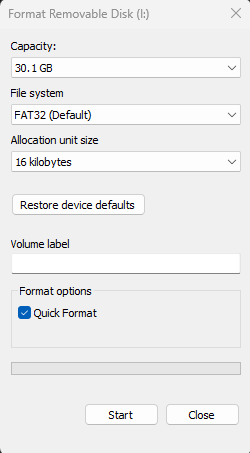
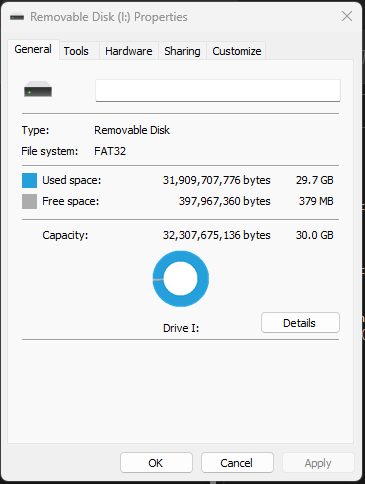
Yes the cluster size on the one I installed FAT32, 32 GB. Allocation size is 16 kilobytes. With this release of the Maps on it leaves 379MBs free. That number may vary on the manufacture of the card but not a lot. : 4096 is the number for the Mib2 standard that should never be changed.
- 101 replies
-
-
- 1
-
-
- columbus
- discover pro
- maps
- mib
-
Tagged with:
-
No 32gb card in fat32 is fine. People format the 32gb card in NTFS for the hell of it thinking its better. Nope. it doesnt fit on it then. They then buy a 64gb card but a 32gb in fat32 is just fine. Min spec class 10. The fly in the ointment is that Windows 10 / 11 on a reformat changes the cluster size to something stupid, you have to set it back. Don't reformat the card, just delete and should be fine. Not at home at the minute. I'll post up latter what it should be, 4096 from memory, if you do attempt to reformat it in fat32 if it's a 32gb card. I'm using a collection of 32gb Aldi Medion SD cards I inherited 😍. It's a Skoda thing of going off piste / take the high road 😉. The recommended VW way, the mothership PDF I posted up above. NTFS mentioned is for the PC not the card.
- 101 replies
-
-
- 1
-
-
- columbus
- discover pro
- maps
- mib
-
Tagged with:
-
-
Yes top work. I haven't spotted the RoW ones yet. Like the European one I guess that has jumped serial number by a bit so will need a wider search. Btw with a Mac you use Keka as the unzip program. Copy the output then over to the SD card (or USB) then use CleanMyDrive on the media. It scrubs the Mac characters that stop the SLA1 signature check. That is the recommended VW way of doing it. I know Skoda folk like to plough their own furrow but if you keep to VAG company methods you won't go wrong. Attached are the last Discovery Pro (Columbus / Seat Plus / Mib2 high) how to do it notes. Although people misread the pdf, recommendation is a 32gb card in Fat32, class 10 card and if using a Mac Keka and CleanMyDrive, 7zip otherwise. You can't go wrong if you stick to the recommendations, you can go wrong if you move away from the recommendations. Discover_Pro_June_2020_EN.pdf
- 101 replies
-
-
- 1
-
-
- columbus
- discover pro
- maps
- mib
-
Tagged with:
-
Yes we have got it up on this thread - see todays posts... I'm sure MartiniB will give it a proper thread soon: The direct link to the file is this https://navigation-maps.volkswagen.com/vw-maps/P310_N60S5MIBH3_EU.7z By searching under that Google you can test who has also found it and when 🤣. I've loaded it up on my Seat Mib2 High otherwise called a Seat Plus, Skoda call them Columbus.... all fine. It's the 2023 release which comes out in November. It just went a leap in reference ID for reasons unknown. Vag messed up the reference naming a few years back. That one above is bang up to date. Release 310. Breaking news.... has it's own thread now: