




Tell
Members
-
Joined
-
Last visited
Everything posted by Tell
-
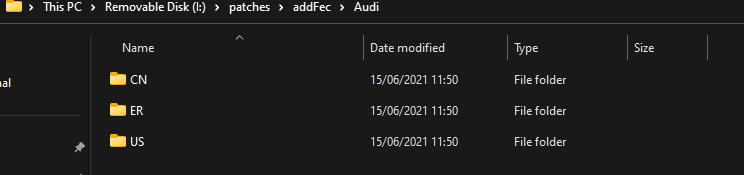
It goes in, in upper case looking at the MIB Tool files. Generally you photograph the FeC screen of the car before and after and compare to see whether it's taken it. Thus if you had a picture of what you had before your CCC characters are the ones you want. On my copy of MIB Tool from 2021 they had example for Europe, US and China, If we assume their documentation is correct it's one of the codes I posted above. Failing that you'd have to find an Ozzie car to photograph it off. In any case if you had Australian maps in it before you altered the FeC it would have disabled them, so once you get it correct you will be able to see what you had before, then do the map update. So it's addfec in mib tool and a reboot. Assuming you used mib tool all along, otherwise there is the question of whether the module had been written for the patch for your firmware release.
- 155 replies
-
- columbus
- discover pro
- maps
- mib
-
Tagged with:
-
If your original navigation FeC code didn't have the 000 in positions 4-6 of the FeC what ever you had before you want that in there plus the rest. If you used mib tool you just edit it in on the txt file. Mib Tool goes in on the green menu. You run it on the green menu via SD card. I guess that's how you did it unless they have another product out or did it on the work bench via Ethernet usb connection. It's the Github jilled work that became the mib tool box of the mib wiki people... but there are variants of the toolbox. If you have done it via the green menu running the tool box there will be a txt file with the FeC codes in it on the SD card in the package. You edit them. Re-run and reboot the unit. I guess however you did it you need to seek out the txt file. I'm sure they will have used the same approach. Mib Tool is on the mibsolution web site.
- 155 replies
-
- columbus
- discover pro
- maps
- mib
-
Tagged with:
-
It can be done that way but the recommended way is the VW pdf. Most fail on not getting it in the directory structure and the Mac issue. In the case above may be the FeC written although if you can see it on the FeC screen then it will have been written. Normally a long menu press will bring you up to a screen that allows you to see the FeCs - a visual check. I would say if the FeC can be seen then it's been read in ok. VW and Skoda are blessed with life long navigation FeCs at delivery in mib2 form. Seat and Audi in mib2 form come with the map update locked down at delivery or once purchased Mapcare / sampler period is out of the period. The life long FeC push the limit so updates can be made. For a period some Cupras were sold with life long FeCs. You can actually interchange the Seat with the Skoda FeCs... some retrofitters load all of the brands navigation long life FeCs in for good measure, handy when they dropped the Seat one, in one release so we know if they ever do that again, what to do. I keep the Skoda one in my unit just in case they do it again 🙄. Shows the Seat navigation FeC plus the Skoda one. On the same basis an Audi with would work with a Skoda lifelong FeC. It could be say Audi was dropped from the RoW if so you use the Skoda one. It could be that. You would have to check that Audi were still getting ROW. It is easy enough to load up the Skoda one by whatever method was used. When it happened to Seat a few years back it wouldn't see the map update. Looking at my Seat notes I see I noted the Skoda one as a European life long FeC Europe 08300008 that would suggest the ROW is different.... so are we sure we have the ROW Audi one ?. Reckon not... from the internet 0ABCCCDD Code: A Brand 2 = Audi, 3 = Bentley, 6 = Porsche, 7 = Sitz, 8 = Skoda, 9 = VW, C = MAN B MIB version 1 = MIB1 HIGH (Harman), 3 = MIB2 HIGH (Harman) ССС Region 000 = Europe, 100 = USA and Canada (NAR - North America Region), 400 = Middle East (AGCC - Bahrain, Kuwait, Oman, Qatar, Saudi Arabia, UAE), 401 = AGCC + Turkey, 402 = AGCC + Israel, 500 = South Africa, 600 = Australia and New Zealand, 700 = India, 800 = Argentina, Brazil and Mexico, 801 = Chile, 900 = Asia / Pacific, D00 = Rest Of the World (ROW - Rest Of the World) DD valid until year (DD is Hex value) DD: 4c= 2030 FF = ~2075/Lifetime Examples MIB2 High: Skoda: 0830004c → Europe until 2030 Audi: 0230004c → Europe until 2030 VW: 0930004c → Europe until 2030 Seat: 0730004c → Europe until 2030 Source: MIB2_Patch_ENG_v0.7.pdf (page 29) You got 000 in there when it should be 600 or something. Check with before and after. Reckon that's the error using a European FeC. It's the CCC part you got to get right for Australia for it to work. 600 Will do according to the table. This is all the mib wiki stuff of the group in that pdf. Thus model answer is 023600ee or 023d00ee One or the other 😍
- 155 replies
-
-

- 1
-
-
- columbus
- discover pro
- maps
- mib
-
Tagged with:
-
Normally if it's showing the lifelong FeC which presume ending in EE is then the FeC went in right. 7zip is the approved unzipping program till Skoda messed it it last year but I thought that had been corrected. If it throws up errors it hasn't been. I use the built in Filemanger one now, right click and file whatever it ever is in the examples I gave when it came up before. Build in unzipping program of Windows 10 / 11. Drag and drop to a directory on the PC. Drag and drop then to an SD card, in the root.
- 155 replies
-
- columbus
- discover pro
- maps
- mib
-
Tagged with:
-
Not suppose to use microSD cards. Stick to 32gb fat32 class 10 cards or above. Don't use a Mac but if you do run CleanMyDrive on the SD card before you use it. Suspect though it's the firmware. The AIO variant will be the one you want if it's coming off the mibsolution web site. Pass on what needs to be done if anything for the Australia firmware variant. The AIO variant is the ones put together which do everything... The latest ones update Gracenotes as well least for Seat. Hobbyist activity. Need to find an expert firmware hobbyist if it's not a technical issue of just kicking the update off due to formatting, file preparation or using a Mac without using CleanMyDrive on the unzipped image in an SD card. There have been a few Audi folk popping up on these threads with the FeC edit. There are two approaches either replace the firmware with AIO or the in car FeC edit updating the module. For that one you still need working firmware and the mib toolkit needs to recognise the firmware you have. There are folk out there least in Europe who can write the module to work with the firmware release or some releases. That's the alternative way. Whether yours is too early for that I pass. That was my Seat solution which someone kindly did for me on 2018 firmware. But as indicated this approach has been overtaken by the AIO firmware that hobbyists have developed but here you need to observe what needs to be done for ROW. Pass on that. Mibsolution web site you can run your finger down looking for variants for ROW firmware. Needs some Googling. Mib Wiki is the administrator of the hobbyist group if you track him down on websites and the band of hobbyists that chat on closed networks. There will be Audi ones about. Just a question of finding them. It's all the same software though packaged up for each VAG brand. That is how people accidentally get Skoda software running on Seats and it's pointed out that's Skoda firmware not Seat 😂. You see it. If it's not the firmware and it's just map presentation see the attached. That's the VW documentation. The bible on doing it. Discover_Media_MIB_Gen.2_June_2020_EN.pdf
- 155 replies
-
- columbus
- discover pro
- maps
- mib
-
Tagged with:
-
Built in does me fine. I do run but both when being the "navigator" abroad checking the Google route with the Here Maps one. That way you get the overview as where you are and the street navigation from the car system. You can keep an eye on whether the navigation is cutting a corner off up single track lanes which you rarely want to do. They both have an ability to do that. Google has real time traffic, TMC can lag. Google / Waze you all do the rat run together in a traffic incident.
-
Yes it's what you said last time this came up. DL double layered DVD. If that's the case you need a special DVD writer that does double layered DVDs and a double layered DVD to go in. My old Panasonic combined DVD / hard disc TV recorder does this.... was a way of packing more onto a DVD by using dual layer with the laser cutting two surfaces from one direction going below the top layer. I wrote a few, re-writable DVDs. More expensive. Was a passing technical curiosity like those high audio CDs. If it isn't the media then it's going to be the navigation FeCs but I thought Skoda had always been lifetime navigation FeCs as now. Perhaps they were not and set at a lower limit so whilst it's a joint mib1 / 2 high map release its limited by the navigation FeCs that Skoda decided you could only update for 5 years after the death of mib1 updates. This one is all before my time on mib. Probably / Certainly the European enthusiasts on mib know the answer if MartiniB doesn't. Chillout one of the programmers was working with mib1 units before mib2 I reckon. Taking them apart and tinkering with them for years.
-
But then reading around people have done it via SD. No Mac involved ?. I posted the VW pdf periodically. That's on these threads. That gives the hard and fast method. Away at the minute so can't did those out. Using a Mac us tricky, CleanMyDrive after. On a PC 7zip. The integrity of the unzipped file is checked so any odd characters in it will slam on the brakes.
-
That's a Mib1 Columbus. Whilst the download is suppose to cover mib1 and mib2 Columbus it isn't clear to me how you get them in a mib1. Via DVD I think. There has been a conversation before and DVD was mentioned. Think I went off on the two layer discs. Normal writer does one but some do two.... cue the mib1 Columbus experts. MartiniB might know. Mib1 High is before I came into this. Think the moderator also knows about mib1 high units on how they got map updates into them... that might have been the cconversation that I had. So it's a combined release for mib1 and mib2 high but you just got to get it into the unit. You have got that reading in since its showing you the contents or that's what you have it on now thanks to a retrofitter say. You might find the manual on internet. Well I reckon the secret rests in the world of writable two layer DVDs but I could be wrong. If you got the unit from a retrofitter he might have circumvented the DVD by having it on a workbench using a laptop or the backend menu to do the job....
-
The moan was that VW hadn't changed or not updated the files from last time but without the original I can't use the trusted scientific method of comparison 🙄. Using a current popular expression in the UK. "It is what it is". Normally said by the guy you get in and means it can't be improved.
-
The question is, is whether the ones Martini B had marked up on the thread for outside Europe were those or whether VW has a processing error now. I don't have a copy of those files from the time when they were "found" (outside of the region I use). It could be that VW never did update the files. We are expecting mib2 files to be updated to circa 2025, the normal +5 years from the end of production of each RNS / Mib version. May be VW have stopped early. Have to wait to see what happens in the November release this year. Not long.
-
The code is 1910 or there abouts for the latest release (June 2022). I gave up talking about calendar years when they changed the way they referenced them. Still October you might get the November release. You never know. I see all of the ones direct from the VW site are marked up as 1910 so on face value they are the June release. Like hot cakes best to get your map updates when they come out of the oven fresh 😉. (It's all of the non European ones that the link has changed on)
-
If you did take the format route previously and you do it again make sure it's Fat32 and the cluster size is 4096. The unit runs QNX and they don't take too kindly to NTFS or other cluster sizes. Attached is the VAG gospel on the mib2 standard "how to", which is what the Amundsen is. Same instructions on file preperation across the brand covering fat32, 4096 cluster size, 7 zip and Keka / CleanMyDrive for Mac users. Discover_Media_MIB_Gen.2_June_2020_EN.pdf
-
Are you using a Mac ?. If so you are suppose to use Keka for the unzip and run CleanMyDrive on the SD after. Just in case its a Mac issue. You are suppose to do that if using a Mac. Mib2 high it will stop the map import in its tracks but for a Mib2 Standard which an Amundsen is it will try to run with the gibberish associated with Mac characters that the unit may not like. That may well cause it to fail. You don't alter the cluster size. Those that have done on some of the cards have wrecked the card. Just a straight delete if using a PC and copy the unzipped contents onto it using 7zip. Mac the above. As said with an old fashioned format people have wrecked some of these cards. Windows 11 formats to a bigger cluster size by default it should be 4096 (correct number) and that can wreck the card if bigger. People play with the cluster size, it should be 4096 and Fat32. Those are the mistakes when people do a format rather than just right click and deletes what's on the SD.
-
On timeliness there are production delays in QA and I'm sure they are similar with all mapping systems. Six months or so, then you enter the production part online real time distribution whether via a six monthly cycle as these or over the air quarterly say. People think Google are quicker. A lot of the data is crowd sourced by a user community of mapping individuals, it isn't picked up by cars going around and it then goes into a process of production delay via QA. Digital map companues also digitally analyse each other's maps which is how mistakes get propagated between mapping systems. Tracer GPS tracks are used to identify new routes and bypasses. Again an area for mistakes to be introduced without good QA Areas where mistakes get seeded between mapping systems. Builders roads on new estates are another one, they are not the final roads but are the truck roads when the estate is built. You often find them years are an estate has been built on digital maps that should have never have been entered, mud roads. Bollards to stop rat runs get missed but in overhead images people miss them. UK OS published planning maps as opposed to other OS maps are the defacto on the ground small scale maps but digital map producers dont check against these for mistakes. Suspect in other countries local planning maps also get ignored by the international mapping companies with one solution fits all in their validation process. It's like painting the Forth Bridge constant painting. The language deletion trick allowed the all Europe map to be put on a 16gb SD card, was a fudge. This year that one stopped working since the maps out grew the fix. I have read somewhere of other aggressive hacks of deleting parts of the directory deemed to be not required which work with this release. I did not note that down since they are only short term fixes to the issue of not buying a new VAG 32gb map card (don't change the cluster size it can wreck some of the cards). Only if driving the length of Europe do you require the all European maps, the zoned areas are adequate for the majority of people. You have a mib2 high with the all Europe map in a car that you'd wish to drive across Europe in whilst the run around would stay in the garage. That's what happens here.
-
It's Ryan of North East VAG Adaptions in Durham is the associate that East Yorkshire Retrofit use. That guy is used by Seat mib2 high people after they mess up their units on DIY firmware updates or another retrofitter has messed it up or fancy a firmware update want someone to do it. They cover VAG stuff. Durham may be closer or easier to get to. They use traditional on the bench retrofitter methods rather than the end user Mib Tool approach. For that you need a bit of hand holding when your FeCs get messed up. That's how I got the Skoda navigation FeC on my Seat when Seat dropped support for one release only. For DIY you need a Mib Tool Skoda expert who can do a bit of surgery on your FeCs or the module if it's currently not supported by Mib tool. One of these guys did it for free on a Seat for me. Another case where a retrofitter in France had messed their FeCs. If you don't fancy DIY and / or are not plugged into the Skoda network of enthusiast on firmware then it's a retrofitter. Ryan is actually East Yorkshires technical expert sub contractor. If you told them the FeC you wanted and the duplicate ones etc they could sort it out I'm sure for a cost obviously. Seems a bit of a mess that your dealer messed it up. Ryan does do a postal service so your dealer could send it to them but you'd have to be clear on the missing app FeC you need and the duplicate. The Mib Tool people miss out that app FeC from their app like Skoda do but it can be put back in by the user. Retrofitters uses "Whatthefec" for their work, Ethernet / USB port boxes to the laptop and password crackers on the unit.
-
6 monthly June and November else we would be taking from there if monthly. 😉 Mib3 are more frequent over the air, they are Here Maps cartography. Mib2 standard (Amundsen on Skoda brand) is TomTom cartography. Mib2 high (Skoda Columbus brand) is Here Maps. Mib3 its all Here Maps cartography, TomTom cartography got sidelined by VAG when Mib3 was launched but still update for Mib2.
-
If you happen to live in Yorkshire, East Yorkshire Retrofit could probably sort it out by putting it on a bench using traditional retrofitter methods. They are reliable. The place that Seat people go to if they don't feel comfortable with DIY or mess up their units. They do all VAG. They use another associate in that location who is their expert.
-
You might want to look at Mib Tool which you can install in the green menu but you need a module for your firmware release, failing that the enthusiasts that support the tool have to write you one for free. Once the module is installed it gives you control over the FeCs. So you could add your missing FeC code, it also has the ability to remove duplicate FeCs. It's been used on Seats to remove duplicate FeCs where a retrofitter made a pigs ear of some work and screwed up the navigation FeCs. There might be Briskoda experts on the board on another thread on this, but it's all the same tool across VAG developed by European Mib2 enthusiasts. It can be found in Https://mibsolution.one Login guest Password guest It's sits in M.I.B where they don't know about your firmware you upload the backup it generates into M.I.B_Backup I believe they have slightly changed the way it's packaged since I used it. It's one of these thing you use once. Then I had one of the Seat experts to write me the module for my firmware. He also sorted out the guy with the duplicate FeCs. How the group works is they have experts in the brand so I expect you need to make contact with one if your firmware isn't within the tool. They do look in the return directory. 3.1.7 is what I used, they are on 3.2.0 now. I didn't find a match on the board for Skoda experts in this. Those Audi people of recent asking map questions will have passed through the link on firmware using an AIO version I suspect which combines the firmware with mib tools to add FeCs in an easy update. Due to you using online probably not a good idea to go for a complete firmware update but a FeC tinkering tool. In mib tool it does list the firmware it works with across the brand once you have it on an SD card. You can nose around seeing whether they have a patch written. Addfec.txt is then edited in notepad to add anything unlisted. I see they have your media one dropped. You should just be able to edit it in. The Seat one is dropped on the same basis. After tinkering, you reboot the unit, long press and go to the FeC listing screen. Mibwiki supports the link. Google on that as well. Being computer programmers they can be exacting 😉. I can look at back posts to see how duplicate FeCs are removed. It can be done in the tool or a module run. Where it came to pass that the Seat guy didn't need the extra programming help it was in the tool. Basically the tool packages retrofitters techniques but in the car in a user friendly way as possible.
-
Problem with Google Maps is a lot they don't have on it and a lot wrong. Now mib has taken a turn for the worse with mib3 it leaves many people thinking built in car navigation systems aren't worth it. A certain beauty of using an integrated system.
-
At some point with lots of hacking it probably won't fit again 😉. Easy enough to buy a new Skoda 32gb card off your e seller. They are not that expensive. Only if you are driving across the breath of Europe do you require the all Europe map. The card is not fixed to the unit in Skodas and VW cars, you buy the card, delete what is on it if it's not up-to-date, copy on the new release and you are in business. For the Seat unit you deploy the "workaround" which is the normal method for the standard unit. Quite a few Seats have Skoda cards in them now although there is a Seat 32gb card. All VAG cards are interchangeable in the unit. I keep giving TomTom new roads in the UK as estates get built and new developments via Tom Tom Mapshare as other contributors do. These get put on, so it will continue to grow.
-
No I don't. The dual layer meant the laser had to hit two surfaces to pack more on. Still sell them https://www.google.com/search?q=dvd panasonic dual layer writer&ie=utf-8&oe=utf-8&client=firefox-b-m I once bought industrial DVDs with no printed label on them. Fine if your nail didn't scratch the surface which should have had the label on, then they fell apart. Will be onto old 78s next 😂. Btw I thought I'd identified the guy that was creating RNS maps from material, Kong ?, on a the Seat board but it wasn't him. Here's a link to chew on https://getnavigationdvd.com/rns510-navigation-map-dvd/ I was trying to get the famous Chillout interested in turning mib3 maps into mib2 high for the day when mib2 high maps won't be released. He said that would be a cool project. Let's hope the mib enthuasts take it up since some of us don't want to change our cars till 2030. Life in them yet till EV. Reckon there will be 5 years without map updates.
- 155 replies
-
- columbus
- discover pro
- maps
- mib
-
Tagged with:
-
You need a dual layer writer as I recall. My old Panasonic DVD TV recorder did that. I don't reckon your average DVD writer does do dual, just single layer.
- 155 replies
-
- columbus
- discover pro
- maps
- mib
-
Tagged with:
-
Or is that the one before, RNS ?. I only graduated to mib2 😂. Definitely the file covers mib1 but how it's introduced I pass. We need someone with mib1 high. 2011 would put it at mib1 high in the life cycle of mib. An old mib1 manual should say. Dual layer... fun.
- 155 replies
-
- columbus
- discover pro
- maps
- mib
-
Tagged with:
-
That's an interesting one. The update is multi purpose for mib1 / mib2 high why the directories have the two inside the download since it dances between the two. The question is whether mib1 high users are still using MartiniB's links. I only came into mib on a mib2 high. From what you said sounds like the ssd or whatever they put in mib1 high's crashed. You might be tripping over getting the card formatted and copied correctly, the Mac issue or some other finer detail.
- 155 replies
-
- columbus
- discover pro
- maps
- mib
-
Tagged with: