Tell
Members
-
Joined
-
Last visited
Everything posted by Tell
-
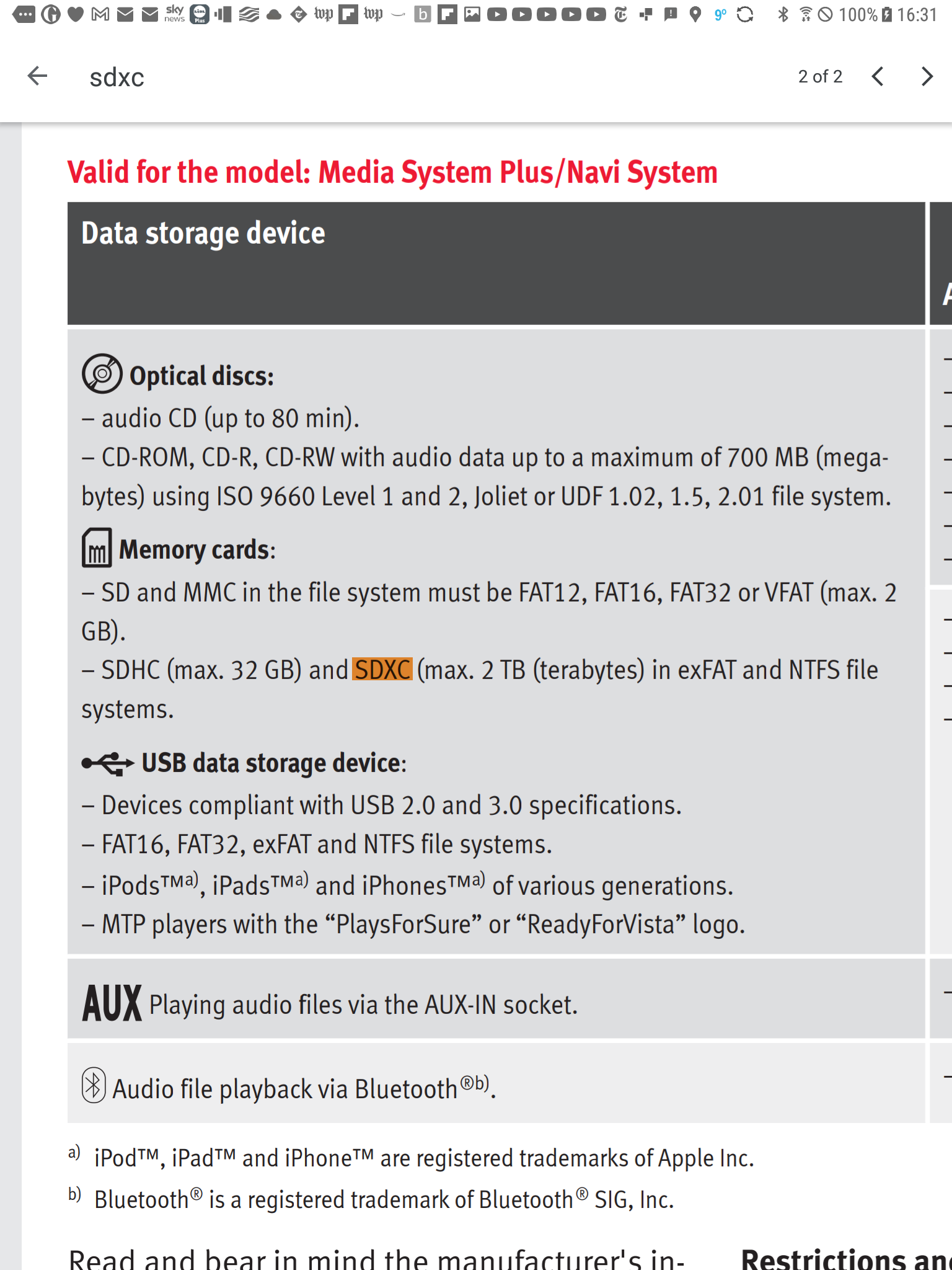
Try to copy the unzipped all Europe file onto it. They are SanDsk Extreme Pro I've been using. Manufacturing differences do make a difference as the files get close to bridging the 32GB size. Possibly the next release won't due to how the cartography getting bigger. I'm expecting one will need 64gb next time round. I've identified that SD cards won't run above 100MB/s in the unit so you don't get any speed increase in the ones rated above 100MB/s it won't have the matching chip for that (I don't reckon). If you do use a USB that needs to be in NTFS. Above 32GB SD cards should be exFat. Suspect this time round you will be fine. Keep it in Fat32 but you should not need to reformat it. Don't touch the format.
- 101 replies
-
- columbus
- discover pro
- maps
- mib
-
Tagged with:
-
Yes you need this thread. It runs on an internal SSD. To update you want to get a 64gb SD class 10 or higher in exFat, or USB formatted to NTFS. The current release is pushing the limits of 32gb SD cards so next time I'm sure it will pop all 32gb cards. Just pops some at the minute. Have been looking into it this time round for the next.
- 101 replies
-
- columbus
- discover pro
- maps
- mib
-
Tagged with:
-
Well if like Seat the Mib2 High units which a Columbus is doesn't come with the map on an SD it's pre installed. It's the updates you you only download with a standard SD card of the correct size and format or USB. This isnt the latest Columbus map update thread, chump back the top link and look for the pinned. If it's the card based Amundsen (spelling) one you are getting which is called generically a mib2 standard that's if it's second hand the pinned thread for that. If it's a 2020 model on then it's a mib3 with no map card like the mib2 high but over the air updates if you are in paid contract connected service period. Unlike Seat you lucky owners of Skoda mib3s can do a similar map update of the mib3 unit for free like you could with mib2 highs (Skoda folk tell me here). Seat can't with mib3 they are running to the old procedure of not giving you free map updates. Getting those mib3 FeCs adjusted, not sure if the story early days so Seat people are stuffed on that one. So question is- Mib2 high or low ? (Second hand cars only / pre 2020 facelift) Mib3 in connect contract or out ? (think there are two contracts, here pass on whether you need both, free for the first year) If its a mib2 standard sold without the map card you can but them on eBay. Get a 32gb card if you plan to drive the breadth of Europe else a 16gb card is adequate. You just pop it in for Skodas.
- 101 replies
-
- columbus
- discover pro
- maps
- mib
-
Tagged with:
-
If you had it working and it went probably is that they left the FeC out for it. Like you have a cookie but not the FeC type of thing. Thinking about it during my shower they did leave some FeCs out of the Seat one they deemed nobody used. One was the Seat app service. They might have done something similar. The documentation shows available. That addfec file txt if you locate it on the SD / USB is what is presented to it. A cross check for any you might see what's missing. You can edit with notepad and rerun it. Ideally as said a photo of the FeC screen - not sure whether the one above shows all yours before then compare with what you got now. Put in any missing etc. Suspect it's that.
- 155 replies
-
- columbus
- discover pro
- maps
- mib
-
Tagged with:
-
The question is did you have it before ?. Those adjustments are the factory locked down ones which I wasn't aware Mib Tool unravelled. Depends whether the guy that gave you that answer is the inner core of those experts. The factory locked stuff over and above coding is coming to the fore on the MQB Evo platform now where things that you could enable before with VCDS type of coding ie. Lane Assist you can't now. I wouldn't have thought adjusting a FeC would alter that but changing the firmware could. There is the revert option in mib tool where the piece of code it changed can be reverted back. I've never tried that. It's the restore one. Probably loose the FeC you added but if it's in that code then you might get connected services back. Perhaps it plants a key in that code like a cookie and you have lost it. Perhaps that is what that screen was saying. Seats are not as advanced as Audi in this mib2 area not having the connected services in mib2. Skoda had connected services thou. There will be others on that Github board if you haven't rattled the cage enough. You could say you had them, but they have gone and see what they say. Perhaps they will say mib tool deleted it ?.
- 155 replies
-
- columbus
- discover pro
- maps
- mib
-
Tagged with:
-
Within the Mib Tool documentation you have the FeC List and the Exception List for FeCs you can eyeball them for whether it's in there. Normally you photograph the FeCs before you start and after and study what it did. Additional FeCs can be added to the prepared FeC TXT file which you find which it downloaded. Stab add FeC command in Mib Tool, reboot and it reads the file in again. So question is, is Audi connect enabled by a FeC and did it get turned off. That Audi Sport website that Boo Boo posts on seem to know their stuff. ExceptionList FECs.pdf FEC List.pdf
- 155 replies
-
- columbus
- discover pro
- maps
- mib
-
Tagged with:
-
I suspect you are fine since Mib Tool adds additional FeCs with addFec doesn't take them away in standard use. They will be a FeC for sure I guess. So if you had it you still got it. The infotainment uses the FeCs that work. Looks at them all and says yes I can do that. It's like a parameter file in the old days of computing where you control the program by the parameters read in. No card reader is required 😉. I see BooBoo is on the Google on an Audi board that covers the subject: https://www.google.com/search?q=Audi connect and traffic fec&ie=utf-8&oe=utf-8&client=firefox-b-m Interesting how the application has a home across brands. Since I used it I also get the performance screen which is novel for a 4drive diesel whilst the normal 2drive get the offroad screen which I always had. It unlocks all the hidden screens which are built into the system but are reserved to show only in a model spec. I can't say I look at the performance screen or the off road screen I always had. Let's us know what you finally get.
- 155 replies
-
- columbus
- discover pro
- maps
- mib
-
Tagged with:
-
How to get at the Audi green menu is here If mib tool went in correctly you should find mib tool installed as a program in there, see mib tool documention. It's run from there also mib tool enables the developers menu so you get SWDL etc on a long hold on menu in Seat and Skoda there will no doubt be a different combination of keys in an Audi. Might be helpful or not: https://www.car-auto-repair.com/audi-mmi-user-defined-update/ That shows elements of SWDL.... has it's uses to force updates or selective processes.
- 155 replies
-
- columbus
- discover pro
- maps
- mib
-
Tagged with:
-
You will get possible SVM errors (software version management) atleast when you run it since it's picked up you have tinkered with it. SVM errors don't have to be cleared but there is an option within the software to do that. Causes a reboot or two. I pass on whether Audi units screen what is being loaded into them and generate that screen. If successful you do the FeC adjustment. The reboot. Do that FeC screen to see whether it has taken it. If so you can then run the built in mib tool SVM clear option. That's what I did when I used it but I did have to have one of their enthusiasts to write me the module since they hadn't seen my firmware before. Not sure whether it's clever enough to do this bit itself now.
- 155 replies
-
- columbus
- discover pro
- maps
- mib
-
Tagged with:
-
Those are Audi key combinations that I pass on to get the green menu. After installation of mib tool the unit should just boot up as normal but then you have the SD card in it when you want to use it via the green menu. I'd post your question on that Github site for it. Normally it installs. Checks whether it can be used with your firmware at the time of running it in the green menu. You then do a backup. It saves an area of code it's going to change in that backup. Then you do the addfec command and reboot for the FeCs to take hold. If you want to restore the code changed you restore. That's how it us to work. I'd post that screen and questions on that Github board. It's Chillout and his mates that wrote that code.
- 155 replies
-
- columbus
- discover pro
- maps
- mib
-
Tagged with:
-
I've done some of the work for you I sent you off on: it was Trevw The assistance on Mib Tool was here: https://github.com/Mr-MIBonk/M.I.B._More-Incredible-Bash/discussions/49 You need the European FeC but that's included by default if all works well but you need to hit Add Fec thou but don't need to edit the TXT file in Notepad. That's the assistance site I got from Mib Wiki who I passed on and Trevw appearing there.
- 155 replies
-
- columbus
- discover pro
- maps
- mib
-
Tagged with:
-
I think you might be struck down by Mapcare like Seat. If that is the case the way around it is the AIO version of the firmware which gives you the long life navigation FeCs or Mib Tools. There are Audi people that appear on the Briskoda board and they are arriving with the AIO software in some cases. Both tools are available in the mibsolutions website, guest, guest but you won't find much documentation there. I am not familiar with specific releases of Audi firmware. But that's what people are doing then just have the normal issues. If you are outside Europe then the AIO software gives you the European FeC. We've had that. The link to the website https://mibsolution.one/#/1 guest guest Represents a lucky dip. I'd Google your firmware against aio (means all in one) and read up on mib tools for the high version. Plus if you look back thru the last Columbus releases here there was one person who I sent off too look at Mib Tools they did get it working first timr. Mib Wiki who is their chief librarian for that site gave me a web page to pass to the guy. It got sorted. They hadn't pressed the add FeCs button that's using mib tool. Mib tool sits in the green menu and gives you retrofitter tools in the car without having to take the unit to a retrofitter. It bypasses having to put the unit on a workbench, using a usb - wifi dongle, whatthefec software etc. Menu driven tool. I've used it on my Seat to add a Skoda life long FeC when Vag didnt manufacture the release to work with the Seat FeC. These units will work with the other brands navigation FeCs if needed. AIO release of the firmware comes pre prepared with the Audi life long FeC for Europe. You have to let it run thru and you answer yes to the FeC update. On the Seat side someone said no, so they got no further forward. Have to fiddle then. AIO versions of the software are constructed by Mib hobbyists which use a backdoor to write the FeCs. Ditto mib tool. Failing all of this then you have to use a retrofitter to do the work for you.
- 155 replies
-
- columbus
- discover pro
- maps
- mib
-
Tagged with:
-
The 2010 you see is the vag common release code so you do indeed have the latest.
-
I'll let the techies comment on NTFS. Suspect it's churning about whilst exFat doesn't.
- 155 replies
-
- columbus
- discover pro
- maps
- mib
-
Tagged with:
-
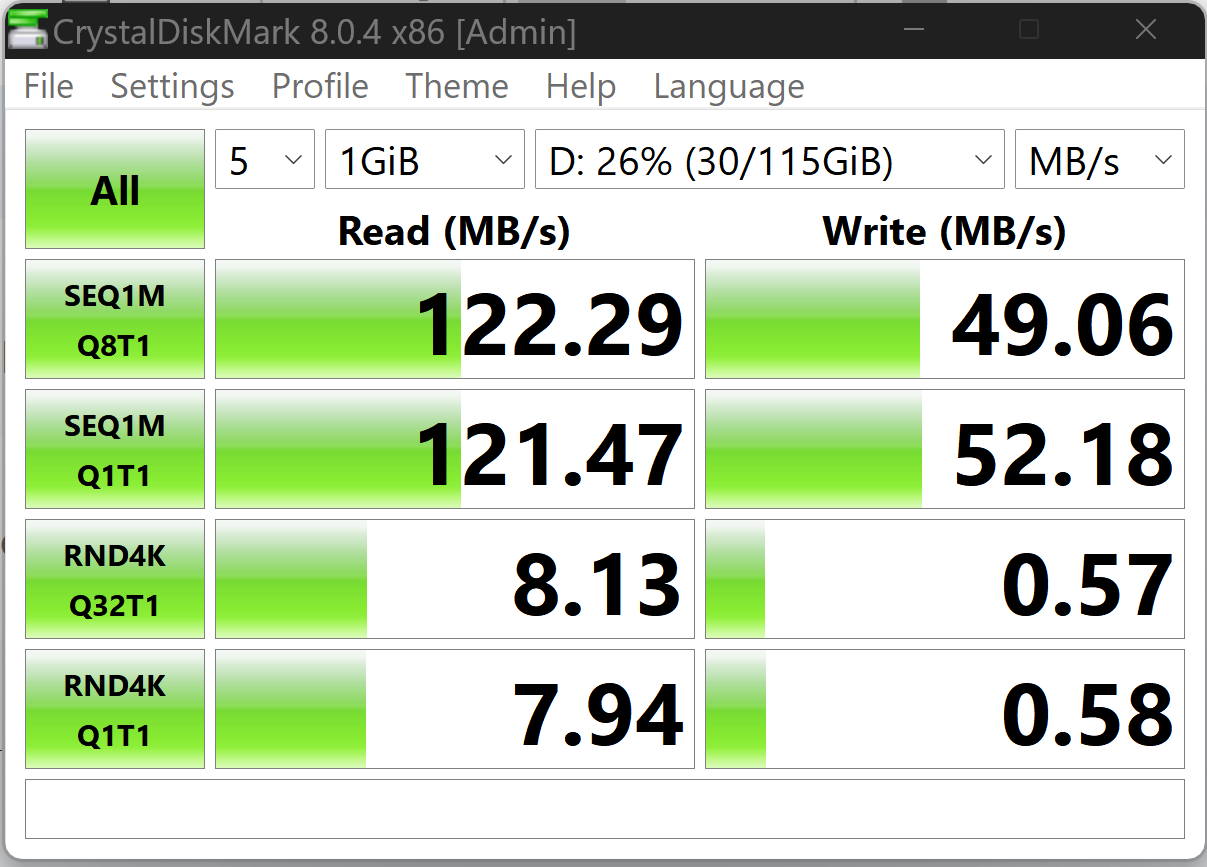
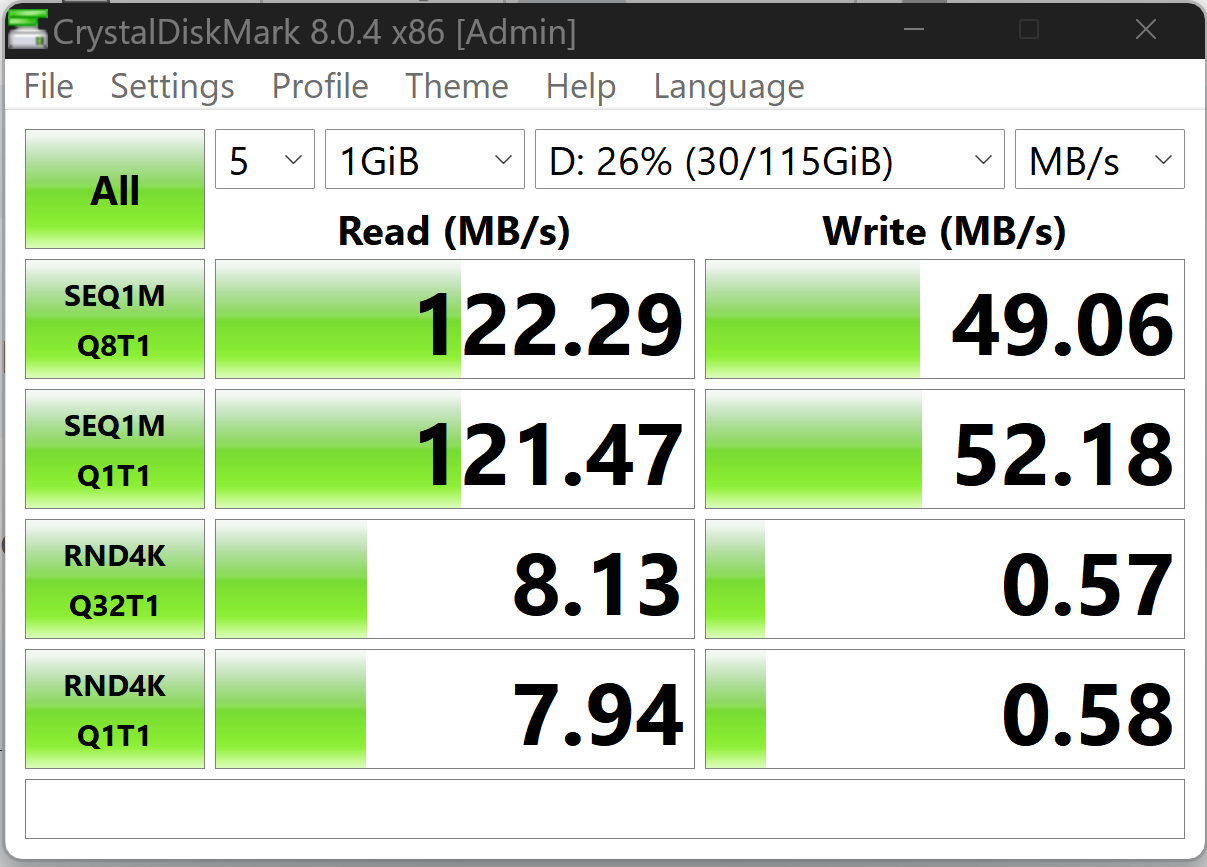
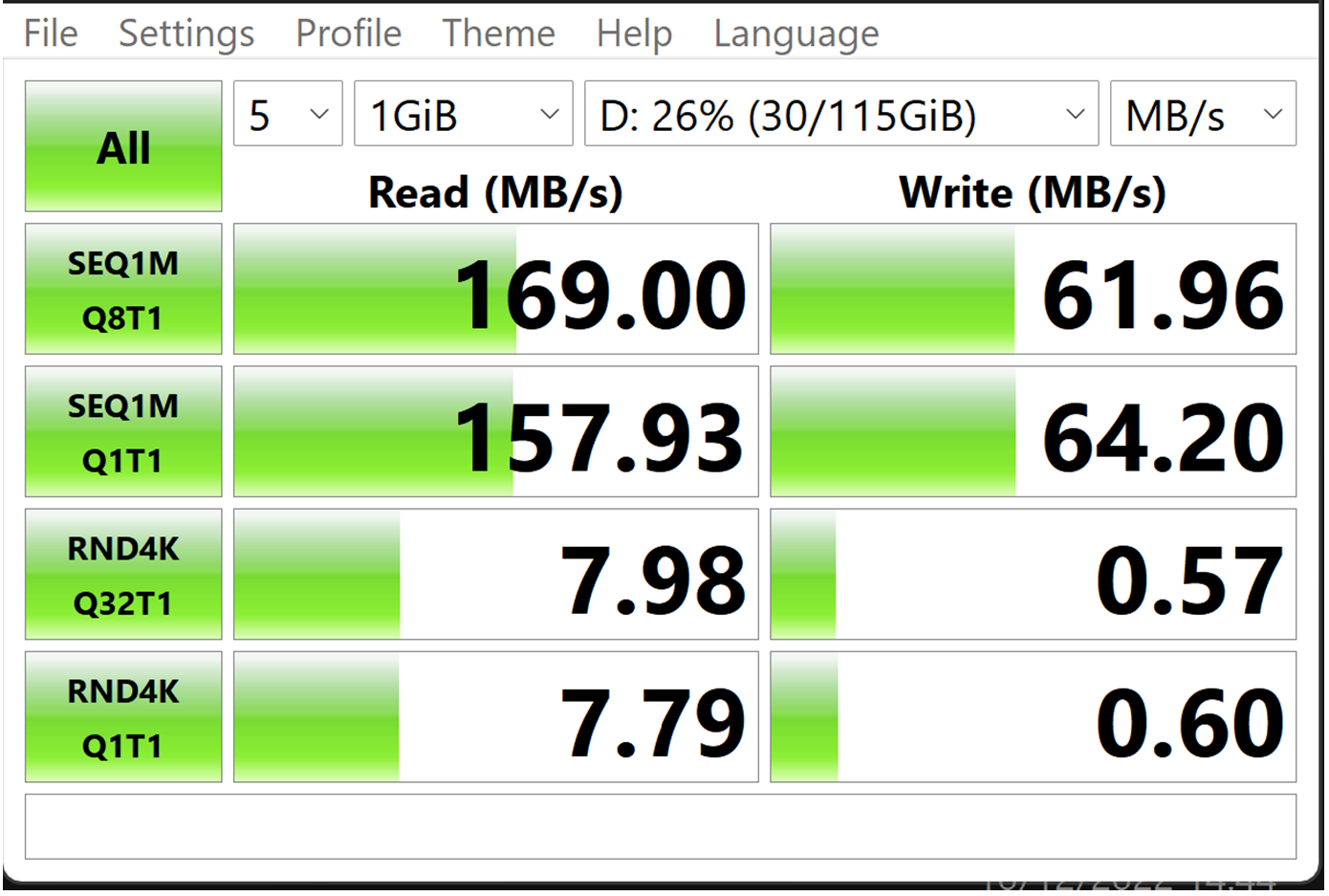
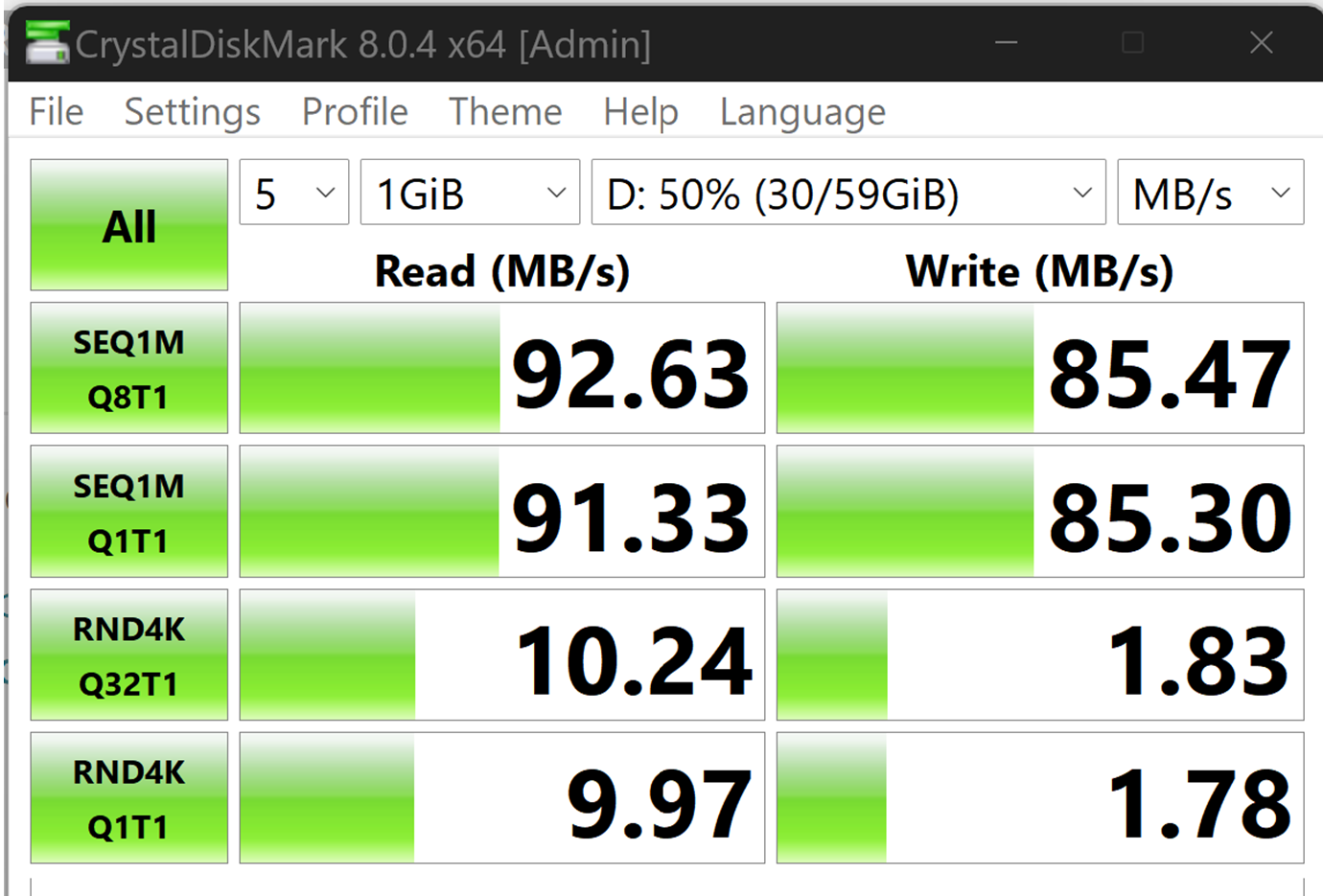
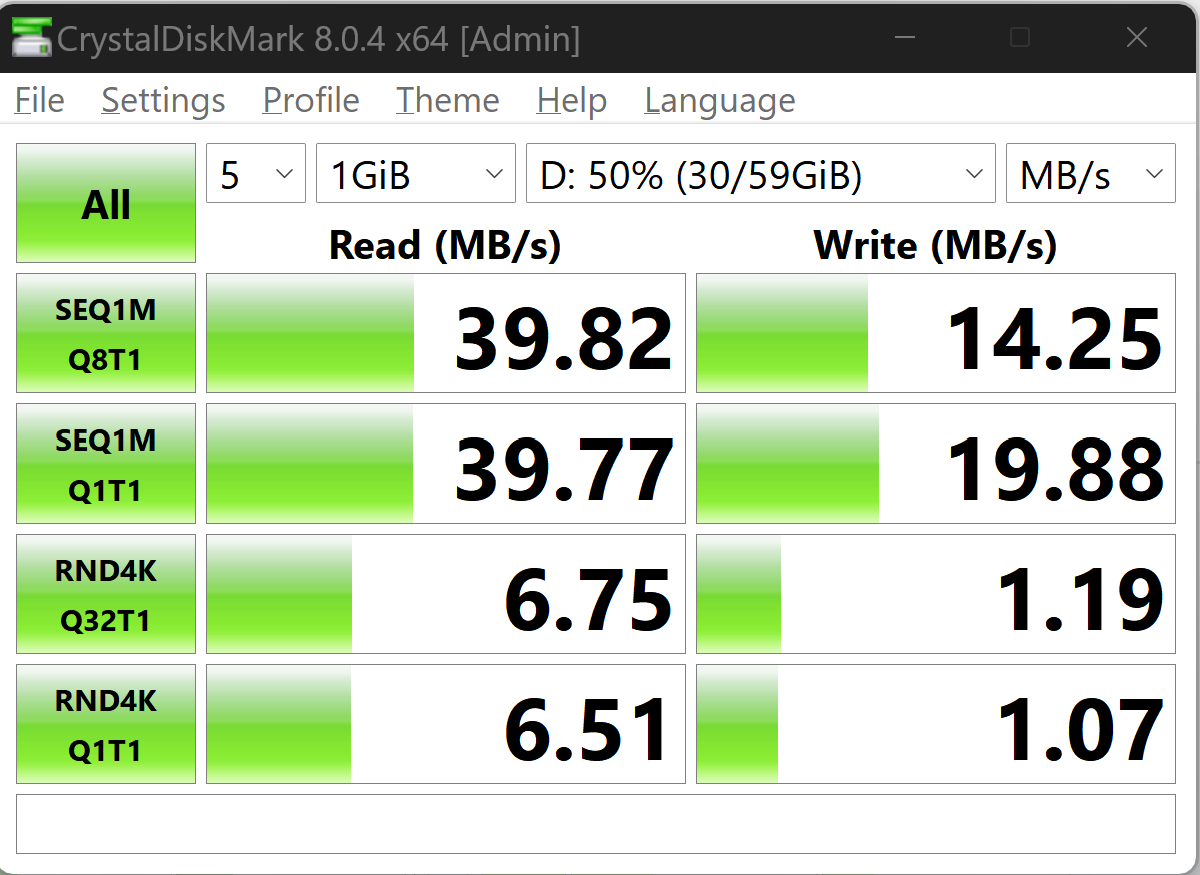
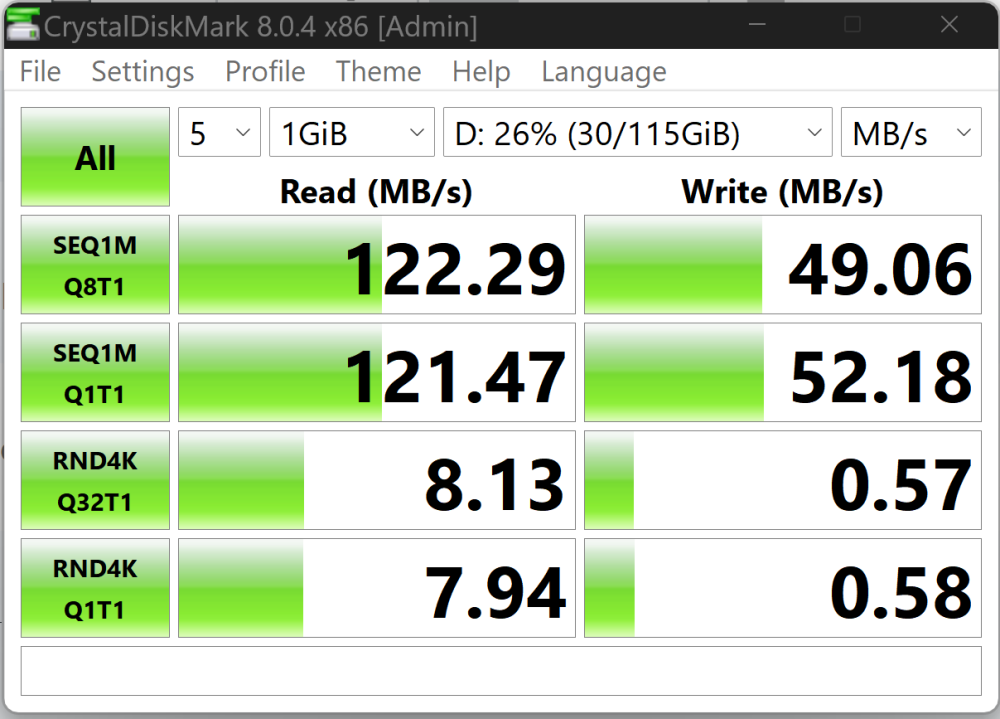
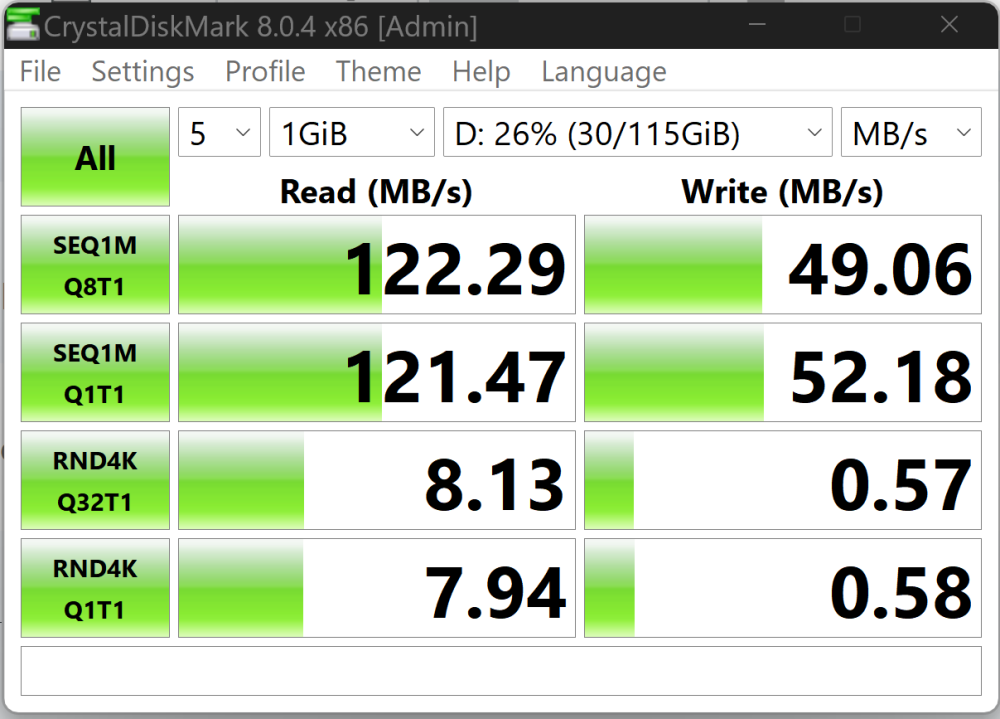
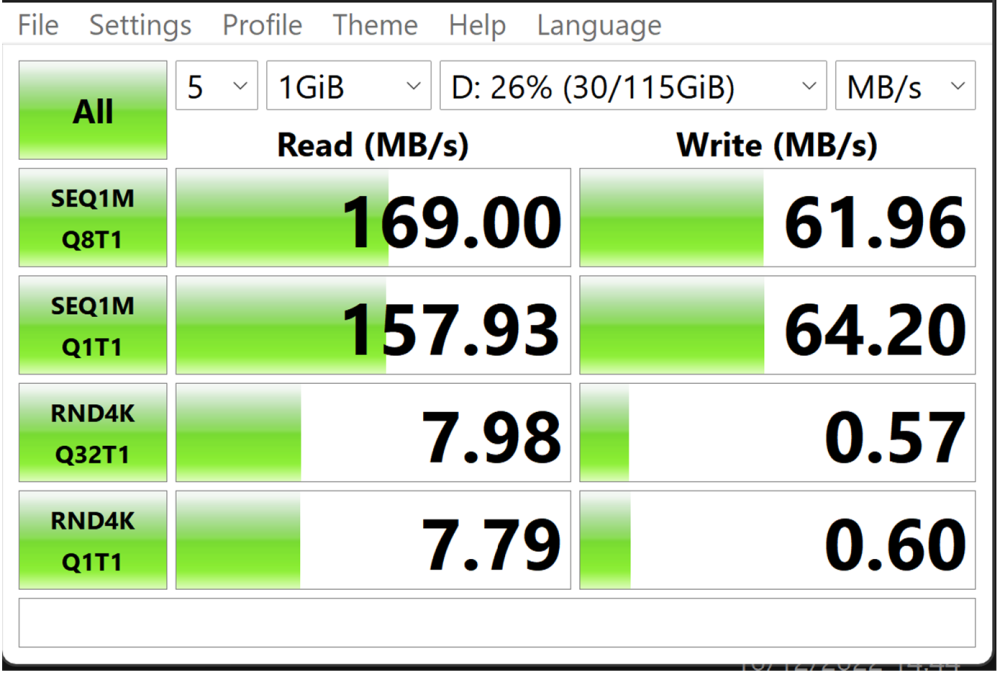
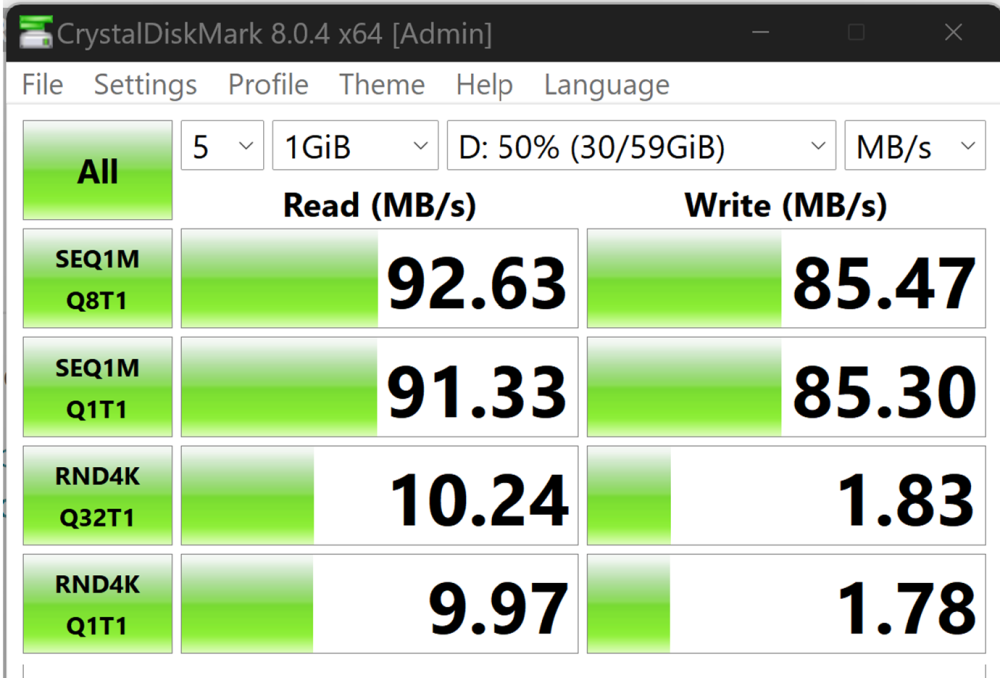
Best laid plans, SWDL doesn't support USB so I can't test USB in the car with it. I'm going to stick to SDXC since I like to use the developers' menu. NTFS does slow the USB down. I reformatted the USB3 to NTFS and got this: 169 / 62 exFat v 122 / 49 NTFS. So exFat is better on these tests.
- 155 replies
-
- columbus
- discover pro
- maps
- mib
-
Tagged with:
-
You might have problems seeing the usb3 pins since the two holding pins block the view. I'm thinking I'll have to test the Usb speed using the usb1 simulation method. If it's just usb1 / 2 it's a pass thru so won't make any difference but if it's slower it's usb3.
- 155 replies
-
-

- 1
-
-
- columbus
- discover pro
- maps
- mib
-
Tagged with:
-
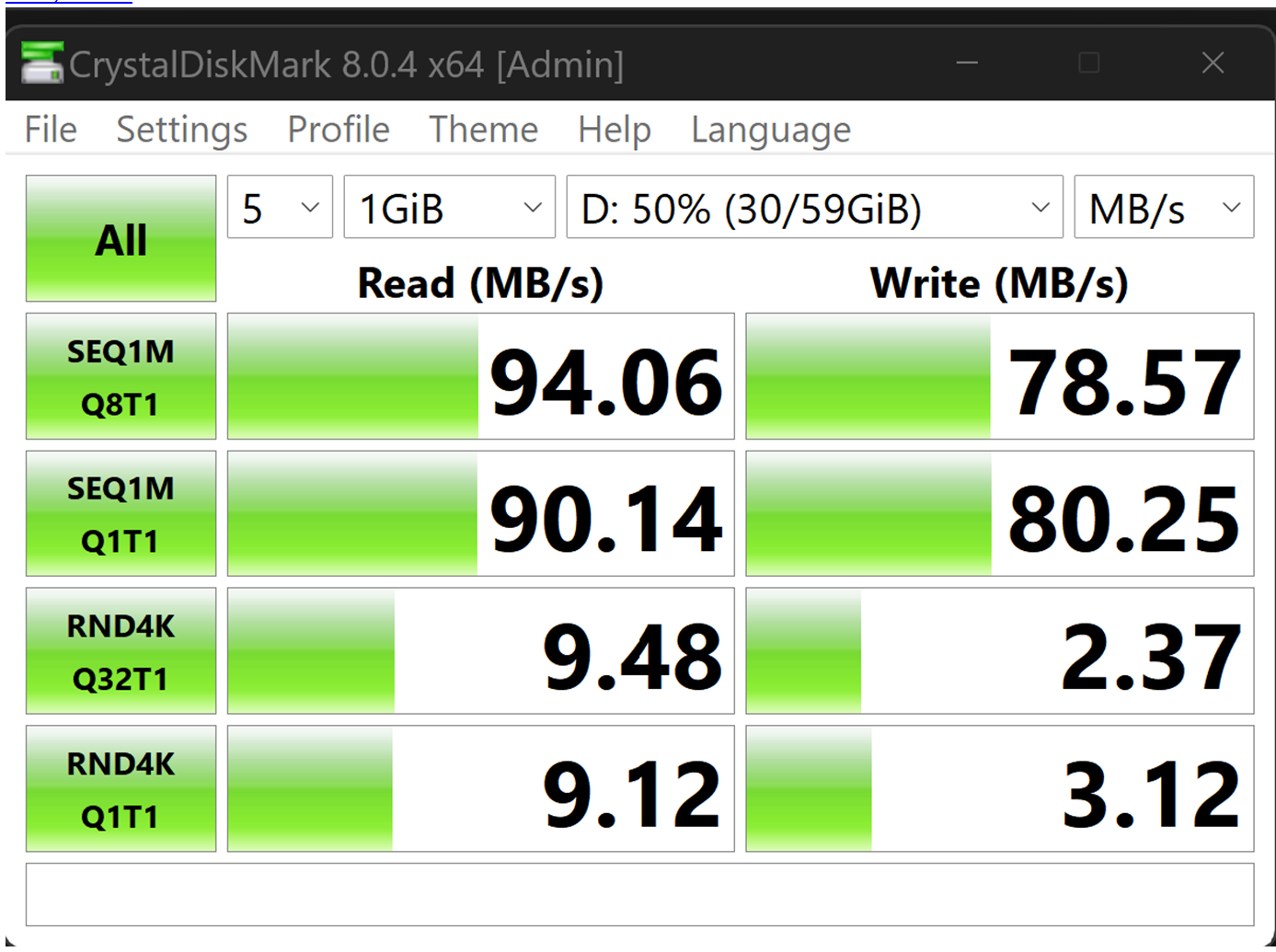
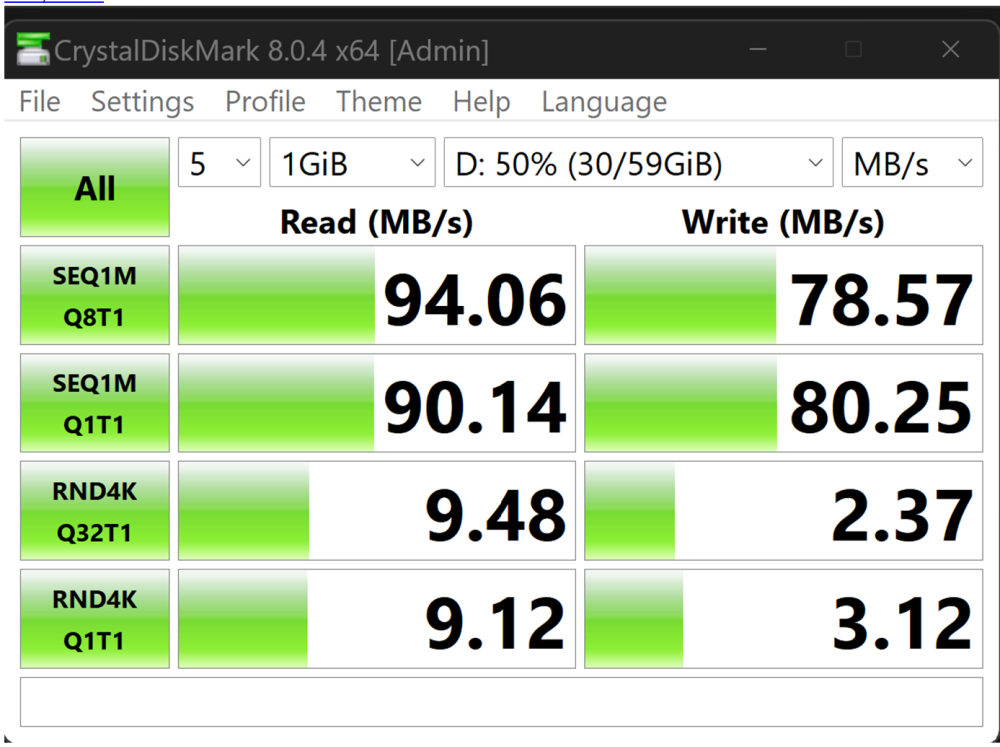
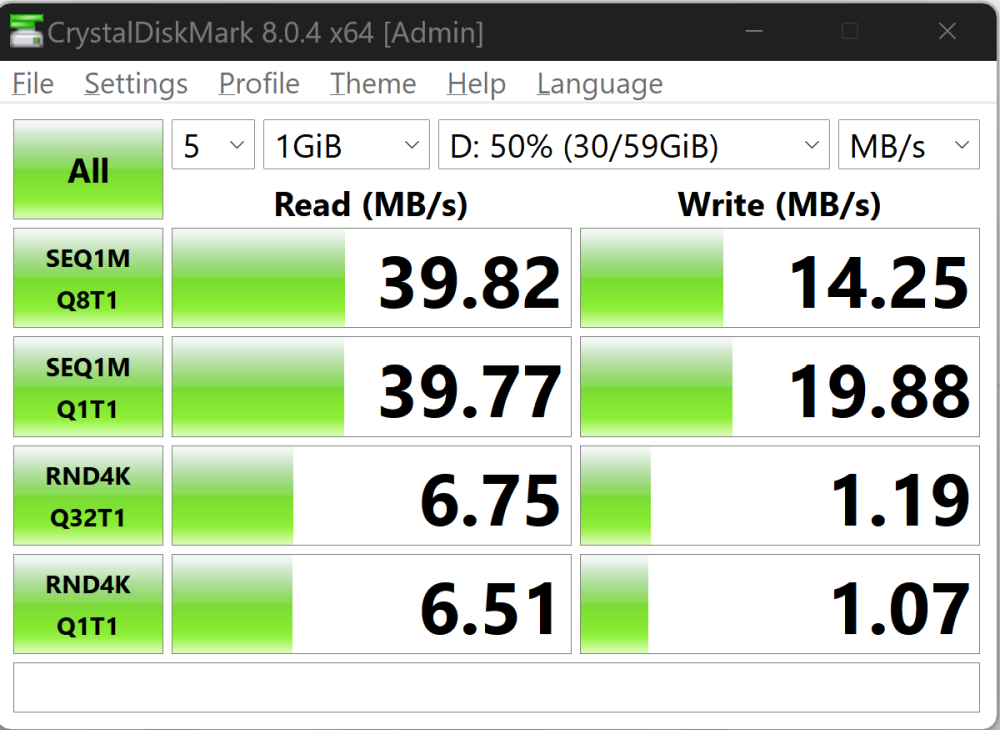
Thank you Dave. I get these from my SanDisk Ultra Flair 128 GB USB 3.0 Flash Drive The SD SanDisk Extreme PRO 64GB SDXC Memory Card up to 170MB/s, UHS-1, Class 10, U3, V30 The 32GB version of that card: Those +100 MB/s speeds that SanDisk quote on their SDXC cards are unlikely to be reached so I read since most card readers don't have the chipset in for them. We can assume the car hasn't. Called QuickFlow https://www.cameramemoryspeed.com/reviews/sd-cards/sandisk-extreme-pro-200mbs-256gb-memory-card/ Comparison card SDXC card speeds here, so I reckon they bottom out at 100MB/s that why my 64GB one wasn't reaching it's claimed speeds. https://www.cameramemoryspeed.com/ So on face value if the USB in the car is really USB3 then it's faster that SDXC. We can simulate it not being USB3 but USB1/2 by plugging in an old USB 1/2 extension on the Sandisk USB it gives this... all comes down to shining a torch into the socket in the car. May try some test timings using the SWDL menu uploading fragments of maps. Downgrade to USB1/2 Sandisk
- 155 replies
-
- columbus
- discover pro
- maps
- mib
-
Tagged with:
-
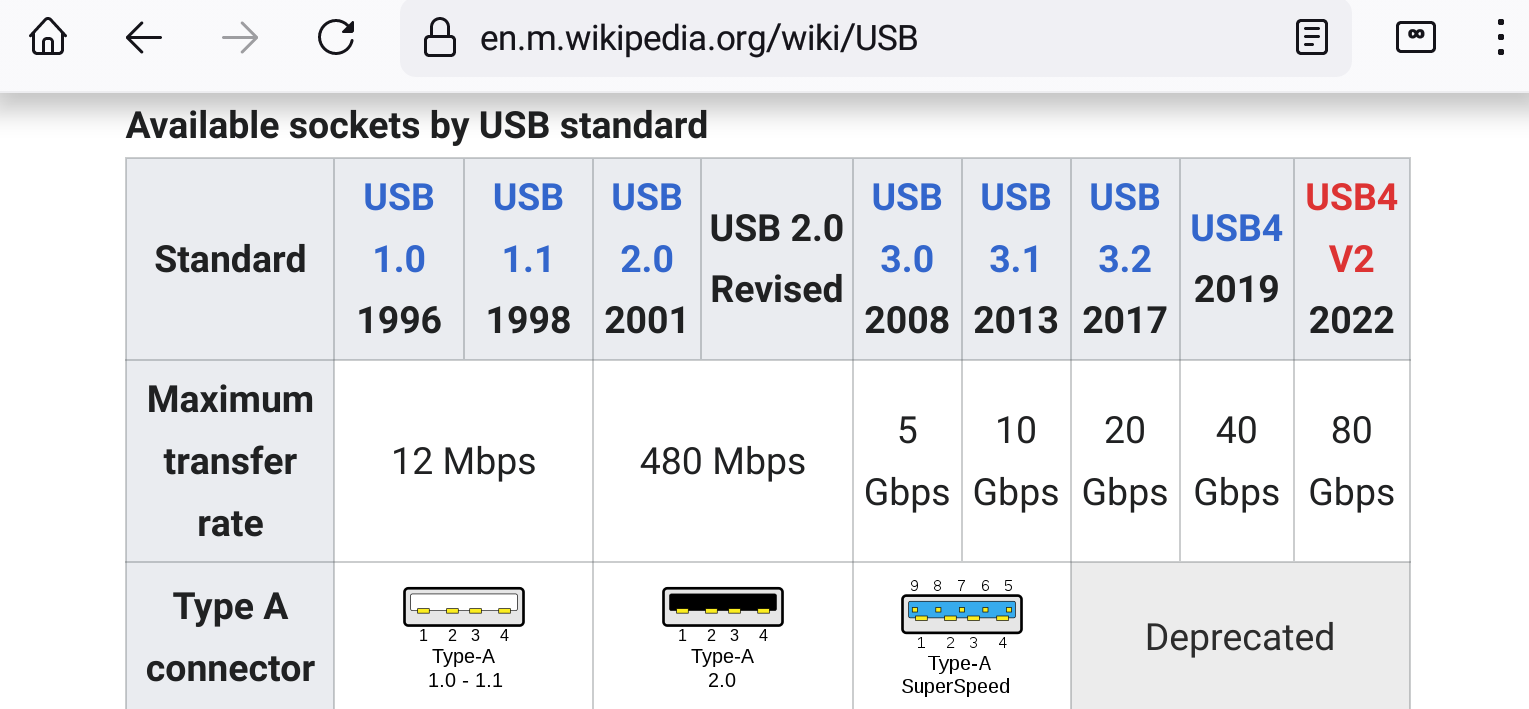
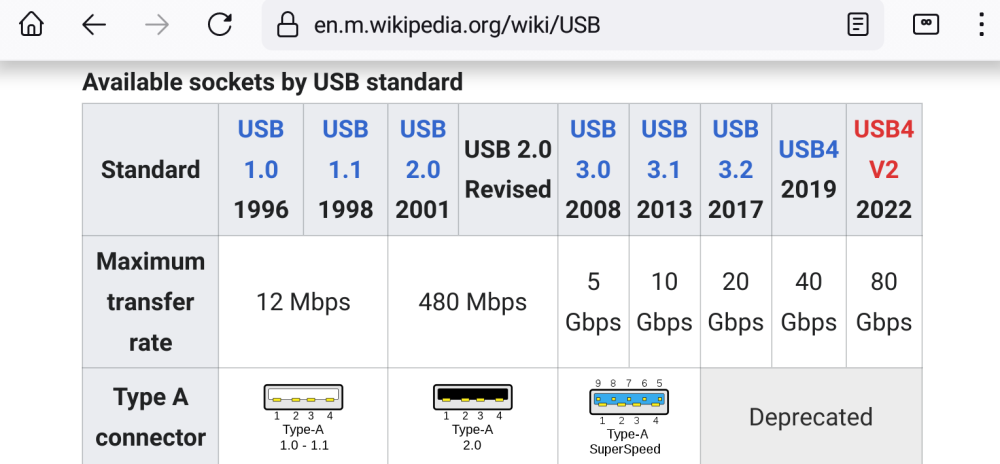
Exfat is the solid state standard so I read which is why they are preformated in it. NTFS is the HD one. I need someone fit with a torch to look in the USB car socket. You are looking for a second line of pins that means it's real USB3. https://en.m.wikipedia.org/wiki/USB Connections 5-9 in the diagram, they sit behind pins 1-4. If it doesn't connect across those it doesn't achieve USB3 speeds in the car. Anyone. I was going to try with a camera. Any speed figures ?.
- 155 replies
-
- columbus
- discover pro
- maps
- mib
-
Tagged with:
-
Like David can I get you to run https://crystalmark.info/en/software/crystaldiskmark/ On your USB3 drive and say which model it is since you are getting fast map updates. Out of line with the normal SD one but out of line with David's USB3 experience. Suspect your USB3 drive is fast. If you can say which model it is. Ditto David.
- 101 replies
-
-
- 1
-
-
- columbus
- discover pro
- maps
- mib
-
Tagged with:
-
David would you like to run https://crystalmark.info/en/software/crystaldiskmark/ On your USB3 and do a screen shot. Some USB3 sticks aren't as fast as others. I've seen some bad Kingston ones. It might be reducing you to SD speeds. I'm still nibbling away at testing SD v USB3. Seem to have got SD SanDisk ExtrePro speeds of 95MB/s verses 175 on a SanDisk 128GB Ultra Flair USB 3.0 Flash Drive, up to 150mb/s read speeds, Tropical Blue
- 101 replies
-
-
- 1
-
-
- columbus
- discover pro
- maps
- mib
-
Tagged with:
-
In the old days of floppy disks the bad sectors would swallow up memory after check disk with that slash f was run. Then your available memory came down. Solid state variations in manufacturer give you differences. Chkdsk /f and it's window command does fix solid state SDs which are playing up, not sure about busying out memory areas thou. Still researching which is the best way forward bigger higher performance SD card like the one I got or USB, like the one I got. Latter depends on whether it is kitted out for USB3 or is just compatible for USB3 via using USB2. Say one thing but don't mean it on speed. It's the bus speed in the unit which is the deciding factor. Mib2 highs have these inside them https://www.notebookcheck.net/NVIDIA-Tegra-3-SoC.72804.0.html Could stop musing and experiment. Higher up on the thread someone did the map update in 20 minutes on a USB. Not sure whether they updated the speed of mib2 highs during the life or not. Mine is the 2016 unit fitted to Golf 7s and the like at the time. In laptop terms accessing memory off board can be slower than on-board where SD is considered better since its accessed on board than a fangled USB board in a tower unit they tended to be USB2 in the early days of USB3, had a combined SD reader, slow off board media unit connection. The question hangs on whether mib2 high unit really has a usb3 speed interface or just compatible.
- 101 replies
-
-
- 1
-
-
- columbus
- discover pro
- maps
- mib
-
Tagged with:
-
I think it's the make of your 32gb SD cards that render small differences in available space. The one I used was Dane Elec Proline 200 this time round... capacity is 32,307,675,136 bytes (16 kilobytes format). 6 months before. 31,902,400,512 bytes (32 kilobytes). SanDisk Extreme Pro. 12 months before. 31,902,400,512 bytes (32 kilobytes). SanDisk Extreme Pro. Reformatting this year's card to 32 kilobytes. Dane Elec. 32,316,063,744 bytes. All Fat32. Expect your capacity is somewhat less on the one you couldn't get it on. The SanDisk ones were more liberal with usageable memory. It's the manufacturer differences in the finished product that makes it marginal. Sure it will be too marginal six months on.
- 101 replies
-
- columbus
- discover pro
- maps
- mib
-
Tagged with:
-
It's CleanMyDrive you do when it's copied over to SD or USB. Think I missed typed Keka above 🙄. So those Mac overheads gets stripped off once copied. So you got that: Map file + Mac Overheads > 32gb. You can't copy it over since the Mac Overheads are on it till you do CleanMyDrive. A catch22 situation. Even if you strip them off before the copy some overheads get put on hence you do the CleanMyDrive but either way the manufacturing differences are now coming into play with some people even without Macs. Think we'll all be using bigger SD cards or USB next time round.
- 101 replies
-
- columbus
- discover pro
- maps
- mib
-
Tagged with:
-
Any speed overheads on addressing the memory in the different formats ?. I did wonder.
- 101 replies
-
- columbus
- discover pro
- maps
- mib
-
Tagged with:
-
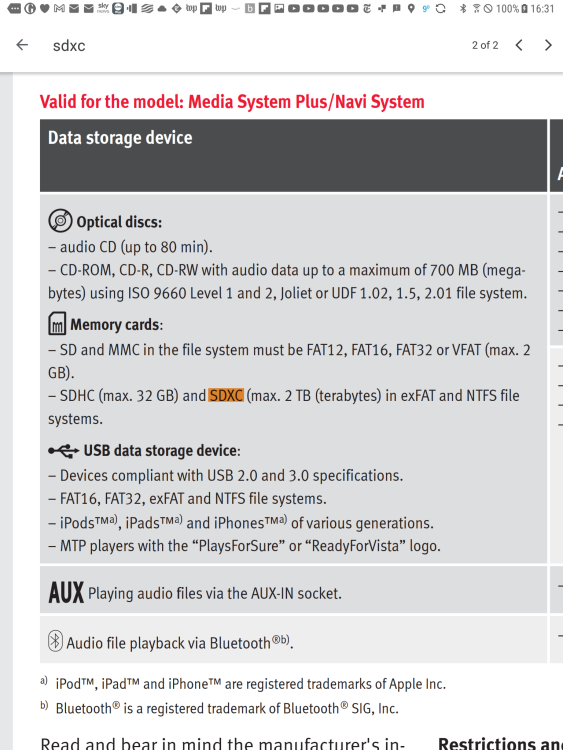
This now begs the question of whether a good 64gb card is better than USB3. The unit is suppose to support USB3 and SDXC cards. If the tables are correct here then a USB3 drive will beat SDXC. https://www.usbmemorydirect.com/blog/flash-drives-vs-sd-cards/ This SD SanDisk Extreme PRO 64GB SDXC Memory Card up to 170MB/s, UHS-1, Class 10, U3, V30, Black claiming 170MB/s V USB https://www.flashbay.co.uk/support/faq/usb-flash-drive-read-write-speed [USB 3.0: Sequential write speed range = 10~45 MB/s Sequential read speed range = 60~150 MB/s] We don't really know what bus speed the SD reader has in the unit apart from it takes SDXC. I'm thinking it might not match this https://wavelength.focuscamera.com/a-guide-to-sd-card-speed-other-specs/ Either way I got one of these ready for the day. SanDisk Extreme PRO 64GB SDXC Memory Card up to 170MB/s, UHS-1, Class 10, U3, V30 We'll have to compare notes next time round. & I'd be doing exFat above 32gb.
- 101 replies
-
- columbus
- discover pro
- maps
- mib
-
Tagged with: