Gax
Members
-
Joined
-
Last visited
Everything posted by Gax
-
I find it curious that for my car the PSI does not have weight-based guidelines. It simply says 33psi, end of. There are no alternate pressures to correspond with alternate loadings. I don't think I've ever had any other car that didn't have two PSI recommendations.
-
I actually find myself paranoid that pedestrians might think I am useless and stalling the car, as often the engine will cut out before I get to a complete halt but it cuts back in immediately as the car in front has started to move before I have even stopped.
-
Were the mirrors dry, i e. no moisture, no ice before you tried this? In which case you won't notice anything, they don't glow red or anything when they're up to temperature 🙂 Easy test: when you are next going out, put some water on the mirrors before you go, and switch the dial to the heated position. If they work then the water drops will dry up within a few minutes, where normally they'll just stay there unless you go at motorway speeds for half an hour. In the Superb it activates when you turn it to the heated position, I imagine yours will be the same.
-
Yep, mine also instantly fires up when the car in front sets away.
-
I won't create an all-new topic just to add this, but driving in another town on Saturday and NOT using Satnav (I repeat NOT using Satnav!) and intentionally heading towards a brand new road that opened to much fanfare last week, the car suddenly chipped in to say something along the lines of 'Warning, a road ahead is being closed shortly'. It was incorrect as the road in fact opened just days ago, but that's the first time I have ever had a car issue me with an alert about a road when I haven't even activated the satnav that day. I haven't seen anything remotely related to this anywhere in any menu settings, so perhaps the Skoda Connect service can send push notifications to you about what are deemed critical bits of information (sourced via a third party presumably, with incorrect information in this instance).
-
Good points. I do confess I don't know in full the part of the city I was in for navigating it by car, but I do know the area and it has always been heavily in favour of public transport routes, and I do believe the road in question has more than likely been 'no cars' for a long long time, i.e. years and years. The problem really is that the satnav seems not to be able to differentiate between a restricted road that you can drive on at certain times (i.e. many bus lanes can be used for example 7pm to 7am) and roads with permanent restrictions. If we could select an option to avoid such roads altogether it would be useful, although that of course would remove the ability to navigate to roads that truly have only time-restricted routes, and thus could end up using a longer route. To be honest it's only about the second time I've had to switch to AA to complete a journey, so it isn't a biggie, but it would be good if there were an option to not use restricted roads.
-
I was looking for that as that works on the phone, but on the car screen using AA there is no compass, or at least not during route guidance. Unless I needed to cancel the route first and then reset it, then choose the route again. Thanks, will see if the compass does appear pre-guidance.
-
Last night I had the first real Satnav niggle in my four months of being a Superb'er. Amundsen, although I imagine the issue would be across the board. I was heading into a city centre last night to an area I don't know at all, when I left from home the Satnav advised me that the route includes 'time restricted' roads. I was fine with that, I've had it say that before and all I was met with was a bus lane next to me that you could not use at certain times. It was irrelevant as I was in the car lane on the same road. Last night was problematic however, as while in the city centre I was instructed to take a right turn, at which point I see the entry signs onto the road making it abunduntly clear that it was only for bus and taxi use at all times. Issue #1 then. The satnav is smart enough to know it is a restricted road, but not to know I am not allowed on it at ANY time. I therefore drove past it expecting that, as is usual, it would recalculate its route and take me down a street I am actually allowed on. Instead however I got.... Issue #2. I spent the next mile at around 5 seperate roundabouts being told to take the exit that would take me straight back to the bus/taxi only route. I could see on the map it was trying to take me back there. It was clearly trying to take me back via the quickest route, but it did not offer an alternative. I did eventually pull up and switch to Google maps satnav via Android Auto, which got me where I was going. This itself had a problem as something was causing it to display the map incorrectly (North upwards I suspect) which I have never seen in the car before and was not obvious how to correct it, especially while under the obvious duress of busy city driving. Can you imagine how bizarre it was being told a direction while my position on the map was going in another direction!? Has anyone else had the issue I've described of being taken to a road you can't go down and any tips on how to avoid it being included in the route? There seems nothing immediately obvious as a menu setting from perusing the manual. I don't recall the satnav giving me the option before setting off of declining the route either, it was that route or no route at all.
-
It is keyless exit though, as you can lock the door without using your key.
-
Yeah, I've read some others saying their's were also sold straight away. Terrible really if the new owners have the same problems. I was starting to wonder if they can ever sell mine, but they will, they'll just lie and say they bought it back as a demonstrator or somesuch.
-
I noticed yesterday the MK4 that I rejected back in May is still sat in a compound out the back of the dealership, so I assume the 2020 SE FE's still don't have a fix.
-
When I had my MK4 and was taking it in seemingly constantly for updates, I had this exact scenario after one update session. I turned the car back on noticing it and went back to the garage. After a short while of them not being able to work out what had gone wrong, they reset the ECU which took moments and that cured it. Tell this to your garage, I'm sure someone else on this forum had the same issue and had it fixed when I advised the above. The explanation given by the garage was that the car seemed to have forgotten it actually had CC as an option, and the reset reminds it.
-
Just reading this oldish thread but wanted to throw in a comment regarding the dealer putting a parts price that includes VAT, then charging you VAT on top. The garage won't pay VAT on what they buy. The customer pays VAT at the end. Sales tax is only ever collected once. They may be BS'ing their prices, but as a trade purchaser they won't have paid VAT to whichever wholesaler they buy their parts from, be it Euro Car Parts or someone else.
-
Do you mean this is happening while you are in the car and driving it?
-
I may have misunderstood the above, are you saying you cannot connect wirelessly via AA in any Superb? Because you can, my Samsung A42 on Android 11 connects wirelessly to my Superb within seconds of me starting the car up. I only ever plug mine in if I want to charge the phone.
-
Plug in your phone and slide down the notification menu at the top of the phone. It will tell you what the USB setting is currently set to and allow you to change the connection type. I can't remember the exact wording, but it should say something like it is set for data transfer or file sharing. That means you have a wired connection to the head unit. (You may still need to set AA up, if you haven't connected before, but it means you do have a data connection ready). One of the available options will be to connect for charging only if you so wish.
-
Do you have a link to the other thread please? I'm a bit baffled by mine, as when I try to check if there are updates via the Skoda Portal using my VIN, it constantly just says there has been an error (this going on for weeks). Not that I am desperate for an update, but it would be nice to know if one is available and if I need to do anything manually, or if the infotainment will DL it automatically OTA. The manual is less than clear. Mine is Amundsen incidentally.
-
If it helps mate, I thought stop/start would be the biggest pain ever from the forums I'd read while awaiting my Superb. I can legitimately say that for at least the 2021 DSG you would not even know it is there. I have not switched it off even once in the three months since I took delivery. There is no lag between pressing the gas pedal to moving off, and if you have a car in front of you it starts itself as soon as they move off. It honestly is nothing to worry about, if it is lag etc causing you any concern.
-
EDIT: Deleted my reply to this as I had read it wrong. Ignore me!
-
No, it isn't possible via legit means, i.e. nothing in the manual, nothing in any of the menus.
-
The paint on my MK4 was okay but I was disappointed in the stone chip on the windscreen, from a stone so small I didn't even see it when it hit the window directly in my line of sight (leaving a chip directly in my line of sight....which is the dealers problem, as it was rejected months ago. Take THAT Skoda!). For what it's worth, I don't particularly hang back from anything, as flying stones are so random. The one that hit the MK4 was from a car travelling in the opposing direction which somehow sent a stone flying forwards. I've had a car years ago being hit on the rear window by a stone thrown up from a vehicle two lanes away on the other side of the A1. Stone chips are down to the stone chip Gods unfortunately, and not worth worrying about.
-
I tested this recently at night looking in the rear view on my 21 plate DSG Superb and the brake lights do come on, but go off if I manually engage the parking brake after auto-hold has activated. (Which I intend doing in the dark if I am to be sat for a while, as a courtesy to the car behind).
-
Lovely car, best I've ever owned. My mpg average is 47mpg, which I can't complain about when easily 95% of my driving is either up and down a valley or on steep hills. Coasting mode comes into its own in this environment though, I have literally had times where I have travelled a mile or more coasting. DSG is fantastic. My first auto in 20 years and I don't foresee I'll ever choose to go back to a manual.
-
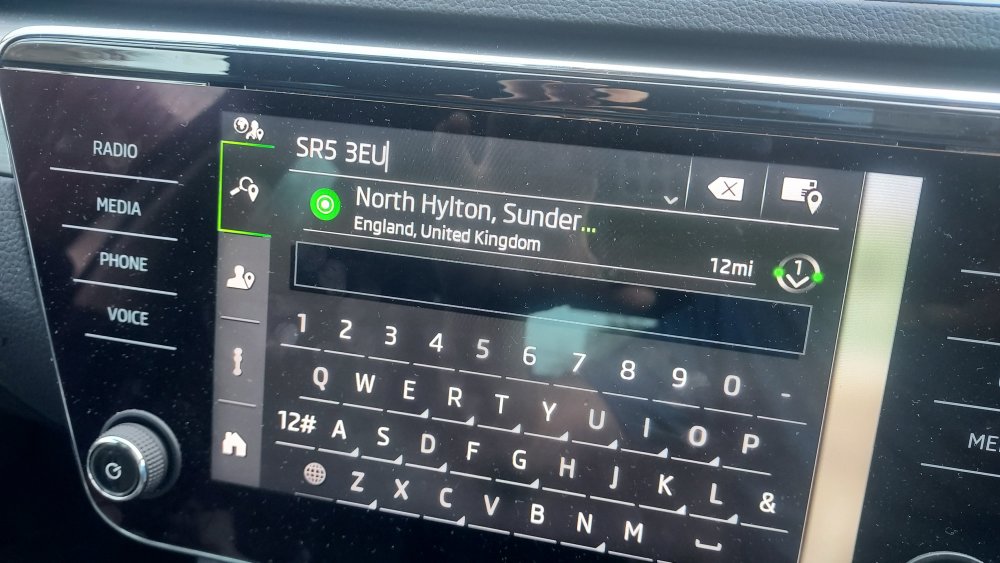
Sounds like we have the same spec and year, so.... Just open the Nav function, select the top-left search function, type your postcode (full or partial) into the long search bar, wait while it searches, then it should pull up the address where you are going. This works for me all the time. See photos below.
-
Look for 'Travel Mode' in the settings.