




Viorel_92
Members
-
Joined
-
Last visited
-
Mine are white and I can only change the intensity of them. The reason that you see them colored on your MIB is due to a faulty coding. To make sure that your footwell lights are RGB, check the wires that plug into them. If you have 3 wires, then the lights are RGB, otherwise(2 wires) they are monochrome. Further infos can be found here https://www.drive2.ru/l/591707406241650380/
-
-
I search a lot regarding this topic, I also want to get rid of that but I don't think there is a way. I found something which I tried on my car but without any success: 💻 Hide parking sensor image overlay by default 5F → Long Coding → Byte: 16 → Bit: 7 → enable (hide sensors overlay by default)
-
-
@Pete_Ger did it work? I am planning to do the same on my skoda karoq, yesterday I've retrofited a highline reverse camera and I was thinking to activate the relay with the reverse signal from the BCM. Does it throw any error? Thank you!
-
@Shahoff were you able to remove the media unit from the glovebox without removing the entire glovebox? Mine seem to have short cables or something because, I can pull the media unit out for about 90% of it and I can not access the quadlock. Thank you!
-
Hello, Quick question: were you able to access the quadlock connector from the back of the media unit without removing the glovebox or it's only available with the glovebox removed? I have managed to remove the media unit but not entirely, just about 90% of it and I can not access the quadlock connector. Thank you!
-
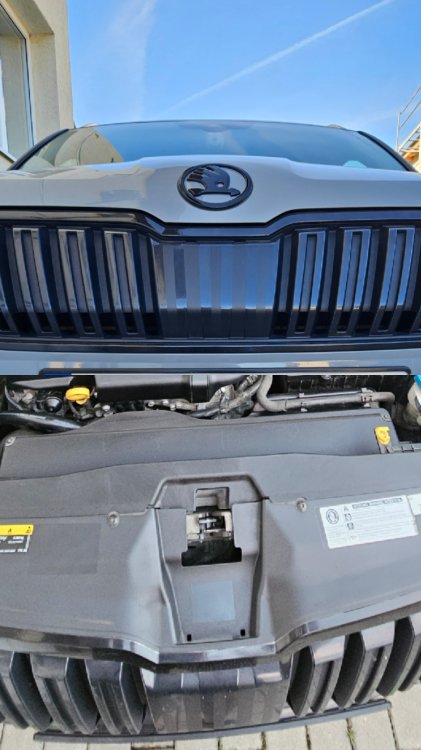
For me, I want to remove this cover just to be able to mount a front parking camera and I want to make it look like OEM but I think I have to remove the entire front grille.
-
I do have the 2 screw holes but I don't think there is a cover there, I believe that for me, in order to access the radar, I need to remove the entire grille. Searching over the ethernet, I found no radar cover for the Karoq, only for Kodiaq 😔
-
Hi @Camarao69 , I am planning to remove this cover on my 2019 Karoq. I am guessing that after removing JUST the cover I will not have to calibrate the RADAR again, right?
-
Hi guys, I am planning to remove this radar cover on my car to retrofit a front parking camera. Are there any chances to do something to the radar that would require a calibration afterwards? Thank you!
-
@JR RS can I add another set of sensors afterwards because I have 4 wheels for summer and another 4 wheels for the winter??Yes, on CarScanner appHello guys, Do you have any idea about the TPMS kits that are being sold on Aliexpress? Are there any good or there is a big chance that I end up buying a fake OEM module? I am thinking of retrofitting this on to my Skoda Karoq 2019. Thank you!

Important Information
Welcome to BRISKODA. Please note the following important links Terms of Use. We have a comprehensive Privacy Policy. We have placed cookies on your device to help make this website better. You can adjust your cookie settings, otherwise we'll assume you're okay to continue.