



MickA
Resident Member
-
Joined
-
Last visited
Everything posted by MickA
-
The 1.2 is a sweet engine. Around 2 years ago I was wanting to part with mine, I'm keeping it for the foreseeable future now and at £30 VED what's not to like.
-
Mine's the Toledo and no rust issues. It does affect the Toledo too as the Rapid with the water in the door problems, reportedly the rear doors but I had a problem with my passenger front. It had about a cupful held in there. Can confirm that they do spray a cavity wax in the doors near the base, I reckon it was that in the drain holes blocking the one.
-
Ease the rubber seal away around the drain holes along the bottom of the doors. For good measure poke something like a zip tie end up the drain hole to clear any debris. Each door should have two drain holes. Do this periodically (when washing the car) and it should stay clear. For a more permanent fix, cut a small V shape it the rubber seal adjacent to the seal, I didn't bother as mine wasn't so troublesome after I'd originally pulled the rubber seals away.
-
I've seen that too, just wonder if that's connected to my problem. My wife has the very same phone, hers is fine and working properly with Google photos and the cloud etc. I'm baffled and beaten on this. As I said above the photos are in the cloud, all there backed up. So it's reset phone time and see how it goes. Thanks for you input.👍
-
I've cracked that side of things, something until you've mentioned it I completely forgot how to do. My old Motorola was different in the way you connected it, more deep in the settings to change to file transfer. Anyways it still doesn't show any files to transfer anywhere, I bring up the internal storage on the phone, zilch nothing showing although it shows as they are there. Been on Google account/photo storage this morning, all photos there so good. It's a clear everything off and start again from scratch and I think and reset the phone. I've had nothing but trouble this week with technology, my PC's are ready for the scrapheap, got two over the hill laptops. Bought my missus a nice new tablet this week for her birthday, I like it I'm having one myself. Thanks for sharing your thoughts, been very helpful but this ageing blokes just had enough, lockdowns getting to me, might take to the ale early today whilst watching the match.😵
-
Yes that's correct and I think this is my problem cloud v phone storage. I deduced that any photos that have be enhanced or altered etc on the phone are now corrupted. I managed somehow to get back around 75% of my photos to show in the phone, how I have no idea. I did uninstall the photos app and reinstall but this immediately didn't solve anything. Now after a little tweaking we have a large percentage back. The I reckon that don't show as I say are those that have been adjusted previously on the phone.
-
No I can't see anything on the phone although the phone shows up as a connected device when plugged in via USB. I usually back up photos to an external harddrive every so often so it's about 3-4 months of photos that can't be accessed and won't show on the phone.
-
I have a Motorola G7 power with Google photos app installed, guessing most come with this as the norm. Anyways up to around a week ago all my photos were there and showing in the app now most don't. I get the odd one that shows up in the list, let's say around 6 out of maybe 200, the rest just greyed out but they are definitely there. If I take a new picture they definitely show up no problem. I also have an album from 2017 showing up on the drive, all nice and clear and showing but this is an album synced from Flickr. It seems a display problem to me, my two Google accounts are all synced and working properly, I'm signed in and all permissions known to man are enabled, I just can't fathom why it's like this now when it was all working fine 1 week ago. BTW the phone hasn't updated recently, I know sometimes that can screw things up, it all up to date as it says so. Any ideas on how to solve it apart from maybe a full reset of the phone?
-
Yes I've had the very same fault code when read. Mine too, although a Toledo (same engine and most other components under the skin) went into limp mode, no power. Codes read by myself then the garage came up with throttle position sensor faulty. Cleared codes and it happened again after a short while. Also I had the traction control and also the engine management lights come up too. Remedy for mine, I had a new battery fitted, less than 5 years old it was failing and not providing enough for the car, btw mine's a stop/start. Man at the garage says he's seen a few vag cars with similar code faults, new battery sorted them. Not saying it's your fault 100% but just get the battery checked as a first call, it may save a long list of trial and error fault finding, throttle position sensor quoted for my car £112, not needed but a new battery £140 heavy duty was.
-
Poor battery, not holding a charge caused my traction control light to come on. Having read the the codes it said throttle position sensor at fault. Codes reset, it happened again, took into the garage and they confirmed what I already knew. But their clever mechanic tested the battery, confirmed to be below par. New battery solved the problem. Morale of this story, get your battery checked first👍
-
Back in 2014 my Toledo was £11499 new but pre reg. So only 10 miles on the clock, fully loaded, sat nav, climate, even a proper spare wheel, full mats set, cargo net etc. The only thing it lacks are heated seats but with cloth fabric not really a big deal. I've had all amounts of stuff in the rear, seats down its acts as an estate more or less, massive space. Tried to sell it around 2 years ago, no takers it would have been a good buy, keeping it for now, only 26k on the clock.
-
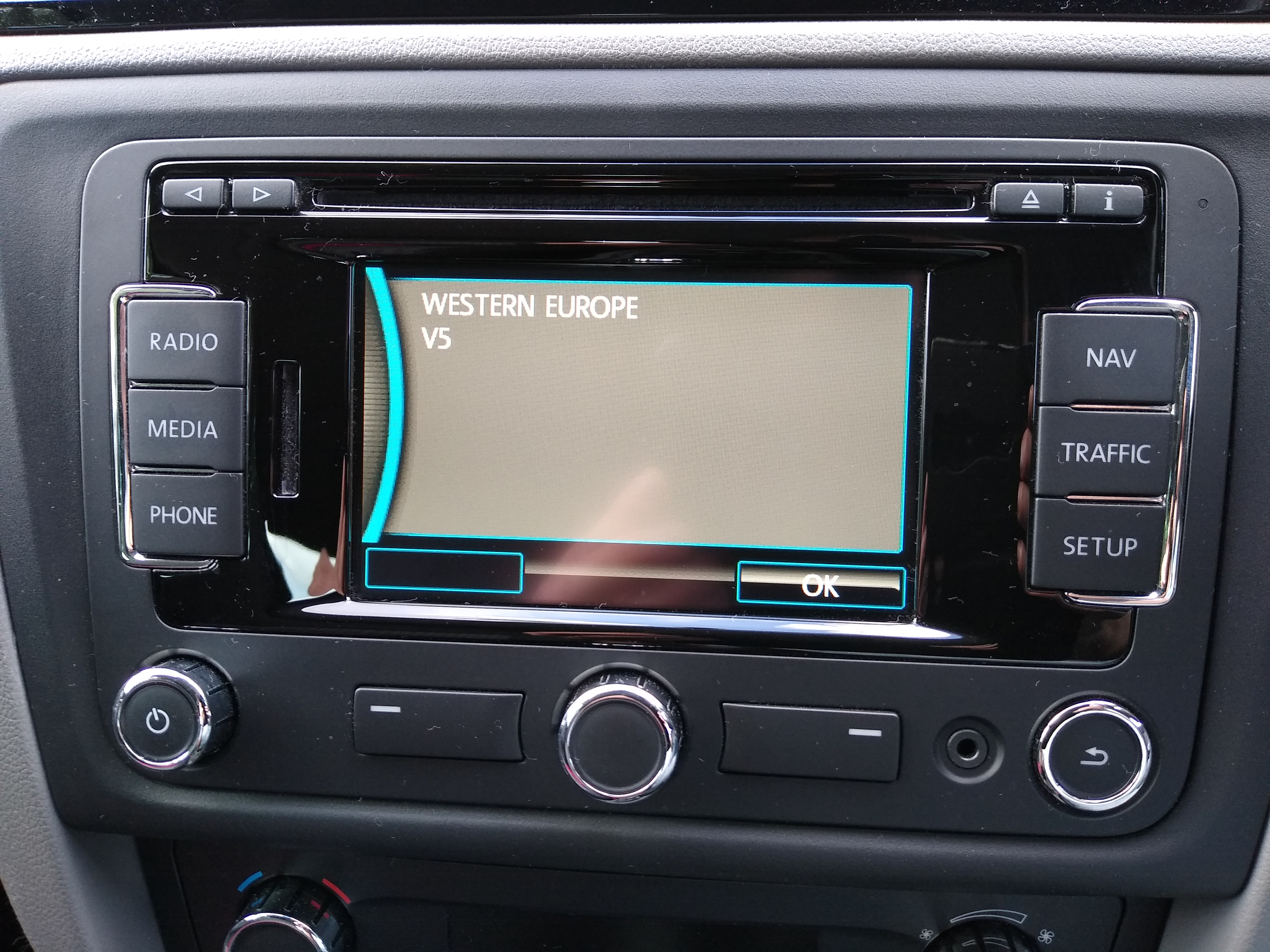
I can say my 1.2 Tsi (105) runs sweetly. Regular oil changes, bit OTT here I change at around 5-6k miles, that's all I do per annum. Agree the Rapid , for me it's the Toledo flavour, ticks all the boxes. Into 6 year ownership now, I've looked at many cars/mini SUV types and can't really find anything that could be better to change to for bangs for bucks like this one. Couple that with cheap for me insurance, running costs and £30 VED what's not to like.There different Amundsen units so maybe a picture posted of it could help. I bought an updated SD card with the latest maps on only this year. My model is the RNS315, just insert the card and update. Picture shows the out of date mapping in the unit, I updated to V12.
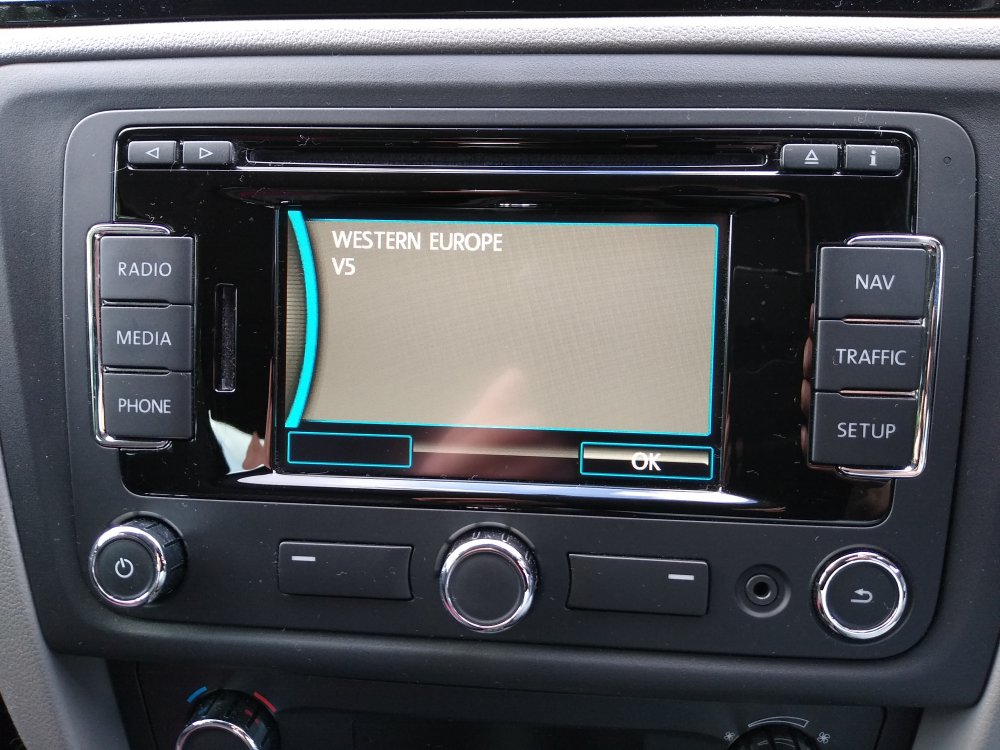 Which head unit?That's how it's supposed to work, stopped it cuts the engine, to restart press clutch down to engage gear.Never heard anyone changing the fuel filter. My motto don't get looking for stuff to fix if it don't need fixing, or in this case replacing. I've got the 1.2 Tsi engine, great engine so far. It's on 25k miles in 6 years so just warming up compare to yours, only a new battery and a set of tyres in that time apart from your normal servicing.👍Where from if you don't mind me asking? There are few supplier's, I might have a go at this.I have the 12tsi petrol engine in my Toledo. 40-45 mpg if you are careful, more on a long run of course. All mine's cost me are oil changes and brake services, nothing spent on brakes, I do the work myself. I've had a new battery and a new set of tyres in 6 years. Engine runs sweet but I change the oil every year even if I've only done around 5k per year for the last two.I've gone and bought a JVC head unit for my other car an MX-5. It functions should be Android auto Carplay etc. It works beautifully with Carplay but not AA. Had to hook up my wifes iPhone to test it but I own a virtually new android phone (Motorola MotoG7 power) but that just won't work with the head unit, perfect with Bluetooth for music just can't get any apps up and running. Now the big problem it seems after reading up is the latest updates Google have made to AA, some have said it's stopped working in the cars from around December last year. Changing USB leads may solve it, well I've tried 2 and still no go. So anyone with any suggestions apart from buy an iPhone? 🙄 I'd go that route but as said I've got a decent phone which should easily run AA wondering if anyone had tried a fix and it works with a similar set up?

Important Information
Welcome to BRISKODA. Please note the following important links Terms of Use. We have a comprehensive Privacy Policy. We have placed cookies on your device to help make this website better. You can adjust your cookie settings, otherwise we'll assume you're okay to continue.