




inspectorman
Members
-
Joined
-
Last visited
Everything posted by inspectorman
-
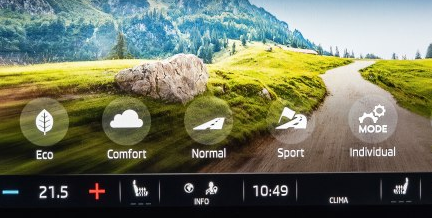
Can you select sport in the drive mode? On normal setting the car does not feel like a 150 bhp car. This is from a DCC equipped car but you get the idea
-
The trim is available as an extra. Read https://www.briskoda.net/forums/topic/324026-spaceback-boot-storage-boxes-now-fitted/
-
I think you need to have specified "Travel Assist. Includes traffic sign recognition, adaptive lane assist, predictive adaptive cruise control and traffic jam assist." in the options list for this to work.
-
-
Generic scissor jack may not have the correct top to engage with the designated points on the sills. The profile of the jacking point is not flat. Plenty on your favourite auction site.
-
So are you saying McDonald's ketchup is excellent mouse poison?
-
It's very handy. But it's reactive - in the sense that nothing happens until it's read and processed the sign - I prefer to be knocking cruise off as soon as I see a speed limit sign in the distance. Most useful when the local authority can't make up its mind about speed limits and they're constantly going up and down. There's little evidence of a predictive function, except for the occasional "foot off accelerator - approaching roundabout" type of message. This is on a 1.5 SEL with " Lane Assist with Traffic Sign Recognition " in the UK market. The relevant brochure describes the SEL as having ACC as standard, with "Travel Assist. Includes traffic sign recognition, adaptive lane assist, predictive adaptive cruise control and traffic jam assist." in the options list.
-
Good news! Now, what about your water/coolant issue? Any progress?
-
The laws of physics haven't changed. Max recommended recharge rate for lead acid is 1/10th of the Ah rating - so a 70Ah battery should not receive more than 7A. Now - assuming the car can supply this consistently (mostly yes) - it would take ten hours of driving x 7A to get to a full battery. Much simplification here but you see how you need a perfect 10 hour drive to get back up to full charge. A fast drive along an A road won't do it. Or sitting on the drive idling.
-
Your real problem is Skoda are using H15 bulbs for main beam. These also have the DRL filaments in. I was never able to find the usual Nightbreaker / Philips equivalents for brighter main beams - it's not a popular bulb type and the manufacturers didn't (or couldn't) improve the output. Eventually I specified Xenons on the replacement Rapid and they are actually usable at night.
-
Run a cable from one of the rear USB ports.
-
3 to 4 a couple of times, and twice going into reverse. Not an issue after 500 miles and now just a little firmer than the other changes at 1600 miles.
-
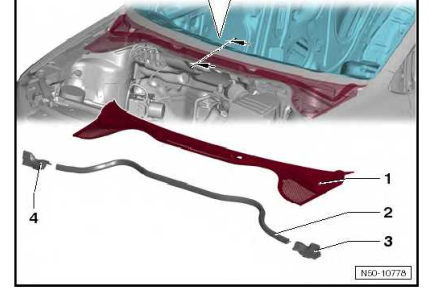
You are looking to get the front edge of component 1 up so that you can peek underneath.
-
If it is coolant then you should be able to see your coolant level dropping in the coolant reservoir under the bonnet. And eventually the coolant warning light will come on. If it is rainwater collecting in the plenum chamber then only by getting the plenum chamber cover off and having a look will you be able to rule that out. The bad news is that, to get the plenum chamber cover fully off, the wiper arms have to come off. This is not a trivial job - often tight on their splines. Levering them off against the windscreen will crack your windscreen. But, by releasing the rest of the plenum chamber at its front edge you might be able to get a good look in. An endoscope would help! Any water apart from drips is bad. It should drain through two drains at the back of the chamber down into the wheel arch, but the actual holes (I think) are covered by the wheel arch liner. You may be able to see the drains - and poke something flexible like a big cable tie - up these drains too clear them by pulling the wheel arch liner back or taking the wheel arch liner off completely. Beware of a sudden release of dirty water. Not at all uncommon for body wax or leaf debris to block these drains.
-
Heater matrix leak? Is it water (clear) or coolant (coloured, slightly sticky) you are seeing? Only when air conditioning is selected or also when no A/C heating is selected? Any water collected in the plenum (this is the large space between the bulkhead and the engine compartment firewall - if rainwater collects here instead of draining away eventually it will leak into the air intake for the heating). There should be drains for this space but sometimes they can be blocked. Can you hear water moving about when you turn a corner? So many questions but there is an answer out there somewhere.
-
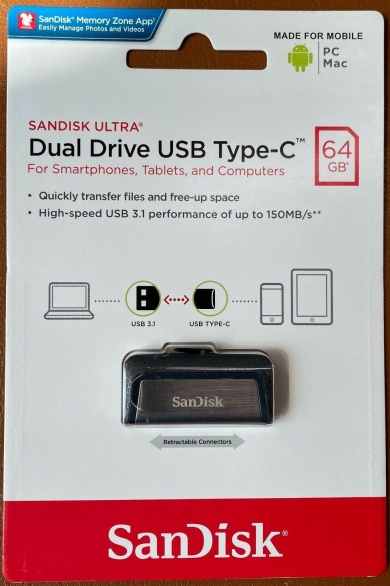
Dying batteries on modern cars cause all sorts of warning light faults. But there is also a possibility your engine light fault is really trying to tell you something. Start with the battery change.Is this any help? https://www.briskoda.net/forums/topic/475679-air-filter-change-14-tdi/ Attempting to remove the little screws whilst it's in position guarantees they will shoot off into the engine bay - even if you can get to them all. Unclip the pipes and pull up seems to be the way to go.Here you are; September brochure SKODA_OCTAVIA_Brochure_22SEP2020.pdfOther manufacturers, capacities no doubt available. This is the easiest solution to putting music on from a USB equipped computer, and then just plugging it into an Octavia with no adaptors or Kabelsalat.
 "Standard" LED lights are much better than the Nightbreaker halogens I had in my Audi A6. Only you can decide if the 1575 sovs Skoda will charge you for the fancy matrix LEDs is worth it. Lane assist with traffic sign recognition does bring the ACC speed down from 70 to 50 when entering a set of roadworks clearly signed at 50. The next challenge will be to see if that works with the changing comedy of speed limit signs on the M25.


Important Information
Welcome to BRISKODA. Please note the following important links Terms of Use. We have a comprehensive Privacy Policy. We have placed cookies on your device to help make this website better. You can adjust your cookie settings, otherwise we'll assume you're okay to continue.