MikeTheThinker
FREEDOM
-
Joined
-
Last visited
Everything posted by MikeTheThinker
-
This centre cap (55mm dia)? Or this one (50mm)?
-
Can you be a bit more specific? Are you talking about wheel centre caps?
-
The parts diagram for a 2007 Octy underbody trims is HERE, but I can't make it match exactly to your piccy? As far as I can see the trims are mounted by through screws going to brackets welded to the car body and using speednuts.
-
The "roaring" noise sounds like air intake roar - is that what you're hearing?
-
Have you checked the lobes on the camshaft for wear?
-
Interesting juxtaposition of "Summer house" and "blanket of snow"
-
The dealer is trying a standard "shuffle the deck whilst your attention is elsewhere" move and hoping you'll bite once he's stacked the deck against you. Also FYI in case you weren't aware he will make a commission on a finance deal if he sells you one. I suggest you do the following - IF the bike is the one you want and the deal is acceptable: Email him spelling out your offer using lLanguage such as this: "I confirm I am interested in buying motorcycle XXX XXXX for £xxx in cash / transfer / on finance (specify the terms) subject to the following: - what exactly is included (MoT, tyres, luggage, service - and which type, anything else) - what conditions apply to the transaction (completion period, delivery etc,) Please can you confirm your agreement within 48 hours in writing (email is acceptable) as I have other alternatives to consider." If you're part-exing you need to be very careful about the agreed condition of your part-ex or he's likely to try to ding you on that as well.
-
Parts diagrams for 2007 Octy 2 bumper options for standard saloon & estate, VRS saloon and estate and Scout. The main bumper cover (item 1 plus variants) has a different part number root for saloon (1z5) and estate (1z9) which makes me think the parts are different. The covers for the estate versions (combi) only differ as far as I understand in terms of their fiddly bits (such as reflectors and the side trims on the Scout) and the presence or absence of parking sensor cutouts.
-
Nice to see an Octy (or Laura) so well looked after.
-
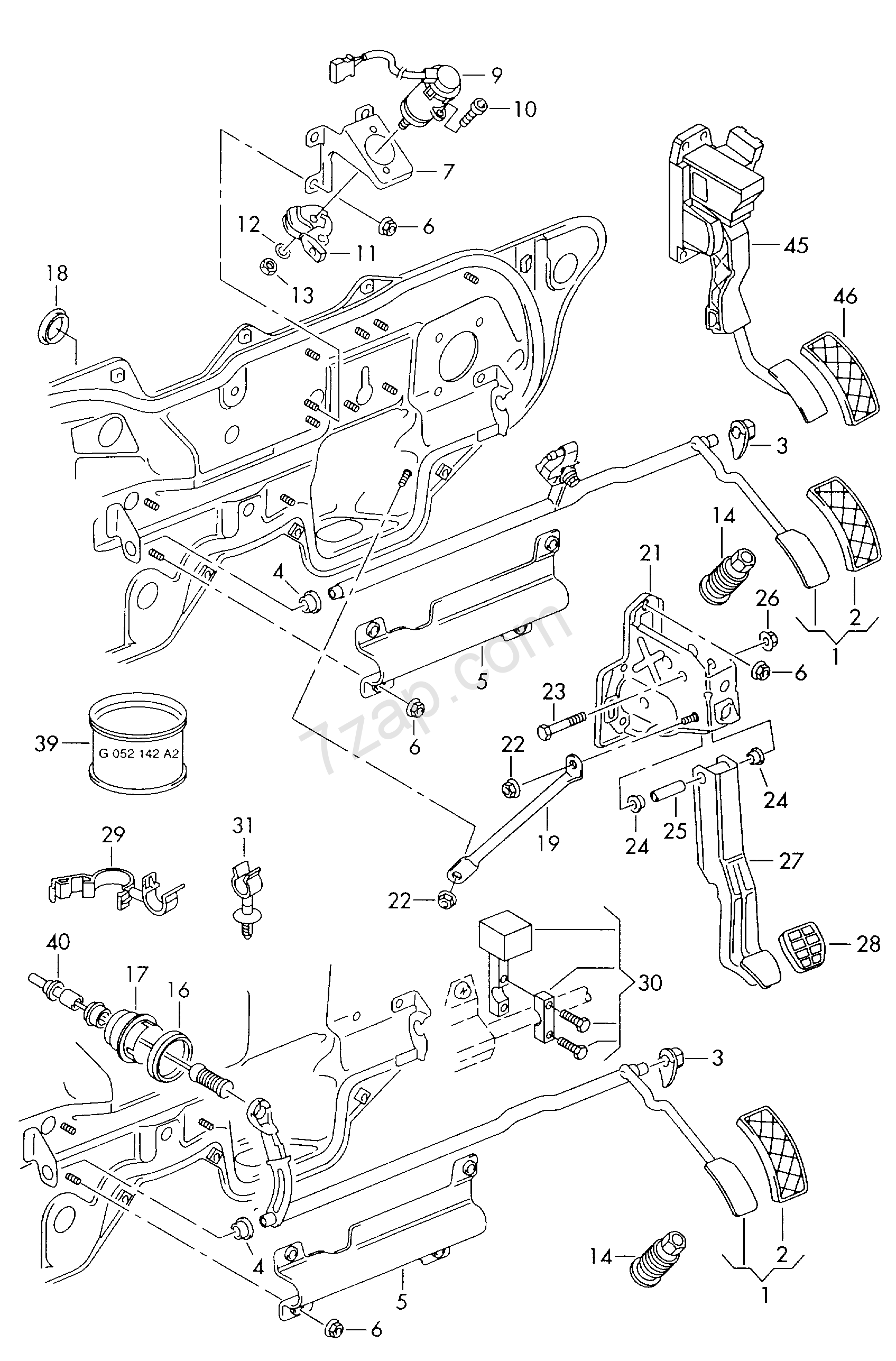
The parts diagram with part numbers for a RHD 2002 Octavia is HERE, which may help you to understand what is happening.
-
Where one can play with the motorbikes
-
You can look up PR (factory option) codes on this website.
-
Also, do try a trip in the Octy with a window or windows open to keep you breathing fresh air.
-
Does it affect others who are in the car and does it happen if you drive with the window open?
-
Has anyone checked the rear wheel bearings?
-
Welcome Whereabouts in Cheshire? I'm on The Wirral at the moment and it's been a lovely sunny day with mild temperatures (for a change).
-
Nice! Top Gear when it was worth watching
-
I'm still waiting on a 3-months old delivery from aliexpress - less than 10 squid - and no available tracking information.
-
Just a thought on motherboard vs add-ins; is the price/performance for on-board SSD drives (i.e. the chip versions) good enough to move to that form as opposed to external SSD drives?
-
What happened to your current car? The 1.9tdi is usually pretty reliable.
-
OK, results from the following: 1) scan "as-is" - see attached 2) follow xenons learning procedure as per https://www.ross-tech.com/vag-com/cars/xenonalignment.html 3) result adjusting/invalid and adjusting/not possible 4) reset 5) repeat scan 6) repeat step 3 - same Results from both scans are in 1 file attached (even though the filename says "pre-reset" it's both) Log-MW07ULB-TMBKE61Z678033316-246140km-152944mi-pre reset.txt
-
OK, will do after I rescan later. I was trying to be nice and not overwhelm peeps with info.
-
Yes, that's the route I followed to try the beam setting; response indicated it wasn't possible to make the setting. I'm still learning my way around VCDS so as a double-check I'll go back to the car later, do a reset and then try resetting the beam level. I'll then report exactly what responses I get.
-
'07 Octy 2 pre-FL Scout with dip xenons. Beams light fine and do the wag dance on startup but settle at the top of adjustment and aimed at oncoming traffic. A VCDS scan shows a fault with the headlamp range controller and the VCDS reset process does not work as the controller does not respond. BTW I tried using the mechanical beam adjustment on the headlamp unit but it doesn't appear to do anything. Address 55: Headlight Range Labels: 1T0-907-357.lbl Part No: 1T0 907 357 Component: Dynamische LWR 0003 Coding: 0000008 Shop #: WSC 73430 790 08192 VCID: 74E3210417C7DE2416-8020 1 Fault Found: 01539 - Headlights Not Adjusted 005 - No or Incorrect Basic Setting / Adaptation I'm initially suspecting connectors oxidising up but don't know where to find the range controller to start playing. Can anyone help, please?
-
That's pretty good. I've been paying around a tenner per can for local pickup from a couple of car paint specialists.