




Everything posted by SteveTheElder
-
Great to read your positive review, thanks for sharing. I’m experiencing a few too many niggles (incl. the kph/mph issue well documented in this forum) which is a real shame as it takes the shine off an otherwise very good car. I must drive like my grandad ‘cos today’s motorway run I got 50+mpg from my 1.5Tsi estate.
-
As I understand it, Yes; though so far I have only set up one key with the seat memory etc. It needs a second user to log in to the car and that is associated with the second key (the guest user can’t save personalisations).
-
Yes, I noticed that too - but was heavier rain and thought it quite nice that I didn’t have to think about the rear wiper. As you say, nice that it wipes when selecting reverse; also that the headlights [can be set to] come in when raining.
-
The mirror and seat positions settings saved are fantastic. I am about 30cm taller than my wife so having the seat move is ideal. I'm frustrated that the Drive Mode isn't saved in the driver profile, would be so nice to just get in a drive with it set how I want it. Lane Assist isn't so bad - worth driving with it on for a while. I disabled the steering wheel vibrate, just get a little resistance on the wheel if I drift to the edge of the lane (and if I let it, it will correct). It also works with the ACC in detecting vehicles in the lane you are in and not those you are overtaking. Interestingly I have had mine about 1 month and have already adapted my motorway driving to use the various Assists - rather than letting them drive me I am using them in my driving.
-
A very good question! I have mine set up and have some interesting stuff in the app, such as confirming the car is locked; but would I pay for it? Jury is still out on that one... Some functionality isn’t there yet, or isn’t working for me anyway. The remote lock/unlock is supposedly setup but doesn’t appear in my app. Similarly, I can plan a route in the app, but can’t send it to the car - which seems a bit pointless! Logging into the web portal is says the send route to car isn’t available yet. What I don’t know yet is what the significance of lost functionality if I don’t not pay for the services. Over the air updates for example. It’ll be interesting to know what others are thinking...
-
Lane Assist has been OK for me but I have had a few odd events such as a light fault (DRLs) warning which cleared itself on stopping and restarting the engine.
-
I feel your pain with the ‘richness’ of the infotainment system. I moved for a Mk2 Superb which had the then basic Swing radio and a CD player, no SatNav, and basic AirCon The Mk4 Octavia is a world apart, but after a few weeks am getting to grips with it and I’m sure you will too. There's lots of helpful people on here too - for example, the other day I 'lost' the odometer, and somebody pointed me in the right direction.
-
Works for me, thanks @ShEfA @TheUltraRunner - Deactivating ACC by pushing the third (ACC) column stork away, beyond the spring to cancel it turns off the ACC symbol in the virtual cockpit - and shows the total mileage
-
Yeah, see where you’re coming from. Though to be honest it doesn’t bother me as I’d just use the Long-Term memory and reset it before a weekend trip away (when we can do those!) or the Since Start. I think it’s a function of Skoda moving to the touch-screen world! Lots of things have lost their dedicated button which is a bit of a shame and widely commented in this forum.
-
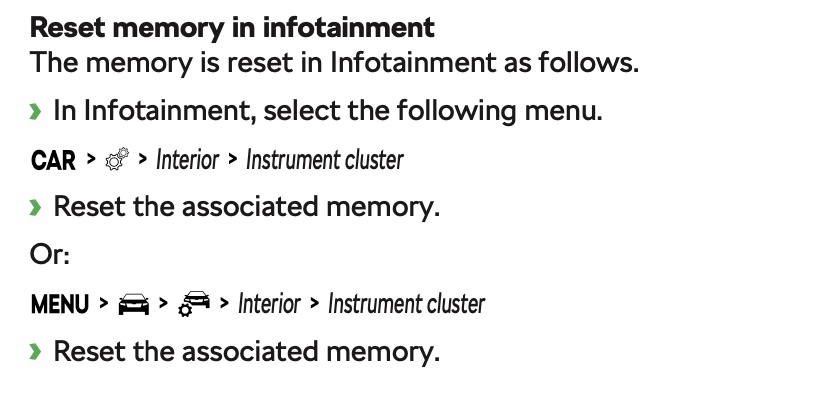
I have the Columbus Infotainment system in my SE L FE and there are three trip counters - Since Start, Since Refuel, Long Term. On the main screen can swipe from one to the other. To reset...
-
Nice! Hope you enjoy it...
-
Brilliant, thank you. I’ll have a look next time out.
-
Hope your dealer can get the Auto Hold sorted. iPhone auto reconnection is a thing in my car too. I suspect (though haven’t validated it yet) that if I listen to the radio then turn off the ignition, my iPhone doesn’t auto reconnect next time; whereas if using CarPlay when turning off, it does. I’ll try to remember to check what I do each time... With the voice activation, I have turned off the listen for activation phrase and just press the steering wheel button to activate it. Works surprisingly well for navigation etc in the car and for Siri (a long press)
-
Hmm... Just found it in the My Skoda App - Vehicle Status (the bit that shows the time/mileage to a service). Be nice to see it in the car though!
-
OK, feeling a bit of a numpty... How the ...... do I display the total mileage my car has covered? It’s displayed briefly when turning off the ignition then poof its gone! The three standard displays (Since Start, Long Term, Since Refuel) don’t show the absolute total mileage, and I can’t find it anywhere else and not found it in the User Manual (except with the analogue dash). Am I missing something obvious? For context, I have an early SE L First Edition with the Columbus Infotainment System and the infamous ‘KPH/MPH issue’ Thanks
-
Thanks for all the contributions so far. To date, in popularity sequence, we have... Styling (looks, colours, and "Wow! Is that really a Skoda?") - 6 Power (performance, notably the VRS) - 4 ACC (esp. slow to halt & move when combined with DSG in traffic) - 2 Fuel efficiency (1.5 TSI) - 2 DCC - 1 DSG - 1 Memory seat - 1 Space (cabin & boot) -1 Value for money - 1
-
Me too... Six months old with about 2500 miles on the clock, run by the Sales Manager. No call yet for mine to go in, hoping I will hear next week.
-
I've had a couple of new s/ware glitches show in the last three days. Turning on the left indicator to exit a roundabout I got the 'boing' of a problem then a bulb/light failure indication which remained on for the remainder of the journey home. Checking the lights all worked OK. The error showed up in the My Skoda App asking me to check both DRLs - which were fine. Next day, the error was gone from the dash as well as the app. Today, the App is telling me the drivers door and tailgate are open and the vehicle unlocked. Well, all doors are shut and the car very much locked. At least its got the bit about the parking lights being off correct! Perhaps it's the developers idea of an April Fools 🙄 Also, had an email from Kate Laws asking for my daytime number so am expecting a call sometime.
-
Thanks. That may explain why I thought mine was a bit erratic in the way it reacted to things, most notably a brick barn close to the side of the road on the outside of a sweeping bend. No white lines and the Lane Assist hadn’t locked on to the muddy verges; ACC slowed the car as I approached the barn. When I get the chance I’ll drive that road again and see if it does the same.
-
Whether you go for the Scala or the Octavia you will notice a big difference from your old Vauxhall, and I’m sure you will enjoy it whichever you choose. The extras you mention sound worthwhile to me. I suspect the winters in Slovenia can be a lot colder than they are here on the South coast of England and I’d be looking to add the heated windscreen. @Greezy56 makes a fair point about the DCC (Dynamic Chassis Control) instead - I am happy with the standard suspension though. I guess we have different driving styles. As for the keyless entry and starting I don’t think there is too much to worry about. The car cannot be driven off without a key nearby, and a key is need (or nearby) to lock/unlock it. The usual way to unlock it is to walk up and grab hold of the door handle and it unlocks. Locking touch a sensor on the handle. The buttons on the key can be used also. There is a way to disable the walk up and grab the handle to unlock - lock with a key then touch the door handle sensor within 5 seconds. This ensures that the key button has to be used to unlock the car. The idea behind this is to prevent access should the key be cloned. Infotainment issues I think are mainly with the early build cars. Most of us with the issues have cars built in the first few months and the later models have updated/revised hardware units, and a higher s/w version number. A few things could be better, as mentioned above not saving Drive Mode is something I’d like added in. Overall I am very pleased with my Octavia, the 1.5TSI is plenty quick enough for me and economical and I haven’t noticed the kangaroo effect. Hope that helps...
-
Another thought, if restarting the phone doesn’t work.. Log on to the web version Skoda connect portal. If the car is there, then maybe try removing the phone app and reinstalling it.
-
Just checked mine - all OK The other day I had an update to the app (IOS) and it wouldn’t go past the Skoda logo screen. Restarted the phone and all is OK.
-
I guess so. Just that the braking on a descent is new to me - and I love it :-)
-
OK, many of us have had more than our fair share of gripes and problems with our shiny new Mk4 Octavia. But if your experience is anything like mine there are many things to like about the cars, even the most irksome ones. To lighten the spirits over the weekend how about we each list the three things we like best about our cars. A moan free zone, and an opportunity to indulge on the nicer side of owning the car. So grab a glass of your favourite tipple 🍷 and share our enjoyment. At some point in over the next week or so I'll consolidate the lists and see if there's a patten emerging. To kick off the proceedings here's mine Fuel economy (1.5Tsi Manual - about 50-54mpg so far) ACC (esp. the speed limiter when on a steep descent & gear change without disabling it - SO much better than the basic CC on my previous motor. I guess I might be in a minority of one here! ) Memory drivers seat with key assignment Over to you guys...
-
@cppgr Good to hear you're OK and avoided the pile up. And you make a good point. All to easy to forget these are driver Aids - NOT Substitutes
