JD52
FREEDOM
-
Joined
-
Last visited
Everything posted by JD52
-
I used Fairstars CD Ripper to do all of my cds(>300 albums). It allows you to configure how the tracks and albums are stored. It also has a link to a database that will recognise your album. After testing a couple of cds, I had the naming down ok.
-
How did the files get on your laptop?
-
I don't know how you ripped the tracks, but it's worth doing it again with proper name formatting. It'll be quicker than renaming each individually.
-
When in manual, the gearbox will change up at or about the rev limit. Manual means only the driver changes gear except at the limits of the engine.
-
I have an OBD11 unit from OBDeleven.com. Beware the the single press functions, I believe they do not all work correctly and don't record the steps in the history.
-
I seem to remember that the sound actuator was not an option on MIB1 unit. So setting the volume to zero was only possible using OBD11 or VCDS.
-
It is possible to set the volume to zero using vcds/obd11. It's worth checking.
-
Just a thought, if a previous owner has tried to change some settings, using say OBD11, it's possible that they have screwed up the settings causing the system to not recognise the sensors. I am speaking from experience with different function.
-
The 245 engine doesn't have a cambelt, it's a chain.
-
-
Pretty sure this should be aircon condensation and is normal. Enjoy your holiday.
-
-
I believe all 245s have VAQ diff. Simple test BE CAREFUL. On a damp corner floor it. If only the inside wheel spins, then no diff. If both wheels spin up and the car understeer, you have a diff. I know this from personal experience. BE CAREFUL.
-
Yeah, format the original card and copy the extracted files to it. May be worthwhile to copy the existing files to a backup device. Good luck. 👍👍
-
You have to use a Skoda SD card as it has a security section.
-
Try using Waze it shows speed and delays.
-
If there are any marks on the piston(s), there could be hotspots which may cause piston failure. A case of you pays your money and takes yer chances.
-
I had something similar, purchased a quality cable and a short time later same thing again. By accident I noticed that the issue was the connection in the phone getting a bit worn because of the frequent plugging in and out. The solution for me was to buy an AAWireless adapter. Now when I get in the car my phone connects and never drops out.
-
SmartLink is cable only. For wireless you need to buy another adapter such as AAWireless, currently £69.99 on Amazon. I can recommend this as your phone connects without issues.
-
Software updates are for the firmware!
-
I had a GPF regen happen after several days of house hunting where the car was driven quite slowly for long periods. I didn't realise what was happening when I noticed a petrol smell inside the car and the fuel gauge was dropping quite quickly. After calling out the RAC he could find no leak and then asked if I had a GPF? - problem solved, doing a regen.
-
Thanks guys. 👍👍
-
there are wires in the sections that are not heated and the complete screen used to heat.
-
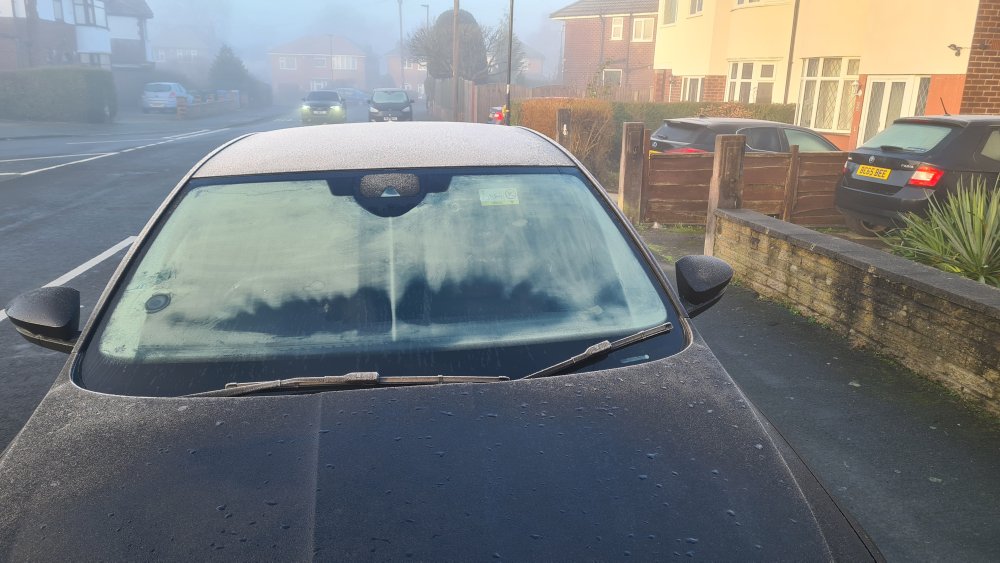
Hi Guys, The attached photo shows the edges of the heated windscreen not heating up. It started with just the left hand edge and the right hand side failed not long after. The car is booked into my local dealer later this month and hopefully the screen will be replaced under warranty. Anybody else seen a similar issue? TIA
-
I ordered VRSs in 2015 (mk3) and 2018(mk3.5) and in each case the heated and folding mirrors were an option. As far as I am aware, they may have been standard on special editions.