



Skip to content

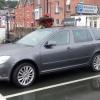
MINI gets a Fabia vRS. It's another mini adventure...
Featured Replies

Holy flamin moses john,are you a detective in the plod force. You've got eyes like a sh one t house rat! :eek: C.J.

  • Author
Holy flamin moses john,are you a detective in the plod force. You've got eyes like a sh one t house rat! :eek: C.J.

I KNOW! I KNOW!

Stalker! ;)

Holy flamin moses john,are you a detective in the plod force. You've got eyes like a sh one t house rat! :eek: C.J.

The smaller ones are only good for 5bhp it the large ones that are good for 10bhp but they weight more so that comes into account. :rofl:

Holy flamin moses john,are you a detective in the plod force. You've got eyes like a sh one t house rat! :eek: C.J.

:rofl:

I'm just sad and spot little things like that.

The smaller ones are only good for 5bhp it the large ones that are good for 10bhp but they weight more so that comes into account. :rofl:

Think it something to do with the aerodynamics. The larger one do give more power but due the increase in drag its only really 5bhp. Now because the smaller one has less drag, on the road its more like 10bhp. :D

Think it something to do with the aerodynamics. The larger one do give more power but due the increase in drag its only really 5bhp. Now because the smaller one has less drag, on the road its more like 10bhp. :D

Ya nutta, what about the Briskoda Sticker ?

Ya nutta, what about the Briskoda Sticker ?

Thats my next performace mod :D . I've seen a standard Octavia vRS fitted with this amazing Briskoda.net sticker have off a Jabba'd Octavia vRS.

Ok it had nothing to do with the fact the Jabba'd Octavia wasen't running very well. Honest :D

Create an account or sign in to comment

Recently Browsing 0

  • No registered users viewing this page.

Important Information

Welcome to BRISKODA. Please note the following important links Terms of Use. We have a comprehensive Privacy Policy. We have placed cookies on your device to help make this website better. You can adjust your cookie settings, otherwise we'll assume you're okay to continue.

Account

Navigation

Configure browser push notifications

Chrome (Android)
  1. Tap the lock icon next to the address bar.
  2. Tap Permissions → Notifications.
  3. Adjust your preference.
Chrome (Desktop)
  1. Click the padlock icon in the address bar.
  2. Select Site settings.
  3. Find Notifications and adjust your preference.
