Leaderboard




.jpg.1006585dfe4e2977315b67c3d642e37b.jpg)

Popular Content
Showing content with the highest reputation on 02/08/19 in all areas
-
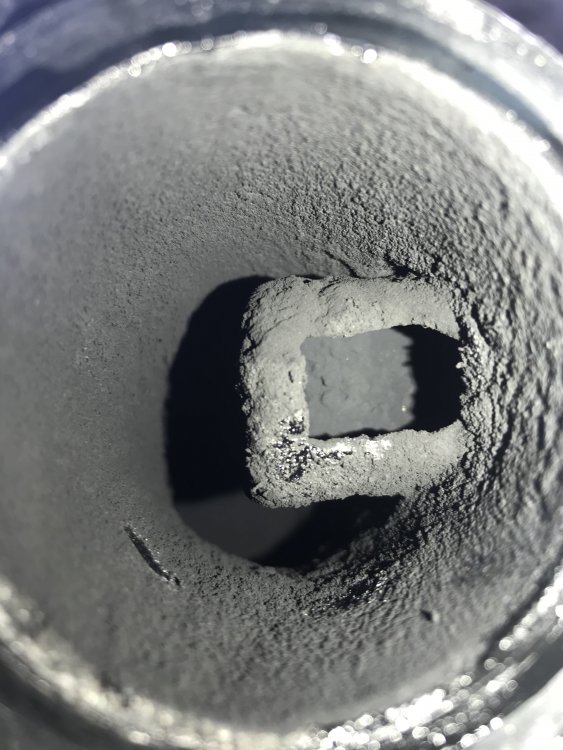
Took some photos during a recent clean of the intake manifold flap valve V157 which was not as bad as others I've seen. The nozzle coats the valve causing reduced movement or even sticking and results in the glow plug light flashing and limp home mode. Logged codes in address 01 include P012100 and or P211100 and or P211200. While your valve is soaking in your solution of choice take the time to remove the EGR nozzle to the plastic inlet manifold and rotate it 180 degrees. The nozzle body is mechanically coded (only fits one way round) and needs to be modified with a round file to allow it to fit correctly. Later cars have this done from the factory now, but to check to see if yours has been done, remove the boost pipe and use a mirror or take a photo looking up into the valve. If you can see a slot facing you, it has not been modified yet. Remove 2x T30 from the pipe at the cylinder head Incidentally, if your EGR valve sticks open, the engine will peter out like it's run out of fuel. These are the two bolts to undo and slide a cut to shape drinks can (width of the pipe diameter folded over in two for added durability) down between the gasket and the head , tighten the bolts up again, this then blocks the EGR gas from choking the engine and allows it to start as an emergency repair to get it back home or into a garage. Then undo the clamp to the nozzle and remove the EGR pipe. Another 2x T30 and you can withdraw the nozzle.
 1 point