Skip to content

Leaderboard

Popular Content

Showing content with the highest reputation on 23/04/20 in all areas

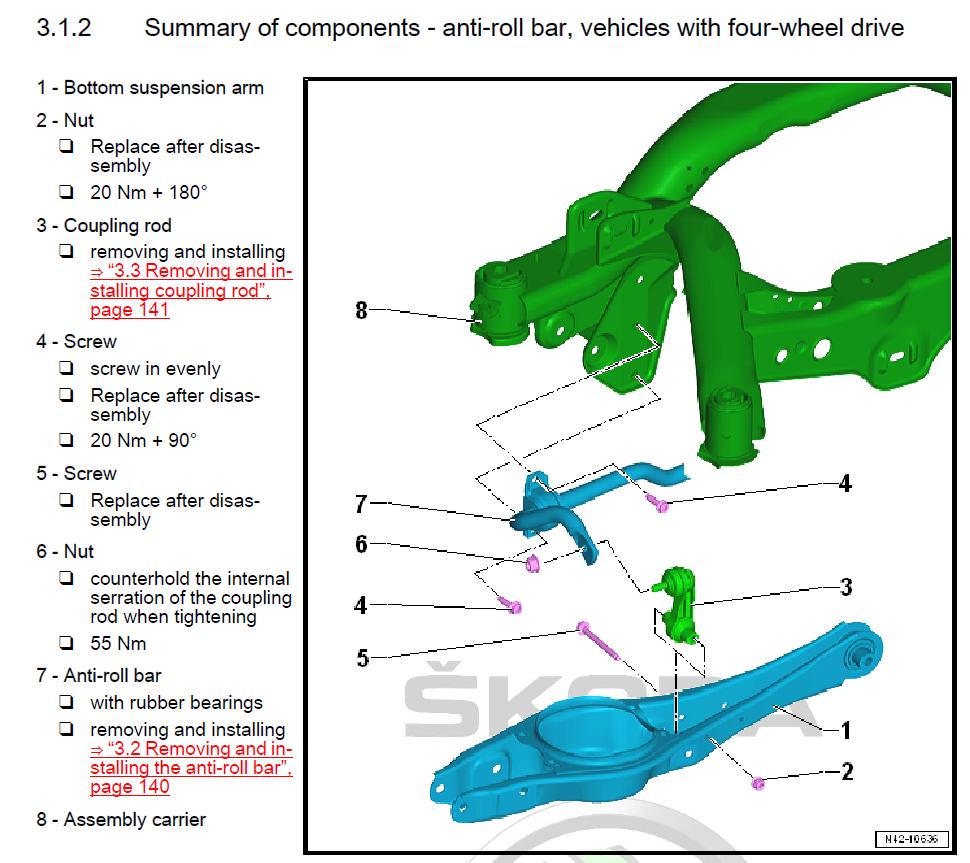
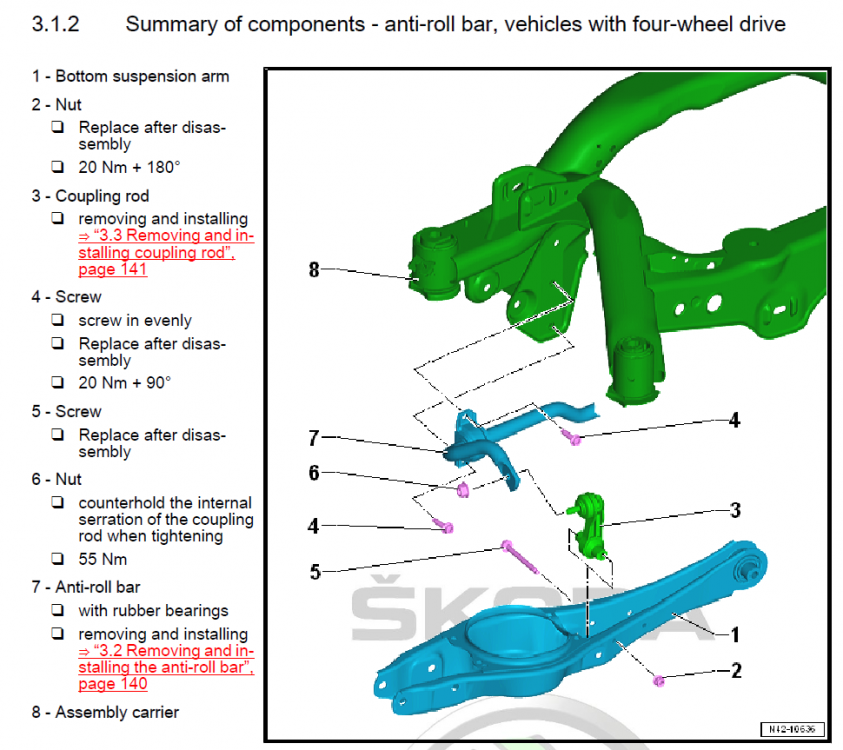
  1. This has become a hot topic lately, a few people have ordered or are about to order an upgraded rear arb and many more are asking about it so I reckon it would be helpful to have this information gathered in one thread, instead of scattered in various (sometimes not even related) threads. Information about possible options, installation and reviews of-course. I've went for the H&R 25mm one, the model number for the 2.0T 272/280 AWD cars is: 33581 HA5. The model number for the 2.0T 220 FWD is: 33851 HA for the 24mm one and: 33851 HA2 for the 26mm one (apparently the FWD has two options) The bar already arrived today but I will hold off installation until I get the replacement OEM bolts and nuts on Monday, needed for the job. Below is the illustration of the items from the Skoda manual as well as a small table I made with all the involved fasteners for upgrading the rear arb and end-links (if needed), numbers and torque figures. FASTENERS INVOLVED: # in Skoda manual Title OEM No. Torque Quantity REPLACE Tool #4 Bushing bolts M8x30 N10765801 20Nm+90 4x YES Triple square No.10 #6 ARB to droplink self_locking nut N10286110 55Nm 2x NO 16mm socket + Triple square No.6 for inner screw #5 Hex head bolt M8x85 N10776501 - 2x YES 13mm socket #2 Hex nut N90183804 20Nm+180 2x YES 13mm socket UPDATE: Link of a very clear video of the installation on a Mk7.5 Golf R (identical setup)
  2. Hi All, I thought I would tell you about a failure that I had at the weekend, as perhaps it might help someone else in the future :-) On Sunday I drove up into the middle of the nowhere to take my dogs for a walk. On returning to the car (2018 Karoq with Keyless entry) I was shocked to find that the car would not open. Neither the keyless entry on any doors or via the remote control button. It seemed like the battery had died without giving me any prior warning that it needed to be replaced - this is what is supposed to happen. So at this point I have no way to get into car, I have 2 wet and grumpy dogs and internet access to look up how to proceed. After swearing like a drunken sailor for 5 mins, here is what I found out: On the drivers side door handle there is an old fashioned key slot hidden behind a piece of plastic. To access the slot you can use the key itself and from underneath slide this into a little hidden hole. When inserted you pull the main door handle out as though you are opening the door and lever the key up slightly to remove the plastic cover. Now you can get into the drivers side of the car. Unfortunately, the central locking does not work but you can lean over and open the other doors manually from the inside. Therefore I opened the rear drivers door and laid the seat down to get access to boot. I am sure I could have crawled in and opened the boot but decided to simply push the dogs in the back. Next was getting the engine going. Being a keyless entry system there is no key access available and I found that the Start/Stop did nothing even with the keyfob in the car. However, I found that if I held the key against the button, with the lock button pointing directly at it then it would work - hence I got the engine started and managed to get home. Changing the battery is a 2 min job requiring a 2025 battery, a large flat head screwdriver and a very small flat screwdriver (plenty of vids on the internet). I am now storing all 3 in the car in case it happens again in the future. Anyway, sorry for the long description and lack of pictures but maybe this will be of help to someone else stuck in the middle of nowhere some day. All the best Dave
  3. I'm back, baby! I've changed cars three times since I was last involved here (Honda CR-V to Volvo XC70, to Kia Sportage, to Volvo XC90) had two mental breakdowns and two kids ( possibly linked!!) However, now I'm stuck indoors, and only just beginning to consider working from home if I.T get their act together) I thought I would reignite some old acquaintances, with Briskoda being the safest of the available options!

Important Information

Welcome to BRISKODA. Please note the following important links Terms of Use. We have a comprehensive Privacy Policy. We have placed cookies on your device to help make this website better. You can adjust your cookie settings, otherwise we'll assume you're okay to continue.

Account

Navigation

Configure browser push notifications

Chrome (Android)
  1. Tap the lock icon next to the address bar.
  2. Tap Permissions → Notifications.
  3. Adjust your preference.
Chrome (Desktop)
  1. Click the padlock icon in the address bar.
  2. Select Site settings.
  3. Find Notifications and adjust your preference.