TheWanderer
Resident Member
-
Joined
-
Last visited
Everything posted by TheWanderer
-
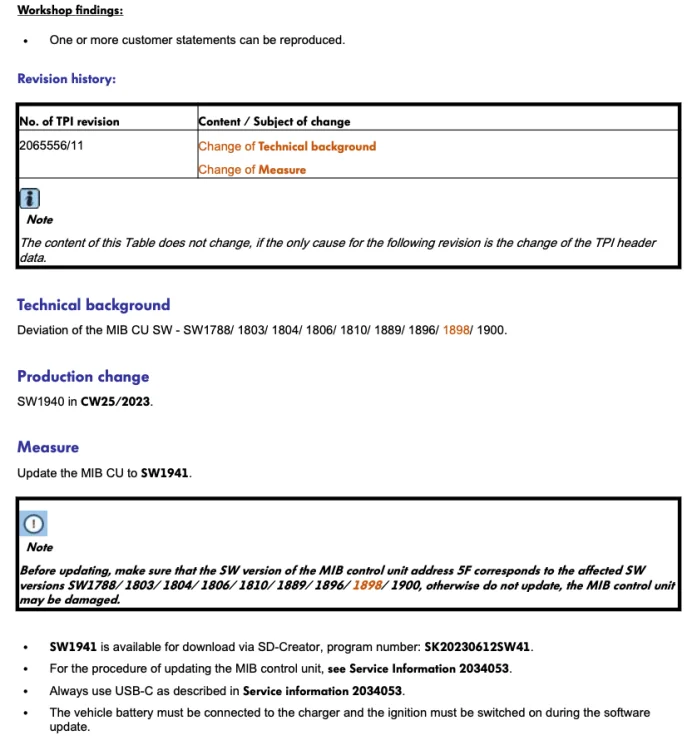
These threads are to do with the infotainment system software, so if you have a look on your cars infotainment system and find the system information, you can see if you have the latest software or firmware for it. If it's 1900 or less then ideally you need to get your infotainment systems software/firmware updated for smooth operation. If it shows 1941 or (unlikely) 1969 then you're fine. However these threads are for those who want the latest soft/firmware's now, rather than wait for it to be automatically downloaded "Over The Air" or OTA, this carries a risk of causing damage to the system unless you know what you're doing. I put a guide to doing the update in this thread: Infotainment System Restarting Endlessly on Page 26 If you don't want to DIY then I notice that you're based in North Yorks, so you could always pop across to the folk at East Yorkshire retrofits who will undoubtedly be able to help you out for a fee: East Yorkshire Retrofits
-
Yep I found that my radio was dipping in and out, yet live less than 6 miles from a moderately high power national transmission site (Guildford Hogs Back).
-
It depends if you still have the pop pop issue then you may need to visit a dealer for a hardware and software/firmware update. If you have a lower numbered software/firmware revision (see the necessary threads for the revision numbers) then you need to have a visit to get a software/firmware revision done there as you may brick or damage your infotainment system permanently. New vehicles seem to have suffered far less than early aka 1st editions. However reading some posters still report that there are a few issues with 1941 & 1969 software/firmware revisions, which may well be down to hardware issues.
-
You might be able to get a car body shop to repair it, ask at a dealer for a price, then an independent, then a body shop. See what comes out cheapest.
-
Iirc 1940 is more or less the same as 1941, just the factory defaults specification.
-
It looks like the trim around the grille, so may be an integral part of the grille, but also look below and the silver bit appears to be broken too. I would take it to a dealer or Skoda independent as you might need to get the sensors recalibrated too.
-
Under warranty?
-
No. I don't think so. You would be better off asking on the Kodiaq forum, if owners of Kodiaq's are experiencing the same issues.
-
Nope. Got a Nextbase GW622, with a 64Gb card. Try to find a recognised brand as technical support is easier to get should it play up.
-
I was worried too about my car and yet when it arrived it was perfect until it did an update to 1900, then it went into a random restarts. but when 1941 appeared on here I was desperate so did the update myself and all the problems ceased, your car will come with the latest hard & software revisions installed. So I wouldn't worry too much and if it did start giving you hell then you have consumer law on your side (look at Martin Lewis' website for details). So you could ultimately reject it, if things were that bad.
-
I would suggest that you talk to Skoda Customer Support, and email them too asking them to call you over this issue. It's not acceptable behaviour and needs to be rectified asap. And ask politely if they could get a master technician involved with it at a dealership.
-
Which version of software do you have?
-
I would say that was lucky. Skoda technical don't issue those TPI instructions without good reason.
-
It is imperative that you DO NOT attempt an upgrade from a low numbered SW revision otherwise you will almost certainly get a big bill for a replacement infotainment system. The forum or it's members are not responsible if you damage your cars infotainment system irreparably. Like any of us. YOU DO THE UPDATE AT YOUR OWN RISK.
-
Try updating to 1969
-
Yes. So if you have one of those firmwares listed then visit the dealer, get them to do the checks and necessary upgrades and then they can do the upgrades afterwards or leave it up to you or the system to do it itself via the OTA system.
-
COULD A MOD PLEASE PIN THIS.. Please read this very carefully. If you have LOW numbered firmware/software, then you MUST visit a dealer before you attempt to upgrade to 1941 or 1969.  If you attempt to do so then you may cause major damage & have to buy a new infotainment system which is hideously expensive. So please bear this in mind.
-
I don't use 7z. I use either Windows built in extraction system or WinRar. Much better solutions. However you many want to download it again and see what happens..
-
Have a look over on the other thread. Infotainment system restarting endlessly This also contains a "How to" post on page 26, if there's a 1969 download available it will be towards the end of the thread. Just be aware that if you get it, it's somewhere in the region of 9-9½Gb in size. As per usual if you do use it, then you do it at your own risk and the forum cannot be held responsible if it bricks your infotainment system.
-
That's what I was on about. Not a complete charge!
-
Well if you have a look on Amazon under: AA 12 V Car Solar Battery Trickle Charger There are two derivatives.
-
Yes. Just plug it in the solar charger whilst at work if no charging available or out and about for the day. It's just to help keep it topped up and no issues.
-
It trickle feeds that useless battery it the hybrid has.
-
TBQH I don't use AA very much at all I find it quite clunky to use and now I'm retired from the railway, I don't get many phone calls at all. The only time I tend to use it is when I'm going somewhere out of my area that I don't know and I'm using Waze or GM for navigation.
-
Well you never can tell whether Laura is a he or a she these days in the real world 🌎. 😬