langers2k
Resident Member
-
Joined
-
Last visited
Everything posted by langers2k
-
Cool - so it's been retrofitted at some point as the Octavia never had that module factory fitted. You might want to check the Superb owners manual as that (briefly) mentiones the wifi config: https://ws.skoda-auto.com/OwnersManualService/Data/en/Superb_3T/11-2014/Manual/Superb/B6_Superb_OwnersManual.pdf Pretty sure it's the APN stuff I mentioned previously though :)
-
A 3C8..E BT module is likely to be in a MK2 Superb so there is no USB port or a 4G dongle avaible. @TommoC It's been a while since I last used a 3C8 module but try this: - Have the hotspot disabled on your phone and forget the cars wifi hotspot - Connect using rSAP (premium BT) to the car - This should cause your phone to loose signal and have no data connection - You now need to check the car has the correct APN set, this is done via the maxidot, possibly phone -> settings -> access point? The settings will depend on your mobile network - Now disconnect the phones bluetooth and reconnect - Connect the phone to the cars wifi hotspot Hopefully you will now be able to browse the internet etc using your phone. Finally, connect the blackvue to the cars wifi hotspot.
-
Does your network allow your phone to be used as a wifi hotspot?
-
Some SIM cards can be a pain with the 3C8...D/E BT modules if I remember correctly. Have you checked you're in an area with 3G coverage as the BT module doesn't support 4G or 5G. I also assume you're able to make/recieve calls and the signal level is shown on the maxidot?
-
You have 5M0 907 357 C, it's mentioned in your autoscan ;) Looking at these scans, 1T0 907 357 appears to be the correct module for earlier xenons systems: - https://forums.vwvortex.com/showthread.php?7890121-Octavia-1Z-electric-problems - https://forums.ross-tech.com/showthread.php?2763-ABS-coding-Skoda-A5 - https://www.briskoda.net/forums/topic/277524-interior-monitoring-sensors-fault-code-related-to-door-led/
-
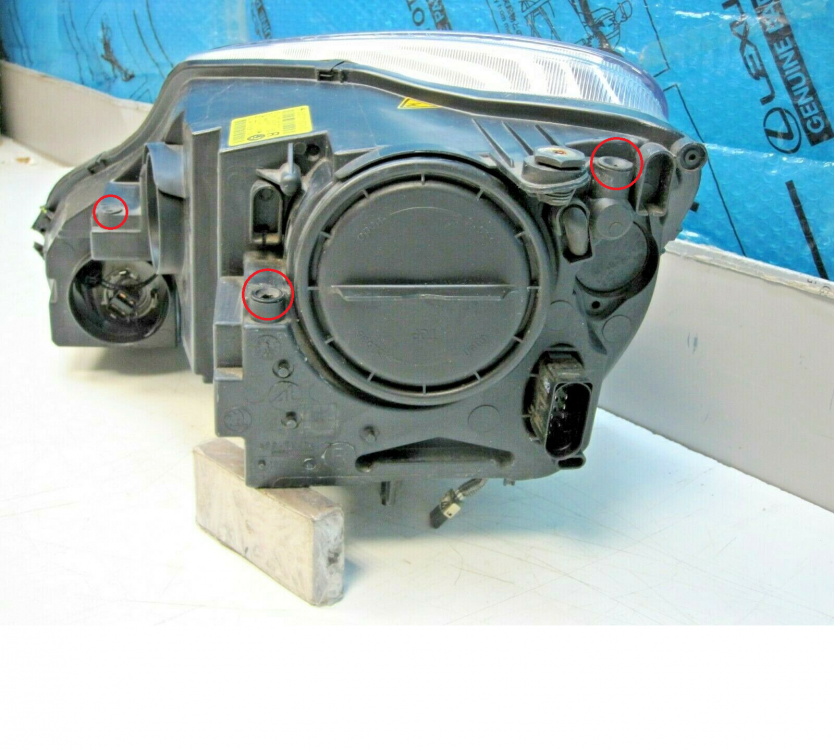
What are you taking about? That would be completely mad! There are three adjustment screws: - vertical for dipped/main beam (same bulb) - horizontal for dipped/main beam (same bulb) - vertical for the fog lamp I've circled them here:
-
It'll probably be the black hex adjustment screw above the fog lamp, to the right of this picture:
-
Glad you sorted your DRL :) Couple of scans from google: https://www.briskoda.net/forums/topic/398511-force-regen-with-vcds/ https://forums.ross-tech.com/showthread.php?10901-Retrofitted-RLS-and-Autolights Both seem to have CEGA engines :)
-
What are you trying to fix/achieve?
-
Are we talking a small amount? If so, then I think it's normal. The mirror bases have slightly different angles so if both motors move the same amount, the drivers one won't close quite as much if I remember correctly.
-
It should assuming it's working normally... Do you have manually or electrically folding mirrors and has the drivers side ever worked?
-
-
If you fit a headunit that uses CAN-bus, there is a chance you'll end up with battery drain as it's pretty common on older MK2 Octavias such as a 2007. If you fit a headunit that needs a switched live, you will need to run one from the fusebox as the standard quadlock does not include one.
-
Both a dealer and VCDS can disable travel mode, it's just an adaption channel in the AFS master/range controller. If travel mode is enabled, you'll have an obvious fault code stored.
-
Travel mode will stop the left/right movement so if that's happening, travel mode is not enabled. TBH, it just sounds like the OP doesn't understand how their headlights should work as nothing changes at 60km/h. - City mode should work under 50 km/h, this means the drivers side headlight will lower slightly and point to the opposite curb. - Motorway/highway mode activates somewhere around 120km/h and raises both headlights slightly. - At all speeds the headlights will automatically level. I have no idea what behaviour they are expecting based on their first post. They really need to get an autoscan and possibly even a video showing whats happening compared to what they expect. Not all countries get travel mode as standard as many won't need/use it. The menu can be activated by the right coding
-
It won't be easy as a 2013 and 2019 Superb are based on completely different platforms.
-
Post an autoscan from VCDS and an adaption map from 17 (Instruments). I still think your ECU won't support it but at least we can check the adaption channels
-
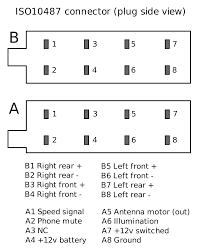
Yes, A7 needs to be the switched ignition wire. The stock Stream headunit does not use a switched ignition wire, because of this, the quadlock connector does not have one fitted. You need to run a wire from A7 to a switched ignition feed, the best location is the fuse box.
-
Typical quadlock wiring on a MK2 Octavia: Typical ISO wiring:
-
Assuming you're enabling it the cluster and nothing happens, your ECU probably doesn't support it. I've seen since people flash support to select TSi ECU's but I've never seen a solution for a TDi.
-
In the picture from the website you linked, you can see a red wire coming off the black 8 pin connector that goes nowhere. You need to extend the red wire to the car fusebox and attach it to a switched live. A multimeter will help you find one...
-
Yes, the Stream turns on and off due to a CAN-bus message. However, your aftermarket headunit needs a switched live as it won't support the CAN-bus message.
-
The stock headunit doesn't use a switched ignition feed so there isn't one. You will need to run a new wire from the fusebox or use a CAN-bus adaptor
-
Yup, plenty of sellers on eBay are happy to change the CID before dispatching cards too. Once 32GB is required, I'd expect to see a spike of eBay sellers offering suitable cards ;)
-
Who knows!? You haven't told us what the error code is or posted an autoscan. It could be a corrosion on the contacts but you shouldn't be using WD40 on them...