djmartzian
Members
-
Joined
-
Last visited
Everything posted by djmartzian
-
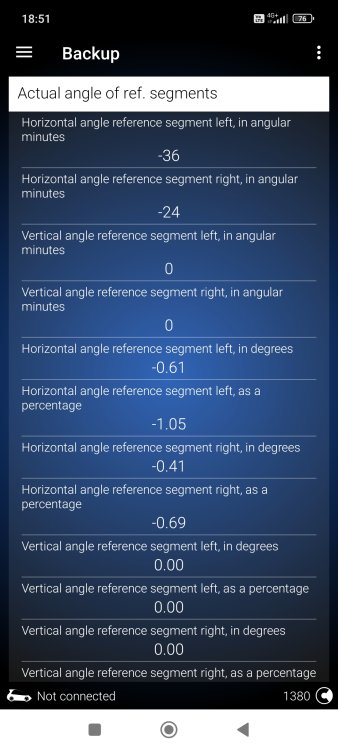
Thx @Felix2021, as always eager to help. 🙂 I've also attached a screenshot with values for the car in the profile, hopefully these values will helm someone with same chassis and trim. Cheers 🍻
-
Hi guys, Is this procedure supposed to work on Bolero without the SatNav(Columbus) enabled? My current version of Navigation database is 21.2, based on the details from System information. Thx
-
Hi @Felix2021, I've did a new Backup in this evening with headlights/Low Beam ON. The same apply, all offset values are set to 0. I've also checked other parameters, data/values have been recorded for them. Would you be kind to check your 4B Backup in Offline mode? Thx
-
Thx @Felix2021 for your fast reply. Yes, I get the point to follow the backup procedure prior to do any coding on 4B module. Actually I just want to have the "live data" within the backup for future reference (given the "professionalism" which the dealers give evidence) . I'll not touch the coding on this module since I don't want to fry the basic settings. In regards to the procedure, I think you're making reference to: Do you have a backup including the live data or some data inside the live data when offline? If so, search for "Matrix light, calculated offset values" and take note of left and right offsets in angular minutes. But, I've just checked within my backup did last week and all the offset values are set to 0. Is this because probably I did the backup during the day and the headlights were turned Off? Shall I try another backup with Low-beam ON? Br
-
Hi @Felix2021, Would you be kind to provide some instructions how to do the backup of calibration settings with OBD11 App, please? Thank you D
-
@varooom, Here they are: Control unit: 19 Gateway System description: GW2020 High Software number: 5WA907530Q Software version: 7099 Hardware number: 5WA907530G Hardware version: 756 Serial number: 26016090202418131100 ODX name: EV_GatewMQB2020 ODX version: 005011 My car isn't PHEV, it's a Mild Hybrid type. Br
-
Hi @varooom, Do you know if a TPI has been created for this kind of issues? I'm asking because this week my car went to dealer for the software updates (VC received ver5370 and MMI received ver1896), but they didn't want to upgrade the Gateway module (currently my car is running on software version 7099, and from what I can see in OBD11 the ver7300 seems to be available). Even so, they changed the battery(prob due to my complains in regards to fast discarding in less then 3 days) , with the pretext it has been checked and a manufacture problem has been detected with it, but this not required software update. Thank you
-
Hi @strudlovina, What is it the coding for "turn on steering wheel heating automatically" option? OR are you talking about an extra option within the AC menus? 1 - Module 08 - Air conditioning / heating electronics 2 - Adaptation 3 - Hand heater function during cold start: - (Default value is Active) Thank you
-
Hi guys, QQ: How did you manage to get Waze in Full screen with Android Auto? Over the past months I've tried different settings and smartphones (Xiaomi Mi10T and Samsung S21) but with no luck. SW number is 1889 on my Bolero unit, w/o the SatNav. Br
-
@Felix2021, Agree with what you said. A few words in a warning + instructions will save a lot of pain/time for others OR you will think twice before doing any changes in the 4B module. @Avi1407, In my previous post I was referring to the B17D7F0 DTC from 09 - Central Electrics module. I also encountered the same error when I ran 1-click app from OBD11 apps list store. The DTC is still present on my car too. So, please please, raise a separate ticket with Voltas Support ONLY for this issue. More tickets to be raised, more pressure will be on they shoulders to search and to find a fix for this.
-
I had the same error U112500 in 19-Gateway module before the KLR coding. You said that you disabled the capacitive steering wheel, probably that's the reason your car is missing B17B8F2 DTC. U112xx DTC is hiding the B17Bxxx error. Br
-
Hi @Avi1407, For this error can you please raise a ticket with Voltas Support guys? I also encountered the same error when I ran 1-click app from OBD11 apps list store. More tickets to be raised, more pressure will be on they shoulders to search and to find a fix for this. Thank you
-
Yes. You need to run a full scan or a partial scan on Module 19.
-
Hi @Mario_Delgado, Can you please check with an OBD11 dongle what is the DTC stored in module 19 - Gateway, please? Is it B17B8F2 ? If yes, keep in mind that Skoda is aware of this issue and based on the 2062172.13 Travel Assist sporadically unavailable TPI the only "fix" provided by the dealer is to disable TA. Very disappointing and as you mentioned fingers crossed they will provide a software update soon. I've also been hit by the above DTC in a foggy winter day during a short trip in town. Br.
-
Hi guys, Does anybody manage to successfully retrofit the Octavia 4 steering wheel on any Octavia 3 car? Does anybody know a place where to buy the LIN convertor OR get in touch with the Russian guy? LATER EDIT: @Krosta , can provide any contacts details for the "master" of the LIN convertor, please? Thank you
-
Thank you for all the details above. What do you mean by "turning on the indicators" ? Can you give more informations?
-
Hi, 1. In which conditions the bug started? Did the Instrument cluster display the following messages like "Travel Assist Unavailable" + "SOS failure" during that time? 2. How often did this bug is replicated? 3. Did your car was stopped/parked and you just started the engine OR it was during driving(short trip OR long trip)? 4. Have you turned ON the Travel Assist function by using the dedicated button on the steering wheel before the trip? 5. Do you have an OBD11 dongle to check for errors on the 19-Gateway module, especially B17B8F2: Steering Wheel Touch Recognition Control Module - Sensor malfunction DTC? 6. What did you do to get rig of the messages/errors OR they just "magically" gone away? Br.
-
Hello, I only can say that the heated function just worked BUT my previous steering wheel it was also heated. The heated function is a factory option in my case.
-
TSR can only be activated with the SWaP code 😒 More details in the thread below: https://forum.obdeleven.com/post/70584/thread
-
Hi guys, I'm back to you with a question: Does someone else encountered the below errors/failures? Off course 2 error messages have been also displayed in VC: something with powertrain error and Travel Assist unavailable. Are they something to do with the above coding OR is just a set of annoying DTCs that I should not worry about? 01 - Engine - P164700 - Checking coding/versions of control modules in drivetrain 13 - Adaptive Cruise Control - U112200 - Databus implausible message 17 - Dashboard - U105400 - No communication In this morning the outside temperature drop around 0 degress and from what I can read with the OBD11 the regular battery voltage drops ~11.28V. Can this be the root cause? Thank you
-
Woohoo! It worked! This a very nasty bug! It worked only after I've enter twice 20103 code in the Security Access menu. I still have that open ticket with Voltas Support. One more time, many thanks to you guys octavianx and Mario_Delgado
-
Thank you for your reply and feedback. So, you are suggesting that I need to access "Security Access" menu first before start the coding?
-
Thx mate. I really appreciate your help and support on this. I've also tried a couple of time in this evening, but like I was expected there are some issues/problems with the OBD11 app. I've raised a ticket in the meantime with the Voltas Support. Hopefully they will reply to me Tomorrow. Have a great evening!
-
What diag tool are you using? I have OBD11 dongle, with no access to VCDS device. I've tried multiple times, one by one but 13 module didn't accent any coding. It might be a bug with OBD11 app. I'll raise a ticket with Voltas Support guys. I'll keep you posted one I'll made some progress. Thank you for your support. Humble Regards
-
20103. I've already tried. Same error.