




nickytheshaft
Members
-
Joined
-
Last visited
Everything posted by nickytheshaft
-
-
This is what it is, you need wired activated to get wireless
-
Maybe you can find something here https://mib-helper.com/
-
@pab567 to help you
-
you can also get your maps and speedcams here : https://mib-helper.com/
-
-
I put the mic over the sun visor. The issue is the sound processing so the mic you showed won't change anything. When i got the unit i went with the 4gb one You are better off upgrading to mib2, it is what I ended doing
-
Yes they use aux input. Thr best i managed to achieve was use a noise cancelling mic from Amazon, the synco S6M2 It got decent but nowhere near the stock mic at higher speeds. The stock mic is a powdered mic. For. The screen brightness, i never had issues. Just put a dark theme.
-
Go for agm and ofbeleven. The people saying you can't change the type are idiots. I went from efb to agm and there is a code for the battery type
-
Sorry, no cheap way, you need a vagcom i changed mine for a varta AGM battery five years ago and is still ok. Stock one was efb like yours. I codded with a Chinese vagcom cable. Other way is have it done by your dealer
-
You could unclip the port and re rout everything behind the screen. It would leave a gap but you could find a way to fill it. But again, wireless would be the way to go.
-
He should then have the answers to all of your questions
-
The best person to ask is @pab567 He can provide you the upgraded usb port For the gps if you use Android auto or carplay, you don't need it as it uses the gps antenna of the phone. If you really need an antenna, i guess any ali... Will work as i once had a Chinese head unit and tje stock gps antenna of the car worked on it. But again, maybe pab can provide you with one
-
Yes, don't go to expensive in these thing. Get one on ali and you are good to go
-
-
-
I totally agree, good music means the connection is ok. How is the quality when you use your phone without the bt?
-
Man, this thing is expensive. I went with a cheapo adaptor. I have a Galaxy s23. All I do is connect to the dongle Bluetooth. Once the connection is done, the WiFi is automatically activated. Nothing more to do. Make sure you have the car Bluetooth registered on your phone as when you connect to the dongle, it will activate the WiFi and switch to the car Bluetooth. The WiFi between the phone and the dongle replaces the usb cord
-
yeah he seems to have an mib1. My car originaly came with an amundsen mib1, same small screen but with satnav and dab. You likely won't have carplay on this. you can add a box to have carplay but it is quite pricey, i think in the 200 euros range. downside is when you are on carplay or android auto you can't acces anything else on the systeme. The chinese head units havec been discussed number of times, short story, you get what you pay for. great screen, sound and satnav but extremely poor call quality and hit or miss acces ti car parameters. If you are ok with these drawback then get on, but as personnal experience with several units, save your money and go for a mib upgrade. Yes it is expensive but you have perfect systeme intergration.
-
Then maybe a faulty camera. I have mine also taking power from the rear wiper and plugged in the quad lock and everything is ok. Nothing really different from yours.
-
Are you sure the camera is coded? I would just get a vcds cable and check
-
A faulty camera or maybe signal and ground are inverted? You never know with Chinese product. On some usb cables i splitted for a previous head unit, the cables colors where not what they were suppose to be
-
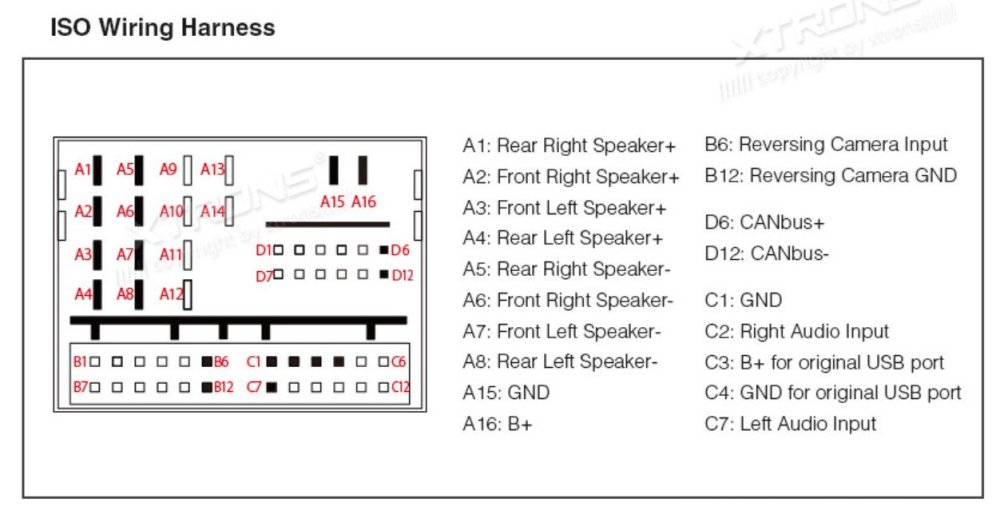
is your camera plugged in correctry? (B6 and B12)? Also you power connectors are quite ****ty, you are better on with splicing and soldering. you should also check if you have power
-
Strange, from memory, I think I only hade one wire to add t the quad lock
-
Stupid question, did you code the car for the cam?

