Tell
Members
-
Joined
-
Last visited
Everything posted by Tell
-
Well that was also in Seat manuals. It's those technical writers of old that computer companies use to write like ICL. There is a spec but programmers don't write to the spec so the two don't tally. It's the back door into mib units for toolkits in mib2 so management twigged to protect mib3 from hobbyists they had better prevent usb import. That's what is thought. The source of why the technical spec is at variance to the software.
-
There were the Chinese replacement Android units but given a Seat guy having issues didn't mention that. Probably a similar vogue thing. Problem with Alliexpress is the level of support. LED bulbs probably straight forward enough if they don't flicker, but specialist electronics, bit like a traditional market stall take a punt but you get it direct from China. The chipset is pretty much the same for a mib2 standard or was it mib2 high as a Nexus 7, so these Android units are like having a Nexus 7 or something. They do have a charm if they work but a niche market. The Seat guy got sent the wrong leads to connect up. Probably end of line stuff being sold. BTW the Inrix mods are still working well. Trafficmaster never gave the level of traffic reports you see on Inrix. That was a good thread. A bit of technical knowledge could gets the Inrix traffic reports on the mib1, change traffic group thingy to 14 from 15 on a mib1 with coding and on a good day download the 2023 maps for mib1 from mibsolution.one. That's on the thread, refresh the unit with recent maps and traffic reports that work. Who needs Android navigation... well you might if you live in an urban area with dynamic routine to bust traffic jams via rat runs. Main selling point of it other than that peak at traffic via the apps before you start off and pick the route that looks good. What I do... then when the traffics stuffed up follow everyone else with dynamic routine 🤣.
- 5 replies
-
- amundsen
- android auto
- apple carplay
- estate
-
Tagged with:
-
In the past people upgraded to the mib2 unit. Think you have to change your USB since the original were never specced for data. It's all before my time but that's what was done. You'll find projects on it. For you, you are only interested in the screen so it's a bit of an overkill.
- 5 replies
-
- amundsen
- android auto
- apple carplay
- estate
-
Tagged with:
-
No Vag work with a complete memory overwrite of the maps. 350 and below the VW, Skoda and Seat releases was a combined mib1 / mib2 release. Just the way they did it. From 370 mib2 high only. It all came up with the release of 370 and why it had decreased in size. Answer all the specific mib1 high files only has been taken out. We had seen it previously or rather some had, that had used the Audi version which loads happily into other mib2 high general Vag cars. Audi had always so I was told by @pcbbc released them like that. He's an Audi driver and knew about the mib2 high only releases of Audi. That practice had not happened till 370 on the other Vag brands. What's more important is that there is no point in mib1 high drivers spending much time trying to get these files to work. They won't. The backend menu of SWDL will load them in but you'll loose your maps so have to scramble to find 350. We have been there, done that with one poster. An Aussie on the RoW release six months ago. Mib1s standard life on map updates finished a few years back and then the high version in 370. 350 is the last one and associated RoW series. Last year a commercial special was brought out for Audi Mib1 standard drivers and that does work with some coaking on file preparation on other brands. 2023 maps. Something might happen for mib1 high if the market existed. That mib1 standard 2023 I've posted up on a thread here with the mibsolution.one file link. That has found to work on Seat and Skoda mib1 standard. So they did get a boost and in the UK can get TMC Inrix to work and new maps as opposed to 2020. Something similar may happen to a mib1 high release but it will be only based on Audi commercial reasons if they exist. Who knows.
- 142 replies
-
- columbus
- discover pro
- maps
- mib
-
Tagged with:
-
-
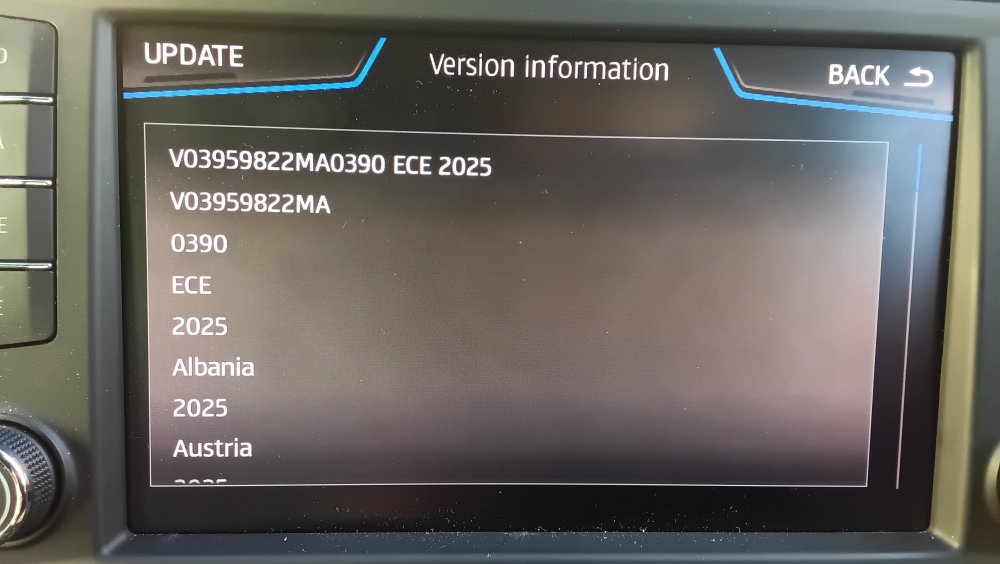
The customary success screen on a Seat mib2 high. Thanks @MartiniB for your hard work.
- 142 replies
-
-

- 1
-
-
- columbus
- discover pro
- maps
- mib
-
Tagged with:
-
It's a programmers hash it doesn't work with mib1 high whatever the metafiles say. They took the mib1 files out. The history is mib2 high came along and they grafted that on. Specific mib2 high files are in the mib2 high directory but the common stuff is in the mib1 directory. The catch is the mib1 only specific stuff they took out of the mib1 directory. That's why the download reduced drastically in size. Audi behind their pay wall always shipped the mib2 high only download. So it's nothing new. It just came to the rest of the Vag brands six months ago as they discontinued mib1 high support.
- 142 replies
-
- columbus
- discover pro
- maps
- mib
-
Tagged with:
-
-
Not new... new... yes new is out 390... installed on Friday. @MartiniB had put a thread up but I hadn't pressed refresh. Not so sure what's happened to the Russian with the early releases.. probably sent to the front line. I did think it went through Russia a bit quick when I was up dating it with SWDL. That was a bit fast progress through "white Russians" some inclusivity training may be required in Germany 😉. Like the black music categories you use to find in German CD stores... err World Music. Those thought that you get when you see each element of the maps updated. I think there is a block on Russia in these release. No, no areas including North Korea (military) and Japan for commercial reasons. Funny enough I use to see the south Korea nuclear power stations that get hidden in digitised foliage on South Korea aerial images. Hardwork putting in all that digital foliage to cover up heavy water reactors that everyone knows about with knowledge of the country. So yes I do see some changes in the maps. It might even put me at McDonald's now. Time lag in digitised to production. Was off straight across a field. Might lock onto the service road now checking it after. Closest point.
- 142 replies
-
- columbus
- discover pro
- maps
- mib
-
Tagged with:
-
Not if it's mib2 high only. The maps files are interchangeable between brands but they have dropped support for mib1 high. They are all run off from the same system and are identical on the same release code, but it won't help you if we assume that's what they have done. The mib1 high release has been dropped from European maps so it will be the same for RoW. A check can be made by looking in the mib1 directory...
-
Hobbyist mib project of enthusiasts. Spends a lot of time down... like now else I'd point you to the page. Maps would be the directory area. No forum so that's the downfall of it. Another piece of AI type webpage. Mib helper https://mib-helper.com/ Which links into it but again no discussion site. Mr Fix it videos that will equally give you problems if misused. The wild side of mib with trap doors for the un anointed.
-
Yep that's how they did it. The folders don't resemble what's in them. For mib2 they take bits of the contents of mib1 so the mib2 folder contains an adjunct to mib1 to give a mib2 release. Tiss all straightforward 🤣. You never know Audi might put out a new mib1 high update if there was a market how the mib1 standard 2023 release came about one assumes. You have to periodically eyeball what's out there. Mibsolution.one Guest, guest posts the links up. Fumbling through the directories. File dump.
-
If you got a mib1 high you can't do it now. I'm assuming RoW is now like Europe the files only apply to mib2 high now. The title of the thread needs the mib1 bit taken out. Upto and including 350 you were fine but 370 on not. That dropped support for the mib1 high. It did come up with 370 (exact number ?) on the RoW. You should find the same level of down sizing from a year ago which means they have dropped mib1 high. The contents of those directories don't resemble exactly what's in them. It was a joint release for mib1/2 high but not anymore after 350 number or your RoW number 35?. Clear as mud. The death nail on mib1 high map updates.
-
That did get delayed in the last release either they will miss a period or put it out delayed or scrap the updates 🫣. The Inrix solution on old mib2 standard maps for the UK is still working beautifully. Bit surprising the men standing there looking at the new lights, traffic message. Returning men gone, no warning 😉. They must religiously type it into their systems or use flow patterns around a known traffic site.
-
🫣 Must have missed the posting dates or I didn't press refresh. A lot on trying to update to pesky 24h2. One machine is being difficult of the three. I'd been looking for 390.
- 27 replies
-
- columbus
- discover pro
- mib
- mib2
-
Tagged with:
-
@MartiniB 390 has broken cover https://vw-maps-cdn.lighthouselabs.eu/vw-maps/P390_N60S5MIBH3_EU.7z Do you want to sniff out the others and start a new thread off. I haven't tested it yet. Try on Friday. A Seat poster found it cross-referenced on MibSolutions as a link, dated yesterday.
- 27 replies
-
- columbus
- discover pro
- mib
- mib2
-
Tagged with:
-
I think the Briskoda board has a list of hobbyists that do coding for each other. Somewhere on here. If it's not a mib2 high ( Columbus) or mib1 then it's not coding but using an old copy of the maps and a copy of modules to overwrite them. One splits into purely computer skills if it's an Amundsen (links on the thread) the other VCDS / Obdeleven Pro coding or the like just to change the TMC group and a reboot (mib2 high and mib1). Link on the thread for both... we thank all those involved.
-
That will be much older than your online connected services one. Above after I'd asked for a bright spark to crack the files one came forward: For the technically minded and with a bit of SQL skills. Basically the mib3 files rolled out through Vag portals but not via connected services keep to the six month release. June / November but signed off six months before. Then the connected services are monthly. Always uptodate with Here Maps material. On top of that the Vag six monthly files can be out of date and not what they seem. Hence the code above to peak at them.
-
I got fed up with things falling off the dashboard, glass etc. Happy with the built in systems since 2016. The demise of Trafficmaster over the air but the mod to shift it to Inrix on Vag equipment works fine 👌. User POI import programs can turn mib1 and 2 inbuilt systems into fully fledged satnavs of old. Mib3 you can't do that. I imported my old user destinations into the car... all 200 of them building them up. So you can get the older systems running as if a GPS system. Was an old Vag user trick. Depends alot on what roads you drive on whether you need real time re-routing which is more Google side or more relaxed traffic information more Inrix. That one tells you what the problem is together with re-routing. Map updates are still available for mib2 and there is a mib1, one to 2023 which isn't bad. Mib1 and mib2 high inrix solution of changing the parameter with a coding device. Mib2 standard for inrix two year older maps. It's all on the thread. Life in the built in systems yet. Apple products are banned from this household 🤣.
-
-
Any advance on 23.12 with that file release above means it's taking it over the air. You lag with a 6 to 12 month period if you use the file loads rather than over the air but saves money on connect services (get out of contract). If you live in a 4g black hole like where I live it also has merit. Quite large down loads over problematic 4g, fine for people living or traveling in good 4g locations. Horses for courses.
-
-
At the minute for mib1 high. Always a possibility that something might be put out outside the standard support timescale for the free updates. That's taken to be 5 years onto the last fitting of the mib model. Mib1 standard got that 2023 map update which was 3 years after the regular update period ended. So you never know. Mib2 high is reckoned to go on after 2025 due to Audi TTs still having the unit fitted after 2020. Mib1 high road on the back of the combined production for mib2 high so had that the longer life till they pulled the production of the combined file. At that stage the cut down file came to the other brands in mib2 high form although Audi had always had the three flavours. Just nobody is offering that mib1 high flavour at the minute. 2023 mib1 standard was a special flavour... Ice cream parlour. You never know. That was a paid for update within mapcare well outside the 5 years. They could always do that for mib1 high in the future.
- 142 replies
-
-
- 1
-
-
- columbus
- discover pro
- maps
- mib
-
Tagged with:
-
Yes by 370 it became mib2 only, prior the standard release across Skoda, Seat and VW was a combined mib1 / 2 release the installation recognised whether it was mib1 or mib2 and just took the files it required although these were jumbled across directories they called mib1 and mib2 but it did dive across irrespective. Audi released the files in two or three flavours combined, mib1 and mib2 historically. 370 only mib2 as far as what is on the net that I've seen. The three others or one or two then released the same materiel but just built differently with checksums, same data, but still just mib2 only. Why the files reduced from circa 32gb to 17gb or so as they dropped mib1 high support. So you know just by the download it's not a combined file. Now that isn't to say a mib1 high version of 370 isn't out there somewhere. I haven't seen it though. The ones that appear from Audi on sites seem to be the ones from behind the Audi mapcare pay wall. Audi running a pay wall on the VIN whilst others don't. Why Audi owners came to this board for the file link after hacking their navigation life long FeC. The downloads work across the brands.
- 142 replies
-
-
- 1
-
-
- columbus
- discover pro
- maps
- mib
-
Tagged with:
-
Just to clarify the Skoda good news stories with this are here: https://www.briskoda.net/forums/topic/511425-amundsen-mib1-maps-update/?do=findComment&comment=5871771 Seat people found the Seat 480 firmware was what they needed, Skoda people the Skoda 490 so it appears. That was my conclusion as to how it's done. The edits as shown in the link plus having the relevant firmware installed then you can enjoy 2023 Here Maps release on your mib1 standard. Mib2 SD card saves hacking the files around to fit the mib1 16gb card and lastly don't do anything without backing up your existing mib1 card if you aren't prepared to buy a mib2 card. Either way take a copy else it may end in tears.