Tell
Members
-
Joined
-
Last visited
Everything posted by Tell
-
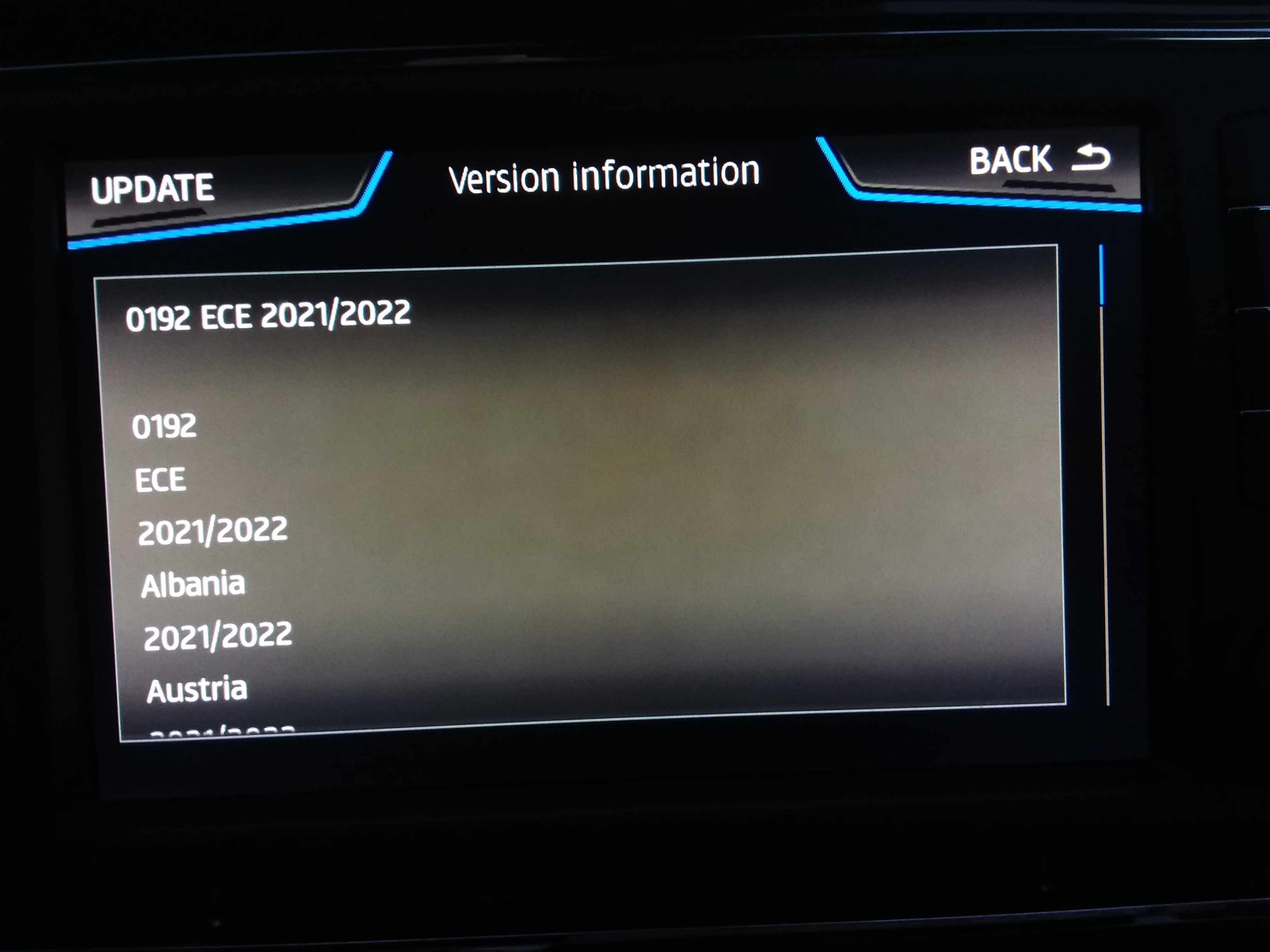
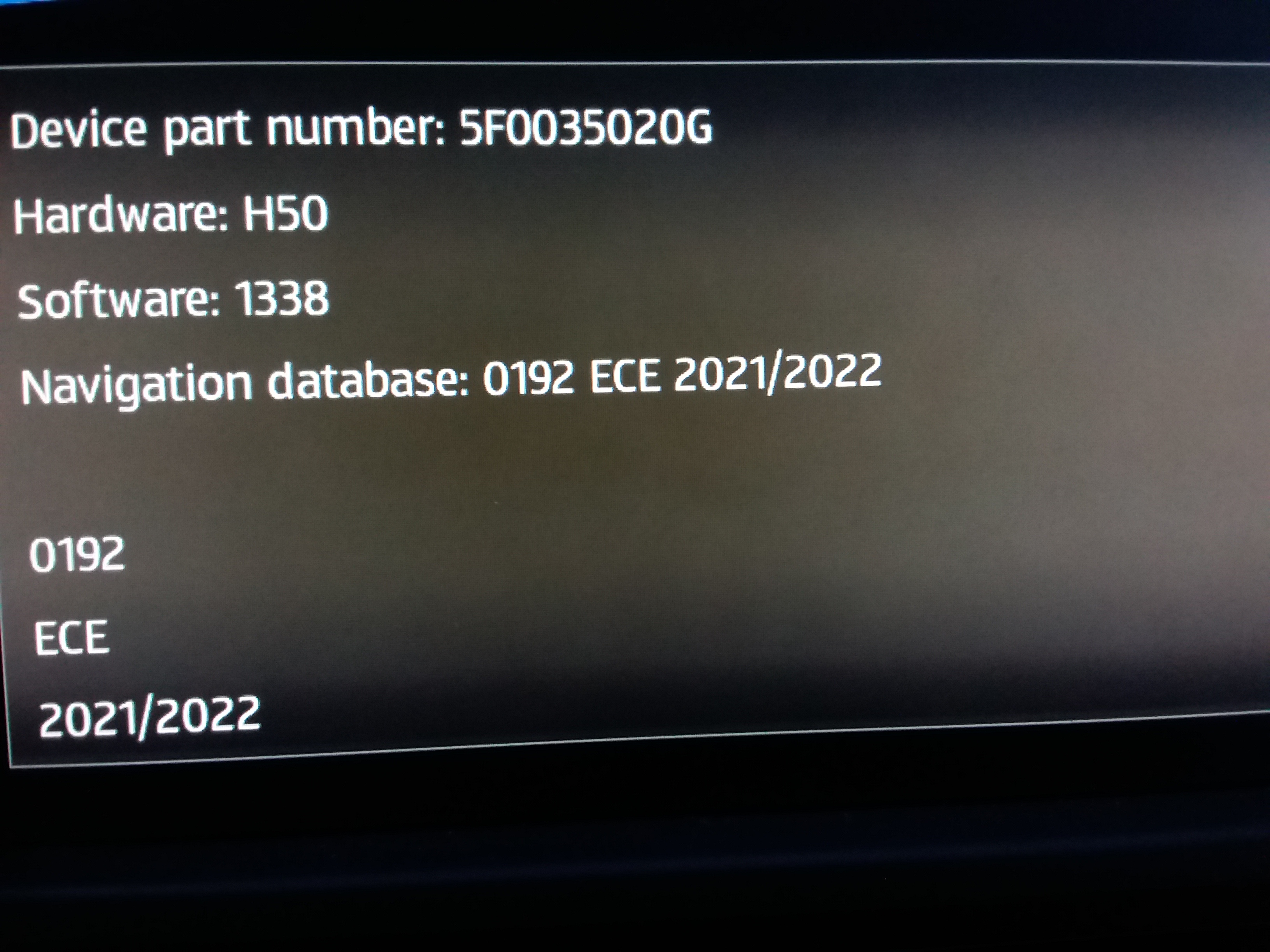
Ah well the solution for Seat mib2 high owners is to get the Skoda lifelong navigation FeC on your unit. "Easy enough" needs 08300008 added then you can enjoy all the benefits of Skoda 😉. We say easy enough. You either find a retrofitter to do it for you or do it yourself. Currently not many of those in the UK that touch Seat Mib 2 Highs since they were not marketed as much as Skoda by Seat. The DIY solution doesn't cost anything but needs VCDS / Obdeleven skills to enable the green menu. Then you use Mib Tool and guys from the M.I.B. collective. German DEB board has postings since its all in German to an extent. You can do a firmware upgrade but obvious risks to that or stick on current firmware. Mib Tool runs on a SD card in the unit. Contains a module for each firmware release they have looked at. If a module exists for your firmware then it will recognise that when you back up. If it doesn't you are invited to supply the backup to the "collective" (I call them that). Useful to be on a board where they are. Then some useful guy may offer help. It's possible for them to create a dummy patch module. You then install that into the patch folder of Mib Tool, go into the patch module option but don't import the module, it's a dummy one, just tap AddFecs. Come out and reboot (the long press on/off). Check installed FeCs and Bobs your Uncle. You can write the dummy module yourself but I reckon that's too complex. The FeC table in the patch is a normal txt one and can be edited. The process circumvents the program "Whatthefec" since FeC edits are built in. They have Skoda modules as well. Worth looking at if troubled by FeCs🤣. But obviously Skoda drivers are not, just Seat being petty. Normal success pictures attached... got there in the end.
-
That's good. Seatcupra people are finding it works as well :).... where there is a resource you will find other tricks if you happen to want to drive your car to the ROW or vice versa. That thanks to the T6Forum but we had a bit of cross working between boards to get US Golfs working on European maps they are more pesky where a Palestinian guy found additional twigs that had to be made. Seat France exports to Palestine on ROW maps. Spanish VWs to Morocco etc etc. All fun... where there is a need. The Arona becomes the test bed where I put it in demo mode to drive RoW countries... so far Israel and Morocco without leaving the garage.
-
-
They are in the directory maps\00\sds Each countries language is stored as the international plate. If the country has two languages it uses them but the other countries can be deleted, you must keep the meta_info.db Thus for GB delete everything else other than GB, keep the meta_info.db I got it from a German Skoda board so they were keeping Germany 😉. You can check by putting the unit into demo mode where you select your position for the demo and then navigate to a destination (should see that under advanced). Worked fine in France using the GB language. It's just how the languages are picked up and used. French roads got the correct pronunciation and the directions were in English. The people who identified this space saving mod were waiting to get abroad to try. No just do a demo navigation run. Since then it's a mod that has appeared across European boards as the trick became known. Only a short term fix though till the card out grows again. Yes I did try the sector size out but concluded as others did, it didn't help. But the language trick does.
-
Nope. Also if you want all of Europe on a 16gb card a trick has been found where you delete all other language countries apart from your own. It buys sometime before you need to get a 32gb card. Alternatively if you aren't planning to drive across Europe just use one of the zoned releases. You can always test it by enabling the demo options. It works. Trick: For GB language across Europe you just need GB and the meta_info.db in the folder: maps\00\sds That's a fix till it out grows the card again. Other languages pick your plate and delete the rest except meta_info.db --- The language in total come to 1gb. Just one language saves a lot of space... 😍
-
-
-
Sure the navigation wasn't being jammed. Had that in Jordan close to the Syrian border. The satellite lock fell, open road, no hills, had to turn round and retrace so we didn't get lost. It then reconnected. Satellite navigation is illegal and jammed in Syria. Happened in Milton Keynes once, probably kids in that case. Mind you got thrown into the back of military 4x4 with machine gun on that trip. Didn't like where we were walking so got removed to the check point for passport inspection. Rolling around on the back of a 4x4 machine gun platform vehicle isn't comfortable. Passport and walking guide book inspected and we were driven back to our car. You wouldn't get there now in any case with the troubles.
-
Interesting project. I got a heated windscreen but it takes the signal off the roof aeriel. The Ateca's do that if a heated windscreen else the aerial is under the dash. Yes those older mib2 high units only have American GPS in them whilst the newer mib2 standards atleast have the full range including China but not the European system. My deduction from the number of satelites seen on these units and my tablet. I'm assuming it's not the rear aeriel interface to the unit. Put it down to the unit, not the interface. On your other issue there is calibration screen I've read about, haven't looked for it thou, since I get good lock on except after I tried to force 192 into it using an exploit of putting the input after a Poi input below the signatures. It's how they do mib tool via SD. Doesn't read other signatures if you take the metafilecheck out. Saying that it still stumbled on the read of common_eu. Think there is a limit to that technique in anycase that it may of hit, did open the navi uodate windows in swdl. Net effect the unit became a bit detached from the road, it corrected itself by retraining itself... a few kilometres of bends etc. Thankfully.
-
Non built in navigation bounces about with the GPS in towns putting you on neighbouring roads as built in navigation anchors the car to the road better as it calibrates the car to the map, mib2 high does that least once you have a big fiddling session of reloading maps. Will first put you off the map but will then calibrate the vehicle to the map as you drive, retains that calibration when you turn off. So you get continued registration of the vehicle to the road. Standalone systems don't have the same calibration routine, just GPS with a map overlay. You got that verses v timely traffic information. Ofcourse TSR warns you from speeding with road works and variable speed roads which Waze may not if it hadn't been entered. I use both as a navigator but only built in when driving.
-
-
Disappointed. That means whatever Vag / Seat were cooking up dates back six months to when the files were closed. Leaving their Mapcare customers high and dry. Retrofit solution(s) exist of reprogramming the unit. Side loading a technical app (Mib tool). Think they load up non Seat navigation FeCs in them and tinker with other things. Latter we know.... suppose we knew the other but never said what. Whether they all use one tool we know about or different, haven't got down to the bottom of it yet. There is modded firmware about which might be being used and sideloading Mib Tool on the other. Wonder if Seat will pay back the money they took for Mapcare from customers ?. Seat's stand on built in navigation continues to be weird. It leaves you to think there may not be parity with mib3 charging structure or services. They do a good job of shooting themselves in the foot.
-
-
-
-
Is that because earlier versions were operating some form of Mapcare which needs to be corrected or put another way never had Mapcare removed when VW and Skoda abandoned it. I know in Australia some VW units were shipped without Mapcare e.g. with fixed Mapcare on the build date so couldn t upgrade. People could go to dealers to get that fixed circa 2015. Mapcare operates by either having the navigation FeC set to the build date (quarter) so you dont effectively have it. With Mapcare but within period (future quarter of a specified year) or out of period, passed the valid quarter. Skoda FeC tables I've seen on mib2.5 didn't have a navigation FeC so concluded it was completely deleted from recent Skoda unit so that check isn't made. Audi and Seat mib2 runs with Mapcare, wasn't abandoned. Are there some Skoda mib2 highs (Columbus) that have Mapcare implemented on them which leads to user grief which slipped into a time period before Skoda abandoned Mapcare ?.
-
It's a dealer thing. They don't release them.... if you find one on the net they can brick your unit. If they are like Seat ones which they will be there are upgrade paths which you can follow but if you dont you have a problem. Haven't messed with mine. If it's a genuine fault then a dealer will do it. Users do it if there is some issue like Android Auto being problematic then if the user community finds a reliable one online which is the original and not modded you can if it's designed as a valid upgraded that's straight forward and doesn't require VCDS / ODIS. Suspect if it's a Mapcare thing around an old unit that got missed out its a dealer thing. Will post my question to the Skoda expert.
-
-
Not using a Mac are you ?. An integrity check is made on the files for transmission errors and any fiddling within the files. The Mac operating system adds additional rubbish to the files which is why you are suppose to use CleanMydrive and the recommended MAC OS unzipping program, ditto a PC 7zip for unzipping. Other PC unzipping programs can lead to problems. In the route of media you have the metainfo2.txt file, mib1 and mib2 directories. Attached is the VW guidance. See Mac OS guidance if using a Mac. If still no success you could always download the files again to the HD. Unzip to the HD with 7 zip if a PC. Then drag and drop to your SD card which is blank. People sometimes manage to get them not in the route. Need to be in the route. Since its telling you there is a problem with the metainfo2.txt file it means the files are corrupted or not as expected (The Mac question and correct unzipping). Btw there is a newer release that MartiniB has posted up. 192. 189 was the previous, 187 the one before. I see another post has come in, I'll post since I don't want to loose my edit :). Discover_Pro_June_2020_EN.pdf
-
The Seat solutions lays here, it's Chillout with his toolbox https://www.drive2.ru/l/589815971363982212/ Been monitoring boards to see how quick they pick up on it. I see MartiniB picked up on the map link being available on that link but not Chillout had the fix since it probably wasn't known that it wouldn't load up on Seats. More on the SeatCupra site. I haven't tested it yet. Requires one of three firmware releases to be on the infotainment unit (on a prior one). Navigation FeCs to be valid (think the normal Seat ones). I believe you then edit the Seat part number back in which got left out of this release (covered in the German board looking at the file). The toolbox tells the unit to ignore validation errors with toggles set as I understand it as per the link above. They will be the signatures not matching since the part number has been edited. I'm told the screen then looks just like normal. Magic as the youngsters say. We still don't know whether it's a big mistake or whether Seat has done the dirty on those people with Mapcare. Looking for MartiniB to flag up when Seat puts a link up (presume corrected) or no link = the dirty. The RoW link suffers from the same issue for Seat / Cupra owners. Had a look.... two accidents in one.
-
Yep the all European one has popped the 16gb cards even if you alter the allocation unit size to 4096. Unpacked the Seat version of the all Europe one comes to 16,523,067. That day that Skoda warned about in atleast on the German Skoda website where you need a 32gb Skoda card for all of Europe has arrived. Took mine out of the envelope and put it in the partner's car. Really only if travelling opposite ends of the continent do you need this, but then it's nice to have all of Europe than both with sub files. Also nice to see my digital offerings to TomTom appearing on the maps .
-
Present for MartiniB lifted from the German Ateca forum 2021-22 maps all Europe Seat server: https://seatmapdownloads.akamaized.net/EUAS/EU_AS_STD_1730.zip VW Servers: https://navigation-maps.volkswagen.com/vw-maps/DiscoverMedia2_EU-AS_1730_V14.7z Musing about whether all Europe fits on the 16gb card now. Have not tried yet. Reduce your sector size if that doesn't work by the 32GB Skoda card or use a smaller region when they are published.
-
I know that's what is so annoying. The local Seat dealer is good... Karoq suspension is firmer. I'm holding for electric in 2030. My Ateca is fully loaded everything other than the tow bar, stuff you can't buy now. I see the standard maps have now come out from both Seat and VW. 1730.... pop over to see whether MartiniB has got them. People are moaning about they can't fit them on the SD card now for all of Europe... perhaps that day has arrived.
-
-