Tell
Members
-
Joined
-
Last visited
Everything posted by Tell
-
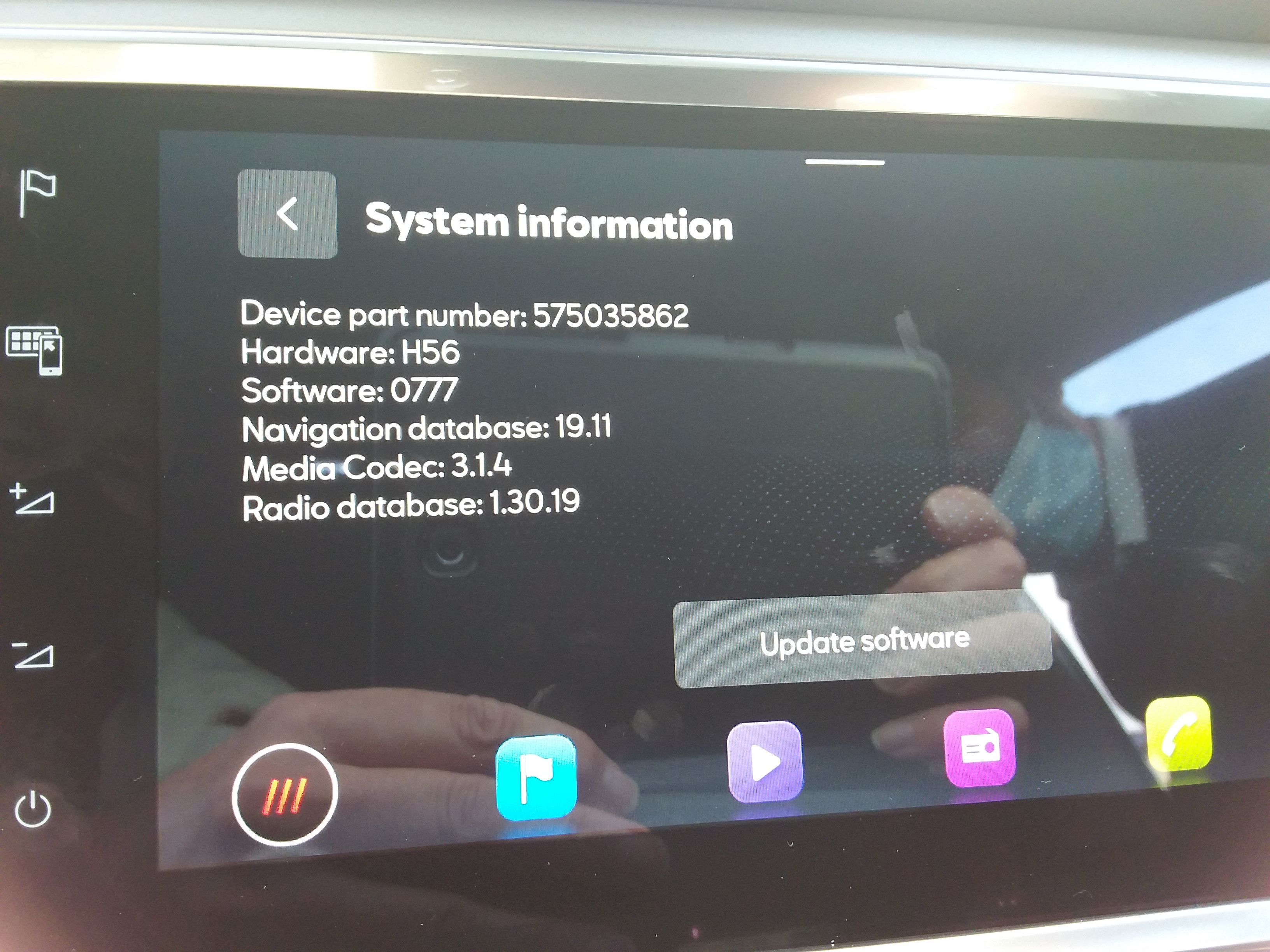
Afraid we can say the Seat retrofit community isn't having any success with this. May be they forgot about us. Will be interesting to see what's finally on the Seat servers or whether VW revises this. It could be it's an oversight on Mapcare which Seat still uses. Cupras in Holland 2019 were given life time navigation FeC which went on for 30 years or so. They won't be happy bunnies if it wasn't for life or even till 2025.
-
-
-
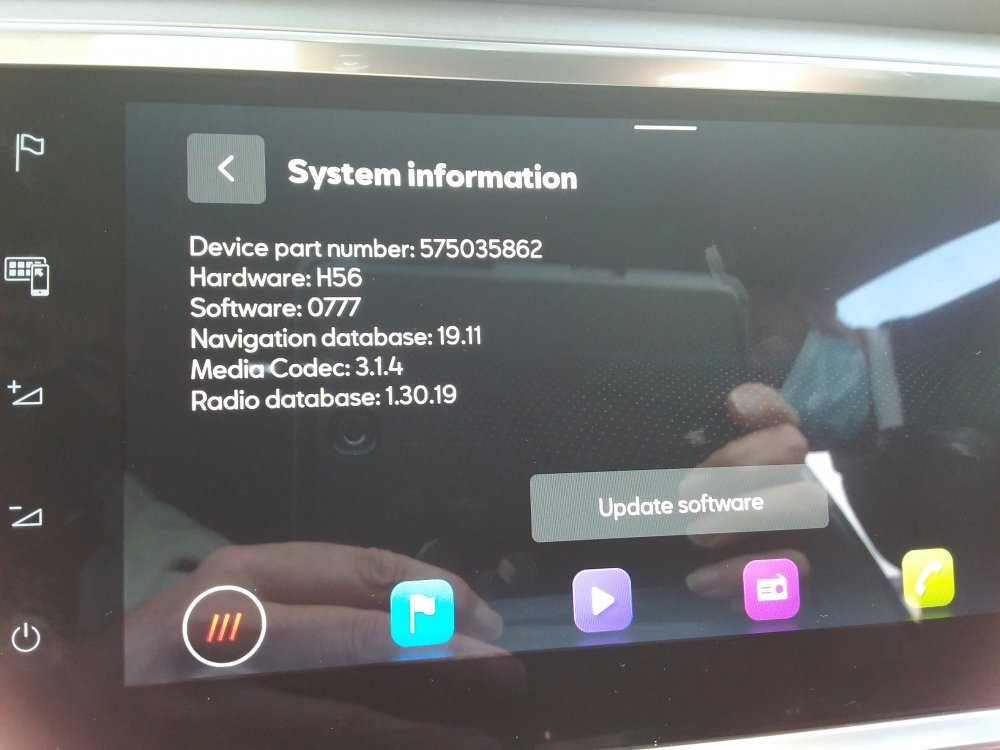
Edit. On the last para it's come to pass that Seat Wireless Android Auto is now put on the base mib3 units and its identified by the part number ending in a letter. That one above doesn't which I photographed at a dealer doesnt'. Causing a certain amount of consternation with Seat people with early 2020 models that some get Wireless Android Auto and other don't. There was a production line change. So called zn1 vanished, the base unit. Whilst atleast in Germany business cars can optionally buy with and without Wireless Android Auto, whilst the 3D buillding building of the old mib2 high are optionally priced as an addon to the zn2 build codd (what was the old mib2 high identifier). Not sure whether VW and Skoda have all these wrinkles in the mib3 product offer.
-
-
-
That's more for the standard SD card based system which has a CID (hidden ID code). All VAG standard mib2 cars read any VAG SD cards so you can buy a 32gb card if you got a 16gb card or lost one. It's really for the SD card based VAG systems not the mib2 high which is this thread title. Don't need a specific VAG card for that. I just get a bit irritated when people ignore Vag guidance and go off pista on mib2 high updates. Suppose to be a 32gb card, fat32, they are cheap. Class 10.
-
Pass on what its saying about realtime POIs on a Skoda. The stored POIs should be being shown if you toggle them on. Will be in the infotainment menu. You are allowed a set of nine or so in mib. If you have particular needs you can import other ones with Poinspect0r if you Google that. Takes some effort to set up but once done you can import your own still within the limits of how many poi groups you can show at a time. It has a Skoda, VW, Seat user base. It replaces the now deleted VW website in German and the Skoda one that doesn't work very well. Mib1, Mib2 and the previous RNS. Doesn't work with Mib3 where there is (currently) no Poi import menu within the infotainment system (how people get the beeps with their speed camera databases they import themselves). But as said takes some effort at PC computer skills but once done it's there to be used. You can use it to save destinations from coordinates, it's an old Skoda trick I was told about :). Swiss army knife for getting user POIs in, but there will be built in ones on your map file for sure. https://poinspect0r.blogspot.com/?m=1
-
I never have the space so delete the Google downloads 😂. I have Co-pilot all world ones on my phablet (Here Map based), Sygic Tom Tom all world ones. Both offline, you have HereWeGo online Here Maps and new online AmiGo TomTom based (last two free). AmiGo is suppose to be supported within Android Auto as an alternative (they opened Android Auto up). Haven't tried that within Android Auto but works fine in standalone. Latter two use free online traffic data. Ofcourse with connected cars (mib3 etc) they are now feeding real time traffic data into the system getting the same edge as online Google Maps. Once 2025 comes I'll be using apps where there are new roads rather than the built in mib2 🤣. Nothing so annoying than finding you are off pista according to sat nav when you aren't or just grin and bear it. New bypasses are the issue where they take out an existing route so you can't get a route to where you want to go.
-
I think DIY FeC adjustments are a bit too dangerous... best to leave it to the experts, some are better than others. A London based one killed a Seat mib2 high but since it was under warranty the owner got it replaced. Was the same retrofitter that had aligned the FeC period to one year that generated repeat business. e.g. unscrupulous operator. The guy has gone back to Poland, home grown northern retrofitters that do a better job now. Due to Seat in the UK putting mib2 highs on Cupra brand up to 2020 and not supporting Mapcare in the UK, quite a market for their work. Re reading Australian VW mib1 high posts at the time around 2015 or so, they were taking their cars back to VW to get Mapcare put on them which would have been unlimited. Semantics. So Mapcare on those vehicles gave you unlimited as they pushed the hex code to a high value. Without Mapcare the hex value is set at the build quarter least in mib2 highs so you cant update it. They probably also had a firmware update at that period reading those boards. Veritable dv52 was commenting on long strings before and after to work out what may have been done. Suspect if you find a reliable Australian based retrofitter and they knew their stuff they might be able to help. Since the mib1 high shares the same map update file as mib2 high, reckon the units will be able to be updated till 2025 if the FeC codes were adjusted. 2025 is 5 years after they stopped fitting mib2 which may be the end life for mib2 updates (2020+5 for mib2 (standard and high), 2015+5 for mib1 standard). We will see. Assume there are some Columbus Mib people in Europe that have taken the map update of November 2020 and will be still taking this forward. One advantage of the shared update file, five extra years of updates.
-
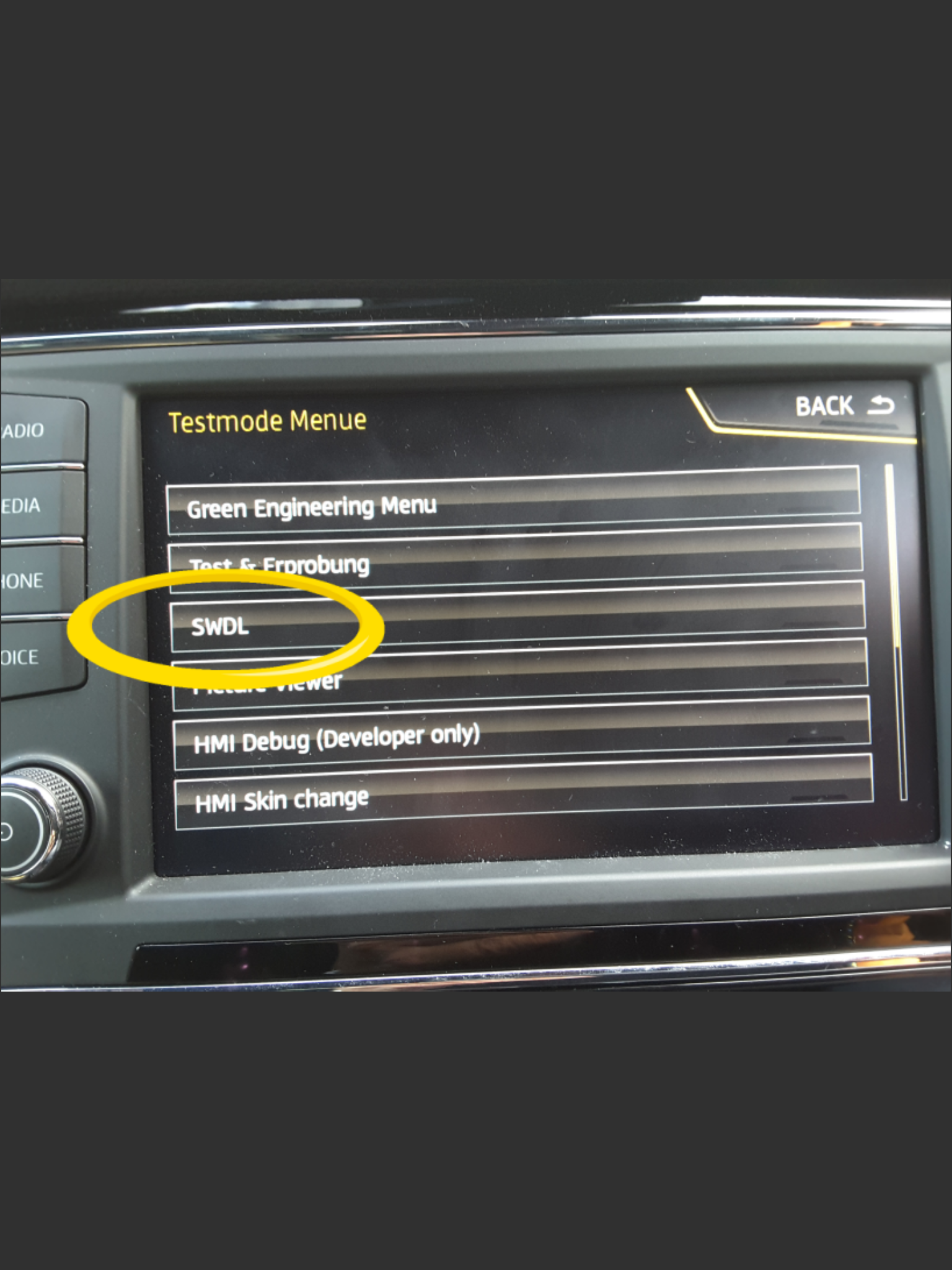
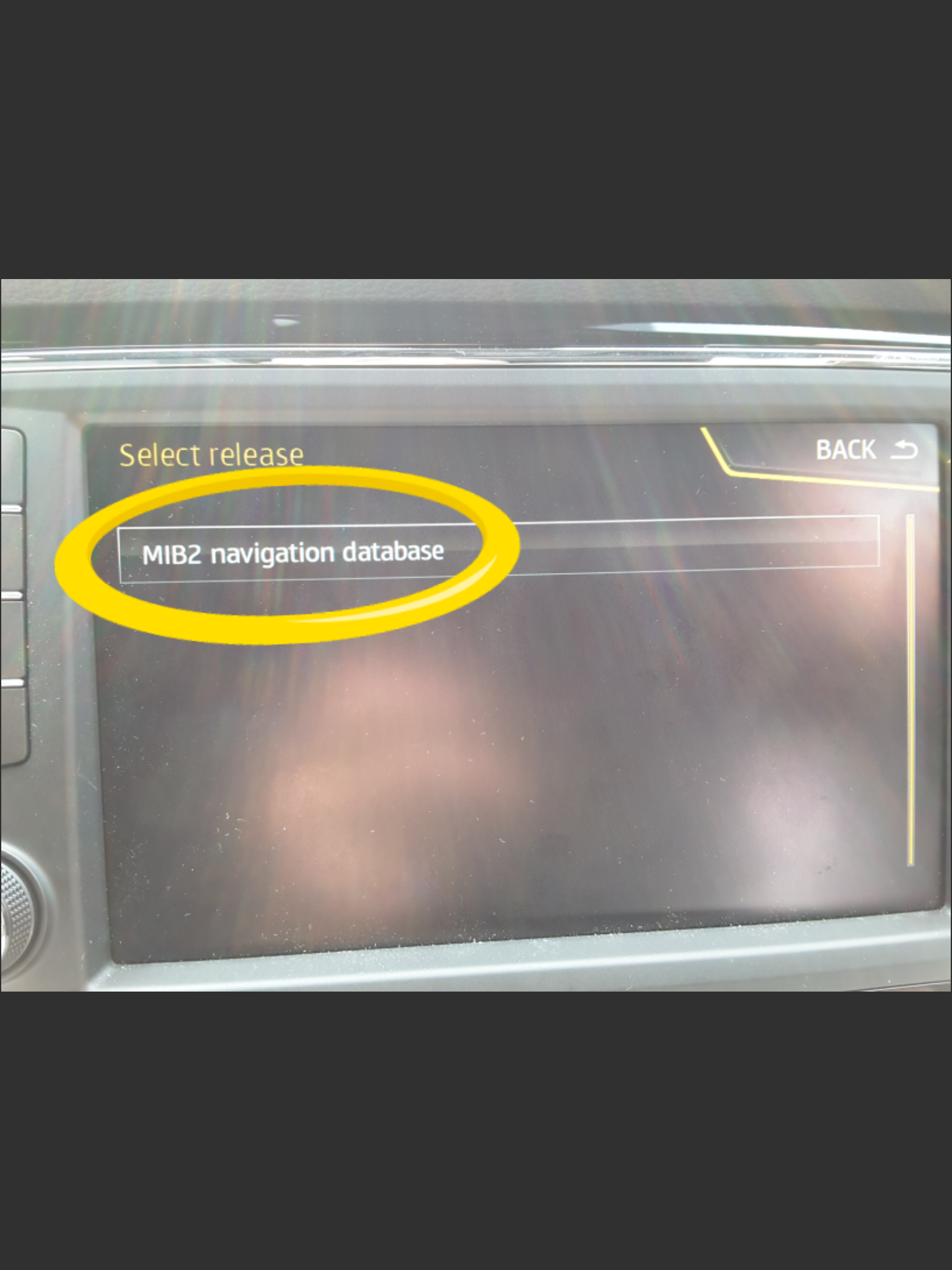
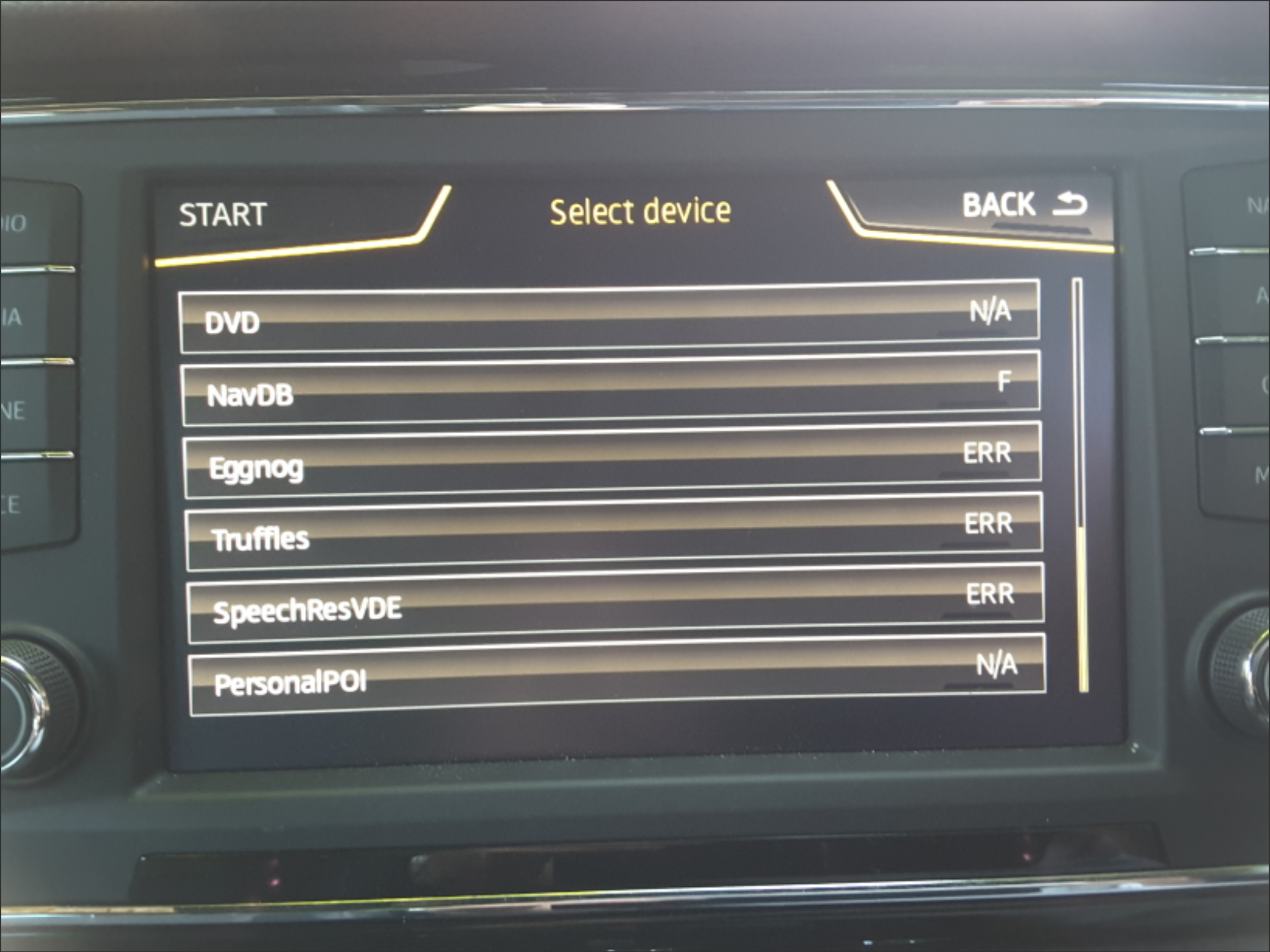
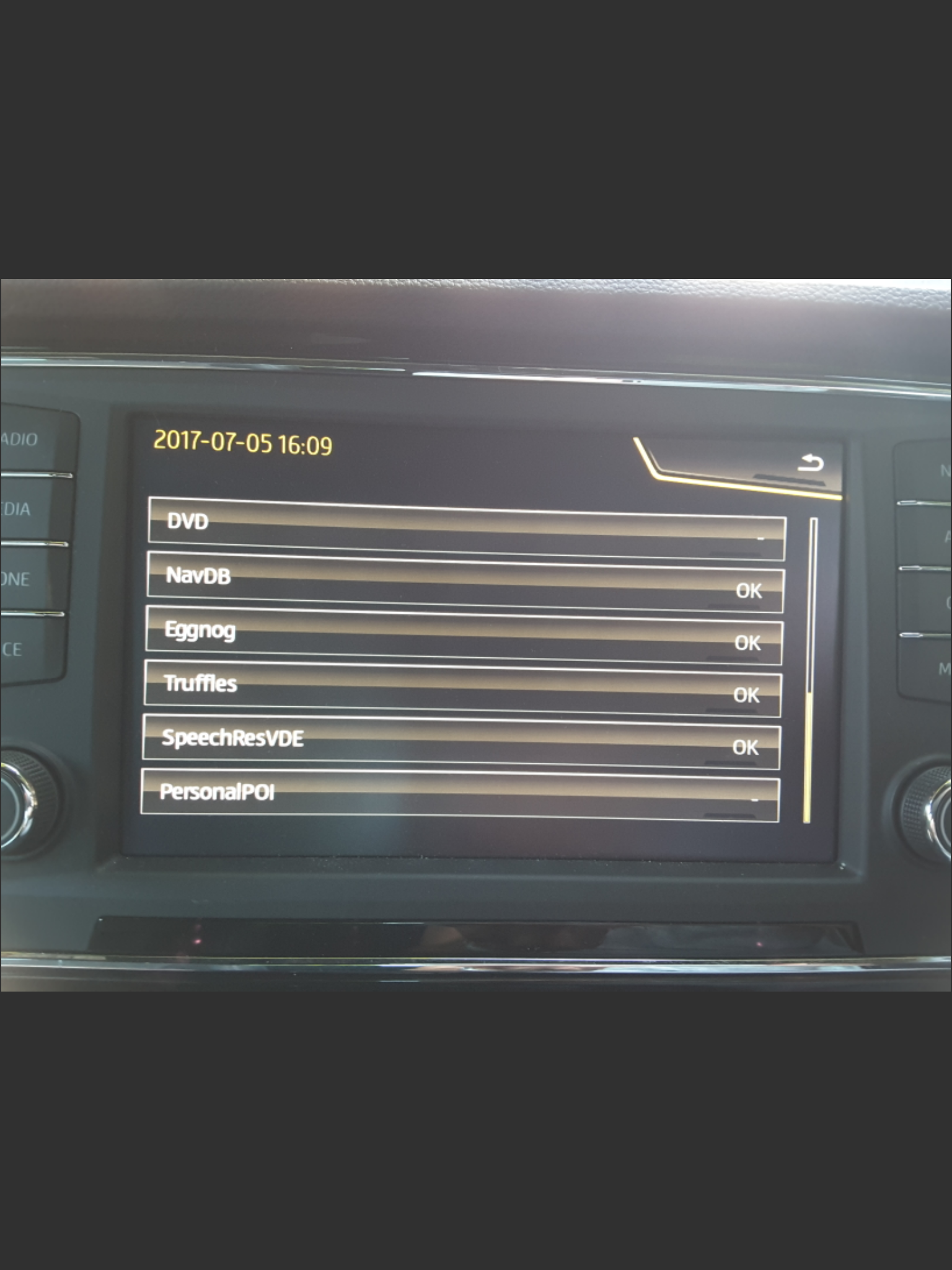
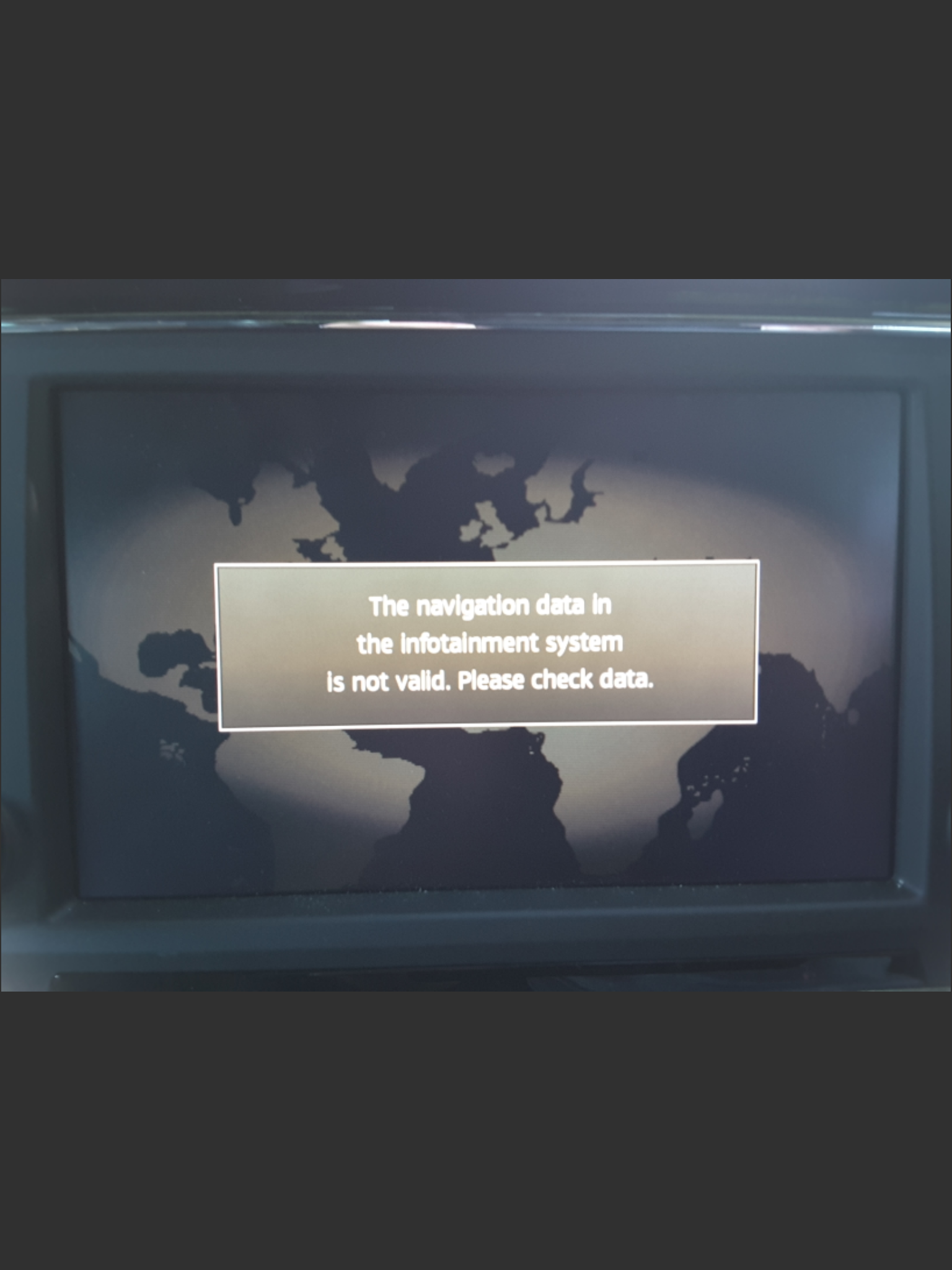
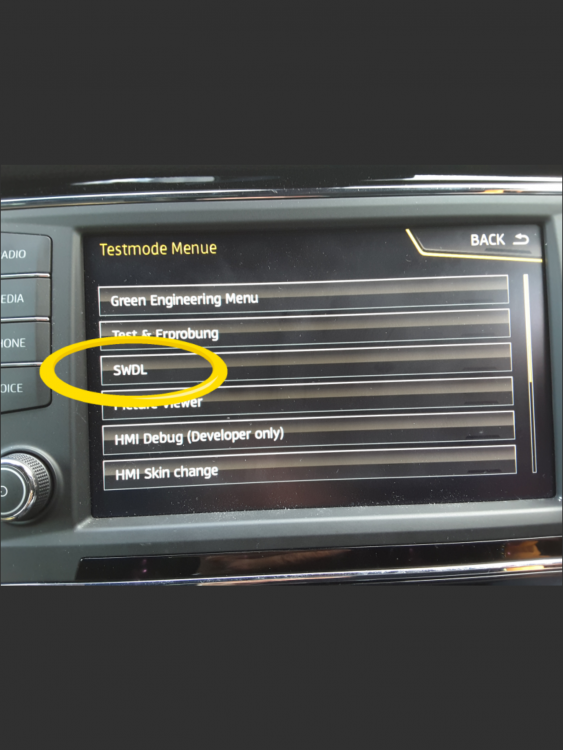
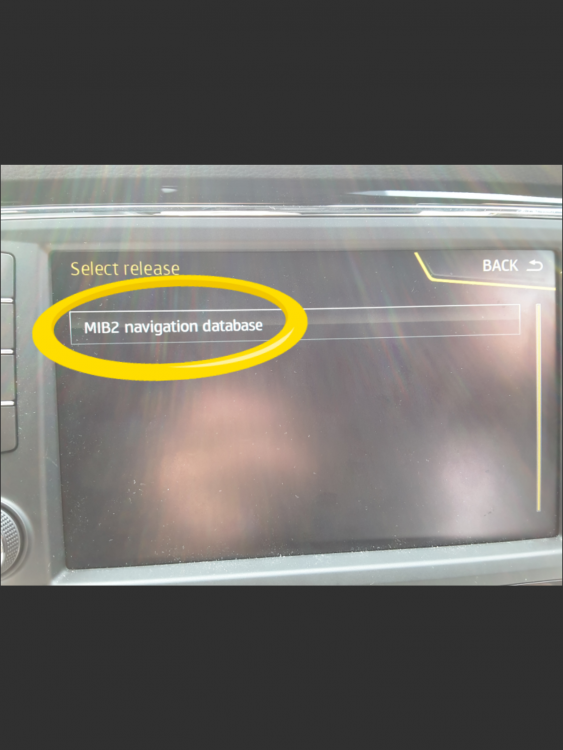
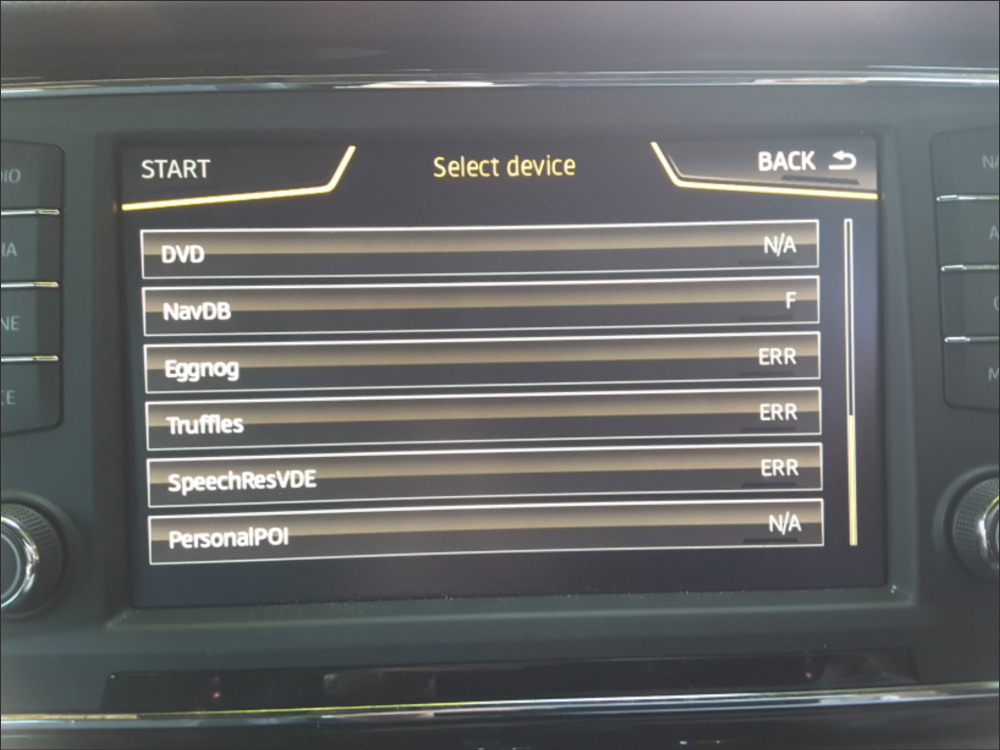
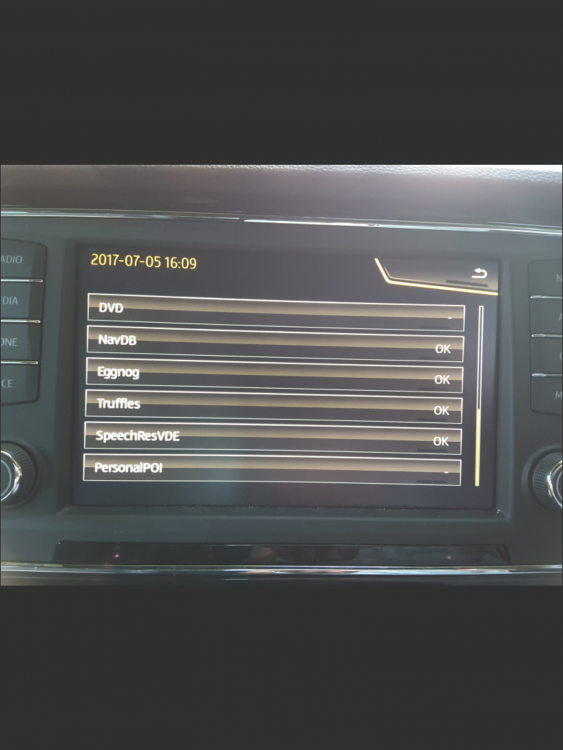
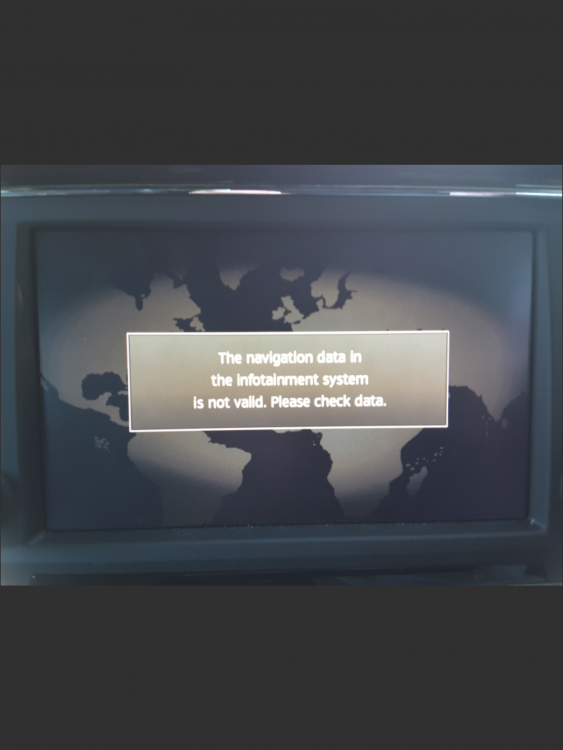
This is where you need a good retrofitter to adjust the navigation FeC in it I reckon if they exist in Australia now. So it's pre when they took Mapcare off Mib1. Adjusting the navigation FeC was something they use to do with VWs in Australia prior to Mapcare being dropped. It is a Mib1 high from the build code and Google's. That bar that says "Mib1" means it's read it off the SD card / USB. The "N/A" means non applicable so the update on SD card doesn't tally with the function. You need to be careful that you don't force a navigation update where it's not supported, done that been there on my learning curve with mib2, people before me and people after. If you do that you need a version of the map that tallies with the unit or before... The file named on the screen to restore. I spent a month driving about without navigation till I did that. In mib2 high the key before starting off the update via the backend menu is to see a row of Y (for Yes) against NavDB, Eggnog, Truffles, SpeechResVDE via the backend using SWDL. It will be similar for sure in Mib1 high. The navigation FeC protects NavDB which is the cartography. SpeechResVDE is the speech, Eggnog and Truffles are I believe the built in POIs and Names you see on the map. Everything other than NavDB you can update but you kill the navigation if you update NavDB. Attached are keys screens. If you see the third one with the F and Err means the navigation FeC isn't applicable, the update is beyond the period allowed by Mapcare. If you force an update then you get the forth screen with the OKs in it. Enter a destination, start off navigation and within 30 seconds you get the fifth screen. You then reinstall what the map the car came with (version Or earlier) and find a retrofitter to adjusted the navigation FeC least if it's a mib2. Will be the same for mib1. DIY activity is beyond the average user to do a navigation FeC update and can wreck the unit. Least on a mib2 high. I saw Mr Fixit wiki had something assembled from web pages last night I guess. A good retrofitter takes a copy of the units settings, does the adjustment but has a backup to restore if it goes wrong. DIY fiddling you wouldn't have that and at £800 or so messing up an infotainment unit by attempting to reprogram the FeCs isn't recommended although some places offer DIY downloads. It took a day for a retrofitter to restore traffic sign recognition back to my car after the updated the FeCs, read road speed signs as kph not mph so told be I was speeding at half the speed it should. They kept saying job done, half a mile down the found it wasn't. Three attempts and three hours later they got it right. Traffic reports need to be enabled via VCDS. The rather poor retrofitter had a reputation for not reabling those. I was forwarned of that one. There is a much better retrofitter in the UK now than the one I used at the time with positive reports. That's where the problem exists is to find a decent one locally. There are people that offer to do it remotely if you buy the USB box and they go online taking over your computer remotely... Not a totally good one either without risk. Extract the unit and parcel it up or a personal visit is the best (latter). The UK ones use one of the three methods.
-
On your PS a fake card could do that as you say, so your check would work - good idea. That one is a MIB1 high unit which shares the same upload as a MIB2 high. I see Fkw00d visited the board 22 minutes ago so still alive and kicking but only made three posts in 2019, two on the issues of the map update but no success reported. @fkw00d - see whether that works :). (comes of being a Seatcupra moderator )
-
Those are the Seat navigation FeCs... the Skoda ones when in play would have had something other than 073 as the lead in code. I did look at Skoda FeC post the abolition of Mapcare on Skoda hoping to find what code that they added. Basically they just abandoned that the navigation FeC in the firmware. Seat did subsequently roll out lifetime in the Netherlands on Cupra's but nowhere else, so they stuck the finish date off the end. That's in that link. One pesky retrofitter in the UK was giving out one year time limited navigation FeCs on Seats when they should have been banging the Hex code out to a high value. The retrofitter was getting repeat business linking the firmware release up to the navigation FeC on the basis that you would need a firmware release each year. Decent retrofitters in the UK now put the navigation FeC at the same value as the Cupra one well off the end of when VAG will stop releasing mib2 updates... life time isn't really life time. That's the history of that table why I created it. Been useful for people with Seats in Europe where they have taken out Mapcare but run off the end of the free updates. FeCs are in play on mib3, had a look in the local dealer but I reckon the concept of navigation FeCs has gone, they do other things... you can pull them up thou on those units and have a look.
-
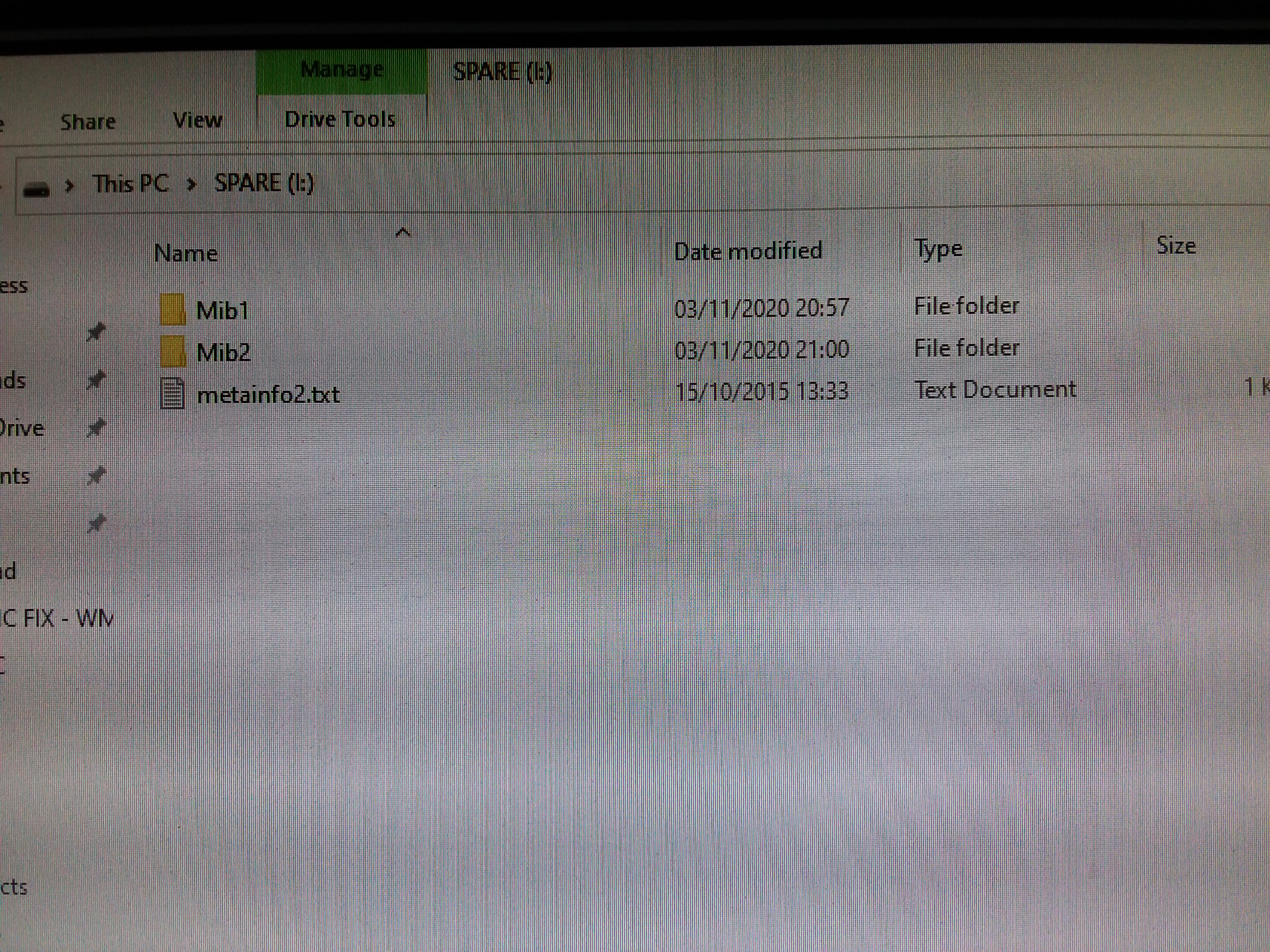
No pesky Mac involved in what you are doing ?. If so it's the CleanMydrive and Keka to unzip as per VAG instructions for people who uses Mac's 🤣 》If the map update is performed using the Apple® OS X operating system you may find that Discover Pro does not recognise the map material or displays it incorrectly. This is due to a lack of compatibility between the “7 zip” program and the OS-X operating system. In addition, the OS-X operating system has a tendency to create hidden additional files on external data media. We therefore recommend that OS X users use the “Keka” unzipping program. We also recommend using the “CleanMyDrive” program to remove any hidden files.《 That's due to the unit checking that the upload file is in tact and not tampered with against the sla1 signature. OS-X adds rubbish characters to the unpacked so then leads to the unit failing. If not that... it is a mib1 unit. There is a Dave on this thread who used the developers menu and said they did it that way. On a mib1 that comes enabled already. Mib2 it's locked down and you use VCDS tools to enable it. Long press on the menu button if it's anything like mib2 brings it up, keep pressing till you see an SWDL option if anything like mib2. Indeed what it says on the Dave post where he links to it following the link. Otherwise called the back end menu, cuts the front end out. Fkw00d a fellow Ozzie to you referred to that on here... You could chase them down on the threads or PM them in case they had a break thru. I'd stick to fat32. The presentation is that the metainfo2 file, the two directories for mib1 and mib2 must both be on the route, not one down and no other files or directories should be present except those mentioned. I don't know what the situation is with Mapcare whether Skoda had abolitioned it in Australia by that year. VW called some vehicles in or rather you could take it into a dealer to get Mapcare removed. If it is Mapcare and you use the developers menu you will get the maps in, you will loose what was installed and it might lock you out of navigation if it's like Seat mib2 high and you go outside of the navigation FeC. You then reload your old maps presupposing you can find a copy. I mention that just in case that happens if you use the developers menu and Mapcare was in operation on the unit. Subsequently Skoda and VW abandoned Mapcare circa 2015 with mib2 (some unit on VW certainly slipped into Australia you see that on Ozzie boards), Seat kept it going thru the life of mib2. Developers menu could avoid Mapcare on mib1, but certainly doesn't on a mib2. Basically it kick starts up the update manually and the unit only runs with one task. BTW nice to see Martin quoting my Seat posts 😍.... Failing all of that you find a descent retrofitter to sort it out.
-
I forgot that if you are really intent on not loading up all of Europe you can use the developers menu and pick out countries. Use to pick out Iceland as the test country when I trying to update a Seat with pesky mapcare.... Iceland loads in about two minutes, not many roads so was a good fast test. Saying that you need to have the developers menu enabled on a mib2 high. That's via VCDS tools then use the backend SWDL command (Obdeleven will do it). Navdb entity is the one where you pick off which countries to update. Writes over the region so you have a mix or old and new maps in the system. As said there is no way of editing the input but you can control the upload via the backend menu. Don't think it's worth the sweat thou to save 25 minutes every six months. The maps were designed for driving across Europe even thou we aren't now with Coronavirus and Brexit. Mib3 they update over the air on a module basis so invisible to the user.
-
-
We unpack to the HD first since its faster else you can get (or may get) a lot of bus activity between the drive and the SD card as it slowly unzips checking what its done, what it's going to do with a very slow teansfer speed. It gets there in the end but faster if you just unzip to the HD (or SSD) then do a straight forward copy to the SD card. That's the traditional recommended way of doing it although if the SD writer / reader is on the motherboard in a laptop or a USB3 dongle the speed improvement may be reduced. Try both ways. I then keep a copy of the unzipped release on the PC and delete the download. The trusty HP Pavillion that I use is 10 years old but did relegate the hard disk and put an SSD in a few years back on a USB3 card. The card reader / writer isn't on the motherboard and is part of a USB2 internal connection (doesn't have the benefits of USB3 ). i5 processor. Use USB3 to back up the HD via a card. My careful approach of always keeping a back up of the map files to cover the current release and the last release just in case one wants to go back.... not that I always keep every download from the year dot of software in the download area, has it's uses. Never delete an email :). Contain release product codes etc.
-
-
You drag and drop those three items out of 7zip onto your HD then drag and drop them onto a clean blank SD card from the HD. That's faster than dropping them directly from 7zip onto the SD card. It's open archive on the right clip of the mouse on 7zip to see what's in it. Then drag the three items to your HD, then from the HD drag them to a nice clean 32gb, SD card with the spec:).... hopefully that's it.
-
-
That's goes unzipped via 7zip onto the card as per Xman's image above. Nothing else on the SD card except the mib1, mib2 and metafile in the route, not one level down. Should have read sometimes the German Skoda site when I gave the Seat link. ... This one if it comes up... Failing that and everything else it will be the firmware release in the unit. Using the "scientific method" you need to find someone who's done it on your firmware release to eliminate that one. The unit has a series hardware release which is checked against the map update, if the hardware isn't recognised it would give the same effect. It's not unknown that the unit's Id isnt in the meta file. That's a steering macro for the update. Checks whether the unit it's seeing tallies with what it's expecting. A duff release of the infotainment firmware might have got this wrong. You could request your dealer updates the infotainment firmware to the most recent. Normally firmware updates are not done as a matter ofcourse only engine management ones. Make them work.
-
hmm sometimes the German Seat forum moans about incorrect downloads on the VW site, you try this one: https://www.seat.com/owners/my-seat/navigation/ateca-navi-system-plus.html that's the 189 download just in case the other one is messed up. Other than that it must be your card writer or Skoda successfully messed up your FeCs on that unit. if you draw a blank with the Skoda dealer you need a decent retrofitter to sort it out if you want to pay to sort it out (Yorkshire on the coast know what they are doing). You did seem to be going into the back end menu with the SWDL command which should be prohibited in a MIB2 high. That's only enabled via VCDS, the long menu press and two screens open up to give the SWDL command. Mib1 wasn't protected against users doing stuff in the backend. Skoda's are suppose to have a lifetimes guarantee of map updates unlike Seat's that need the navigation FeC adjusted to give the same effect.
-
Fingers crossed. The unit could have been fussy about the bus speed on the card, ditto the issue that some people have with USB drives when they ignore the VW guidance. The units are like Linux media boxes, touchy when updating them, they aren't computers as such and this is where people have issues treating them as if they are fully specced PCs throwing formats at them found on PCs etc plus the full validation that the units runs before importing the files. That's where it traps Mac users not following the guidance and those that wish to ignore 7zip on a PC (some get away with that). Then you get the bragging of short cuts which dont help if they are not universal.
-
There are still fake cards about. Had a fake microSD about a year ago. Amazon Marketplace trader... Googled it and it met the spec of the printing and edge. Returned back to Amazon and got my money back. 128gb card for a tablet. Targeted by Chinese manufacturers that frig the Fat table of lesser cards and label and package them up as Sandisk. Great info.
-