




Viffer800
Members
-
Joined
-
Last visited
Everything posted by Viffer800
-
It is a 1.5 DSG I can't say I can feel a difference in the steering even though I'd expect there to be one I also know that it holds individual gears longer in Sport Mode. It does regardless of how I switched but I can't tell if the changes are different between them. It's specifically the throttle response I am confused about as to whether it is really different depending on which method I choose to I switch to (a) Sport Mode. I'd swear it's 'better' using the Mode button but I have no way of confirming/proving it
-
I know the mapping is different but I can access (a) Sport Mode via the different methods set out in the original post. Are you confirming they are different?
-
Possible weird (aka stoopid) question I may be imagining it but I really think my MY22 Karoq is noticeably more responsive if I select Sport using the Mode button in the console as opposed to selecting it with the gear lever. Is that an actual 'thing' or will I really be imagining it?
-
My regular contacts have both. Some multiple email addresses Another thing to try 👍
-
Checked my wife's entry but could only see the Type and nothing I could 'Classify'. Maybe more obvious than I found it However, I created a new entry for 'Wife' and added her number. Imported contacts in the car and only one number appeared when I used Voice Control to call her I'll keep fiddling but for now that helps
-
Oooooooh, interesting Will have a look at that. Even if only for the numbers I regularly call before going through all 402 entries
-
Hi Not sure if anyone can help with this If I use the Voice Control feature to "Call" it comes up with the contact but it shows the phone numbers twice for the contact. I've looked in the Infotainment Settings in the car (2022MY Karoq) and the settings in my phone to no avail. Bit of background ...... I have multiple accounts on the device with contacts (Google account, email accounts, etc but only the main Google one to use an Android device has the phone numbers. None are saved for any of my email client accounts. I have the sliders positioned in the device Contacts settings to not display the contacts for all but the main Google account. The only thing I can think of is it might be the WhatsApp account causing it. i.e. The numbers are obviously relevant as they are essential for WA to work but the slider is in the off position to stop them being displayed on the phone. Could be summink, could be nuffink but I'm at a loss as to why the numbers are duplicated on the car. It's not a First World problem as I can just say "Line 1" when the Voice Control system says there are multiple numbers but I would prefer it if I could resolve the problem Any ideas greatfully received and much appreciated
-
By Jimminy I think you're right. Looking at the photos on t'interweb it does look the same as mine 👍 Although not sure how my friend's 23 plate would have the arm originally used on 21 models. I could understand it on a 22 plate vehicle if registered a while after manufacture. I guess a looooooong while in his case. Anyway, thanks again for the helpful info
-
Well here's a thing So impressed was I with the front wipers I decided to replace the rears as well. A simple task I thought. No it wasn't as you'll see from the attached photo. The fitted Bosch replaced the blade on my wife's car. The top blade in the photo came off mine. Completely different size and format. All the searching I've done confirms that a Bosch A331H is the right blade which I guess is half right for my 'fleet'. Got no idea what to get for mine but currently trying to find out. Anyone got any suggestions If all else fails I'll do what thamestrader says above and replace just the rubber blade in my current arm until I can get hold of a replacement arm the same as on Mrs V's car.
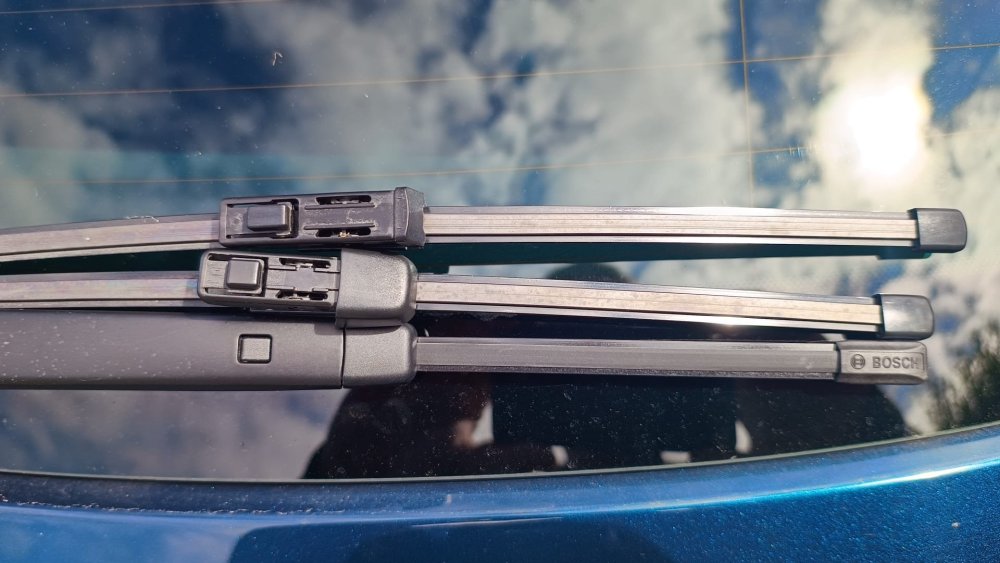
-
Just fitted and tested the Bosch Aerotwin What a 'kin difference? 😀 Another set order for Mrs V's car
-
Very helpful posts above My wife and I both have Karoqs My wipers are noisy, hers aren't Initially flipped just the rubber blades as suggested above and the noise, although not as bad, went from the bottom of the screen (parked position) to the top (return stroke). That's kind of what you'd expect if the rubber blade inserts were getting old and hardening from exposure to the sun. I then swapped the whole arms between the two vehicles and the noise disappeared on mine using my wifes blades. Conclusion, mine are pants and need to be dumped. Bosch Aerotwin replacements ordered I'll switch the arms back when the new Bosch blades are delivered
-
Not sure whether this is entirely relevant but thought I'd share anyway I regularly suffered the dreaded wheel spin in my 1.5 SEL Points to put the (i.e. my) problem into context 1) Bought it in Dec 2023. Ergo, cold and wet a lot of the time 2) I experienced the issue more often that not when pulling out of junctions and turning L or R 3) Still has the OEM Bridgestone's which by most accounts are pants tyres 4) The fronts were more worn than the rears 5) A couple of weekends ago I swapped the fronts to the rear. And vice versa, obvs 😁 So, what have I discovered ..... Despite the weather not being as cold it has definitely been just as wet as it was in December when I bought the car. But, with the tyres now having more tread on the front the wheel spin has stopped. I can only conclude that, everything else being equal, the temperature and tread depth have made the difference If I was a betting man I'd go for the tread depth If anyone is still experiencing the problem compare the tread on the F and R tyres and if significantly different try swapping them round
-
I reckon it's definitely exhaust resonance
-
Neither do I
-
Just checking / ruling it out
-
Screensaver? You can make the screen stay off even if the device is on and recording. An optional setting
-
What happens when you leave it for 5 mins after turning off the ignition and locking the car?
-
Aren't you more likely to want it on when away from home?
-
Is it worth trying a factory reset and/or firmware update?
-
From my 222x User Manual Parking Mode When Parking Mode has been turned on, the Dash Cam enters standby mode when the 12Vdc supply has been turned OFF (typically removing your ignition key). See page 6 for more details. The Dash Cam will also enter standby mode if no physical movement is detected for 5 minutes. Should physical movement of the vehicle be detected, the Dash Cam will power on and start recording a 30 second protected video. If no further physical movement is detected then the Dash Cam will return to standby mode, if physical movement is detected subsequently, then the camera will continue to record normally, i.e. driving once more. Options: On and Off Default: Off There are two sets of Settings. I tap Menu once to get one and twice to get the other. IIRC it's the second one for Parking Mode. Yours may be the same.
-
Not sure if it's due to Skoda Connect but sharing options was one of the choices I had during a 30 day trial. My car was >1yr old when I bought it so the initial subscription had expired. Decided not to continue as didn't think the benefits were worth the monthly sub Another thing to look at is the Driver Profile (s). Maybe deleting or amending yours might help. Not near my car atm so can't give more specific suggestions.
-
Do you need to tweak your dashcam settings? My accessory socket (MY 22) is permanently live regardless of the ignition/lock status. I enabled Parking Mode on my Nextbase dashcam in its settings and it goes to Standby after 5 mins. If I bump the car with my arse it switches on and starts recording
-
Looks very nice in black imo
-
BIB Done that 🙂
-
Same here on my 2022 1.5 DSG SEL with the 8" Amundsen infotainment system. Selected using the arrows on the RHS of the steering wheel and then using the scroll wheel to choose Consumption to be displayed in the centre of the display screen. I get the "MPG" and "2-Cyl Mode" in the centre section and a blue (Eco) symbol in the bottom RH corner of the overall display.

