VRT24
Members
-
Joined
-
Last visited
-
In short - no (other than the brief bit about her in the manual). Laura supposedly is capable of understanding just about anything you ask of her! Hence why she'll often pipe up without being asked when the wife and I are mid-conversation. The only time I used to deliberately use her was with the command 'OK Laura let's go home' in order to get her to start the satnav up and direct us home. Otherwise, I think the best way of getting her to do what you want, rather than what she thinks you want, is to start the command with the name of whatever part of the infotainment you want (e.g. navigation, radio, media etc.). That should let her decide if she wants to actually take the conversation in the direction you want or to just ignore your commands and try to do something completely different! I'd rather use the old system I had in my Merc, where I literally had to sit in the car for 10 minutes repeating words and phrases that the command system spouted out to me in order to set it up. Once this was done, it had learnt my voice and 95% of the time understood my voice commands. Technology progresses however and I guess the VAG people assume their voice assistants should be capable of understanding us from their pre-programmed vocabulary and accent databases. I have tried to get Laura to understand anglo-saxon phrases relating to procreation and travel when she rudely interrupts me, but to no avail. These days we use Android Auto for satnav etc. so use that and the mobile phone's voice command system which works for us - Laura just sits there like a petulant child listening to everything we say - biding her time to just jump in uninvited. P.S. you don't need the info online subscription (ripoff) to be active to use Laura. With Waze etc. we have a better satnav (including traffic conditions) that we can use free via Android Auto - you should be able to use that wirelessly on a MY20 car.
-
Must be annoying to get so far and then see it fail. Just a thought - these are big files, and if you make several attempts, even if they fail half way, they could be leaving partial files on the computer. If the PC only has a modestly sized memory and there's not much room available, then that may cause a problem. Also remember that any 'failure' files you put into recycling are still there. So may be worth emptying the recycling bin (either fully or at least all big items) plus deleting any previous year update files still hanging about on the PC. I cheat as my mate has some ridiculously fast fibre broadband package, so does the download, unzip and load of the flash drive for me - all done before we've finished the first beer!
-
Even for OTA updates with an Infotainment Online subscription in place, the updates are, I believe, only around quarterly rather than monthly. Wait until your Infotainment subscription ends and, unless you had Skoda money, then you have to do the long drawn out update via USB-C drive process and you get two updates a year at best.
-
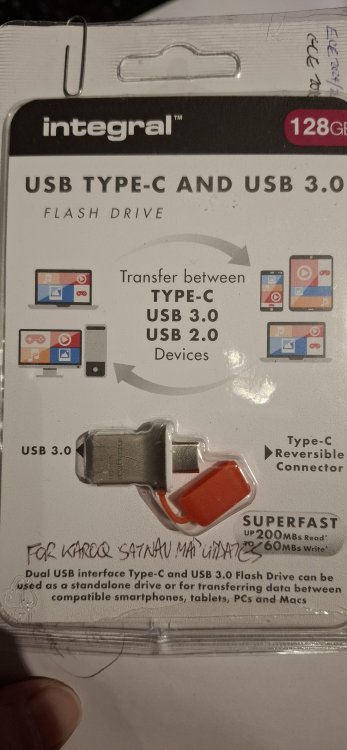
You need to leave the drive plugged in for a week or so (sometimes less) with the infotainment on (and preferably set to the navigation screen) as you drive around. These updates are big files and it takes time for them to download to the car, and it seems downloads only happen when you are driving. Keep checking the database version screen to see when (if?!) the download has been successful. I note you are using a portable hard drive - something is telling me the car doesn't like those - I use a tiny 'double ended' flash drive which is small enough to leave in the usb c socket and still close the sliding lid above it. Photo of one I use attached.
-
The items you mention, (USB-C etc.) are Model Year 2021 specs, which were introduced for new orders registered from late 2020 (70 plates onward). However there would still be Model Year 2020 build cars that didn't get first registered until late 2020 on 70 plates. Your car will be one of those i.e. MY20 spec, so would not have the items you quote - the ones you have seen online have been MY21 cars.
-
Sorry - got my service years mixed up in above post - service was for years 3 and 4, rather than 4 & 5.
-
Feedback on our interaction with Camberley Service Centre. We took out a 2 year service plan for the Karoq covering year 4 and 5 services which included one extended scope service, one air filter change, one cabin filter change and one spark plug change. The car went to Camberley for the year 4 service in November 2023 and they were asked to do an oil change plus extended scope service, and an air filter change. On arrival the receptionist took the view that an air filter change was not included under the service plan we had. Eventually someone more senior intervened and confirmed it was included. On collection, we noted the invoice showed the air filter change, plus the cabin filter had also been changed - despite the fact the latter wasn’t scheduled until year 5 and that it had been changed at year 3. There was no reference to the extended scope element of the service on the invoice, or on the Digital Service Record (DSR) sheet. The receptionist assured us it had been done but ‘just doesn’t appear on the paperwork’. At year 5 (November 2024) we took the car to another dealership. When we booked it in we commented that we remained unconvinced that the extended scope service had been done by Camberley at year 4. The service advisor looked up the car’s service and warranty record and confirmed that it had not. We asked the new dealership to do the spark plug change - as included in our service plan. When we collected the car the invoice showed the extended scope service having been done (albeit not referenced on the DSR). The key issue, however, was that they had not changed the spark plugs as the vehicle’s Skoda service/warranty database showed that these had been changed at the year 4 service – Camberley. We highlighted that the invoice from Camberley hadn’t included a spark plug change nor was it shown on the DSR. The new dealer just advised that ‘we would have to take it up with Camberley’. The outcome was that we complained to VWFS (who run the service plan) highlighting that we were paying for a service plan that included a spark plug change and we were now being denied this, despite none of the invoicing / DSR papers we had been given showing it had taken place. They commented that in these circumstances VWFS would normally have to refer the matter back to Camberley to correct, although they acknowledged that with the passage of time this was probably going to take some months to resolve. After further ‘discussion’ VWFS provided us with a goodwill payment sufficient to cover the cost of the spark plug change at another dealership. Camberley Service Centre 1) Initially tried to make out that the air filter was not included in the service plan which they had confirmed would be included when the booking was made. 2) Did not undertake the extended scope service sought - undertaken at Winchester the following year. 3) Updated the car’s service and warranty records to show the spark plugs had been changed (and presumably claimed for the cost of them from VWFS). 4) Changed the cabin filter despite it not being due as a year 4 scheduled item and it had been done the previous year. Based on this experience I would not recommend using this service centre.
-
The two oblong pieces are load retainers for the boot. They should have velcro on the shorter return side, and if you have a carpet tyoe boot floor they stick to it. They bend in the middle so you can form a right angle to butt up against things in the boot to stop them moving about. I find them very effective. If you don't appear to have a carpet type boot floor, look at it's underside - Skoda do a reversible boot mat with plastic one side and carpet the other. Can't help re the other item though.
-
24.10 would be the latest update for your car. So you are done. I find the update portal gives me, at most, 2 updates a year, with the second released around autumn. They stagger the releases based on VINs - my database shows 24-6 which I loaded in November.
-
Please can anyone that has had an oil & inspection service WITH the Extended Scope option, advise if the Extended Scope is shown after the oil & inspection wording on their Digital Service Record. We just had that service on our Karoq and whilst the invoice quoted Extended Scope, the DSR showed just 'oil & inspection service'. Thanks.
-
ECE 2024/2025 is the 23.12 database. I haven't got a newer version showing on the update portal for our vehicle. Whilst those that enjoy (pay for?) OTA updates get newer databases it seems Skoda choose to penalise the rest of us by making us wait for them. There seems to be updates released for download at week 25 and 45 each year, so I guess our next time to 'play' will be early November.
-
No - it doesn't tell you when the update has completed. You just have to look up the version info in the car after say a week of driving around with the flash drive in the socket. At least you have successfully completed one update and so now know the process.
-
Judging from comments on other posts (including yours) covering the routes to car topic, the common theme is that it is 'patchy' and is heavily dependent on the 'route details' successfully passing through Skoda's servers and thence OTA to the car. Software version 0276 was loaded onto our car to address the SOS call errors that kept occuring, but it also enabled OTA navigation map database and live traffic info to be received OTA, which on the previous software version did not happen. I would suggest therefore that in terms of your software version, you have one that does at least ensure that OTA communication to the car can take place (assuming such messages/data etc. are being sent from Skoda in the first place). Dealers are meant to ensure your car has relevant software updates when they service it - again 'patchy' performance - ours has remained unchanged on 0276 through 3 services, and I have only seen one other forum poster noting they had had an update as part of a service without asking for it. Software updates take a long time and therefore I think dealers try to limit doing them to cases where they are needed to address a known fault, so as to not tie up workshop space. In my view, if everything else on your car is performing as it should (hardware excluded), then I'd leave well alone - if it ain't broke, don't fix it.
-
As per topic title - question relates to MIB3 infotainment system which doesn't have SD card slots.
-
Nothing will happen when you put the flash drive into either socket. The system presumably is always looking for any update triggers when navigation is open, and then starts to download from the flash drive in the background - it doesn't tell you it's doing it. The navigation database version (as well as the overall MIB 3 software version details) are on a different menu screen (not under navigation), and how you reach that depends on which model of infotainment you have. Unfortunately I can't remember exactly which menu/sub-menu I get the info from on ours (car in airport carpark - me on hol) so can't be certain, but think it's Car > Settings > then something else like 'details'. If you update your profile to show your Karoq model or advise which Infotainment model you have, then hopefully someone on here can guide you to the screen you are looking for. It may be worth finding that screen to know which navigation release is currently stored before you insert the flash drive - that way it'll be easier to spot when the update has taken effect.