Aldfort
Members
-
Joined
-
Last visited
Everything posted by Aldfort
-
Sadly this is a well documented problem with all VAG products. There can be multiple causes but very often it is a broken antenna wire or a faulty SOS module. If you have tried the hard reset on the infotainment (Turn it fully off and then back on again). then the only other thing to do is visit the dealer.
-
Ah, understood, I tend to part with my cars at around 6-7 years old. At that age they still have some value and I can generally get better trade in allowance by providing a dealer or factory history. Amazingly (or maybe not) any VAG group dealer in the UK can look up the electronic service record of any VAG group product.
-
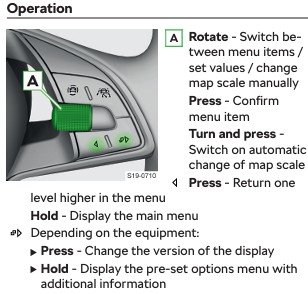
Page 57 of the handbook (at least on my car). Press the right hand silver button on the steering wheel to bring up the menu. Scroll to "Warning at" Press the right hand silver button again. Set a new speed for the warning. I have a horrible feeling that, once activated this warning is there for ever. It should cancel if the car is left standing for 2 hours. Maybe try setting it to 90mph as the stored value? Your car will have speed limit recognition as well, does the little speed limit symbol in the dash reflect the posted speed limit? In my car overspeed due to exceeding the posted speed limit gives rise to a little "bong" and the speed limit symbol pulsates.
-
-
H'mmm, so the car, for whatever reason, says service in June 2026 but you are sure you know better. Frankly I'd have serviced the car in June and had the peace of mind that I'd done things properly. You will realise there will now be a mismatch in the cars digital (or paper) service record which you won't be able to explain. I'm pretty sure the ECU logs the service resets. This might make your life difficult in the event you need to claim under your warrantee.
-
It seems you have a good dealer. Stick with them. Bleeding both systems is the right thing to do. If you don't you leave an amount of old fluid in the system due to the combined reservoir.
-
I think there are pitfalls to EV's if you are not careful. For sure if I were considering one I'd lease it on a short lease that was no longer than the manufacturer warrantee. There is no way I would buy one. That said that are a good option for those of us who do short trips and home charging on a "granny lead" is a practical option but you MUST still use a 13A socket designed to support car charging, BS 1363-2, often marked with "EV". (This is due to the constant load). My sparky recommends a separate circuit as well as the safest way. My preference, despite the short trips, remains a petrol engine and in the Skoda range I prefer the 1.5. It'll return 43 mpg around town with ease and over 50 mpg on a run. Given my low annual mileage I personally think a full oil and filter service once a year or at 5000 miles makes the most sense. The one thing short trips are good at is gumming up the engine internals. I also follow the advice after a long run at higher speed to allow the engine a few minutes at idle to cool down before switching it off.
-
I use our 1.5 TSi for mostly short trips (less than 20 miles). It's OK so far at 1 year and 3.5k miles. It get 2-3 long (200mile) trips a year.
-
No mention of any wiper cleverness in the owner manual. Other that the "automatic" rear wipe (configurable in settings) and the "service" position.
-
Thanks all, I stand corrected.
-
OK - I agree - electric cars don't have EGR and some older cars still on the road don't have EGR. However the vast majority of newer cars, both petrol and diesel have EGR.
-
-
As has been said, even the 1.0 TSI needs a longer run occasionally. All cars have EGR and short runs and EGR don't mix. For sure avoid a TDI if the majority of trips are short.
-
Something else I've noticed is that on a hot day, parked in the sun the infotainment can go mad. I use a cheap tinfoil sunshade in the windscreen. Weirdest thing I saw was the steering wheel buttons reversing function (i.e, left buttons doing right button things)!
-
Worth a look. “Emergency call restricted, workshop” Warning in Skoda cars
-
OK, the ignition must be on engine NOT running. Next you need to select and then scroll the driving data menu (which you have) Next you need to scroll that sub menu to total range Next (while in total range) you press the right hand silver knob and hold it for 10 seconds. Now let go of the knob and then press it again, you should see the extra service options. Sorry can't help any more.
-
Ah, the famed "diagnostic" I've seen number ranging from £150 to £250. Frankly it's BS unless they offer to get to the bottom of the problem. I've experienced the "that SHOULD fix the problem" only for it to recur a few weeks later. Now I ask for written assurances and a warranty.
-
-
Ask if there are any technical service bulletins relating to the issue. This means Skoda know of the problem and should, as a minimum, offer a goodwill gesture.
-
As mentioned before, lots of people who drive VAG products have mentioned this. I can remember years ago the remote unlocking on a Golf not wanting to work in one spot in a carpark. The only thing you can do is have the dealer ensure the software is up to date when the car is in for a service. If the module goes fully bad then dealers seem to know how to fix that. The random gremlins that infest modern car electronics, not so much.
-
OK, I spoke to Skoda, this might help others: If you use the Skoda app but don't use banking apps on your phone then you can log into the Skoda Connect shop to renew your subs to things you might want to keep. (e.g map update, online realtime traffic etc.) Use the same e-mail and password as for the Skoda app.
-
This is the only way I've made it work reliably on many VAG group cars over the years. Start with a clean thumb drive, format it if you need to. DO NOT create any folders on the drive. Copy each album in turn onto the drive so that each album shows up as it's own folder. All album folders need to be in the root of the drive. DO NOT nest folders one inside the other. If you want album art there are two possible ways: Inside each album folder place a small JPEG of the album art. (It must be exactly the right size, but I forget what that is. Too big or too small and it does not work). Use an MP3 tag editor to embed the album art as a metatag on each track of the album. Using the above method I have media available on both a Mk8 Golf and the Kamiq, most of it showing album art. The Thumb drive must be plugged into one of the front USB C ports under the heater controls.
-
-
-
It injector should be around £30, I'd hope they'd pay up to cover their embarrassment!