



.jpg.68c7823d355ff3e5b20e82ddbf78398c.jpg)
.jpg.c170764e46da2c3c21f9cbb3a74ba3ad.jpg)
PetrolDave
Resident Member
-
Joined
-
Last visited
Everything posted by PetrolDave
-
Been asked on the Ross-Tech forum several times recently, the simple answer is no - once a VIN is used it's permanent and cannot be removed. A VIN is only used when changes are made to coding or adaptation, reading and clearing faults or doing an Auto-Scan doesn't use a VIN.
-
Not so - with an Amundsen there is no internal memory, the maps are read directly from the SD card which must be present at all times. The Columbus does have an internal HDD where the maps are stored.
-
Just to clarify that's true only with an Amundsen (which reads the maps directly from the SD card), with a Columbus the maps are stored on an internal HDD and can be updated using any SD card.
-
The lights come on as a bulb and system check - in most cases the system check can be done straight away so they go out. But the engine can't be checked until it's running, so the ECS light can't go out until the engine is running. So perfectly normal and correct behaviour.
-
IMHO the problem isn't damaged storage but badly written software that uses the storage not using it properly.
-
The immobiliser in the fob is totally passive, it doesn't need the fob battery to be able to start the car - as has been suggested holding the fob (with dead battery) against the Start button will start the engine and turn off the alarm. At least it did when I needed to do it earlier this year ...
-
That's the latest version
-
The MOT guidelines say that if headlamp washers are fitted they must work to pass the MOT, even if the car has halogen headlamps (that don't require headlamp washers) - as I found out with my Elegance which had headlamp washers with halogen headlamps.
-
AFAIK for both Android Auto and CarPlay the initial connection is via Bluetooth which is then used to negotiate and enable the WiFi connection that AA & CP use.
-
Dartmoor Prison was going to be closed next year so they been moving inmates to other establishments, so there are now more farmers etc. living on Dartmoor (mostly paying rent to the Duchy of Cornwall) now than those in the prison.
-
... so long as OP doesn't live on or near Dartmoor or Exmoor.
-
There's an awful lot of misinformation about car infotainment systems about...
-
-
Pretty standard practice for most car manufacturers, making the seal at the base of the window to be a complete seal would be a hopeless task.
-
Same on the Mk3, you needed the 13 pin (IIRC) motor with feedback connections and the memory seats to provide the memory.
-
Sounds like the EV manufacturers need to do more winter testing in northern Sweden at one of the many testing sites already used by ICE car manufacturers.
-
We'll have to agree to disagree there
-
To reduce/prevent glare from accumulated dirt on the headlight lenses when LED or Xenon lamps are fitted.
-
AFAIK erWin doesn't record the detail of each service, only the actual invoices give that detail. Maybe the dealer(s) that did the service(s) can provide copy invoice(s)?
-
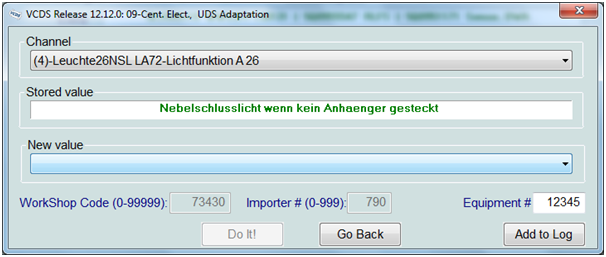
This worked on my 2015 build Octavia Estate which had non-LED rear lights: Controller 09 - Central Electronics 16 - Security Access - enter 31347 10 - Adaptations Change the 2 channels listed below - scroll to just over halfway down the long list of adaptation channels to find them. Do them one after the other, and do not come out of the adaptations until you have finished. If you do, you will have to close the controller and go back in and enter the security access code again. You have a couple of options here - the original values are: (4)-Leuchte26NSL LA72-Lichtfunktion A 26 - Nebelschlusslicht wenn keinAnhaenger gesteckt und Rechtsverkehr (4)-Leuchte27NSL RC6-Lichtfunktion A 27 - Nebelschlusslicht wenn kein Anhaenger gesteckt und Linksverkehr which translates roughly as rear fog lights when trailer not connected and right hand traffic and rear fog lights when trailer not connected and left hand traffic. So, for use on the continent you could just swap the values over and the left fog light would light up. A third option is available - Nebelschlusslicht wenn kein Anhaenger gesteckt - rear fog light when trailer not connected. I set both of mine to this value and they both come on, but if you set them both to Nebelschlusslicht wenn kein Anhaenger gesteckt und Linksverkehr they both come on as well. This has been tested on LED Hatch & Combi rear clusters, and standard Combi. Change (4)-Leuchte26NSL LA72-Lichtfunktion A 26 to Nebelschlusslicht wenn kein Anhaenger gesteckt
-
It was a zero click attachment that McAfee failed to spot - fortunately no data loss happened and SVRT (Sophos Virus Removal Tool) spotted the 'interloper' when it was run. It wasn't recent, I'm talking around 7 years ago.
-
MIB1 - first version fitted to Octavia 3 until mid 2015 production MIB2 (and MIB2.5 update) - second version fitted until end of Octavia 3 production in 2020 MIB3 - latest version fitted to Octavia 4
-
Doesn't that just turn off Kessy at the car end? How would the keys know that there is no point in them continuing to transmit as the keys do not contain a receiver and hence cannot be 'told' there is no point in transmitting all the time.
-
I run Windows 8.1 on my desktop and Windows 11 on my new 2-in-1, both have One Avast and Malwarebytes installed. I have only been hacked once, and that was when I used McAfee - and around the same time my brother (who doesn't live at the same address) and was also using McAfee got hacked - since then (and based on some poor reviews at the time) we have both vowed never to let McAfee near our PCs again.
-
Might also be worth asking in the Octavia IV forum if you haven't already.
.thumb.jpg.f83a46b9b3c0d976b9dbffbb523c9874.jpg)


