varooom
Resident Member
-
Joined
-
Last visited
Everything posted by varooom
-
When you factor in fuel, the slighly extra cost is offset for sure 🤝 Nice link, might have to give that a click as someone probably lost the one that came with the car.
-
Here's the link, you don't need ODIS, but you need tool that can talk to the module and gain access to adjust. It persists in ALL modes, so no matter the profile it is gone for good.
-
Part number is 8D0 012 244 A About £1.78 from dealer, and cheaper than posted ones, but feel free to look about of course
-
Welcome, I can send you a firmware you are happy to try if your firmware disk is no good. I can PM you a link and you will need to burn it.
-
It does seem they are covering themselves, the kit should fit fine as far as I can see. Fingers crossed that you get on ok with it, and hopefully feedback if you go with it so that others know it's fine to use.
-
I see your new thread, good luck with that... hope you get some responses over there 🤝
-
Welcome, good luck with the purchase if it comes off (don't pick my brains though... they are empty!)
-
Try and find a VCDS user on the map that is local and has knowledge to input the correct values back in (as you are partway into your oil service) Remember that you have to convert the miles driven into Km for the values stored. So a 30,000Km Long life oil change, and you have done 10,000 miles since last changed, you need to input 16,090Km or such as distance driven since last change. Locate a user, and send a PM (try and locate a user with Hex v2 as you have 2017 model! https://maps.google.co.uk/maps/ms?msid=209732397261666218585.0004c66cecde3f435ecb4&msa=0
-
You are really going to need to find someone with VCDS to put back the car onto what service regime it was on before, and turn off the inspection. It can all be programmed back in, but you will need to know if it was set to long life oil change or fixed.
-
Welcome to the forum, We have no idea on your location, but locating someone with VCDS or similar tool that you can visit for beer tokens is best. If not invest in VCDS as it will always be useful tool to have for when the car misbehaves.
-
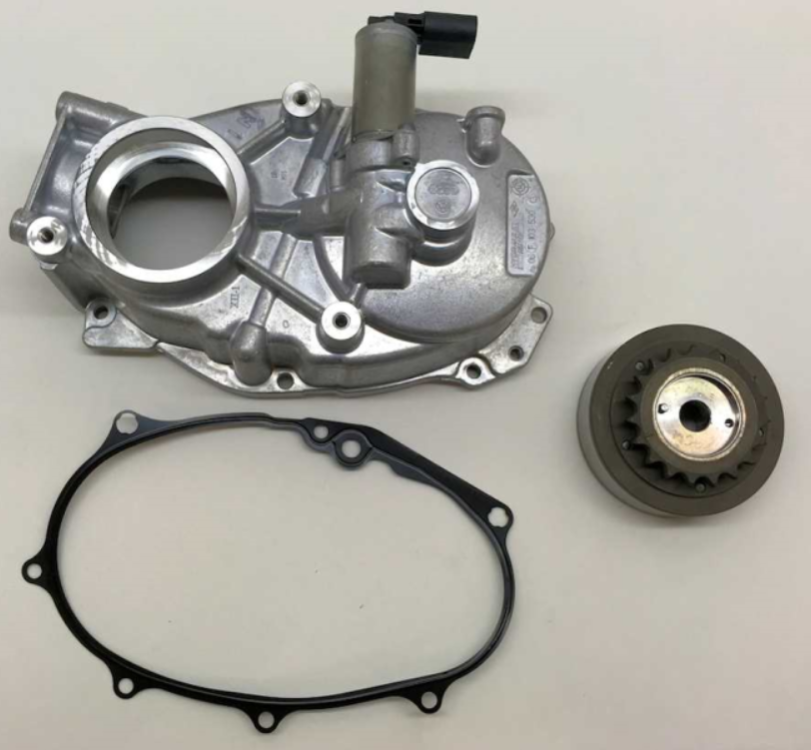
If you zoom on the cover for the above named kit I mentioned, it shows this part number https://www.amazon.co.uk/Volkswagen-Engine-Timing-Camshaft-Sprocket/dp/B00KWGF5HK From the shop you linked us into https://www.kmotorshop.com/en/article-detail/view/148343/camshaft-2-0-tfsi-camshaft-cover-hv0419-et-engineteam-06f103530-06f103530g-06f103530h
-
Do you need the repair set as seen in this page? 06F 198 088 D https://www.lllparts.co.uk/product/06F103530F/housing
-
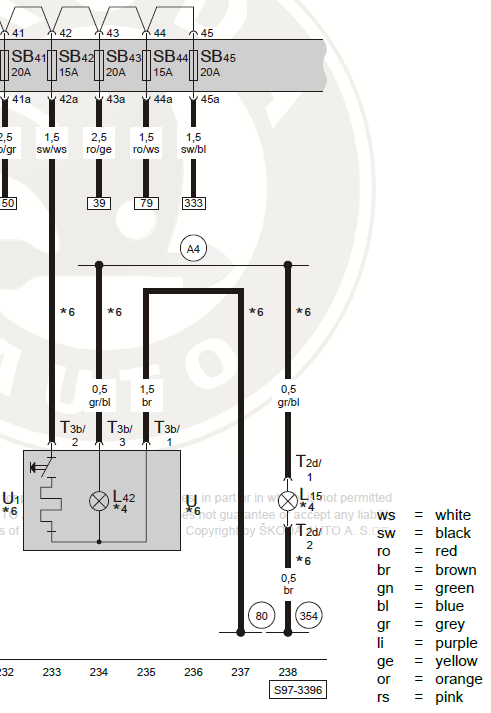
Yes, L42 is a bulb in diagram, so you should be able to cap it off securely and the socket will be fine.
-
VIN or Engine Code?
-
Try this wiring diagram snippet T3b/1 = Brown - Earth T3b/2 = Black/White - Positive from Fuse SB42 T3b/3 = Green/Blue (colour may differ, but a thinner wire) that is the light for socket
-
You will need to go old school, start calling local garages. Begin looking for Skoda/VW independent garages that are doing specialist work.
-
If you are looking to rollback the EA189 fix that has been applied, then you will need a garage with ODIS-Engineering ideally, or a tuner that is friendly enough to help. You will have a small hardware change that was fitted during the update to adjust the air flow, this will need to be removed (watch this video from 05m 58s) afterwards. These are the available flash files FL_03L906023NG_8817.frf <-- Pre EA189 (also known as Pre-NOx) FL_03L906023NG_9594.frf <-- Pre EA189 (also known as Pre-NOx) FL_03L906023NG_9970.frf <-- Beginning of the EA189 fixes FL_03L906023NG_9971.frf FL_03L906023NG_9972.frf FL_03L906023NG_9978.frf <-- Your current version FL_03L906023NG_9979.frf FL_03L906023NG_9980.frf FL_03L906023NG_9983.frf
-
Ah, I've had many Passats over the years, had a nice Superb, and now Octavia (after a break)
-
The more the merrier, welcome back 🤝
-
-
Evening Riley, looks dark and moody shot. Hopefully you have plenty of nice journeys ahead.
-
I have ODIS also, so I think I can edit the value. If you read @J.R. Post, I would like to see your VCDS autoscan to see which engine software you have (asked earlier) as I can advise of a possible previous version.
-
You might be able to test beforehand. So you need to use VCDS security access function, so it might be needing a login code S12345 for an example. Then view measured value blocks to see how much distance it records for the DPF and drop value by 10, see if you can save. Then if it allows, you know you can write back distance value. The above login code might be incorrect, and it also might not be possible with VCDS. (Make a Google search to see if possible)
-
They are hardwired to do a regeneration at a maximum of 1,000km regardless. I suspect that this value drops down to compensate for the age of the DPF filter. The software in the car ECU handles this, and maybe there's an update, but don't expect a miracle. The other choice is to lie to car, and tell it that it has a new DPF filter installed... do this at own risk (the car can still measure physical soot via G450)
-
To me it seems your car runs good, not generating much measured soot. The calculated soot is calculated by driving routines, short journeys will increase value, motorway journeys should decrease this value. Are you doing short local journeys?