Rbz5416
Members
-
Joined
-
Last visited
Everything posted by Rbz5416
-
I'm also in the walk away camp. It's by no means a rare car so unless it has desirable options that you desperately want/need, there will be whole raft of alternatives, even if it means travelling. I'd also question the diligence of the dealer if they couldn't be bothered to ensure their stock is in good shape. Although that could be mitigated if you just wandered in asking for a test drive rather than booking one. I had a Polo before the Karoq & the discs would literally rust overnight. But even if left for a week would never judder beyond the manual handbrake initially releasing. @Rory may have a point about wheelspin as the Karoq is indeed very prone to it even on a damp road, never mind icy. Although the 36 PSI her references is in fact the current specification at 2.5 bar. Something that seems to have changed on later cars.
-
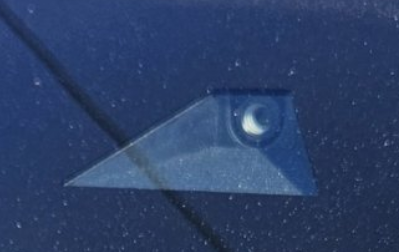
Edit: See the post below, apparently the presence of a camera doesn't mean TSR is present. Do you actually have a camera behind the rear view mirror? Not sure it was standard on the SEL in '23.
-
-
You can get tents that attach to the open tailgate, so you can easily access the vehicle contents. Or just go for for a regular tent in a roof box. There's all manner of pop-up versions that don't require an afternoon of puzzling over faded instructions. Although they may require that same afternoon to get the buggers folded away!
-
-
A 72 plate comes out at £87.18 at Colchester. Looks like they set pricing depending on whatever they think they can get away with!
-
25 Plate Karoq SEL Edition.
-
This is Skoda Colchester. Edit: Checking Mitchell in Chester I get £74.92, no idea why the discrepancy. So I'd be inclined to look at another dealer, Audi or an independent. Just make sure you get an invoice to keep as evidence, as it won't show on the Skoda app.

-
I've seen a suggestion to lubricate the "plunger" with silicone spray. This may be useful in an emergency: The list of "known issues" on the Karoq seems to grow longer by the week...
-
Looks like they've fixed it then, although must be fairly recent. 👍
-
It's speed related. Even if your turn it off after setting off, the next time you slow for traffic it will re-lock. As alluded to above, older vehicles have an option in the menu to turn it off, but Skoda have removed it. I doubt any apps can disable it either, as VAG have locked the software down on all vehicles now.
-
The last two threads asking the same question went unanswered, so maybe have a look at the Facebook Karoq groups.
-
Be aware that 2.0 is only available with DSG in the 4x4 Sportline, which will take you over £40k & into "luxury" car tax.
-
No, mine launched a myriad of updates on the way home after picking it up.
-
-
@Barneyboy48 Maybe post your location in case there's someone nearby who can assist. I find it hard to believe that you need Android Auto enabled, as that implies that you could never pair a phone that doesn't have it. I agree with @NottsIan that you should try to remove any existing pairing & then try again from the bluetooth menu.
-
-
The issue for me, & apparently the OP, is more that it also triggers the SatNav screens to flip to night mode making them harder to see in daylight.
-
Fair comment but there's no reason why Skoda can't make this work properly. I had it on my 2015 Polo & it worked flawlessly. So quite how Skoda have managed to make a pigs ear out of existing, basic, working technology is a mystery.
-
Low is less sensitive, so should be what you want. But note that they setting can apparently be reset after an OTA software update. Even then the switch is way too early in my opinion. No idea why Skoda have set it so.
-
Never had it on any car so don't miss it. As @sussamb says, given how the other Skoda "aids" are prone to error, I wouldn't trust it either.
-
Not checked my Karoq but my Polo had one. It was little more than a thin plastic sleeve & I really can't see it doing much in the way of extra insulation, compared to the thick case of the battery itself. Google threw up this, which suggests it's more relevant to AGM batteries. Battery Heat Shield According to the VAG ERWIN Self-study guide, guide No.504 “Vehicle Batteries- Design & Function”, the engine bay is considered a high temperature place for the battery. This can adversely affect the durability of the battery due to:- “Corrosion of the positive grid, water consumption, & self-discharge increase.”. They also state that AGM batteries must retain the heat shields they have been installed with as they are more susceptible to heat damage. Conversely if your car wasn’t fitted with an AGM battery there is a chance that it won’t have the required heat shields & you will have to retro-fit them.
-
-
-