



Skip to content

Post your Mk3 Octavia photos!
Featured Replies

  • Replies 5.4k
  • Views 1.2m
  • Created
  • Last Reply

Top Posters In This Topic

Most Popular Posts

Posted Images

  • Author

Great looking car!

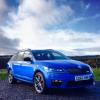
Love the blue!!!

Has anybody got a picture of the vrs with the drl's on but not the headlights?

2L TDI SE 4x4

post-106900-0-34065900-1385764680_thumb.jpg

I'd post a pic of mine. but it looks the same as every other white one so won't bother :-)

I'd post a pic of mine. but it looks the same as every other white one so won't bother :-)


Would be interested myself, as its another white 4x4 I have on order.


TP

Keep them coming guys...so that I can drool until mine comes home...

I am yet to see a denim blue estate

Here is mine.....need to dust out my DSLR and get a decent pic of her........

null_zps3d3eea9f.jpg

Mozz, would really like to see this through your DSLR. Think the Silver Octy 3 vRS looks fantastic!

Here is mine.....need to dust out my DSLR and get a decent pic of her........

null_zps3d3eea9f.jpg


One for the Briskoda calendar next year.

I'm dusting my DSLR today and with the sunny weather I'm gonna take full advantage of it!!! Pics coming soon

Here's my 1.4 tsi Elegance at the dealer, waiting for me.

post-28247-0-74328300-1385824829_thumb.jpg

A month old and well chuffed

Finally got photo uploaded!!

post-110939-0-46941000-1385826899_thumb.jpg

Here's my TSI VRS. Amazing car, engine, tech and practicality. Love it to bits!

post-103892-0-58217800-1385827086_thumb.jpg

Keep them coming guys...so that I can drool until mine comes home...

I am yet to see a denim blue estate

I had a denim blue elegance for a courtesy car

Mine needs lowering desperately

Mine;post-106910-0-77133400-1385836917_thumb.jpg

Create an account or sign in to comment

Recently Browsing 0

  • No registered users viewing this page.

Important Information

Welcome to BRISKODA. Please note the following important links Terms of Use. We have a comprehensive Privacy Policy. We have placed cookies on your device to help make this website better. You can adjust your cookie settings, otherwise we'll assume you're okay to continue.

Account

Navigation

Configure browser push notifications

Chrome (Android)
  1. Tap the lock icon next to the address bar.
  2. Tap Permissions → Notifications.
  3. Adjust your preference.
Chrome (Desktop)
  1. Click the padlock icon in the address bar.
  2. Select Site settings.
  3. Find Notifications and adjust your preference.
