



Skip to content

Work Car Park Tonight
Featured Replies

I am currently working for NHS24 performance testing the Triage systm they use when you phone them up.

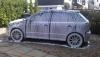
Left the office tonight to see this...

dsc00740ge1.jpg

I parked next to the blue MK2 vRS this morning, but the Fabia vRS LE was a late arrival :lol:

There is also a black Fabia vRS - must try for a full group photo sometime.

:rofl: - good effort :thumbup:

You may want to blank some plates out though....

Steve

Hope you left briskoda calling cards on them :thumbup:

good job,but when stevrs had his vrs there were 4 fabia vrs on my mums drive on a sunday:D

Nice pic! I still can't work out whether i like the Mk1 or Mk2 Octy vRS best!

Nice effort...my vRs had a few parked round it...at the garage:rofl:

MK1 all the way:thumbup:

i do prefer the vrs 1 bumper to the vrs 2

Nice pic.

Mk2 needs a more prominent chin and should sit a bit lower. Mk1 looks more lean and aggressive - but also has dated...

Which triage system?

They are getting common as muck;) in truth though,I do see lots of vRS's now.

Mk 1 wins hands down on the front spoiler front.Mk 2 looks great though.As does the SE Fabia which I thought would be pants in Race Blue

Maybe its because the Mk1's front bumper look similar to the ones on an old style Porsche 911?

  • Author
Which triage system?

It's called PRM and involves bringing back CHI data, linking to ECS, adding algorithms, PMH, etc.

Links into another system caled KMS which I am also working on.

Don't have a triage system in car park here. Luckily I know what's what though. Other cars awaiting replacement are probs still on the waiting list.

Mo

Create an account or sign in to comment

Recently Browsing 0

  • No registered users viewing this page.

Important Information

Welcome to BRISKODA. Please note the following important links Terms of Use. We have a comprehensive Privacy Policy. We have placed cookies on your device to help make this website better. You can adjust your cookie settings, otherwise we'll assume you're okay to continue.

Account

Navigation

Configure browser push notifications

Chrome (Android)
  1. Tap the lock icon next to the address bar.
  2. Tap Permissions → Notifications.
  3. Adjust your preference.
Chrome (Desktop)
  1. Click the padlock icon in the address bar.
  2. Select Site settings.
  3. Find Notifications and adjust your preference.
