Leaderboard

.jpg.1006585dfe4e2977315b67c3d642e37b.jpg)




Popular Content
Showing content with the highest reputation on 23/11/19 in all areas
-
1 pointHi all, I understand that Smartlink can be enabled on compatable stereo units with a trip to the Skoda garage and about £150. But is there a way to enable it without paying so much? Any non Skoda alternatives? Can it be enabled by any garage with the right tools? I have it as an option on the stereo but it says contact dealer for activation. Also what does it allow you to do with an iPhone? I can already use the call/phone book function via Bluetooth and play music through the stereo using the steering wheel controls. What else would SmartLink do for me? Trying to decide if it’s worth the £££ if I do have to pay Skoda to activate it. thanks.1 point
-
1 pointI always thought that the current Superb was the most handsome car on the road. But it was simply too big for me. This new Octavia is perfect in styling and size. A beautiful looking machine. I don't want a push button parking brake. I don't want a distracting computer tablet. Or massaging seats or whatever. I want a good looking practical car that I can drive without interruption or distraction by computerised devices. Much discussion here is about stuff that I do not want and are just optional extras anyway. I hope to be driving this car car in the next few years ... and it will be one without the distracting bells and whistles.1 point
-
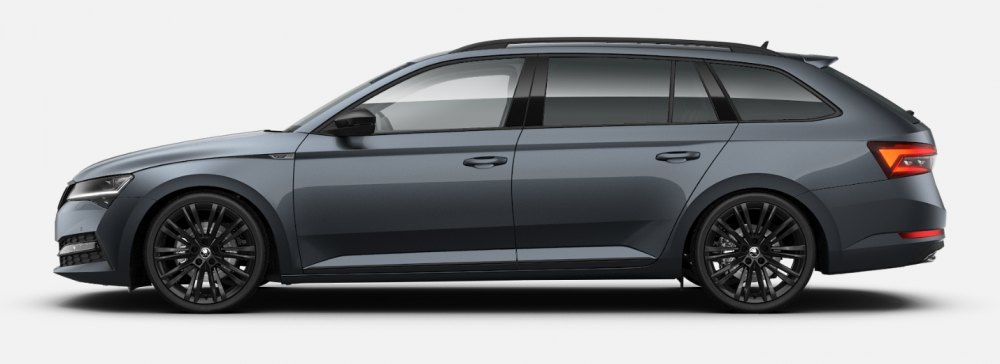
The new Canopus black alloys caught my eye on the FL S3 L&K and I was thinking of getting some for my pre-FL Sportline. A rather crude mock-up (albeit using the FL from the current model). What are people's thoughts?
 1 point