TheWanderer
Resident Member
-
Joined
-
Last visited
Everything posted by TheWanderer
-
-
Went to the dealer today regarding some functionality with My Skoda app and the technical support guy said that my car was due an upgrade to 1941 firmware, I told him that it was already on it and that of got the firmware off the web, he went mad. He said that it won't work without it being linked to the Skoda servers via ODIS or something, and I said it's been on there a few weeks had at least 2 separate updates since and has performed perfectly ever since. I think that he knew where it came from when I said the web and that I still had it on a usb stick. I don't think he was that impressed somehow, I guess it's the loss of money, but that update would've been done under warranty anyway.
-
If it's a 2023 car it'll have a warranty on it, my last Octavia was a nightmare and loads of work was done under warranty including £1400 worth of headlights. So that car will have a warranty and have a look at your consumer rights when it comes to cars. But there really shouldn't be any issues or problems with it and if you want the car, then as part of deal say I would like you to install the latest firmware on the infotainment system which they should know all about.
-
The 1941 software seems to have resolved 99.9% of the issues that owners were having. With very few exceptions, those seem to be with the older hardware, which needs upgrading. With a car that's registered in 2023, that's not going to be an issue. I had 1900 software on my car when it arrived, it then received an OTA update and the reboot and restart problem arose, but I was kindly given the update to 1941 and received a couple of further updates and all is still good and no problems.
-
Ask for the 1941 upgrade file in the infotainment thread here and follow the guide that I put up and do it yourself, the usual caveats apply. You do it at your own risk, but it's quite easy to do, just make sure that you turn off ALL non essential things (Air Con/Headlights etc) and battery is fully charged and generally good condition before you start.
-
Maybe time for a new phone then. My S22 Ultra works reasonably well with it, although I prefer to pull over and stop to hold any call. Not that happens much now as I've retired so no work related calls anymore 🙂 Hint: If you can afford to buy it off contract and SIM free, because buying it from a network ties you to it and as such is a hire purchase agreement, of you can find a 0% credit card or suchlike and then get a PAC code transfer your existing mobile number to a 30 day rolling contact or annual contract (whichever suits your needs best). Somehow I got a 100Gb upgrade, so I've got 200Gb from EE for £22 pcm (I think because of a BT account).
-
You have turned the Bluetooth at the same time?
-
You should "in theory" get at least 2 updates directly afterwards, I did the other day when I accidentally tweaked a security setting and nothing would connect, so I did a factory reset on it. I got 1 which put the manual and basics back in and a second which has apparently improved the look of the HMI which I take it means human machine interface. Didn't seem any better or different to me. 🤷
-
Nope, not as far as I know.
-
If it's 1900 firmware then it's good to go for the 1941 upgrade.
-
There are quite a few times when Google Maps tells you to turn off when your local route knowledge will tell you otherwise. I often ignore it around in Guildford and Taunton Town centres, as well as going out towards Western Somerset and North Devon as it sticks to principal routes. I may follow it for areas that I'm not familiar with like Birmingham and Nottingham, generally it's OK, but I won't follow it blindly and without question.
-
I'm adamant that putting the car in P does NOT put the handbrake on, it just puts the gearbox into PARK, the only times that the handbrake applies is when you operate the switch or turn the ignition off. I'm pretty certain that doesn't it release when you you try and pull away with it still applied.
-
If you want to you can always go for 1941 software if your current software revision isn't too low.
-
It more than likely received the dreaded update OTA like mine did and it went bonkers doing random restarts.
-
The hardware is often shared within a group, however it doesn't necessarily mean that you will experience the same issues on an Audi or VW, I was dreading getting my car with all of the posts regarding software problems. Yet when my car arrived it performed faultlessly bar one occasion when the infotainment system went into a loop and wouldn't respond, then came a download and the reboot issue arose, but since I grasped the nettle and updated the system with 1941, I've not had any issues or problems whatsoever. Been a couple more downloads and no problems still. So make of that what you want, but I'd give them the chance to completely replace it and see what happens with it. Keep Skoda CS advised that it has been replaced and will be back in contact should it fail again.
-
You shouldn't have any issues with 1941 firmware, after installation, you may get a few minor errors momentarily, whilst the system settles down, you'll pretty much certain to get at least 1 download, possibly 2 (I have now) and the built in manuals probably missing temporarily, they do return. Any others faults are often random in nature and very infrequent. Not had any yet myself.
-
I put a guide on how to do the update a few pages back.
-
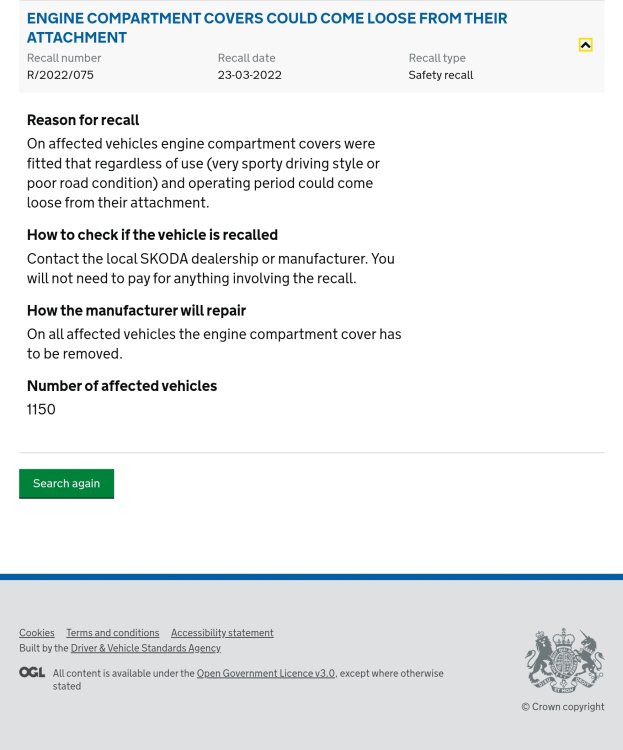
This is the outstanding recall notice on the Gov.uk website.
-
Just use the controls on the steering wheel or you'll find everything that you want with the menu button on the infotainment system.
-
I gave my dashcam footage and screenshot of the SORN information to my insurers, the latter the next day and they we're most grateful and I think that the Ferrari will only be covered for 3P,F&T, so he could find himself with a BIG bill for his car, my car, plus my expenses for legal costs and hire car charges.
-
Apple CarPlay is exactly what it says, so if you have an iBone you can play your music Backgrounds, exactly what it says, you can change the background on the VC & Infotainment system to what you want from a list. Settings again exactly what it says. Select them and play with them (steady!), you'll be quite surprised what you can do.
-
Got this back from my insurers Claim Update: Based on a detailed review of your claim and the information you have provided, we believe that you were not responsible for the accident. We've sent our views to the other insurer and will update you once we receive their response.
-
Like I said mine didn't come with one, heard nothing from the dealer about it being missing, nor having the car being recalled for one to be fitted.
-
Don't keep deferring updates they're free and there for a reason. I've had a second one and everything is still fine.
-
You're welcome 😊