TheWanderer
Resident Member
-
Joined
-
Last visited
Everything posted by TheWanderer
-
Shop around, also see if you can get any special offers via cashback websites or voucher codes, so you can pre-order them and have them fitted later. Or try Camskill, Oponeo, MyTyres, Black Circles etc.
-
Or Goodyear Eagle Assymetrics 5 or 6
-
Rather strangely my infotainment did a sudden restart today, but I had been tweaking the WiFi settings.
-
Hi folks. Ive had my windscreen replaced and I've found that the usb socket inside the casing keeps popping inwards, is there any way to stop it doing this? Is there a clip in there which AutoGlass may have damaged? Also I'm noticing an increase in drive in the centre of the lane warnings, so I'm wondering if they didn't recalibrate the camera properly 🤔 Any ideas of how much a stealer would charge for a recalibration and to replace the usb socket? TIA 😊
-
Always find that Waze or Google Maps are best for navigation and traffic. Although if you know where snarl ups regularly occur local knowledge is a bonus.
-
Absolutely spot on. The Eagle Assymetrics are far superior to these.
-
No, they're awful. They're Goodyear Eagle F1 Supersports. Terrible handling but I can't afford to change them.
-
Goodyears' but can't remember what they are.
-
If all you want to do is scan for fault codes, then just buy a compatible one and download the appropriate app. But if you want to scan for faults and tweak things then OBD11 is the cheapest route otherwise you'll be looking at a laptop and VCDS which is serious kit. Just be warned that you may get accused of tinkering by your dealership if you do something wrong, like I was.
-
Bloody well need to. After all of the hassles that owners have been dealing with. I'm fortunate in that my car has so far been unaffected. 🤞
-
Yep, it's brilliant. I've got a couple of roads around here with speed humps, switch it to comfort mode and it just bounces over them, sport mode is hard, so I don't use it, eco is just bland nondescript. Overall it is what it is and what you make of it.
-
Brings a whole new dimension on going for spin.
-
-
I know very frustrating. It would allow me to attach a cable to the phone and still leave a socket spare for charging or usb drive.
-
Just the white one. It vanishes within a few seconds of sitting there or metres of movement.
-
I'm very happy with mine, a couple of minor glitches one of which was the infotainment system saying loading settings infinitely, but that corrected itself and the front assist warning saying it's not available when I start the car, but that disappears as soon as I move the car. But generally very happy with it.
-
Can someone tell me how to get the infotainment system to recognise a USB hub, so I can add a USB drive to the system and leave the other USB socket available for the passenger. Ive tried and it comes up with an error. 😟
-
That was my old phone, I know that 22U is more powerful and has greater drain, so with your advice I'll give it a miss. 🙂 NB: Got a cheapo USB charging pad from a market site coming in a few days, only £6 so if it doesn't work it's not a great loss.
-
Thanks but I've given up on the idea. Decided to try and find a mount that I can attach to the A pillar instead, although not much joy at the moment.
-
Not available.
-
But the Velvet Red is stunning!
-
-
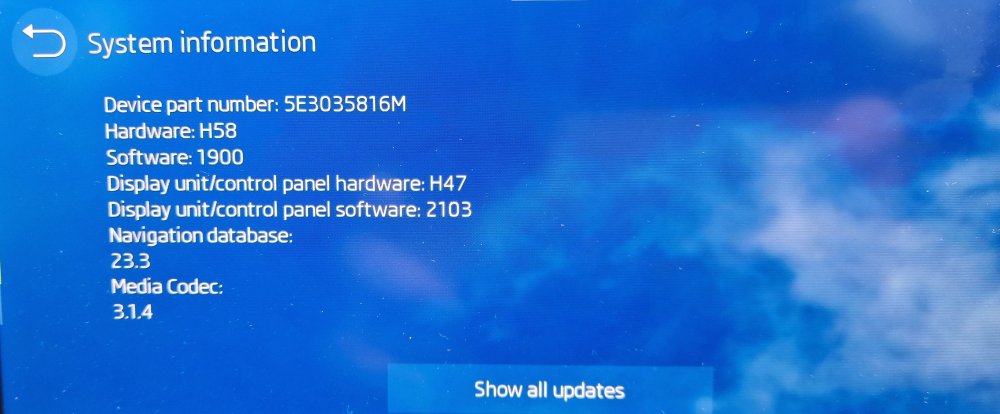
Well it finally finished updating or upgrading itself today, don't know what its done to itself, but this is now what I've got on my car.
-
Hi. Can anyone tell me is it possible to retrofit the official skoda wireless charging pad into my car? Lookers in Peasmarsh say that it's impossible and a FF option and dealers cannot retrofit it. I've installed a Auckly wireless charger which is stuck to the windscreen next to the A pillar, but it has a rather unsightly wire going to it for the time being and I'd like to get rid of it. TIA
-
Well I've learnt something new today. Thanks SteveTheElder.