pab567
FREEDOMTech
-
Joined
-
Last visited
Everything posted by pab567
-
Check your PMs
-
PM
-
Not possible with 5Q0035820, must be replaced with 5Q0035842x (x = A, B or C)
-
Unfortunately there is no SW update for your unit.
-
Unfortunately there is no SW update available for your unit at all :(
-
Model number and SW version of your current unit?
-
There were no MIB1 units installed in Fabia 3 so for sure you have MIB2 unit. Pls share model number and SW version of your current unit.
-
Check PMs - no link means I have no update
-
@Zephyrus unfortunately I don't have newer version for you unit. All others pls check PMs.
-
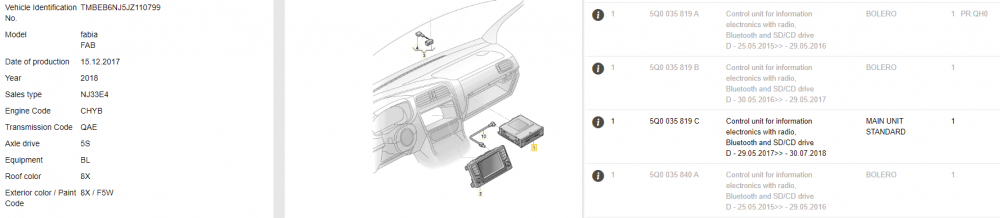
Bad news - your unit is 5Q0035819C, such units do not support SmartLink (although you might have such icon available in touch screen menu). Checking PQ codes of your car just confirms it: To get SMartLink active you must have glove box unit replaced :(

-
VIN of your Fabia?
-
Unfortunately not
-
Even MST2_EU_SK_ZR_P0480T PMed
-
0480. But if you have 0478 and don't have any issues then I do NOT recommend to update.
-
All check your PMs
-
@vdias if you want to get such unit for your car pls contact me on PM
-
Rear view camera image but no OPS - this is related to SW versions above 0241. To have it solved (to have OPS overlay or RVC image) you need to replace or upgrade SW in your PDC / PLA unit. The ones that work are those used in Yeti FL cars - 5J0919475C (4 channels - rear only, can also use any module with HW version 5J0919475A and have firmware updated to 0011), 1Z0919475G (8 channels, can also use any module with HW version 7N0919475 and have firmware updated to 0011), 3T0919475G (PLA 12 channels, can also use any module with HW version 4H0919475E and have firmware updated to 0013), An interesting option is also to replace 8 channels controller with 1K8919472C which has the feature of self turning on when approaching car / wall in front of you (it requires re-pinning or special adapter as plugs are different).
-
Sorry guys for not replying earlier... I visit briskoda rather rarely and ususally only if someone eitehr PMs me or tags me in the post. Microphone - with RNS/RCD series and separate BT module there are two possible wiring set: 1. microphone goes to RNS/RCD and then from RNS/RCD to BT module - this is used for voice controlling RNS/RCD unit 2. microphone goes directly to BT module Those of you who have microphone open circuit issue have 2nd setup. Solution is to make two jumpers in BT plug that will re-route microphone signal to the wires that transfer audio signal from BT to RNS/RCD are re-pin QuadLock adapter microphone input to these two wires.
-
VIN?
-
PM
-
@Arne_Karoq1 PM
-
Unfortunately I don't have any firmware for your unit
-
PM
-
What is model number of your infotainment unit? Something like 5Q0035874C...
-
@detonatorFIN unfortunately I have no SW update for your unit Others check your PM