




langers2k
Resident Member
-
Joined
-
Last visited
Everything posted by langers2k
-
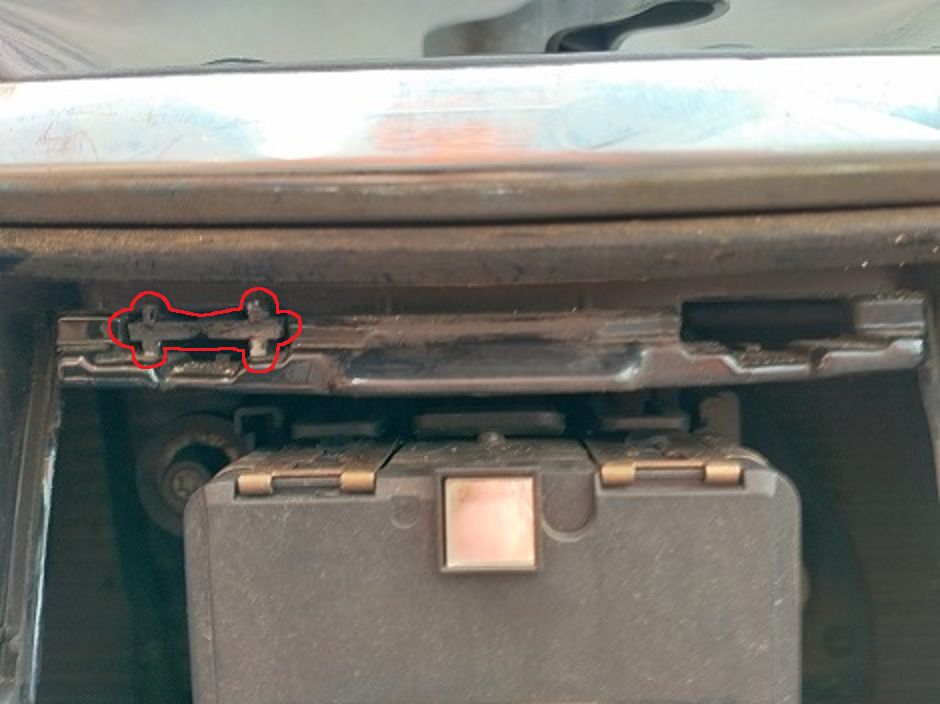
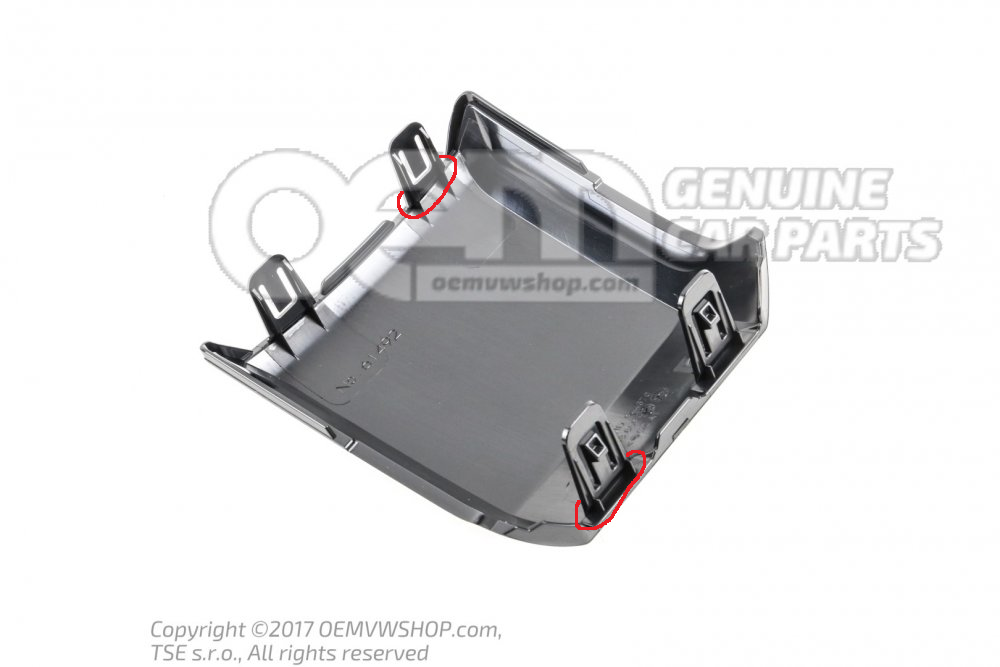
What screws? This part: Looks to be a perfect match for the profile of these clips: So it's very likely it's just been snapped off when they removed the cover
-
I'd agree it looks like a broken part of the old cover. Can you take a picture of the replacement cover and it's lugs?
-
TSB/TPI are available through Erwin for a small fee. Not sure if you can download all of them or if you'll need an appropriate VIN first. Parameters can effect almost anything depending on the module. On a CAN gateway I think it's mostly setting the different drive profile stuff. On a headunit it'll include things like the eq for a specific vehicle. On a highline reversing camera it'll be image manipulation to correct for it's location. On a direct TPMS module it'll set the tyre sizes and pressures. Those are just some of the more obvious uses. The modules are so complex these days that there isn't enough customisation via coding and adaptation channels. The dataset/parameterization is how VAG fine tune a module for so many different brands/models and even spec/options 👍 You won't find many online that are in the XML format for ODIS 😕
-
I don't think ODIS uses .bin files. The updates I've seen tend to be .sgo or .frf files where as parameter sets are .xml files. Flashing can update modules assuming the software is compatible with the hardware. The part number being the same with a higher suffix (last letter) does NOT mean it'll be a compatible update! Personally, I'd suggest finding an appropriate TSB/TPI as that'll confirm exactly which modules a flash file is designed for. Otherwise, following known upgrade paths mentioned in the community should be relatively safe assuming the posts are accurate. As you've specifically mentioned a CAN gateway, there are few things you'll need to do: - Have component protection matched to your car - Enable any FeC/SWaP codes ie: driving mode select etc - Flash an appropriate software, Lear use 4xxx and Continental use 5xxx or 6xxx, do not cross flash - Upload a parameter set suitable for your car I believe 1 and 2 can only be done with ODIS and a valid online subscription. I think ODIS will only provide parameter sets suitable for modules originally fitted to the car. VCP has some and most retrofitters will probably have a selection Happy to be corrected as this is just my understanding.
-
It might help if you posted an autoscan and adaption map of 09 along with which channels you've been changing. There is a list of various lasttyp options here: https://forums.ross-tech.com/index.php?threads/15387/ Generally speaking, I'd expect either 'allgemeine LED bis 12W' or 'allgemeine LED' to sort the bulb warning for LED's so I'd try changing the front fog lasttyp to 33, 37, 40 and 43. Ultimately, it'll depend on how the LED drivers are designed and if their characteristics are a close enough match to one of the presets
-
Component protection is designed to prevent theft of various vehicle components. Moving a headunit from one car to another will trigger it and it'll say "component protection active" on screen and disabled various functions. ODIS (Offboard Diagnostic Information System) is the dealer OBD tool they use for diagnostic and repair. It can be used to remove the component protection warning assuming the item isn't flagged as stolen
-
The OP certainly seems to have a bulb fitted but obviously that doesn't mean there is a wire too Pretty easy to code and un-code it to check though.
-
I assume you're in a LHD country? Stock behaviour is to only have one rear fog light on the drivers side. It's possible to enable the second using VCDS or similar
-
When you connect the new headunit, component protection will kick in and disable various features. A dealer can sort the component protection for you but ODIS will only reactivate licences linked with your VIN so at a guess, smartlink won't work I don't know much about these headunits, maybe @pab567 can add some detail.
-
The coding will be identical for both VCDS and OBDeleven. The method to access the coding and the descriptions/translations might be different though There are a few different A5 cameras used through the years so at a bare minimum, it would be helpful to know which you have. I can take a guess but I'd rather not...
-
@Cas24 - what tool are you using? Can you add an autoscan or equivalent to see what modules your car has fitted
-
Nope... There are two parts to your cluster: - the firmware/software which is normally updated using a frf or sgo file - the cluster configuration and immobiliser data which are stored in the EEPROM If they don't match, you'll have problems... As I say, the best plan is to connect the camera up temporarily to see what works with your cluster. You might find it only needs the two LED's and resistors adding
-
I'd stick the camera on the windscreen with tape then temporarily run the four wires needed to power it and get it on the CAN-bus. You can then see if your cluster is happy to show the correct options/screen before starting to mess with the EEPROM I know my Octavia cluster (SW:608) didn't show any options to start with. I ended up getting it updated to SW:10xx and a tweaked EEPROM to get the lane assist screen up. This might not be needed on a Superb cluster (SW:811), it'll still work without the menu options and LED's fitted if I remember correctly.
-
The coding and wiring is all pretty obvious and I think all the other modules should support lane assist. As you have a RNS-510, you probably want a 3AA 980 654 D camera. That'll support traffic sign recognition if it's available in your country and lane assist/high beam assist. Once fitted, you'll need to calibrate it using a VAS6430 and ODIS. The only real issue will be the instrument cluster. It has a icon for lane assist but no LEDs behind it so you should add two resistors and LEDs to the PCB. You might also need to tweak the EEPROM to enable the lane assist graphics, not sure on a Superb cluster. I think VDOEditor might be able to do this if needed...
-
Which are you wanting to remove? The rear lettering and vRS badges don't have any locating pins AFAIK. I think the rear round Skoda badge does. It also sits in a recess (at least on the facelift) so I think it would look pretty odd if you just removed it
-
Start by posting an autoscan from VCDS
-
There is a very good chance the PCB has got corrosion on it as the faults match this thread:
-
Haldex are the company who make the coupling to transfer power to the rear axle Useful picture of it here: Has your haldex ever been serviced? It should have fresh fluid every 40k miles if I remember correctly. If it hasn't, it could just be full of gunk which is stopping the valve working properly...
-
ABS module is probably below the battery tray somewhere. I believe the AWD module will be part of the haldex around the rear diff. TBH, I'd be looking at the AWD module (it's more exposed) rather than the ABS module. Fuse number should be in the owners manual but I haven't got a WD for your car to confirm I'm afraid
-
It depends on the ECU and if it keeps a record of the mileage covered. AFAIK, the engine ECU in a MK3 Octavia/Superb and other similar MQB vehicles doesn't keep track as mentioned here: https://forums.ross-tech.com/index.php?threads/26571/
-
It certainly is... Unlike older cars, I don't believe it's possible to change the odometer to any value you want. However, there are options to prevent the odometer increasing and it's trivial to increase the odometer by sending a appropriate CAN messages simulating a moving car The biggest problem is that Skoda/VAG limit the options for their dealers. There are plenty of 3rd party tools that can do things the dealer tools can't or aren't allow to...
-
Without seeing an autoscan from VCDS or similar, it's hard to offer advice. It might need some faults resetting to get the original behaviour... I'm also slightly dubious about how the Chinese camera's are plug and play without coding. If it has changed the coding, it should be possible to correct it, but again, we'll need to see what's change to offer a best guess Might be worth checking the VCDS owners list and map to see if there is anyone local who can take a look?
-
The traction control light is almost certainly due to the fault in the ABS module: 1 Fault Found: 01324 - Control Module for All Wheel Drive (J492) 013 - Check DTC Memory - Intermittent Which in turn is caused by the AWD module: 2 Faults Found: 00003 - Control Module 014 - Defective - Intermittent 02248 - Valve for Controlling Clutch Operating Angle (N373) 014 - Defective - Intermittent So at a guess, I'd try checking the fuse for the AWD module and possibly also replace the fluid/clean the filter. If it's not been done for a while it could be causing issues? Rosstech's wiki for the 02248 error: http://wiki.ross-tech.com/wiki/index.php/02248
-
Saying that, these AliExpress versions seem to show correctly.... No idea if they are still available though!
-
I don't think they need to be visible from the cabin, if I recall correctly, they should be visible from a 5 degree angle from the rear? You'll have a better idea than I do if they actually are? Anyway, I expect most aftermarket dynamic indicators will be pretty similar. Even the expensive superskoda variant which is allegedly 'e-marked' may not show to the rear - at least based on this video as there appears to be a dark segment at the rear:

