




Bap33
Members
-
Joined
-
Last visited
Everything posted by Bap33
-
I won’t tell more about the smaller size of the spare wheel. However here are the consequences of having it on the front axle. Since ot doesn’t spin at the same speed as the other front wheel, it will trigger: - ASR which will try to reduce fuel injection top stop what the control unit considers as lack of grip - EDS which will brake the smaller wheel on straight lanes, since the difference of rotation speed will be considered as differential slipping. - Haldex since different speeds on both front wheel will considered ad lack of grip and therefore a good reason to activate rear axle to recover grip and traction control. There may be other side effects from other control units as soon as you brake. ESP for instance… Well, not very surprised you feel it’s a mess! 😉 IMHO, just swap your spare wheel with one of the rear wheel until you can get your tyre repaired/replaced. Same size wheels on front axle will bring back both ASR and EDS in normal operation conditions. Grip will be more even on front axle and should avoid triggering Haldex.
-
Regarding matts, I´ve got 2 sets: - original carpet version for summer - rubber version for winter Don’t forget the rubber tunnel cover. Emergency safety kit is also a ´nice to have’ especially if you have young kids Antitheft wheel nuts depending on where you live. Rear bumper protection if an estate version
-
Also found the approximate unit price on an online ETKA: ~240€! 😮 It hurts! A single headrest costs as much as the "Familiy pack" (2 headrests + 2 side sun blind +...) option in France... Complete nonsense 🤪 I had envisioned to retrofit this for my older daughter who is tall enough to get rid of a her Recaro Monza child seat. This solution looks clever to give her some more confort I'm going to think to another 'clever' solution... 🤔
-
Oups! Sorry, Should have made a search first. Found the answer here: 565 818 901 G FPN. Thanks anyway.
-
Hi, I'd like to retrofit these rear headrest on my Superb Mk3 : I'd like to know : - The width between both vertical rods (I guess it's standard on every VAG models, but one never knows) - The OEM reference (in black color) I've found 565 818 901 X YZ ref on an online ETKA, where X seems to depend on the manufacturing date (A, C, D, E, F, G), whereas YZ should correspond to the interior color (apparently AC or DC for satin black) So if one of you could check that for me and share the information... it'd be much appreciated. 👍 Thanks in advance.
-
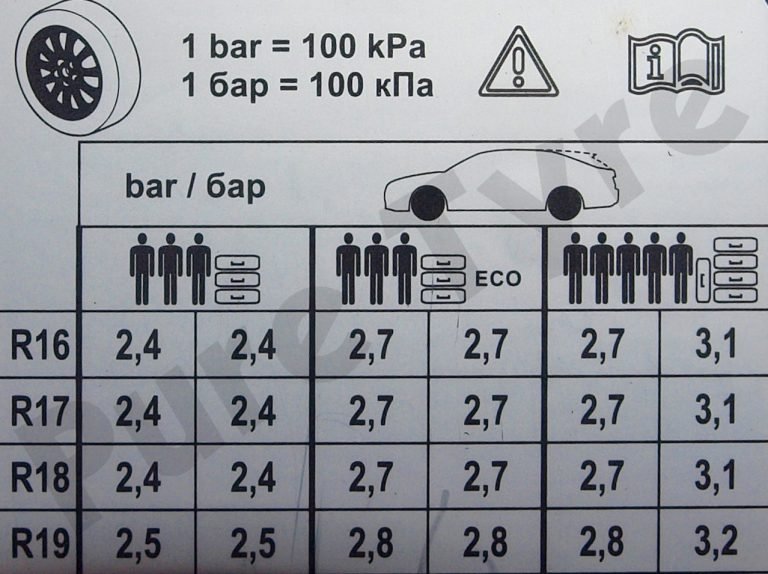
This was formerly true. But on Mk3, pressure recommendations only depend on rim diameter and loading (3 levels: Normal / Eco / ‘Heavy’ loaded).
-
I also have some Chemical Guys Sprayable Leather Conditioner & Cleaner, but not used this time. Maybe I should complete first application with an application of some Chemical Guys product... 🤔 But don't get fooled by latest pics. The best improvement is thanks to my heat gun.
-
You get it right. I put these ones for the tailgate. Fully satisfied with them: https://www.ledperf.com/led-t10-rotation-a-4-leds-hp-eclairage-de-cote-blanche-w5w-p-437.html
-
Meguiar’s Gold class.
-
OK. Cristal clear now!
-
Hi all, New pics with final rendering this morning (leather nourishing cream applied late yesterday evening). Driver's seat cushion (outer side, it's a LHD ) : Before: After : Sorry the sun was lighting in opposite direction. It may change the impression. Driver's seat backrest : Before: After: Passenger seat cushion: Before: After: Quite satisfied for a first try!
-
And did you get any spots with olive oil? It's really fat...
-
Did you choose your mobile home to match the color of your Superb? The ultimate touch of class! 😜
-
May be we don't fully speak about the same thing (sorry, I'm not a native english speaker, only learnt at school). I may miss something in your explanation. For rear doors I have a single bulb with a 2-facecap, which is red on its vertical face for backlight and white on its lower face to light the floor. This is how L&K are standard specced (at least in France) on MY18). But for sure, it's not a proper and separate door light as on outside mirrors lower face. Do I get you right?
-
On my MY18 L&K, it’s standard spec. I´have 4 door lights and didn’t make any retrofit.😉
-
Definitely less expensive! 😁
-
Sorry, I was meaning, keeping all other original components.
-
Hi, I've this kind of lights for front doors on my L&K Mk3. It's a gift from a friend who had a Sportline (he ordered 4 items on Aliexpress but noticed he could have bought only 2 upon installation, since Sportline doesn't any lights on rear doors). Thus I don't have any idea where he bought them unfortunately. Could anyone share me link to find similar ones for my rear doors? I'd be also OK for door lights without any logo as long as they are dual color (white LEDs for floor / red LEDS for safety and horizontal back lighting). Thanks for your help !
-
But there's a risk stiffer springs may decrease confort when unladen, isn't it? 🤔
-
Hi all, Big big interior cleaning this afternoon. My Mk3 really needed it. Even vacuumed the spare wheel well! 😁 I also made some detailing on both front seats. I spent 4h in total, only for interior, and not even cleaned the windows (at least inner part) 🙄 too late. Driver's seat cushion (outer side, it's a LHD ) : Before: After : Driver's seat backrest : Before: After: Passenger seat cushion: Before: After: Thee rendering for passenger seat cushion is not really highlighted on these pics. One could even think it's worse . But don't worry, fortunately, it's a little better. To give you an idea, my Mk3 has now ~78000 km on the clock and will be 5 years old in late december. I heated a bit with a heat gun, while massaging the leather. It's tip I've seen on Wheeler Dealers or similar car restoration TV shows. For me, it was only my first try! But quite happy about the results. I heated at 110°C. It may look very hot, but it's only the temperature measured at resistance level. Actually, I was able to massage the leather, while blowing with my heat gun around 2'' away from leather without burning myself. Thus, I assume the temperature at leather surface was around 50-55°C ish.. ? I didn't have any reference regarding temperature, time to massage, or which direction to massage regarding folds. I just followed my feelings. In the end, since I expected a little bit better, I tried to massage with a barely damp microfiber towel, while heating to stretch the leather a little more. Once done, I let it cool gently. I then applied some Meguiar's Gold Class to nourish the leather. Unfortunately, it was too late to take pics of the final rendereing under natural light. It was almost nightfall. I'll take some tomorrow morning under natural daylight.
-
I can't say any better. 100 kg is way too much (at least, 10% above Skoda limit written in user's manual)... I think 70-80 kg would be much better to decrease your sagging!
-
Problem solved. I had simply forgotten to unhide my Superb BT module. Thus it was looking for my iPhone, which couldn't get any signal, since my S3 was "invisible"... Now everything is back to normal operation. 👍 Note: connecting with USB cable doesn't bring anything at all as long as S3 BT module remains hidden. 😜
-
I have recently switch from iPhone 8 to iPhone SE (Mk3, as my Superb 😁), but this morning I didn't managed to make the first BT connection. I had however removed my former iPhone 8 from the phones list in the phone menu of the Columbus before. BT is activated on my new IPhone, it is set as visible from other BT accessories. I tryed several locations in the cabin to improve detection, but it failed evrytime (6-8 attempts though). Can anyone remind me where the BT Unit is? Shall I try to connect it with the USB cable for the first time? Is there a specific process I missed? It can't remember having had troubles to connect my former iPhone or my Samsung (professional phone) more recently. Thanks for your help!
-
Wow ! It can even be deactivated (OFF) or switch batch to original manual mode! Awesome! I'l try that. I didn't find the time to do it these past days.
-
I would say it’s most probably a geometry issue (toes out rather than too much negative camber, since they’re quite evenly worn on 3/4 of the width. Anyway since you have brand new tyres, it’s the right time to get both front and rear axles correctly set. It should prevent this to appear again.


