Tin82
Members
-
Joined
-
Last visited
Everything posted by Tin82
-
-
-
FYI. My 150bhp tdi uses needs 1.2 litres extra oil between the 30000km services.
-
I have the Chinese version and it is flawless. I did not notice differences. Perfect fit.
-
I retrofitted the paddles an I approve the above message.
-
I fitted and coded an aftermarket towbar myself. Acc works when towing. what could be an issue is that the canbus measures one of the brakelights on the caravan is out. Than acc does not work. I had this once. After a bulb change it was ok.
-
Do you have a trailer hitch? If i connect a trailer AND drive off with the trailer, the car switches off the blindspot detection and a function called maneuvre aid. ( translation, don’t know the correct term). They do switch on automatically when the trailer is disconnected.
-
With me, the coding company removed the component protection after pairing the keys to the new cluster.
-
My father has the oem setup with usb and a 220v outlet. These are also covered with a little door. So that would be no option either.
-
https://wiki.vcds.de/index.php/Nachrüstungen#MQB_-_Octavia_5E_.2F_Superb_3V_.2F_Kodiaq I used the coding from this website. Maybe you can check
-
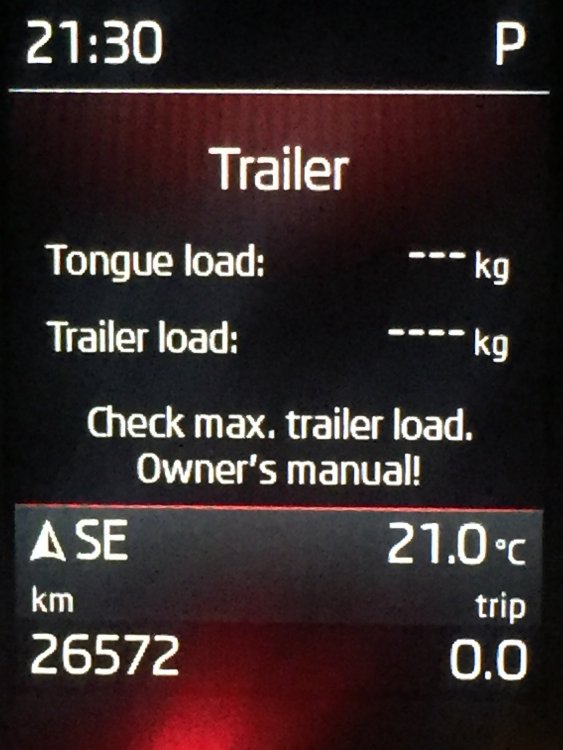
Menu is always accessible. In the MIB. Car→setup→instruments I have DCC indeed. But no loads are displayed when I'm towing.
-
Here is the english version
-
I have this too. You can switch off this menu in the mib. But what i would like to know: how to set these numbers to the values the towing hook dictates.
-
And:
-
Its for a superb but i figure the coding is the same: not sure if you can display maps in the VC with a bolero.
-
It will be the ability to switch maps. Thats needs to be off for Columbus and on for amundsen.
-
So what was the issue with the maps?
-
Just to be sure where to look. Do you have a LHD or RHD car?
-
I have the same thing with my 2.0 diesel. I only hear it with the radio off. The vibration sound seems more pronounced near the center airvents. I checked behind the columbus screen but could not find anything. It is so difficult to pinpoint. Please let me know if you find anything.
-
This will sound strange. But if you disconnect your glovebox light, is there a change in behavior? I have had issues with this. Once I replaced my glovebox light with a low power ledbulb my problem went away. I know the problem is not solved but so far it works.
-
It can be the battery. Mine failed after 1,5 years. Part of a poor batch. Also check your rear parking sensors. My dad had the same faults with his kodiak. One of the sensors was pushed slightly in. Hard to spot. After reseating it and erasing faults it came back to life.
-
the space in the yellow circle is also empty in my car. But i bought it used. So not sure if its also missing from my set, of just not supplied from factory
-
you will need that tool to pull a cover off your rear light clusters. After the cover is off, you can access the screw that keeps the cluster in place. You need to remove the cluster if you want to change a bulb.
-
-
The picture is not from the taillight. It is a generic picture from internet. My girlfriends a3 also had failing led lights. The problem was a broken solder joint. They are sometimes difficult to spot.