Tell
Members
-
Joined
-
Last visited
Everything posted by Tell
-
Further to that I enquired whether they had the engine on during the door open period, just ignition was the answer. I think you don't need ignition just either the door kept open or open and close it at 15 minute intervals. The last one how I do for mib2 high. Needs someone to experiment, I don't have a Mib3 unit. Just gives it a cleansweep of processing rather than roll back and restart positions.
-
Yes that's it, then you have to troubleshoot. That's where the LED activity pen drive come in since they flicker although not everyone uses them and get it to work. Luxury touch. If it doesn't work then the issues fall into - Not presented correctly in the direction structure. One level down in the route etc, has to be at the top, see the PDF. - if using a MAC then CleanMyDrive will be required to remove MAC garbage - no work to be done if the installed release is above the file release (that comes up a few times now with connected services as people try to update but they are ahead of the file release). Installed release is on the infotainment information screen YY.MM and you cross check with MartiniBs designation. If using the Skoda, VW and Seat download web files they may be older than currently installed in the unit. Basically the unit does a signature integrity check on the file presented before setting about the update. If it fails it won't tell you. For mib3 and mib2 high it is impossible to edit, re save or change the contents of the file and to proceed with installation. Why any poking about in the files must be quited and the use of a MAC without CleanMyDrive or similar will lead to issues. The first only the technically minded would do that. On the second MAC users not technically minded fall into that trap but it is flagged up in the VAG pdfs. Old chestnut with MAC users and mib2 high, now carried across to mib3. Having passed the signature integrity check it next looks at, is there work to be done. Current release in the unit verses release presented, if it is an update then it will start the update using rollback restart positions the same as the mib2 high does. That is where it can take a time unless you keep power onto the unit with the ignition off once the update has started, door opened at 15 min intervals or door open... least that is the method I believe will fool it to keep the update going. I've been told the door open method works in a gated community where the update was left running. Took 40 minutes. Normal car use can take several days, depends on what normal is.
-
Post 1 over here I posted all the MIB3 navigation PDFs for the three brands. All the same. https://www.seatcupra.net/forums/threads/updating-the-inbuilt-mib3-satnav-offline.472408/ You notice the engine must be running to kick it off then the process can run for a period... like days. I think you can turn the engine off and leave the door open or open it at 15 minute intervals. You may then get it in 40 minutes 🤨. Basically the process uses restore points so if it doesn't finish it rolls backs to a restart point. Use of the car can lead to varying times for it to do it, type of USB etc. If you can do the clear run at it. Although I've suggested the 15 minute x 3 trick and the door open... someone did the door open trick and did it in 40 mins... not a couple of days. So yes my current belief is for mib3 once kicked off the real processing is when the engine is turned off in that 20 min power down, engine on when doing it, it's multiprocessing. Well that's my theory. Clear as mud. VAG just say leave the USB in... and it will only update is there is work to do. Current release on your infotainment system must be < the this release. Currently 24.6. I think people do poke at the menu or see the file picked up. Seat users like a USB with a flashing LED so they can see data activity. There have been issues with USB A to C adapters that are not compatible with data. Probably cheap Chinese imports. You get the MAC issue where you have to use CleanMyDrive since that will fail the signature check. You do also need to place these files carefully in the route directory.
-
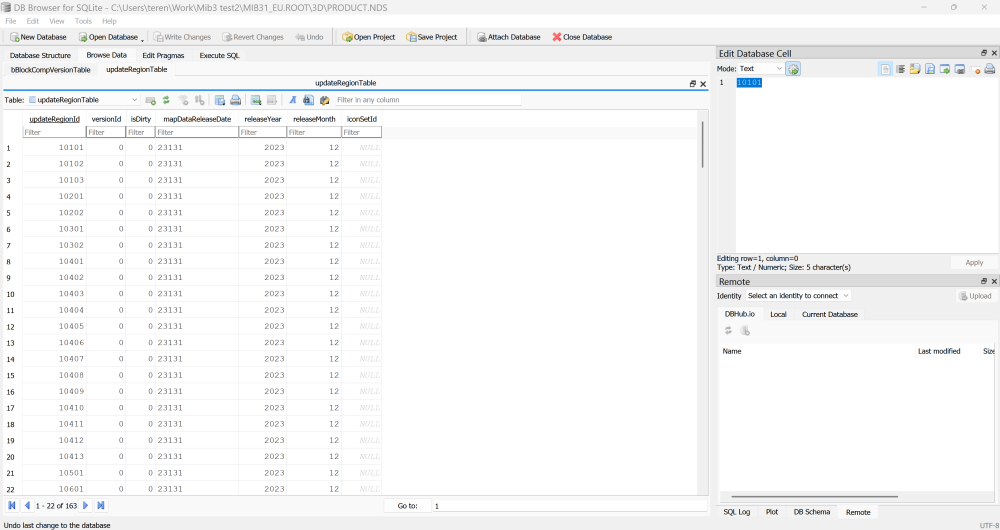
OK sorted that VW link which VW people are getting pointed to is older than the Skoda files: The all important file was missing when I used 7zip to unzip the TAR files. The built in explorer gave us \MIB31_EU.ROOT\3D So we could use the @c34 magic on it... take away use the built in Windows Exporer but I reckon only @MartiniB and a few will be doing this checking.
-
-
I was going to give you the VW link https://navigation-maps.volkswagen.com/vw-maps/EUR_12PR119_FCT3WS-23131_Offline_Update.tar Using the @c34 method... I need a youngsters again🤣, I can't find that bit in the file to read YY.MM. That would be the cross check of the VW file verses the Skoda Still we got the Skoda one working now but a worked example to where that is in the VW file would be useful.
-
I can as well now but not 10 minutes ago not. It's MartiniB's first post on this thread. # ECE 2024.06 28 Gb version:{"major":1167777,"minor":24032,"build":0} Škoda portal: https://infotainment-cdn.skoda-auto.com/base/maps/OI_P129_EU_202448_Offline_Update.zip Files inside: 2024.05.24 Downloadable: 2024.11.18 Published: 2024.11.2? Basically, their file servers must have been down. MartiniB publishes the direct link rather than wrapped in a webpage.
-
It wasn't just me then. I filled in the contact form on the board for them to investigate. You find it in a search of phonostar on the board but won't open. Seat / Cupra drivers are waiting with baited breaths to see SE in the property elements in those files. What I have found out from Seat / Cupra mib3 people is that the connected services update via 4g have gone through, may be not onto the very latest release, but the one before, so it's the container descriptors that aren't used in online (ie. SE) to get them in the unit. Thus those people without connect services with a Seat / Cupra are frozen out of logo updates... in saying that I'm told the last release dropped out logos that were there previously, so a shabby service from VAG. People cherish their station logo ID graphics, wind up with mib3 over mib2 where users could add their own. We wait to see whether mib4 works any better... could be a winter read of the car manuals if the technical authors have written it up correctly. Bit like old computer mainframe manuals where the technical author says X, but it does Y. Generally in relation to languages.
- 51 replies
-
- amundsen
- discover media
- maps
- mib
-
Tagged with:
-
Well the only thing is they use their own wrappers on these services so the wrapper may be discontinued before 4g. Mib3 being the wrapper so it's how long that is kept going for connected services. Probably 2030 then you get a disconnected car 😉. That's the normal EoL being 5 years after mib is moved to the next release. Time will tell.
- 51 replies
-
-

- 1
-
-
- amundsen
- discover media
- maps
- mib
-
Tagged with:
-
Well this is the long thread on TMC with coding solutions on there Joek666 moved to connected services but was still having issues. Towards the end. The inbuilt connect services use specific providers for their SIM card so the thought was towards the end that the slowness of connected services if any were due to the provider Vag were using. Think they bought a dongle. Most of us recoded mib2 high to get the Inrix service or used older map for the Mib2 standard sticking with TMC. I don't think the firmware update is going to help you on speeding up connected services but there are threads around on the Briskoda site on this. Generally dealers don't update software free unless it's buggy. Infotainment units on mib2 tended not to fall into this category. Mib3 is different.
- 51 replies
-
- amundsen
- discover media
- maps
- mib
-
Tagged with:
-
Mib2 connect services continue least in the UK. Mib2 standard (this thread) TMC is getting flakey as TMC providers full out. UK Traffic Master pulled out but Inrix continued and a mod can be made with old maps for mib2 standard, current maps work with a mod. Ditto in France. That's on a thread here. Since you have a Columbus which is a mib2 high you just recode... see the other thread on loss of TMC. Basically as far as TMC is concerned. There are different providers by country. VAG supported specific ones so if they drop out of providing a service they won't show unless you take steps. Here Maps which is used on mib2 high is flexible enough to change the tmc settings. Mib2 standard you have to go back to when they were on Here Maps and not TomTom.
- 51 replies
-
- amundsen
- discover media
- maps
- mib
-
Tagged with:
-
Mib3 runs generally from models delivered from 2020. Some slip in, in 2019. Each MIB has a 5 year period then VAG is onto their next. Generally a 5 year level of support on navigation files but pull the rug quicker on other things. TMC where they didn't want to know about the service closing down, POIs etc. All mib2 stuff. Mib3 uses optional connect services with a payment delivered differently in different countries. Thus Internet radio is via 4g, traffic reports, firmware updates etc, if you don't renew the contract then it's like mib2 with offline updates. Navigation mib3 thread is this: Then @MartiniB has a radio icon update thread... which I have currently lost... hmm. Once you go offline by not making an annual payment you have to update the logos by hand. Useful for VW and Skoda, but Seat got left put by the VAG contracted logo providers. On mib3 satnav on this post I brought it all together on post 1 with the PDFs for the brands indexed. All the same instructions. You can read all PDFs if you like. 😉 https://www.seatcupra.net/forums/threads/updating-the-inbuilt-mib3-satnav-offline.472408/ Looks like if you have renewed all subscriptions you can sit back and enjoy. Yes 4g is build into the mib3 equipment.
- 51 replies
-
-
- 1
-
-
- amundsen
- discover media
- maps
- mib
-
Tagged with:
-
-
You will since 2023 means it's mib3. These are via connected services 4g. TMC is different. Not sure why these posts are on this thread since it's a mib2 navigation thread.
- 51 replies
-
-
- 1
-
-
- amundsen
- discover media
- maps
- mib
-
Tagged with:
-
That's April 2023 in a Mib2 standard. Old post when it went on TMC. Need the workarounds on the thread to get Inrix.
- 51 replies
-
- amundsen
- discover media
- maps
- mib
-
Tagged with:
-
The most recent offline is 24.6 which @MartiniB has posted at the top. Online services once you come off them there will be a delay of 6-12 months before you can do better with offline that is this thread, catching up process. I had asked where in these files was the release code, on this thread and a kind sole told me: This is really useful for us people that look across releases to study what each of the three main brands are offering, the files are interchangeable but not all are recent, for example Seat lags significantly in their offline free posted offer. (You do need a bit of SQL database knowledge to poke about in the files... isn't something you need to do yourself if you take what's posted up as is... as said more for us to audit what is going on. Under no circumstances attempt to save these files after poking about since that wont work and they are encryption signature protected. Look but dont change, same with mib2 high... thats answers your question on how do you know.) So MartiniB now takes a look using this method (I believe) hence he denotes the current one (which will change) as 24.6 tallies with the contents. Basically you have a freeze date, a preparation date, release date. The yy.mm tallies with what is on the screen in Mib3. The ECE information tallies with the previous mib2 high method of denoting the releases. The production cycle of map changes generally means it takes about a year before new items in Here Map files get released. Online has an edge of 6-12 months, you pay for that in the online subscription and convenience. Thus the short answer if you are at 24.8 you can't out do that by 24.6. June 2025 you will.
-
-
Generally the VW are better links... Skoda often messes up the zip process, whilst Seat have a siesta.
- 51 replies
-
-
- 2
-
-
- amundsen
- discover media
- maps
- mib
-
Tagged with:
-
That's the problem people have with turning their back on inbuilt systems. Head up display is now coming to the next generation least on Cupra but ofcourse using the built in system. Regeneration is aided by the inbuilt maps where you have regeneration. Vag needs to work to get the built in systems more aligned with standard navigation GPS systems rather than just making do. Not sure whether mib4 has the same limitations on stored destination as mib3 which is somewhat limited to mib2.
- 51 replies
-
- amundsen
- discover media
- maps
- mib
-
Tagged with:
-
Well that's the last release you need this one: They are TomTom sourced maps that VAG use for Mib2 Standard. The production cycle put a 6-12 month delay in maps but then if they have never been put on the map you won't find it. Cartography providers tend to keep on top of new highways sourcing the information from published industry sources and planning departments. Local new estates can slip through. The TomTom website allows you to tell them of missing features. The AmiGo app gives you real-time access to the database so if your missing road isn't in there then you better get cracking marking up where it's missing on their website. They are pretty good. There are cars going round but it costs them. You register and get a login if you wish to report missing features: http://www.tomtom.com/mapshare/tools
- 55 replies
-
- amundsen
- discover media
- maps
- mib
-
Tagged with:
-
You get a bit of that on SeatCupra. A poster puts the map file links up that were posted months ago, it happens. Self appointed experts. They don't get that the files are interchangeable. I tend to stick to 7zip with the drag and drop. The default file manager right click I find slower than 7zip which is the VW recommended one. Unzipping direct to the SD or USB I find takes much longer due to the bus traffic but some want to squabble about that as well. To HD / SSD then big chunks of data traffic to the peripheral rather than n'th many handshakes on the bus if you do away with the intermediate stage. Depends on the bus speed ofcourse. Skoda folk always plough their own furrow and take the high road 😉. Practical but not always right.
-
There have been instances where the contract runs out but they still get an update. Evident they aren't sharp enough to stop it. The process is to read off the cars yy.mm and compare with @MartiniB 's thread referenced rather than dive onto the Skoda site. MartiniB is telling you what you will end up with and those files generally are indexed and up before Skoda puts a web wrapper on them. Some of us have been playing this game for a bit now but we now know what yy.mm of mib3 you'll end up with before downloading them and installing them... it saves time, why I'd been asking for a knowledge guy out there to tell us where it was in the file, fear not MartiniB will do that, saves the sweat.
-
BTW @MartiniB is the resident expert on maps on the Briskoda site which he sniffs out and indexes on the audio etc bit of the board. The mib3 thread is here: Well worth checking it out from before June and before November. Detailed conversations get put there.
-
You don't need to analyse the files it's only the YY.MM which is of interest to compare with what's installed. These files are only for when you don't have the map services mib3 connect services contract. As MartiniB says standard practice of the Vag group is to release the map update twice a year offline, June and November. Freeze, production and testing means there is a delay. You get what you pay for. The online contract gives you monthly updates or take the free route of six monthly updates. The software decode is only for us people that want to compare files across the Vag group since at times VW is ahead of Skoda and vice versa. They are interchangeable. Seat is a bit lost on updates at the minute offline so use these.
-
Why @MartiniB posts YY.DD now. When you give up with connect services and use the free downloads like they were on mib2 on Skoda and VW... they are only applicable once you are past the one installed. Will take 6-12 months.