Tell
Members
-
Joined
-
Last visited
Everything posted by Tell
-
Well it's been known. Off eBay or Amazon you get what they are selling. On the Seat board people have stumbled with their bought firmware updates. I've referred them back to the retrofit seller and it's turned out it was the adaptor when I've chased them up. On this board they tell you to use the reversible ones if your port is usb-a only on the PC / laptop. That's on their guidance to map imports in mib3. Having additional bouncy connections won't help also an issue. Cheap enough to buy a reversible one for the job.
-
The map period changes yymm or mmyy whatever it is changes. Don't use an usb-a to usb-c adaptor once plugged in. Use a usb-c memory stick or a combined reversible one. That's another issue. Adaptors pass voltage not, data. That's come up on mapping and firmware updates of the upload into mib3 not happening due to the connection of a usb-a only memory stick via adaptors / cable.
-
It's a mib2 high. The coding should be set to 32782 Your current coding indexes groups of TMC providers. Online + VW TMCPro. Change to 32782 it brings in Inrix plus the kitchen sink... a group of others. I've closed down the laptop so can't paste them in.
-
I've tracked down @pcbbc seminal post with the logic in it for mib2 high. That json if you want to look at. Studying that shows the values to get it to Inrix for mib2 high as tabled. Tap the white area above the thumbs up gets you there. Page 20 》》 For MIB2 High… Replace 15 with 14 Replace 32783 with 32782 Yes, you will lose some services abroad when in Finland or Hungary. Of course you can code back to your original value if you ever visit there. For reference the TMC json configuration file for MIB2 are in the Mib2\NavDB\mapStyles_eu\0\default\x\navigation_styles_XX_EU.iso and look in folder Ti for file paytmc.json 《《 Hit the right bit below it takes you there. It's tri above. Thats the scientific method. It's the SetId that does the deed. Itis is Inrix indexes to those numbers without and with online. Your 72771 currently gives you online + VW TMCPro but not Inrix. 32782 is what Pcbbc said... not 32783 that you said. Wrong... my later career was on QA 🤣
-
Your Karoq 2018 won't be mib3 due to the 2018 date. The second check is do you see usb-a or usb-c. The latter is mib3, former mib2. If the latter (mib2) which it certainly will be from the date does it have an SD card for navigation, if not it's a mib2 high (columbus). We have to do that to split out the mod required. SD card mapping the modified files and old maps... specified above. If the maps are held on SSD it's the coding solution. Now @pcbbc did have guidance on what to put in. I'd change to the recommended on the thread if it's a mib2 high. There is a tree in the map files which pcbbc explained to me much earlier up which is where the numbers come from. Thats how he got that number. It's banding which is in the map files. You can use the scientific method and read the files or the experimental method and just try the recommended number. I'd have a nose up when Pcbbc came up with the mib2 high solution and how it went down on the Skodas. If however your system is running with an SD map card then it's not coding but changing the contents of the SD map file.
-
-
Standard has the SD card in it... not so low 😂.
-
Maps showing without a map card on a mib2, then mib2 high. Pcbbc is not a Skoda owner, a cherished Audi mib2 high owner where we hope mib2 high map updates will continue for some more years. I've got a Seat Plus which is Seat name for a Columbus. Pcbbc has a funny twiddly knob to do stuff I know that. MMI had to Google. Audi name for mib. This link is Audi centric. Needs updating. https://en.m.wikipedia.org/wiki/Multi_Media_Interface
-
They should do but the systems people are frightened users will make it work better so handicap it from user access. They haven't got the big resources of Apple or Google to produce systems that work well and lock them down so they aren't open so they can't be improved. They had a contract chasing down the mib2 enthusiasts trying to close down their distribution website. Corporate thing of managers not understanding IT. Connected cars of mib3 and the new system interface of MQB Evo which was like a pack of cards balancing. The VAG group resource VW to sort out the issues but leave Skoda and Seat till last. Not sure where Audi are on that one. Perhaps they never got MQB Evo. Personally I think diesel gate led to them skimping on QA of systems and that goes through till today and the current model range problems. Pretty daft thing to do to try to evade US pollution law with a diesel car. Americans aren't stupid so looked to see how they were achieving it. More science than anything else.
-
The other simple check: If usb-c sockets it's mib3 If usb-a socket, SD card slot and a CD/DVD slot mib2 if manufactured 2015-2019. 2020 saw mib3 introduced by Vag. Mib3 has a blanking plate in the glove box where you'd see the SD and CD/DVD slots of mib2. Then if it is a mib2 whether it's a mib2 standard or mib2 high. First uses SD for navigation. Second SSD for the maps. Columbus mib2 is a mib2 high unit. Each Vag brand gave it's own name to the standard and the high but generically standard or high, SD based mapping or SSD held maps.
-
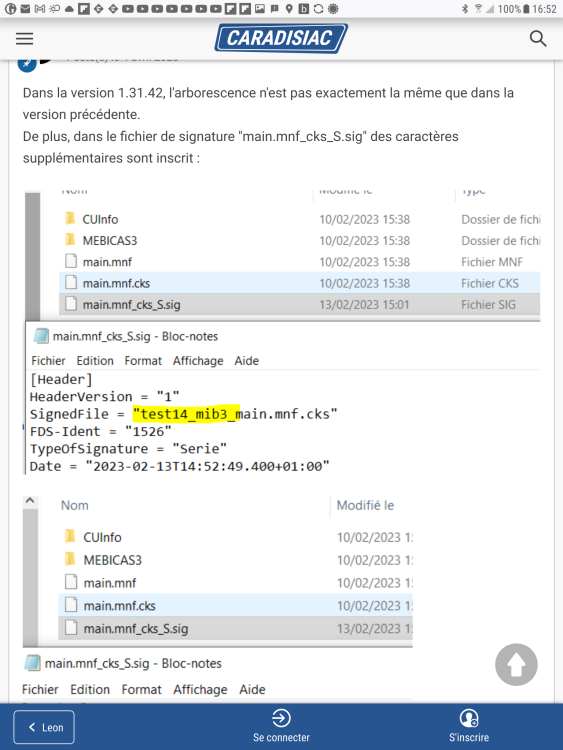
Thanks. Yes that signature file must link into what it puts into the unit rather than what it's going to do or something like that. Why it has a file name in it, that's not in the import. Seeing signature files is generally bad news meaning it's locked. They must have done a good job of that. Question now is whether mib3 files will be carried over into mib4 like maps, radio logos, if not the life expectancy of those to be updated is in question. Maps are probably 5 years or so last conversation but radio logos could be like the mib2 user POI import much shorter. Now you see it, now you don't as they sign off on it and pull the ability from their websites. Vag pulled official user POI import very early, soon after 2020 from their website leaving unofficial add on third party apps where signature checking was not enforced. Radio logo import could disappear quickly if the mib4 file structure for them is different. They haven't made it to Seat at all yet in update form yet (4 years on), whilst Skoda is via the unofficial VW route. Feels like a crunch point is 2024/25 when mib4 surfaces and whether the existing radio logo files for mib3 can be imported. If not the mib3 logo update work by Phonostar will probably cease if it's like previous history. That will be any easy check for VW and Skoda users who have current working files for mib3 at that time.
-
Think I'll stick with the ones loaded into the Mib2s (factory) we got with the supplemented graphics. They probably put those boxes around them to make them stand out. Feel free to try editing the VW out of the Mib3 parameter files and switch to SE, just to see whether a simple edit messes up the integrity of the files.
-
An uphill struggle for Seat customers @MartiniB. Phonostar don't reckon they are responsible for Skoda 🤔. Sadly we can't help you in that case. Although we provide our logo database to the VW Group, Skoda decided to update their download package on their own. Therefore, please contact Skoda directly. Kind regards Your phonostar team Must mean they expect Skoda to provide the file. As for Seat looking back at old downloads they did have the 'SE' identity in atleast one of their past files, they aren't in this release. Any experts on editting these files. Needs SE in place of SK for Seat in these MULTI.MNF file and MAIN.MNF I'm think if a Skoda user changed the VW part to SE and it still worked in a Skoda it will pass the test. Seat people with mib3 haven't had any success yet. Also this French link https://forum-auto.caradisiac.com/topic/566543-leon-4-maj-données-radio-et-logos-des-stations/ They were confused about it identifying a file that isn't in the download. I reckon that might be looking at where the file arrives in the unit to do the signature check hence why you don't see that file name ?. Any takers for the challenge of what is going on and whether if you edit a working file that a Skoda reads replacing the VW to SE in those files it would work on a Skoda on the import. That would test whether there is a signature check on the files being changed. Reckon that could be the element that the French Seat people were umming and arring about. There is a signature in that file but unclear what that file is. It could be that Seat mib3 people having perfected the art yet of reading off a USB-C into the unit.
-
In your part of the world you get auxiliary heating. That apparently is left off the Seat app. So where people in East Europe have fitted it themselves on Seats using Vag parts they can't access it remotely. Probably in Seat's Spain it wasn't planned as a remote access option. Where Skoda envy comes in from one Seat poster. I can see with EVs on a cold day you switch on the AC before going out to the car. People are managing to do that with Seats on hybrids / EVs, that's fitted to remote access. Pre-decing before you get in 👍. You'll be able to do your bi-annual navigation map upgrade on mib3 until they stop that. Probably doesn't cost them that much money to turn Here Maps data into the mapping upload. They would just be paying Here Maps a license fee as long as its not on a unit basis, it's just their internal / contracted out processing. Reckon they would keep the 5 years on that.
- 98 replies
-
-

- 1
-
-
- amundsen
- discover media
- maps
- mib
-
Tagged with:
-
Nice to have the reassurance but then mib3 navigation was a backwards step to mib2. Hopefully it might get sorted in mib3. Limited favourite destinations that can be stored. No POI import. I use the old Skoda trick of import destinations in as POIs and then save the POI as a destination in mib2. A bit of work with x,y coordinates and POInspector but once saved they are in. Useful for journeys, stopping off point etc. Google POIs are hit and miss. So you can turn mib2 into an old fashioned GPS system. TSR integrated which its not if using Google. No faffing with cables. The question with mib4 is how much they will change the navigation import file as they did with previous mibs.
- 98 replies
-
-
- 1
-
-
- amundsen
- discover media
- maps
- mib
-
Tagged with:
-
Although Discover Care was a bit of a disaster package so might have been pulled for that. I'm not going to do the maths for VW but it will hinge on when the last unit was fitted plus 5 years. I reckon mib2 standard people with the UK TMC DIY fix can soldier on another 5 years with old maps to 2030 (maps ~8 years old by then). Mib2 high with any luck we get a couple more years based on the Audi TT on @pcbbc reckoning and UK TMC fix. Nice EV will then await for 2030. You don't need to change your car that often 😇. My thinking will last out to 2030. My normal model of making cars last out. Mib5 for me if VAG doesnt go under or if the local dealer doesn't change to BYD or something. Seat have this Cupra bump in the road as the Seat brand is scrapped for Cupra, what will happen to dealers. I could see some that don't get relabelled Cupra will walk on the sales side. The added dimension that Seat owners have on the next model.
- 98 replies
-
- amundsen
- discover media
- maps
- mib
-
Tagged with:
-
TMC is only the UK and France as far as I know. Going to become more clear I reckon when they put a weblink to the mib2 high map and not mib2 standard - are they waiting for the mib2 standard one to come out of QA. If no link to either then it would appear they have done their discontinued + 5 years calculation for the mib2 standard and high but as Pcbbc said it should run on longer for the Audi TT in mib2 high form. We'll see.
- 98 replies
-
-
- 1
-
-
- amundsen
- discover media
- maps
- mib
-
Tagged with:
-
Well it depends whether you have a map card in it, Discovery Media or not which is the Discovery Pro. The Pro uses an SSD. This thread is for the VW Discovery Media if it's a VW. Your existing map release will be xxxx the other check, 4 characters. The Pro is MartiniB's other thread. 350 is the latest. xxx, three characters. 2.5 whether it's a Discovery Media or Pro use the same maps as 2.0 subject to type, SD storage or SSD.
- 98 replies
-
-
- 1
-
-
- amundsen
- discover media
- maps
- mib
-
Tagged with:
-
Thanks. Ive been told the Seat mib3 part identifier is missing from the January 2024 file, but whilst the Skoda one was missing from an earlier release as you say. I had noted moans on the net about that. So you came in after the Skoda ID went in the file and it worked. Those part indentifiers you can see in the firmware update files least in mib2 which is how the guy who just said it's missing to me on the Seat side knew, probably. So it appears you have to look at the firmware, examine the radio download logo file then tell them the part number is missing. Nag 1. Nag 2 is to get the missing radio logos put in. I here by elect Seat people with mib3 to nag them to make that file useable. It feels we might be getting somewhere.✔️
-
@MartiniB did you do the nag cycle on that email address to get your radio station logos added ?. How many months did that take from when you started to when they got added in the release. It's the RDS PI code I believe that the unit looks up in the SQL database and pulls out the Logo.... ditto DAB. No data entry in the SQL database, no logo. https://en.m.wikipedia.org/wiki/Radio_Data_System I see elsewhere on the net in mib3 once you do a manual radio logo update it then offers you the over the air one of the same. Probably a programming bug. They may have fixed that now, but something which should not surprise. I see Phonestar also offers internet radio apps one being a Google TV app, standard phone apps and broadcaster software apps. Thus it should be no surprise to them to see they have anomalies between radio stations in one service they offer as an internet stations and what is missing from the VW database they maintain for VAG. It's that correction cycle that is the key.
-
Yes it was rookie error of copying @Pcbbc version 2 mod unzipped into the route directory of the card rather than a copy and replace within the file structure of the maps directory. Thus it was only seeing the original files not those which were deposited to one side. Being a Seat you had to do the workaround of moving forward the overall.nds file. That had been done why the V14 maps were working but not the mod. Then it instantly worked once the mod files went in the right place by an overwrite copy. Nothing special about mib2 standards Seats other than the overall.nds workaround copy if the updated maps are newer than the original. In this case they were.
-
Great. I reckon you search under the missing logo station in media.info and in the example I did below. Lbc-news. You give them the link to each station missing a logo. The media.info site has the station logo shown under "other" (if you go in at the right page.). https://media.info/radio/stations/lbc-news You list the station links off and tell them you need the logo put in to the phonestar database for the VW. My write up for the mib2 manual method where you can do it yourself was here: https://www.seatcupra.net/forums/resources/radio-logos-mib-2-only.43/ That was the old mib2 method to fill in missing logos that were not in the VW published database. Now you look the link page up to the station and say get it done to phonestar since you can't do it yourself.
-
In the meantime I think it's what MartiniB said in the post: "Škoda's users don't have to contact to Phonostar" . . . life hack, if you have any questions to [email protected], write them as VW user You become a VW owner and tell phonostar of your missing radio stations. Hope they take that onboard and it gets put into a future release. Whilst I'm cross posting between Seat and Skoda sites the script to get the media.info ones was here... probably needs editing now. https://www.seatcupra.net/forums/threads/station-logo-downloader.465980/ A clever clogs could take that output file and compare with the Mib2 ones which we can assume are the same as the mib3 then tell phonostar the missing ones as a VW owner naturally 😉. Something a youngster can do in no time....
-
They are officially posted June and November each year. Sometimes early, sometimes late, but generally available via direct link that is identified ahead of the web page being written around them. VW Mib2 standard ones run 6 months ahead of Skoda ones so you are always better off using VW files. Basically that is the golden rule use VW over Skoda or Seat. Currently, no sign of the VW mib2 standard ones, which is either due to a production problem or the dreaded end of life (EOL). End of life is 5 years after the last production car was shifted. Slight mute point when the last mib2 standard was sold. 2019 would sort of suggest hard cheddar. Mib2 highs on the other hand were still being fitted in Audi cars, the TT for a couple of years more. Once the VW navigation update page is published for this round which is late, although we know the mib2 high files, it will give a good idea. There have been production issues before. If June comes and goes without any news on the mib2 standard then that will be it.
- 142 replies
-
- columbus
- discover pro
- maps
- mib
-
Tagged with:
-
Afraid, the Mib3 one is protected with a password. Mib2 isn't. It might also be signed... goes on about that in the files - different from check sum. Silly old VAG wanted to protect their stuff but delivered something not finished with gaps in it. Better to have open systems. Mib3 is nearly 5 years old, and hacking isn't that great at the minute. You'd have to look at when mib2 was "broken" in VAG terms against Mib3. Mib2 is fully opened up now by hobbyists, giving user flexibility. On the logos they just haven't done their work, VAG / Polestar. Lacking QA in the finished product and because they were frightened of users getting into the unit via the back door, didn't build user logo import into it or user POI import. Result, you can't backfill missing logo's in the files that are supposed to be complete, which you could legit ably do in mib2. I will continue till mib5 comes out or abandon VAG. See what mib4 is like when it appears this year.