




TheUltraRunner
Members
-
Joined
-
Last visited
Everything posted by TheUltraRunner
-
It's update automatically over the air. Once update is available for your car, you will get a notification message on your screen.
-
My climate setting stay always the same when I return to the car next time.
-
And here goes my theory. Till now all cars without a letter at the end of the device part number had software version 16xx.
-
Can you share the list? I'm running 1788 version and beside occasional rear side assist error and no internet connection, everything is running perfectly fine.
-
1803 version is an upgrade for the 1788 one. And needs to be installed by the dealer. A few people already reported that upgrade to 1803 version has eliminated the faults.
-
Ahh ok. I don't have any other suggestions since I'm not using the satnav that much.
-
I know it's a long shot since your primary language is also English,....but what are your language settings of the system? I had the same behavior with voice control when my system language was set to Slovenian which voice control doesn't support it. I hope they manage to solve all your issues. For the 1788 SW version there is already a never version available. It's 1803. But I'm not sure if it's already available for general release. I know some of the new cars already came with it and some "old" cars were also updated with it as an "emergency" update.
-
Thanks. So we actually don't know what was updated. I'm pretty sure the main SW was not. It could be they just updated certain car's modules. But not the whole system.
-
Who knows how these updates really work together. My assumption is that they work like on regular computers having different operating system versions with different drivers for each HW component. And with each OS version (in our case it's car's SW version) you also get new updated drivers for each HW (in our case it's car's modules). So as you said, if you get an SW update from 1788 to 1803, you should (probably) also get updated SW for car's modules. The question is, if car has one of the earlier HWs with the 1668 SW, can it still get the newest update for the Matrix lights (for example) module as the car with 1803 SW.
-
@krsone01634 can you make a pic of the car's system info? I think this was already discussed here on this forum. HW units ending with letters A, B or C (or no letter) have SW versions 1668 (some also report 1688). The units ending with D and onwards, have SW version 1788. The latest upgrade for 1788 version is 1803. For 1668 version there is no know upgrade to this date (at least to my knowledge). So it would be really interesting to know what did they actually update on krsone01634's car. Is it possible they swapped the whole unit? I did notice some posts from people saying Skoda has swapped their computer unit which has fixed all their problems.
-
1803 is software version.
-
Sorry, yes. You are correct. I mixed it up with the rear DRL lights.
-
Also, today there was a show on German TV about the SW issues in the VAG group. I hope this will push them to fix the issues soon.
-
It is possible to enable memory function for Lane Assist. But you need to have access to Skoda servers to obtain SFD token in order to change the settings.
-
As other suggested, go for it. My VRS was build in November and I'm having almost zero issues. Before your car will be delivered (current waiting time is between 4 and 6 months), there will be even more updates which should eliminate the remaining issues.
-
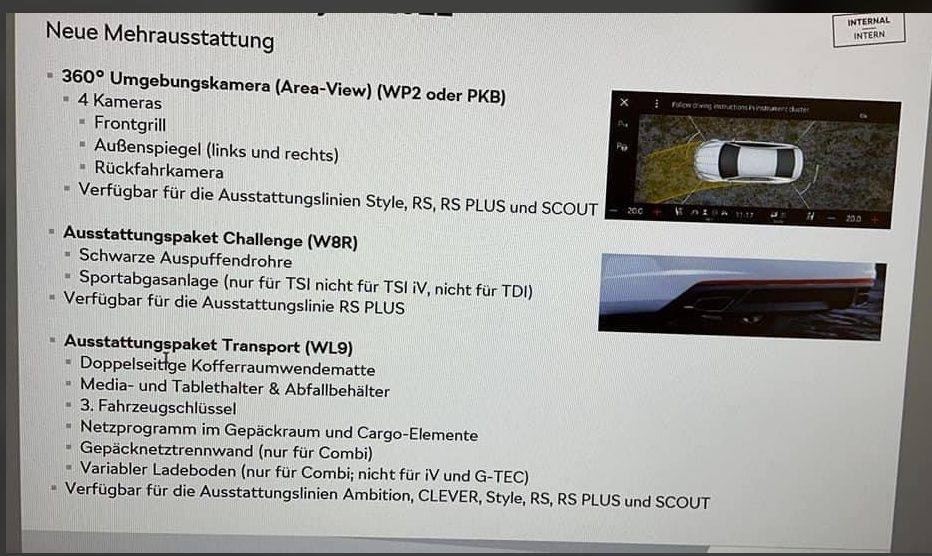
This is coming to German market. - 360 view camera - Challenge package (black exhaust tips + sport exhaust) - Transport package (double side boot floor mat, media/tablet holder, waste bin, net package, variable boot floor)
-
Doesn't look like mk4 infotainment on his picture.
-
I would says this internet issue has nothing to do with the general SW version of the cars. I have the 1788 version and since the last fallout about two weeks ago, my internet connection has been just fine.
-
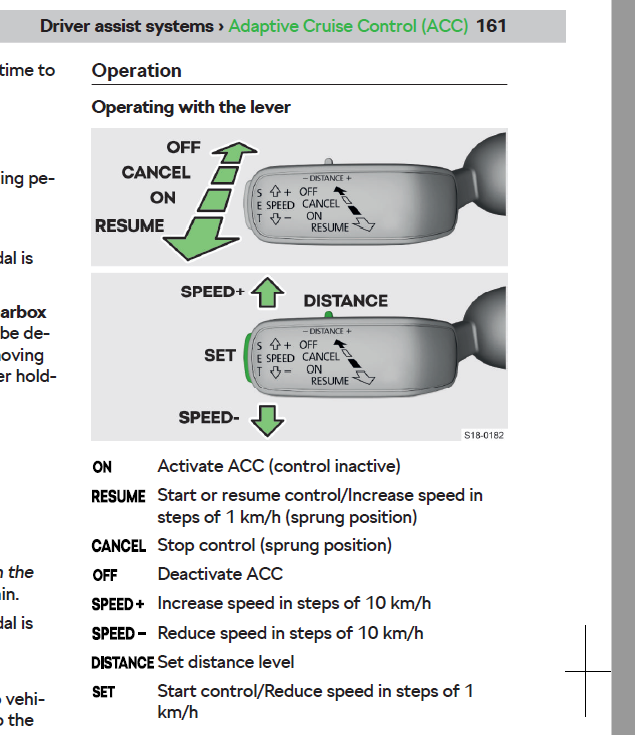
It's the same as mine. And I have ACC.
-
This is a stick for the ACC. So it looks like your car have it but it doesn't work. Your only option is to go back to the dealer to properly check and/or reset the car.
-
Did you try to restart the infotainment system? Long press (cca 20s) the system on/off button and wait for system to restart. If after the restart the ACC option still gives your "Sorry this function..." message, I would suggest going back to the dealer. The same with Mode button. It should bring up the screen for selecting driving modes.
-
Congrats! Don't forget to post a picture in the picture thread. What's really interesting to me is that your car has the same HW version as mine. Although it was build half a year later.
-
I think the only two things to buy currently in the shop are light assist and additional colors for ambient lights.
-
Hi @coxa Were you listening to the radio when you try to set the subwoofer? Try with some music over USB port or over bluetooth and change the subwoofer setting again if you notice any difference.
-
@Jmagee Ohh so jealous of your trip. Been there last year for vacation. It was superb! Unfortunately I had a hire car. Renault Capture.

