ApertureS
Resident Member
-
Joined
-
Last visited
Everything posted by ApertureS
-
Why has the text got to be so large? It is pure guess work without a fault so guessing there is a SCR Efficiency fault code then telling them to delete the DPF (which is not at all related to the function of the SCR Cat or any NOx trap system) is not only illegal but just covers up any underlying fault rather than actually resolving it.
-
Why was the clutch replaced? have you checked for any fault codes?
-
You got any part numbers for any of this cause I don’t think I’m yet to come across a mib2 system without a cd slot whether it’s a Columbus or Amundsen system
-
Sorry I don’t have any photos at all that would be helpful as didn’t take any when I was doing the work
-
The mib1 and 2 units have CD slots. The only ones that won’t are if you have a mib3 or a non glovebox control module unit on an extremely basic spec model.
-
Then you will want the following 2 parts; 565955663J Hose 5TA955993 Washer Jet for RVC The hose has a T piece and connects at the rear washer jet and then runs down the side of the tailgate to the camera. The Washer jet requires a small 3-4mm hole drilling in the rubber part of the camera body (there is an obvious marking on the outside of the rubber), put the washer in from the rear and plug the hose in. All sorted.
-
Why are you contacting Sinclair Skoda, you have no legal contract with them as you didnt instruct or pay them to carry out the work to your car. If you purchased the vehicle from Bristol Street then that is who your legal contract, warranty and terms lie with, They are the ones who have to resolve it for you and if they had work carried out by Skoda Sinclair then they have to deal with that, not yourself. and also there are timescales that must be adhered to before going down any legal route as it could be determined you didnt give fair or reasonable time - So contacting them 24-48 hours ago and then saying you will go down the legal route is not deemed to be reasonable and generally if you have raised an actual complaint they have up to 8 weeks to respond.
-
What is it you are trying to play from the CD? There is the CD player in the glovebox that will play certain media types but if you mean a CD changer then there is no option and you would be better off putting all your media onto a SD card/USB drive.
-
Yes it is the same as how it works on most VW/Audi/Skoda cars where when you wash the rear window it also washes the rear camera lens. Where is your rear window washer, is it in the wiper arm going up or coming down from the centre rear brake light?
-
If anyone is after a replacement tailgate button if I do have a few for sale and can post them to you easily enough. Drop me a message if anyone requires ones
-
Funny you ask - I’ll actually be removing my genuine camera shortly with lens washer setup and this could be transferred over to your vehicle. (Nothing wrong with it just upgrading to a different tailgate) EDIT: Ah you’re in Australia, if you wanted to drop me a PM I can supply the part numbers required to carry it out yourself including modifying your current camera (involves drilling a small hole)
-
Hey there, it might be a bit out of your way but I’m based In north London. feel free to get in touch, it may be worth the drive as my prices generally are very competitive and I always strive to do a good job for my customers Skoda Retrofits in my signature if you did want to look into me a bit more
-
PM received thanks
-
Sounds more like they aren’t able to diagnose the car properly and instead are loading up the parts cannon. the exhaust back pressure valve is just a throttle body in the exhaust to aid with dpf regen, did they fit a genuine part? chances of it being faulty are slim (but not 0) so really I’d be getting an auto electrical to check things over properly. (also hope you haven’t been charged for spark plugs as you have a diesel and there is no need for a spark of any kind, compression ignition, not spark ignition.)
-
The fuse for this is behind the glovebox. that fault code is hard to tell without a better diag tool but you need to check power, ground and for a lin signal at the rear module, if you have these then you need to be looking at replacing the module
-
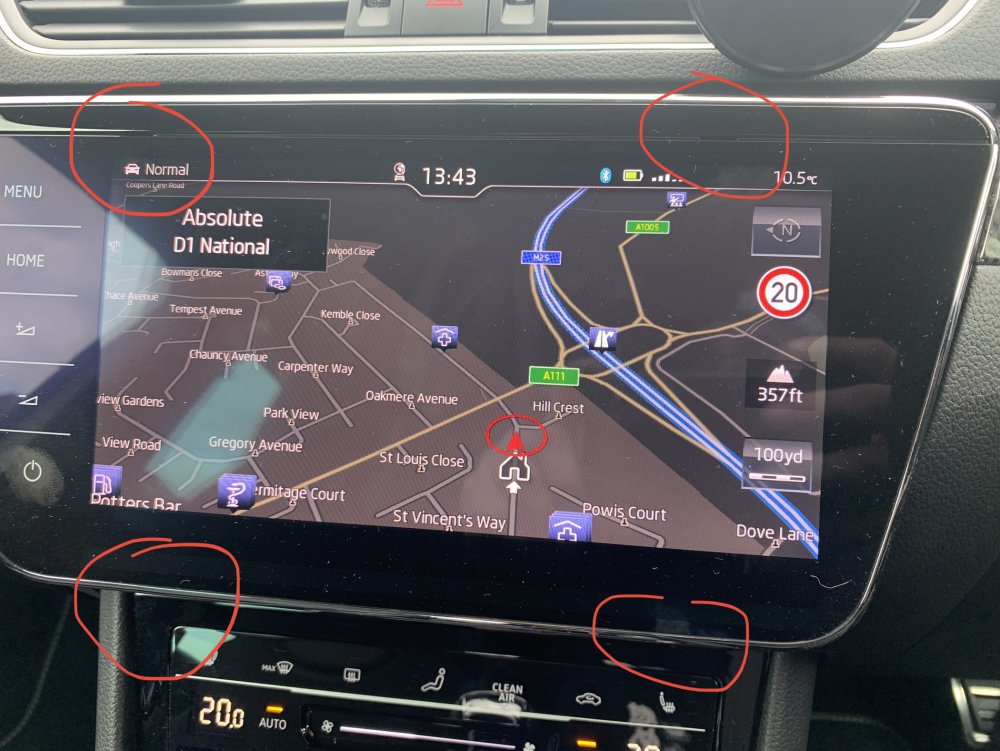
Well now you’ve described it in a bit more detail and made clear you haven’t removed the glovebox no wonder you can’t run any wires. remove the 5F and then the glovebox with 6 torx screws and you’ll have loads of room to run the wires. You keep asking the same question and have even said others have said the same as me to remove the display - yet we must all be completely wrong? I’ve described how to do it exactly, it won’t be any different for anyone else when there is only one way to remove it. see the attached photo, there are 2 holes at the top requiring the keys to be inserted and there are 2 holes just below the gloss display that require the other 2 keys.
-
I have told you exactly how to do it correctly which is based of me doing many of these and also Erwin (etka is for parts, not repair manuals). your keys, have you got a photo of them? there are 4 slots, please look harder, 2 near the top corners and 2 on the slanted bit of plastic below the screen. I’ve already told you the screen has NO most connection at all, it uses a LVDS fakra connector for image display and is not on the MOST network at all. The standard cockpit does not have a MOST connection either as it is not required. I am more than experienced in this task as I do this professionally on a day to day basis so if you wanted to travel down to north London to get your work carried out by someone competent and reasonably priced please let me know. otherwise the information I’ve given you above is accurate and covers everything you need to know
-
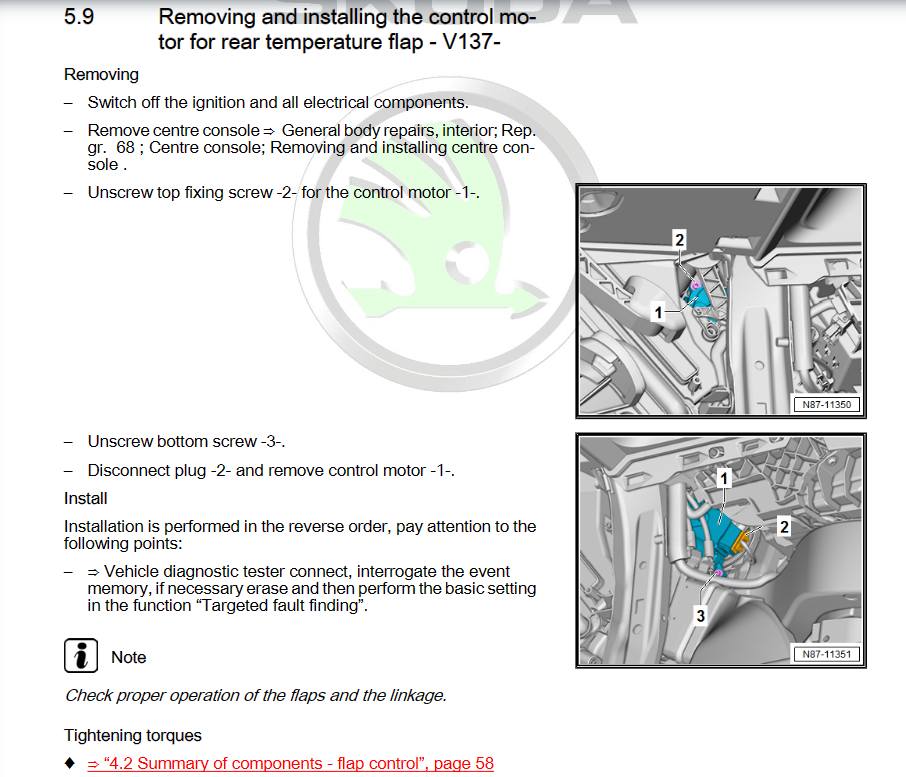
See below; as you can see, although its a very short guide, the second section being remove centre console is a big one. The motor for the temperature control at the rear is located almost directly behind the heater control panel itself but cannot be accessed without removing the complete centre console. (Keep in mind this is far from the worst one to access so count yourself lucky you dont have to remove the entire dashboard)
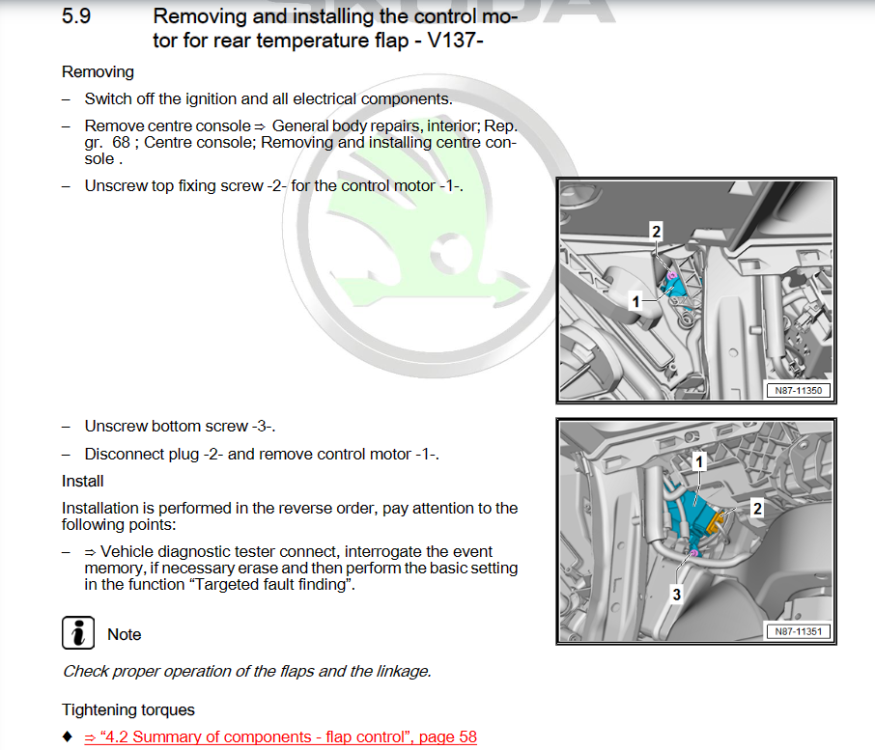
-
Make your own using self amalgamating tape maybe? Or you could cut the plug off, run the wire then reterminate the end but youd need the correct tool to do it. Also do you have an actual size for the ID and OD required?
-
That will be the blindspot monitor/radar
-
This isn’t it. It fits on the top of the rear splitter with 2 visible connectors Your diagnostic tool isn’t giving much detail and this is where the genuine tool or genuine vcds gives more details to assist.
-
If you look under the rear bumper on the offside, above the exhaust you should see a small box with 2 plugs, confirm both plugs are plugged in securely. If they are, you will need to check for the power, ground and LIN signal at this plug.
-
Ive only just fitted 4 new shoes to the car, 55k miles and 5 years on the pirelli P7's. I think thats brilliant for a set of tyres. Giving bridgestone turanza T005's a go now
-
Please tell us exactly what tow bar has been fitted including details about what wiring kits have been fitted. When you say he has the 'correct scanner' what do you mean by this? What diagnostic tool is he using - if any? Do you have a copy of the fault codes at all? What coding has already been carried out?
-
So after a year long court fight over a windscreen company replacing my windscreen and causing thousands of pounds in damage and they finally settled last week and it’s all resolved. anddddd yesterday the windscreen gets hit by a stone and cracks again!!!! here we go again