RobL50
Members
-
Joined
-
Last visited
Everything posted by RobL50
-
If you are buying it as an approved Skoda used car make sure the dealer has upgraded the software. Mine had not and queried the issue until I sent them a picture of the software status screen. They then agreed to upgrade.
-
I bought a second hand PHEV in February. I fitted a Garmin dashcam powered off the mirror USB C port. The car came with a 10A charger cable which plugs into a domestic 13A socket and a cable for a home charger. I use the 10A cable and can charge the car in about 6 hours. If I use the 'time of departure' charging option then I have a range of 34 miles, if I charge it and do not use it immediately then I have a range of 29 miles.
-
When nI bought my second hand Octavia in February the salesman confirmed that they had done a factory reset and all the driving data had been zeroed.
-
Thanks. I have just had a minor OTA update and I agree that 'More Info' gave that information. When I am offered 1969 I will accept it and leave it to workout how to download and install it with my short runs (it is a PHEV).
-
When the vehicle is stationery select the video and press play. When the sound starts pull the tab on the left of the screen to the right to see the video.
-
I have a question about the OTA updates. If I accept the 1969 update when I am on a short journey what happens when I finish the journey and switch off? Does it continue? Does it pause and then restart when next switched on? Does it crash? I was offered the update today but deferred it as the journey was only 2 miles/
-
You could just temporarily disable WiFi on the car or your phone. You should then be able to connect via a USB cable.
-
Interesting, thank you. I had seen the VW announcements and was thinking that an Octavia PHEV with 60 mile range would be ideal.
-
I see that the PHEV version has been dropped which is a pity.
-
I understood that map updates were part of the Infotainment option at £35 pa. I did not go with this and had no problem downloading and updating the maps myself.
-
In my case I was able to have it updated by a different branch of the dealer that was more convenient.
-
If you bought it as an official used SKoda then the dealer should have updated the software to 1941 (or the newer version). Mine had not and I had to insist that they updated it as per Skoda's web site. If you bought it elsewhere I suggest you get it updated to the latest software either at a dealer or following instructions on this site.
-
What happens if you use the lower power cable and a 13A socket? If the problem continues it is probably the car, if it goes away it is probably your charger box. (If you need to use a 13A extension lead make sure it is fully unwound / uncoiled).
-
I bought a used car and the salesman recommended against Skoda Connect. I looked at the options and considered the free 1 month offer to update the navigation but updated it using the download files. I do not see any great benefit for my use.
-
It is the tab on the left.
-
I have it in stock at Amazon UK. This is the cable I use with a Garmin DC2.
-
Mine did not change automatically this morning.
-
I haven't used it at night yet.
-
I bought it from Amazon: 0.3m USB C to MICRO USB, OTG cable, charges Micro USB devices, angled plug, data cable, charging cable, USB 2.0 : Amazon.co.uk: Electronics & Photo I bought the version with the 'right' handed micro plug for my Garmin DC2. If I had ordered the cable with the 'left' handed plug I could have mounted the dashcam slightly higher on the windscreen.
-
Thank you. Very interesting.
-
I see you have found my thread on this.
-
The socket in the car is USB C and I have a small USB C to USB A converter which I used. My USB stick (type A) was formatted to FAT32, I copied the files over after unpacking them and then left it plugged in with the ignition on for an hour. I suggest you use a 64GB U&SB stick if you need to buy a new one. I use the same converter to pug my phone in for Android Auto and another memory stick for music so I knew it worked.
-
Thank you. It had to pass the wife test.
-
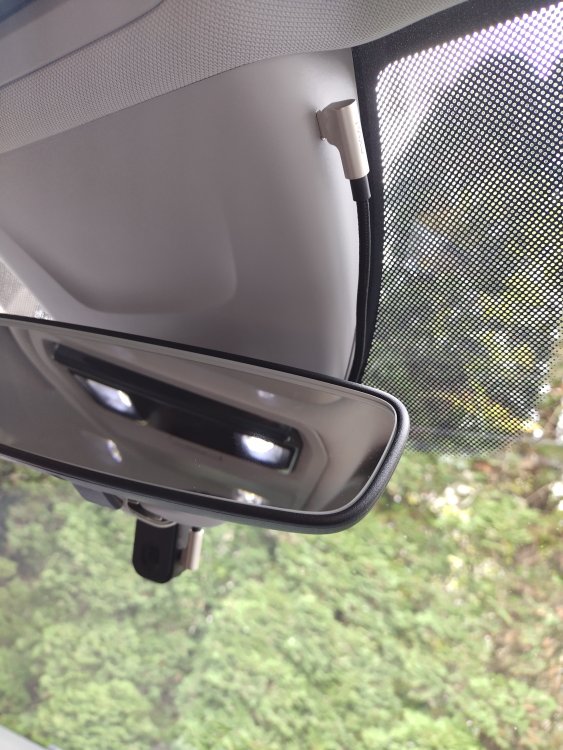
Here is a picture of mine:
-
I have a Garmin DC2 connected to the power socket with a 30cm USB C cable that has a 90 degree elbow. The cable is tucked into the small gap between the windscreen and the mirror / camera housing so it is not visible. The dashcam is then fitted on the passenger side and is hidden from the driver by the mirror. The socket is powered off when the car is switched off.