softscoop
FREEDOMLite
-
Joined
-
Last visited
Everything posted by softscoop
-
I also agree. I had a full set of CC2 fitted just a month ago. They are much quieter than the Toyo 205/55/16 tyres that were fitted to the wheels when I got them, and in the wet weather they have no problem with standing water, wet performance is great. Not had a chance to try them in any snow yet, but given previous reviews I shouldn't imagine I'd have any problems. Yes 16" wheels don't look quite as good as 18s, but that's about the only drawback.
-
Can't say I've ever heard of a pure drive. I assume this is a car for sale that you're looking at? Post a link to the advert and we should be able to work out what trim and spec it is.
-
That looks exactly like how the switch went on my old 55 plate Octavia. I wonder if it's my old car.
-
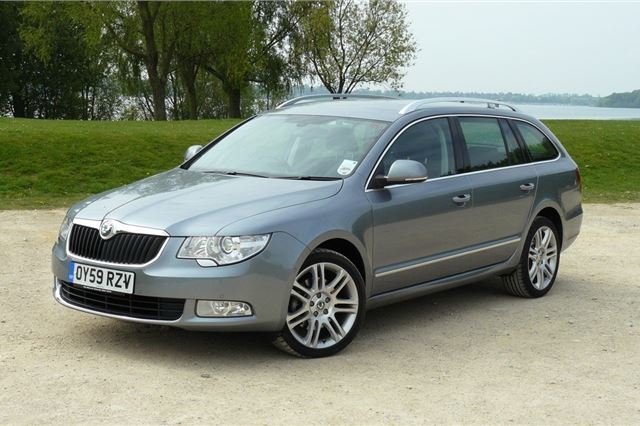
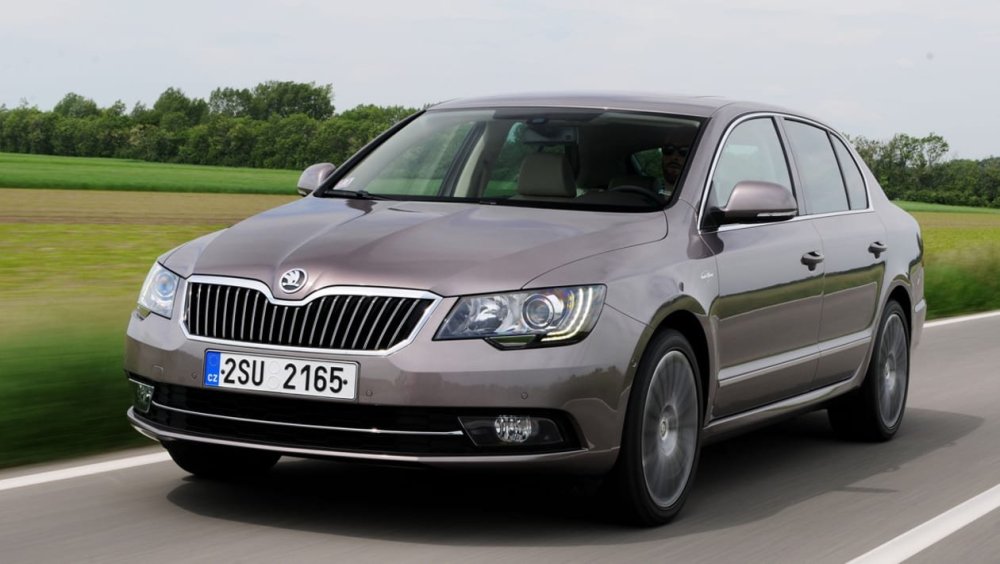
All cars with xenon headlights have headlight washers, and all superb have them at the bottom of the lights. Pre-facelift: Facelift: The Facelift was released around June 2013. The facelift uses a different xenon bulb to the earlier model.
-
If your superb is a pre facelifted model then yes. Take your old bulbs out, remove the plastic retainer clips off the old bulbs, put them on the new bulbs and clip the new bulbs in.
-
These are a very good price on Amazon currently. As you are buying from Amazon directly you can guarantee they will be genuine osram bulbs. As said, replace the pair of them at the same time. https://www.amazon.co.uk/dp/B00HWWX7R2/ref=cm_sw_r_apan_glt_i_5MMAG9CC7BTWGSJV78N1
-
The only real way to know what the car thinks is wrong with the parking system is to scan it with diagnostic equipment. It could be a number of things.
-
Having a look on ebay, there don't appear to be any listed directly. There are a couple of Elegance spec cars being listed as breaking for spares however. https://www.ebay.co.uk/itm/324348832512 Drop the seller a message for a price.
-
Is your superb a pre-facelift RHD uk model with xenons? What year is the car to be sure?
-
I will take the untested 3C8 bluetooth unit if it's still available. PM sent
-
Thermostats can stick and unstick themselves. Did it take long to reach 90?
-
Couldn't agree more. They are much much brighter than the Philips bulbs that were in before. You can really see the AFS shifting the beam pattern around as you drive.
-
Ok so I fitted mine this morning. I also gave the inside of the projector lens a clean with a bit of kitchen roll wrapped around the end of a thin stick. I could see a thin layer of dust being cleaned off the lense as I was doing it so that will make some difference. Instantly I could see the new lights were brighter against the wall, even in daylight.
-
I'd be interested to see how you get on with these bulbs. I've just bought a set myself and plan on fitting at the weekend. I'll also try and give the projector lens a clean as best I can through the bulb hole, as on my old Octavia that made quite a difference as how much light was output.
-
I remember you said something very similar when you bought your mk2 Fabia....
-
Nice to see you back Bryan.
-
Could be caused by faulty abs unit, break in an abs cable, faulty abs sensor etc. Scan the car with vcds or similar and it should guide you in the right direction.
-
The swing should have no bearing on the operation of your PDC. As you said it works with the swing on or off with the ignition on but engine off. All the radio does it look for the PDC signals on the car's canbus network and display as a graphic. A quick way to ensure 100% that your new radio hasn't caused this is to temporarily disconnect the swing and try again? Ultimately, you need to scan the car with a diagnostic scanner (vcds or similar) and read the fault code that will be logged.
-
As the radio you see is just a screen, I very much doubt there is even room for a cd mechanism in the front of the dash, even if you could get a head unit with a CD player. I suggested this CD player below for someone on the Karoq sub forum who had the same request. https://www.amazon.co.uk/Hernido-Transmitter-Rechargeable-Headphones-Shockproof-Black/dp/B091YP389H/ It seemed to do the job.
-
The parking system and the radio fitted are independent of each other. The swing unit you have fitted is too new for the PDC on your generation of Octavia, so you won't get the display. You should get the beeps still however. Get it scanned with a fault reader. Chances are one of the parking sensors is faulty.
-
From what you've described, it sounds like the car is getting a faulty ABS signal from one of the wheels, and it's this that's causing the ABS/TCS system to cut in and out. I had a similar issue with my Octavia when it had an intermittent connection on the ABS wiring. If it's stopping doing it when the TCS and ABS light are permanently on, then the car has disabled the ABS and will then be ignoring that signal. You really need to get the car scanned with diagnostic equipment to get the fault code. It could be a number of components that could cause it to have incorrect readings, so a fault read is the best first place to start to get an idea.
-
Does your car have ESP or asr? If it has esp the button will be a skidding car symbol. If it has asr, the button will simply say ASR.
-
What radio did you have fitted? If it's a non-skoda unit, then did you fit an amplifier before connecting the aerial cable to the stereo? The standard radio has an amplifier built in, and so you'll need to add an external one https://www.ebay.co.uk/itm/363125055951?mkrid=710-53481-19255-0&siteid=3&mkcid=1&campid=5338306792&toolid=10001&customid=mp-shop&mkevt=1
-
No problem. Hope you enjoy your Karoq
-
If you press the unlock button on the remote twice, does that unlock all of the doors?