varooom
Resident Member
-
Joined
-
Last visited
Everything posted by varooom
-
It's all within relatively close proximity in theory, so once you take off some panels you might be good to go. Without funds you cannot send it off to have someone else do the work, so prehaps it's best to wait a little.
-
Ok, sending in a few moments via PM
-
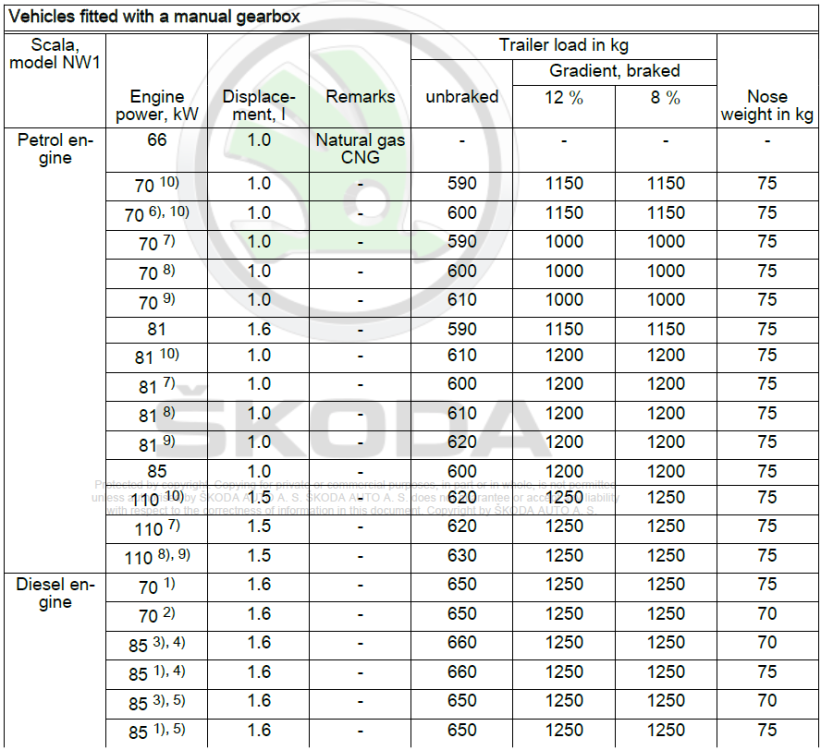
Hope this helps you in some way, here are the towing capabilities of the Scala Manual, as you can see, not a lot in it. The petrol engines have come a long way, and fairly capable units. I would go with @Warrior193 suggestion of going for the test drive, do it with an open mind and I am sure you will be pleased.
-
It's done very well for 8 years of use, and glad to assist.
-
Your next steps depend on your abilities to repair your car, don't open a can of worms that are hard to put back in (referring to pulling the car trims apart) So if you are good/happy with that sort of work involved, then you should consider making an account on erWin Skoda to get all your wiring diagrams and repair documents in PDF format. You will really have to let us know realistically what you are comfortable in doing 🤝
-
Acronym Soup of the day @toot
-
You can get a small bump to 0369 if you still want to update?
-
I think that is only available for MIB3 units, so probably not at all.
-
Yes J255 is your actual dash control unit with heater controls, so you are spot on. The gateway is usually not too far away, not sure without checking where that is located (it has in the past been on the centre tunnel near gearstick)
-
I wouldn't replace the compressor, until the issue with communications to the climate controls is fixed. You'll swap a compressor possibly for nothing. Either you will need to investigate the loss of comms, or get it off to auto electrician if not. Without functioning Comms from that unit, the AC compressor will never be commanded to function, so you won't have any working AC. p.s. if the gas levels are correct, I hope you don't have a dead 🐍 on board.
-
If the touch screen doesn't work, you will most likely not be able to perform update as you need to push button on screen. Most likely you will need to install a new (or used screen)
-
Welcome to the forum 🤝
-
You're opening Pandora's box here. 😆 OBD Port is a physical port that is inside the car, then you plug in VCDS which is an independently created piece of software, and a physical tool of the same name that can talk to the vehicle via the port. VCDS is a tool used by enthusiast's and independent garages will often have it. ODIS = Offboard Diagnostic Information System that is plugged into the OBD port and used by main dealers, independent workshops can also use this platform in some Countries. This is the dealer level tool, and top dog of the diagnostic platforms.
-
Maybe @pab567might be best to answer as you have done some hardware modifications. I think you could be updating firmware, but best wait for answer.
-
VCDS = VAG-COM Diagnostic System (Ironically, it's made of even more) VAG = Volkswagen Audi Group COM = Communication Port OBD = Onboard Diagnostic (not sure why they added eleven) Should be about right give or take.
-
Got some examples 😄Welcome BTW
-
The debate will always rage on, for a "dust rich Country" there is only a distance requirement of 120,000km, for UK this means it doesn't need changing. Skoda UK will tell you do it at 5 years to cover themselves, but if you prefer to play it safe, do it at 120,000km or inspect it.
-
-
Welcome, the are good cars that keep going for sure.
-
I shall send you something to try
-
Appreciate we are doing remote diag, so take anything with a pinch of salt. The one fault that could be causing trouble is the error between the gateway and the infotainment, This could be causing the gateway not to go to sleep correctly as it's not getting a response from the radio, or it's not able to send shutdown command to the radio. Can you explain the battery drain in more detail, have you got Voltages of the battery that you are taking? Has the battery been tested for health (age?)
-
Yes, not sure they would accept 20 Euro for a "quick" scan 😆 Well you might be better making a new thread to discuss some of the tool choices here... https://www.briskoda.net/forums/forum/23-diagnostics-amp-vcds/ This way some members can make recommendations on the Pro's and Con's of each. My only things I have heard about the "one-click" type solutions is they can make mistakes and then to unravel it can be harder (if you are making coding changes) but for scanning also, not sure on how they are with the manufacturer fault codes. Make a post is what I would recommend, then sift through the replies to ask more questions, or make an informed decision.
-
@Mikesuffolk Welcome to the forum, I would say that you may have cloned over any firmware corruption that might have existing on the original. 6276 is the latest AFAIK for that software/hardware combination. The only suggestion would be to see if it will accept the firmware being reloaded over the top, we did in the last few months have a few where their units suffered in this way, For two, loading on firmware helped them.
-
Your tag of his name didn't work. But I can answer this, just press and hold on your radio the Menu or Setup button (depending on what you have) for about 10 seconds, and this will only show you the firmware that is inside the radio. So your engine and all the other control modules will not be in the list, for that you still need VCDS or equivalent.
-
@Breezy_PeteDid suggest doing some live data logging I believe, I'd certainly make that my next step, it can depend on how often this fault occurs if you can capture it in a live data logging session. Intermittent things are the worst to locate.