
travs
FREEDOM
-
Joined
-
Last visited
Everything posted by travs
-
You're probably better off finding if there's someone in your area that could do it - doesn't have to be a Superb, any model with MIB2.5 probably has the same systems. Try the Audio, Electronics and Security Forum as there are the Map Update threads there so you could find someone in your area...
-
Its few and far between - needing either ODIS or VCP are the big pain points because the biggest likelyhood is that the numbers of privateers with access is tiny. Need to start perusing VW and Audi forums to try and find options I think...very keen myself so that's 2 of us and there'll be a few more I would have though - although if you've ever seen a Group Buy thread, the number of people who voice their desire to be included, and those that actually pony up when the time comes aren't the same...
-
Ultimately a DSG remap can be done on its own and should/will be effective on a standard car or a tuned car. No reason to do with/after an ECU remap except usually some sort of discount for the multibuy. Great for profit margin, but if cashflow timing is a thing, then you lose nothing by focussing on the DSG first.
-
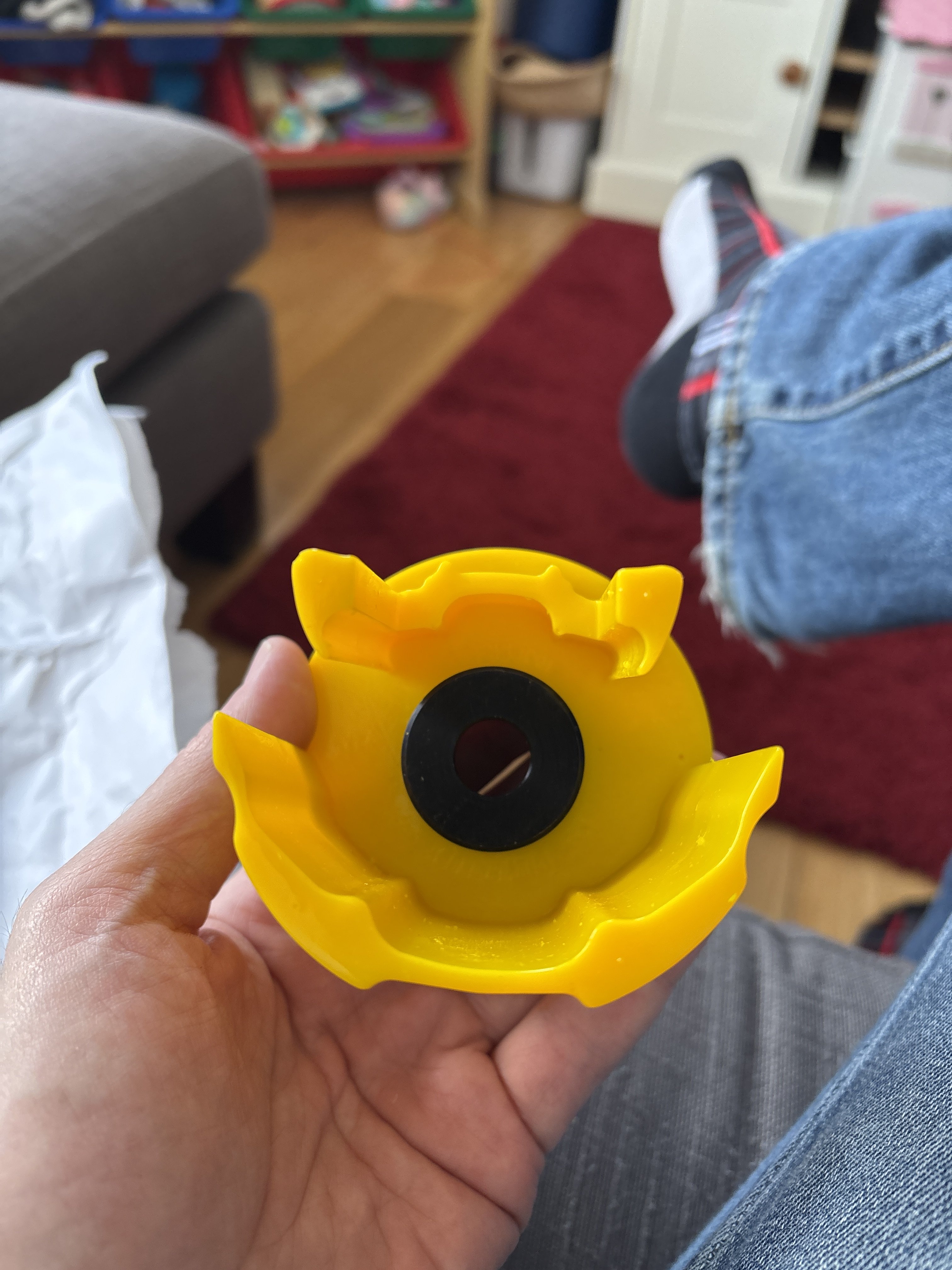
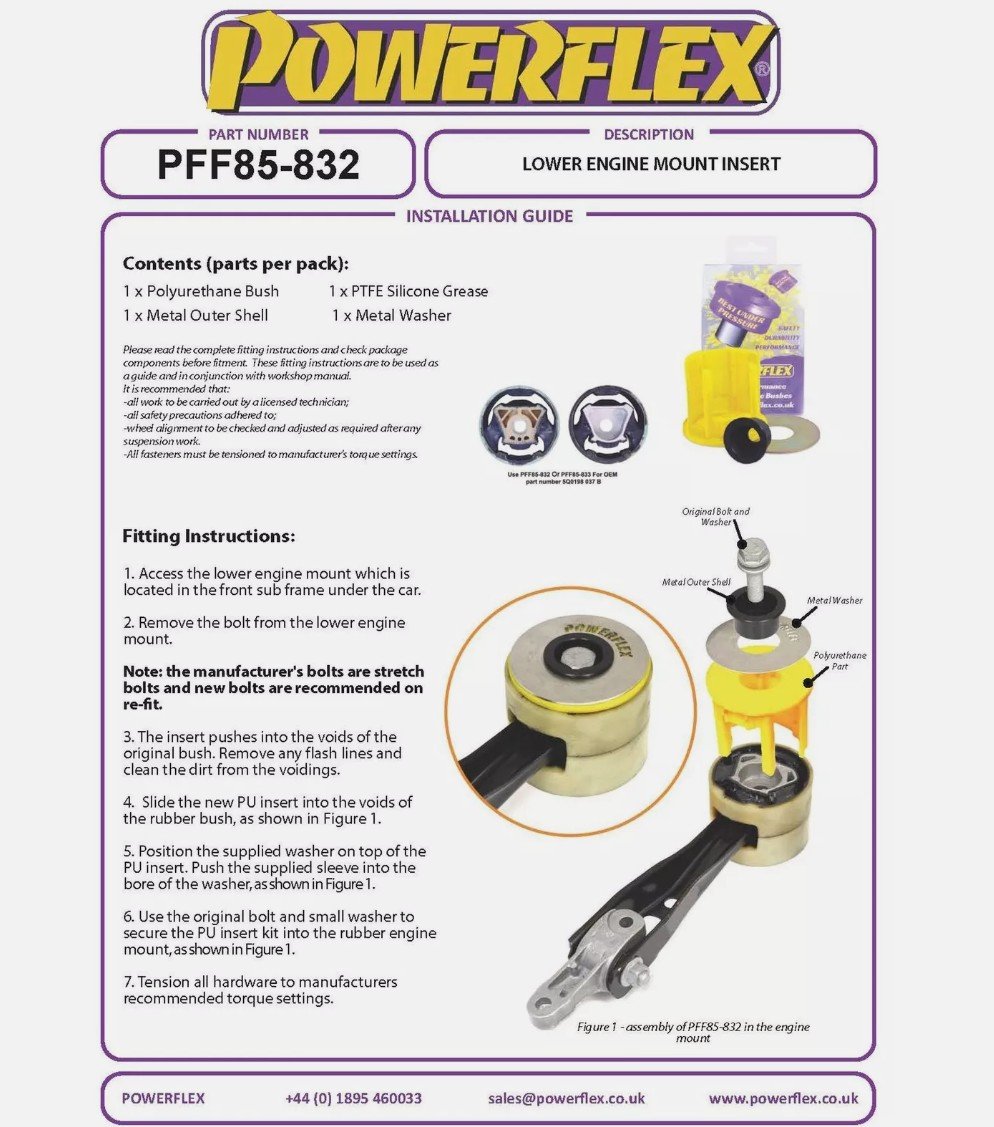
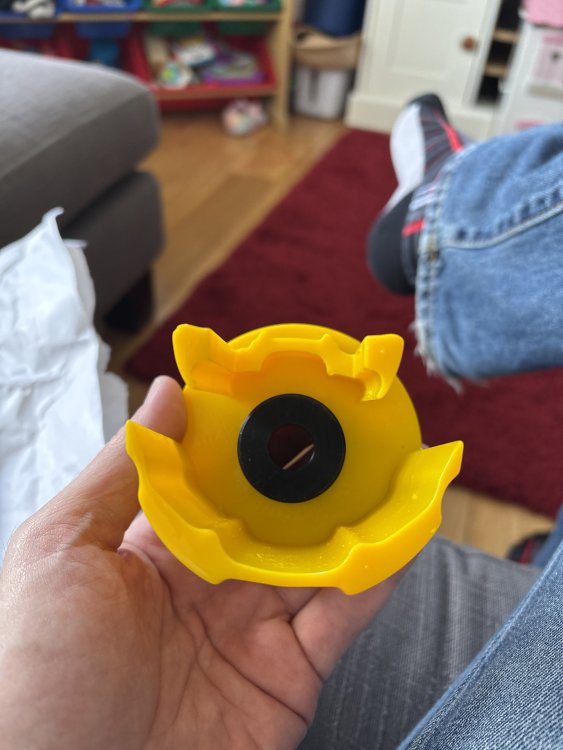
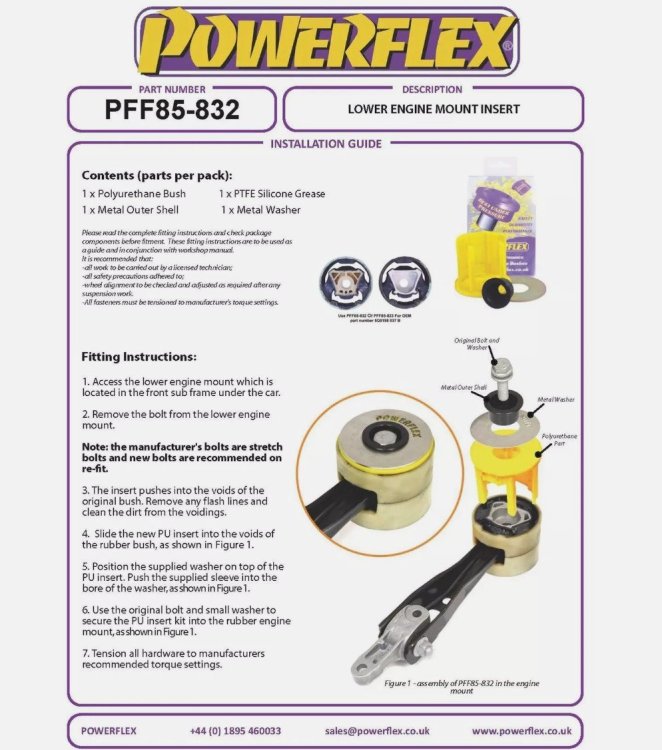
Powerflex received. The bottom section should definitely fit in the slot in the mount’s rubber; the top may need to be modified to fit as the cutouts have been altered in the revised mount. But given this thing is pretty soft and rubbery there’s hope it’s robust and adds a bit more firmness. Lastly, whether the bolt holder fits into the bolt recess now that the inside of the metal isn’t empty is the final challenge/hope. Ramps sourced to have a good look this week!
-
Just looked at a set for the Superb - they look great and with 2 littluns this will definitely be useful if they fit well. Cheers for the tip!
-
Can be solved with a quick photo or put the phone on video and wave it under the car! But for now I’d suspect it’s the troublesome part! I’ve ordered the powerflex part now so if that does fit, then I’ll confirm and it gives you an option. Which is also half the price of the aluminium version too. These poly ones come in different colours for different stiffness in order: red(softest for diesels), yellow(petrol), purple(tuned), black(stiffest for track). I have yellow on order.
-
Good to have a resolution…and that the battery is actually fine!
-
2023 7-speed should be DQ381 (wet clutch) as far as I know, but could be DQ200 (7-speed dry clutch) according to wiki. Maybe not in Superb. Googling whether either of them have a filter is a yes. Unless there’s another 7-speed I’ve missed, it sounds as if Rainworth Skoda don’t know what they’re talking about. No great surprise when @numskull was told his camchained engine needed a cambelt change. Exactly the reason forums like this are goldmines of info. Like @Ootohere said; oil change is scheduled to be every 80k miles and the filter only changed every other (ie every 160k miles). To me that’s bonkers but they’ve obviously decided that’s all that’s needed as a compromise between lifetime and owner-maintenance costs. I have a DQ381 and I’ll likely do it every 40k and have the filter done every time. Personal choice but preventive maintenance pays dividends in my opinion.
-
As with most things, preservation will keep it looking better for longer. Clearcoat can be put back yes. This is always applied when there is restoration work done by leather professionals so there are products out there. When you get jeans dye transfer (classic on light leather colours), it can usually be cleaned off quickly. If left, the dye eats through the clearcoat and into the colour layer. At that point, the clearcoat needs removing, the colour layer re-dyed and then clearcoat put back over. Some higher end vehicles use aniline or semi-aniline leather - this is much more like the real stuff and I think more porous. Volvo have used it, and I’ve seen a C5 RS6 with it but I don’t have much knowledge of it. Whether it’s real or PU, the layers are the same though. Geist restoration - go to 10:58 - this shows clearcoat. Sprayed on and then heat-treated to dry.
-
I’m a former detailer and have had plenty of conversations with guys who are specialist in leather seats. Essentially, not much of it is leather, it’s more Polyurethane (known as PU leather) which is built up of layers: a base material layer, a colour layer and a clearcoat. Basically, most automotive interior cleaners (properly diluted down if need be) will be fine with a microfibre cloth or leather brush on, and off with a microfibre cloth which helps to get into the pattern a little more. Best advice is to go to somewhere like Leather Repair Company or Colourlock and get a product from an actual dedicated leather company. Be gentle, nothing abrasive or harsh chemicals like All Purpose Cleaners. The clearcoat is designed with UV inhibitors to protect the colour and once this goes you can start to experience the classic fading and cracking. Armrest is the same. Most of all, do your steering wheel! Ideally with the brush to really get into the pattern. Steering wheels get dirty/oily pretty quickly. If it’s black leather, it shouldn’t be black and shiny, it should be charcoal and matt.
-
Why on earth would it not be changed if it is a changeable part? You don’t leave the engine oil filter when you change the engine oil. Sounds more like the conversation about cleaning the Haldex gauze that dealers don’t do but all specialists do.
-
So it does one sweep over and stays on the opposite side? Then sweeps back the next time it needs to?
-
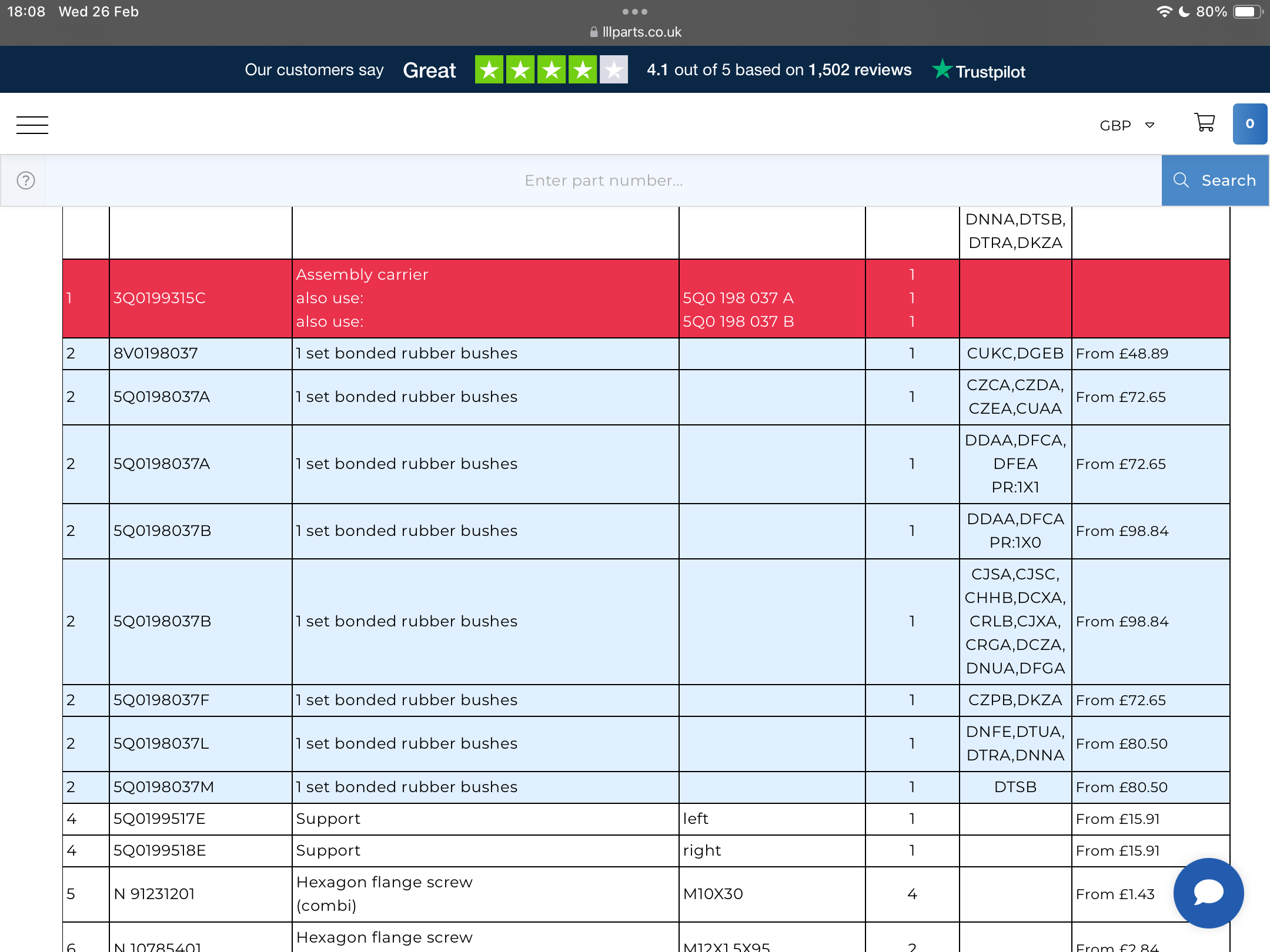
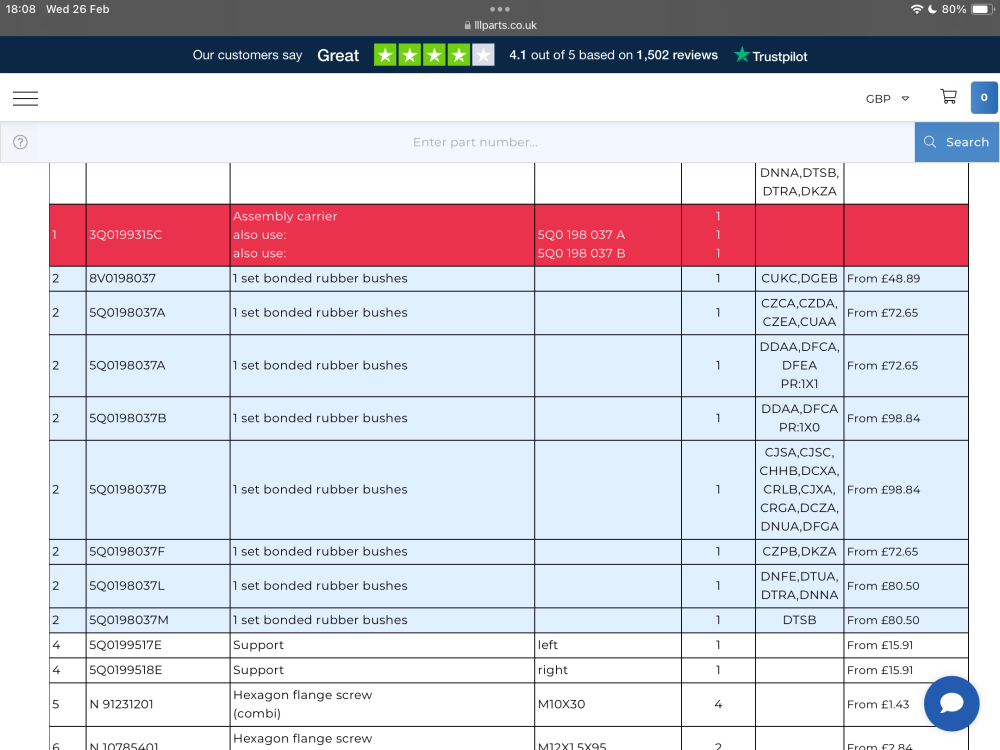
@leolito - you've got the same engine code as me - I think you're going to have the same part as me I think (second to last blue line).
-
Yes just on my way to my first MOT - EPC light came on; asked them to take a look and it was that. Was a charge to reset it and an ODIS online fee; not sure if ODIS was needed and VCDS couldn’t have done it, or that’s the system they have so that’s what they used. Hadn’t happened since and just been through second MOT so just over a year.
-
There is a potential on the powerflex item. I appreciate that the Poly material may be harsher (although they have a range of grades of stiffness offered), but it looks from pictures that it fits around the inner metal part, rather than sit in the recess, if that makes sense? What do you guys think? I may need to have the Racingline Upper version removed as the "legs" of the powerflex item fits in that space but otherwise it could work...?
-
Ok so it’s likely coming straight from outside rather than through the air con system? Can you lay in the footwell, and have someone shine a torch in the engine bay or wheel arch and see if you can see where the source is?
-
Nuts. Like flogging off old stock. Mind you, I guess it’s entirely irrelevant to 95% of owners who don’t know or care about stuff like this.
-
Is it outside temp or is it being artificially cooled from the aircon?
-
-
Win some lose some. Googling the L part number only comes up with the Superb and Arteon; must be the only other model with those engines. I’ll mull over some of the options for replacements but I’ll not be in any rush. The guy from AwesomeGTI is still looking at options so will be interesting if he comes up with anything I’ve not thought of. On the basis of some facelifts being ok, must be some of the older engines (i.e. engine codes starting with C) still using the A-F part numbers.
-
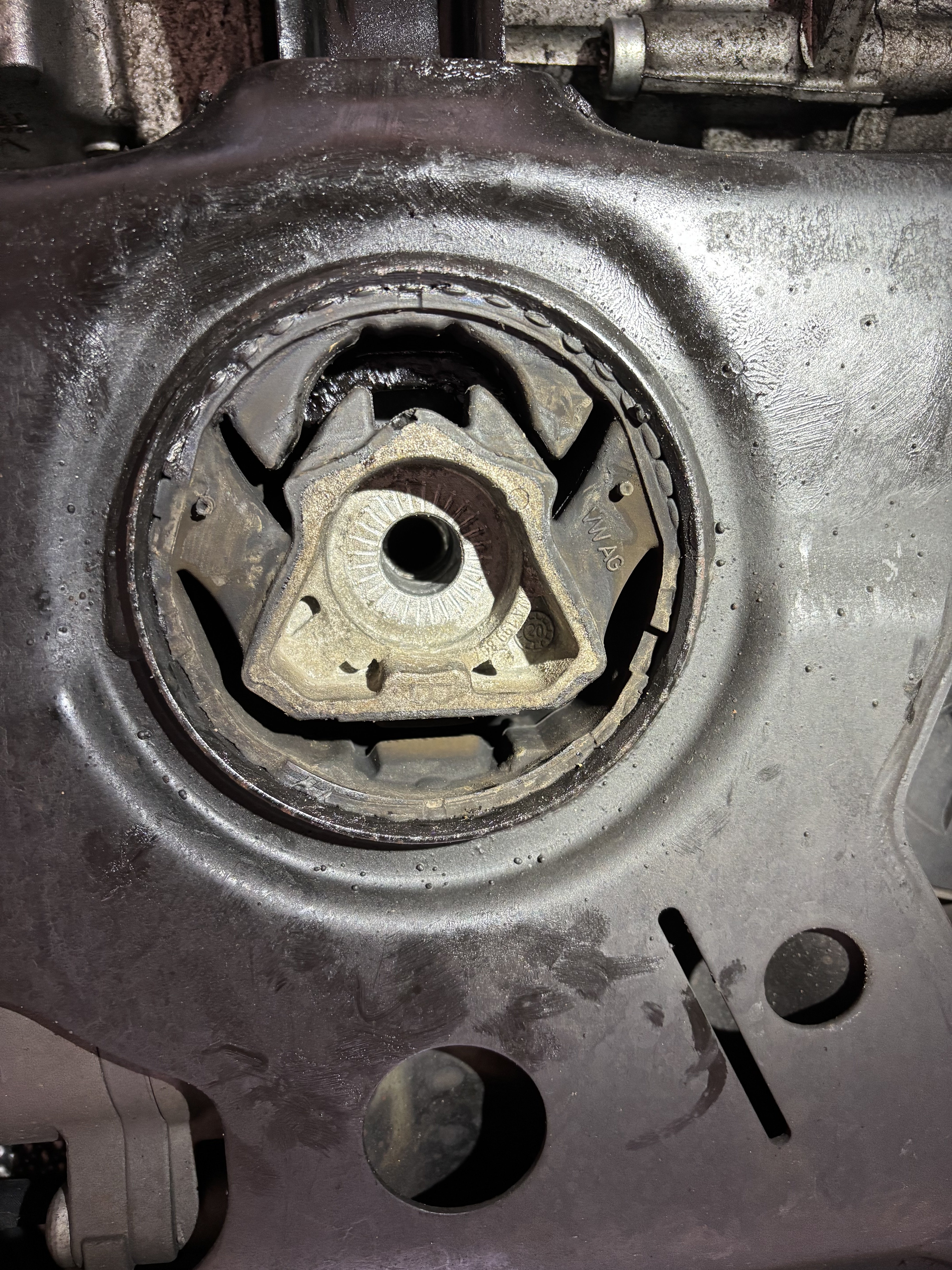
Not sure what the metal is, aluminium maybe? I guess the rubber is what absorbs the load in the main but I’m no engineer. There is a little tab at the bottom of the triangle, but the bolt head is also recessed because they’ve put more material inside the triangle. Spoke to the mechanic about getting a new mount so that the insert can fit and he said it’s a lot of time as they’re pressed straight into the subframe. So they drop the subframe down so they can get it in the press. All of a sudden, 3 hours labour becomes an expensive job for the gain. Its not even worth removing material from the insert because of the build up around the bolt head; you need to end up with a much shallower insert, but then it wouldn’t be flush so the bolt head is not pulling against the mount. Basically, I see my options as: 1. New mount insert with A or F code 2. New version made by Racingline (or APR/034) by moulding the L part. 3. Accept I’ll only have the upper insert (albeit not happy that RL think that it transfers more and damages the mount) and sell in the lower part.
-
Part numbers and version fitment. Is purely down to engine code.
-
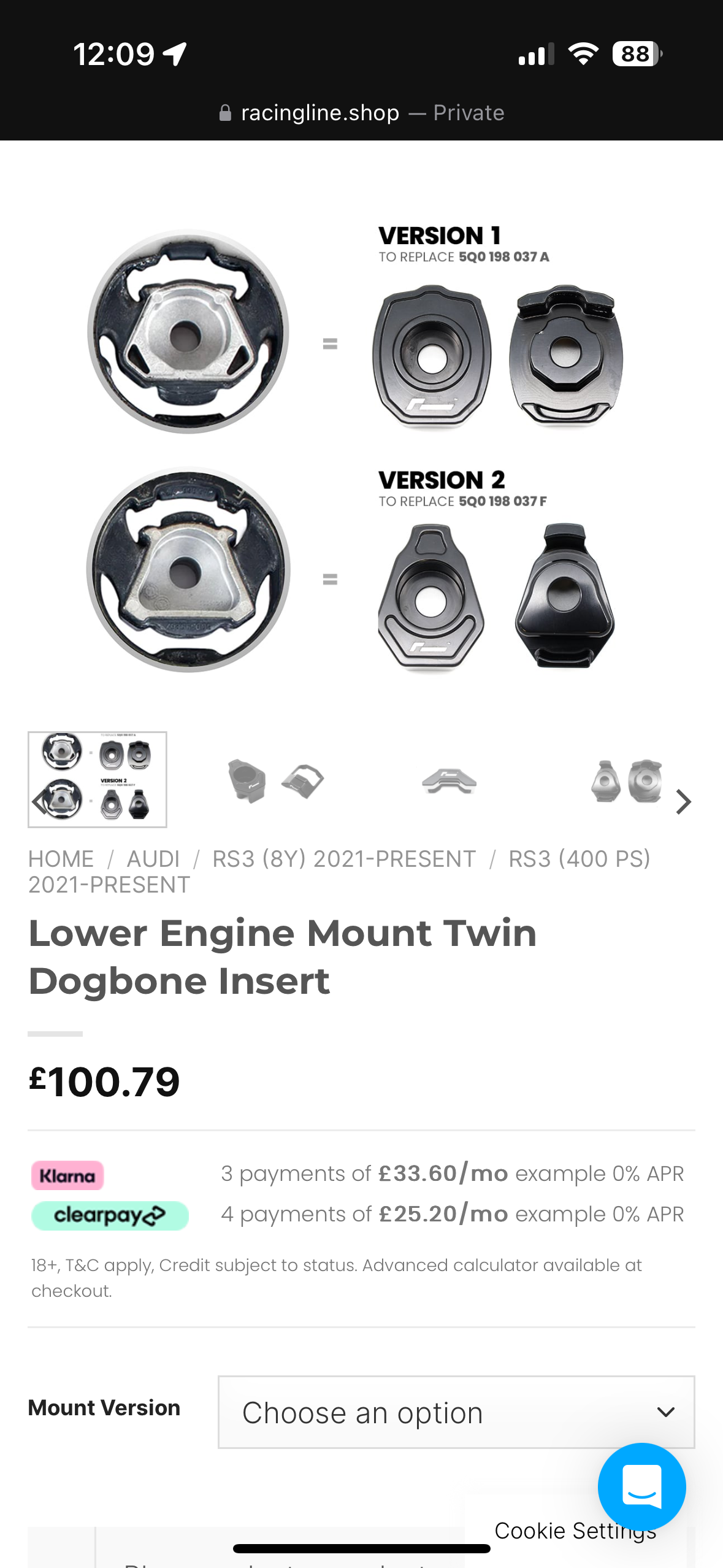
Best thing to do is get under and take a picture of the engine mount. You can see it easily without removing anything - the point being you want to look very carefully inside the recess if its not smooth and empty inside, like the first diagram, neither will fit. Compare my pic to @JR RS's above. 5Q0 198 037 A for the round one (V1) 5Q0 198 037 F for thee triangular one (v2) 5q0 198 037 L - the one that no-one has accounted for...
-
This topic is not quite over yet. Got the replacement part, took it to the mech and…doesn’t fit. I clearly needed the V1 which I originally ordered as you’ll see from the photos but you should also see why V1 doesn’t fit. There are some slight mouldings within the recess which stop the right version from fitting. So…I need to see if the guy at Awesome will swap the bit back as that was what I’ve bought and I’ve got the upper mount in already. then I need to consider options. Most likely seeing if I can get a pattern part that doesn’t have these new revisions and see if that fits and so the v1 lower mount can fit. Annoying but it’s just a case of aftermarket guys not knowing about slight revisions.
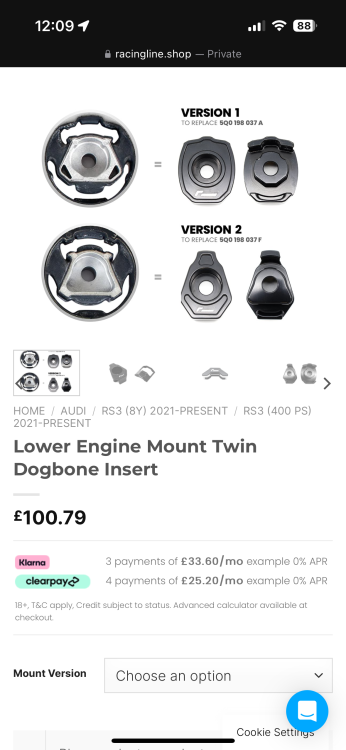
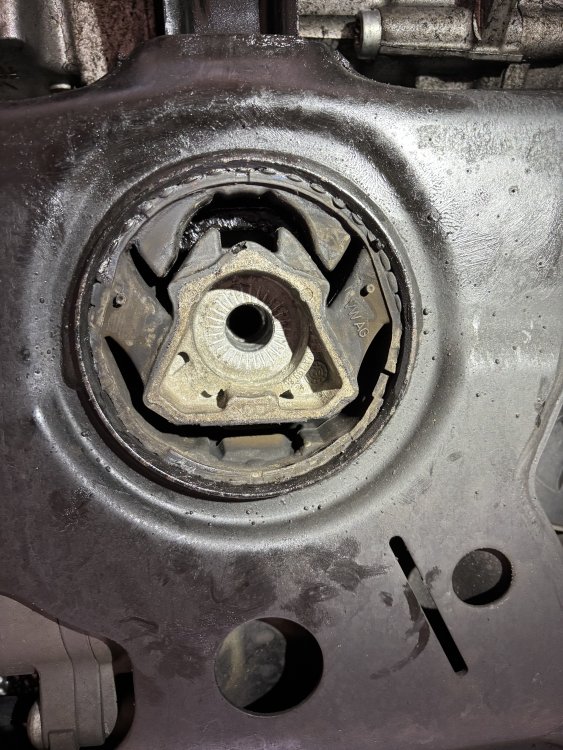
-
Have you guys got up to date Software? For MIB3 that's now 332. Although tbh I've had version 276 (utter garbage), 306, 330 and now 332 and they've all been ok except 276 which made (It now connects to Carplay immediately, then drops it, then reconnects and is fine from then on. Not sure what the latest is for MIB2.5 though - has a different version numbering system. Possibly using the Cyrillic alphabet