SteveTheElder
FREEDOM
-
Joined
-
Last visited
Everything posted by SteveTheElder
-
Check in the shop in the infotainment system. It’s available for my 2020 SEL FE, at about £150 (can’t remember exactly).
-
Did you see this re. the AirCon Sync?
-
It keeps both driver and passenger A/C zones at the same temperature, and I have heard it argued that the dash looks better when the numbers match. Neither of these bother me at all and normally I don't use the sync, I just stumbled across the 'feature' hence I started the thread.
-
I think many of us have had a case logged with Škoda UK which was then managed through their Exec Office. In my case they did a lot of the liaising with the dealer over the diagnostics and supply of new component. Meanwhile I was putting loads of mileage on a loan car. It also seems that some have had more components changed than others, For example, some have a replacement Infotainment unit whereas in May case it was just the virtual cockpit (VC) unit and associated s/ware - the ‘System Information’ hasn’t changed in mine, still on the early 1668 s/w release but since the VC was installed (and a further update for the SOS s/w) all has been working fine. I’ve not experienced the BlueTooth connectivity or PIN issues you mention so can’t comment on those, sorry. It’d be worth you contacting Škoda UK and getting a case raised, push for it to be escalated to the Executive Office - you’ve had the fault for 14 months and you know others have had thier cases escalated so you have a good precedent. Good luck…
-
It fixed mine…
-
I stumbled across another LHD/RHD oddity today to do with the Sync setting of the AirCon - a topic I know several folk here have mentioned/complained about Sync not saving from one drive to the next. Well it seems it does, but not in the way I expected it to. For context, I don’t normally use Sync, but as I say stumbled across this by accident so deliberately tried it out. Posting here in case it helps others who like to use Sync more than I normally do. This is what I did… 1st Journey: AicCon Sync set to on Passenger side displays SYNC, Driver side the temperature Set temperature with driver side +/- controls Park up, turn off, exit car, lock car. 2nd Journey Both sides of the display show the same previously set temperature, but not the word SYNC Adjust temperature with passenger side +/- controls - BOTH temperature display change. Adjust temperature with driver side +/- controls - only DRIVER side changed (presumably turned off Sync in the process). Adjust temperature with passenger side +/- controls - only PASSENGER side changed. So, it seems the Sync does save from one trip to the next but not as intuitive (Simply Clever) as one might expect…
-
Sounds like you had a early SEL First Edition which hasn’t yet had the KPH/MPH fix
-
I’ve just remembered a previous thread about the in-car shop - there’s a bit about the colours in there. Take a look through
-
I can live with one rear fog light (but would prefer two especially when in continental Europe), but am disappointed with one reversing light - especially as the second appears to be physically there. Seems odd not to enable it. It appears there isn’t a fault with my car, but they are configured with one of each.
-
Yes, it's a manufacturer warranty so any dealer should be able to get the job done. @SkOmk4 Thanks. I like the idea of a back-seat ghost, adds a touch of intrigue to the car. Snag is I find the lights distracting when on unlit country roads so will call the dealer.
-
I’ve noticed the rear interior lights coming on at times; somewhat inconsistent though.
-
The best description I have found is “W-Software update Octavia IV” - which is a bit vague to say the least
-
Just noticed that my 70 plate SE L FE estate has only one reversing light (on the near side) and one rear fog light (on the drivers side) - but there is space (and what looks like all the LEDs) for both on both sides. I cannot see why they wouldn’t enable them all. Is this ‘normal’ these days or could there be an issue with my lights?
-
@roottoot thanks for that, a useful insight. I only asked because I’m seeing less of a fall off in economy than I expected, based on the last few years of a 1.4tsi Superb II.
-
Are you guys noticing a fall off now the weather is getting colder? Guess it might be more obvious come January or February though
-
Did the update fix it? And was it 5 hours? Had mine done a couple of weeks ago, the dealer booked it in for two days in case the update took a while. Was all done - less than 4 hours between drop off and a call to say its done. So far, no SOS errors…
-
I noticed there was an update for my car the other day - something to do with the shop… Will go have a look when its updated. Please tell the new app is a self-clean function. 😉
-
There is lots of detail in the main KPH/MPH thread, most usefully the latter pages. Link below. But to answer your questions… In settings I could select KPH as units for the speed, but it would only ever display MPH. Going back in to settings, it was again showing MPH. Conversely, with the SatNav, it would only display Kms, note miles. Again, in settings, I could select miles but it only ever displayed Kms. As for ACC, it would occasionally not let me overtake and would allow me to undertake. The dealer, arranged through Škoda UK, had my car for 20 weeks (yes, 20!) during which time various diagnostics were run and ‘the factory’ came up with a fix. My car was one of two test vehicles fitted with the replacement VC & s/w. Since fitting I have covered about 2000 miles; the selection of the units is now fully operational for both speed and SatNav, and the ACC has worked faultlessly since. The bulk of my mileage has been on motorway and dual carriageway and I use ACC a lot. As I mentioned in my previous post, I don’t have Travel Assist but it seems logical that issues are based in the same/similar s/w bugs. Škoda UK technical is probably the best place for your dealers to call. They know all about the fix applied to my car (and now several others that I know of).
-
-
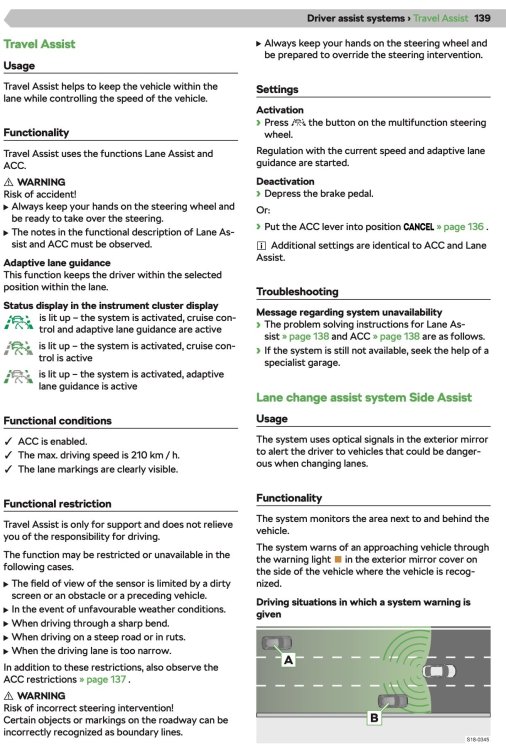
I understand it uses ACC and Lane Assist but adds in speed limit (road sign) awareness so automatically sets the cruise control. Don't have it on my car but sounds like a nice option... Found this in the e-manual... Maybe when the h/w fix was installed the Travel Assist needed to be re-enabled.
-
Interesting. A different fix (or more extensive fix) to that applied to mine! Must be a configuration management nightmare! Anyway, hope it resolves the issues and you can relax & enjoy the car…
-
Yeah, but... ... on the other hand, I had five months driving a loan car, with full warranty cover, breakdown cover, and put 8500 miles on it. As of now, my own car is just over 1yr old with only 5300 miles on the clock. In some ways having the loan car also did me the favour of one heck of an extended test drive in a DSG equipped Octavia Mk4 Estate; my next car will like be a DSG (or equivalent). OK, it didn't have all the bells and whistles that I'd paid for in my own and I am mighty glad I now have it back - I never knew how much I needed heated seats 😄 Really hope you get a resolution for your car soon...
-
Do you have a case number? If so put that in the subject line, or the reg. number. Should help route it to the right person. Good luck…
-
So pleased to hear that your cars have/are being updated @golfnut @Coume. We've each had a long, frustrating and tedious journey to get to this point; and paraphrasing what golfnut said - we can start to enjoy the car we bought. I'm certainly loving mine and a 100 mile round trip today enjoying the ride, enjoying the toys/gadgets (yes, even voice control!) and with everything doing what it should do - still gobsmacked by the economy from manual 1.5TSi (59 mpg today (M3 - M27 - A31 - minor roads; and back)). Interestingly I have found the Lane Assist to be less intrusive than I remember, and certainly less so than the loan SE FE spec car that I had for 5 months.
-
@matrix2020 your car is NOT unique! There are quite a few others on this forum who have (or had) similar issues and I am one of them. My car also suffered the inability to change the SatNav units to Miles and the speedometer to KPH despite the settings options being available. A couple of months ago my car was fitted with a replacement component (virtual cockpit unit I believe) and some associated software - it was one of two vehicles selected to test the fix ‘in the wild’. Over the best part of 2000 miles since the fix the speedo & SatNav units are selectable as they ought to be and the ACC works fine and does what it is supposed to do in terms of overtaking, not undertaking and bringing me to a halt (albeit that bit is a tad pointless with a manual ‘box, only tried it to prove it works - best reason out there to get a DSG next time!) As yet I am uncertain if the fix is being rolled out more widely.