TheWanderer
Resident Member
-
Joined
-
Last visited
Everything posted by TheWanderer
-
On 1941 firmware?
-
The only setting that I tweaked was Eco tips, turned them off and the irritating open window and throttle warnings disappeared. I tend to use coasting & gearbox anyway rather than brakes, which catches a few out. 🙄
-
Try switching it back on & back off. Sometimes that works. I had this when I upgraded the firmware to 1941. I don't have it anymore.
-
You don't need to change the system. Just get the necessary updates & hardware (if necessary) done. Mucking around fitting 3rd party hardware can cause unnecessary stress and later problems with resale values.
-
It's Eco tips settings. Otherwise it nags you about this and windows being open too. 😠
-
Try updating the firmware to 1941 if it's not already there, if it is take it up with the dealer who sold you the car.
-
Don't think so, I don't know if you can even import the database from the likes of pocketgpsworld.com or not. I do camera reports for PGPSW and there are some new ones to be added shortly at the behest of Surrey County Council 😈 I use Waze or Google Maps rather than the built in system.
-
You have a PM.
-
If it's a brand new car then there should be absolutely no issues whatsoever as the factory should have installed the latest software and componentry. If it was built within the last year or so, then there shouldn't be an issues as it will more than likely have had the updates applied or downloaded to it. The issues start to creep in from the early models of the Mk4, these may need a replacement component or two & a firmware update as well to resolve any outstanding issues.
-
Just remember your SSD drive must ONLY have the update files on it. Absolutely NOTHING ELSE.
-
As I said before you'll temporarily lose the manuals, but they'll come back with other OTA downloads, you should expect between 4-6 of them. Let us know how you get on.
-
If you can get ba deal on it Nextbase GW622. It's a 4K dashcam that's excellent. It's been very useful in an insurance claim and nailing a OAP who nearly caused a collision by driving on the wrong side of the road and the wrong way through a junction and traffic islands. You can get a full front & rear setup for around £300.
-
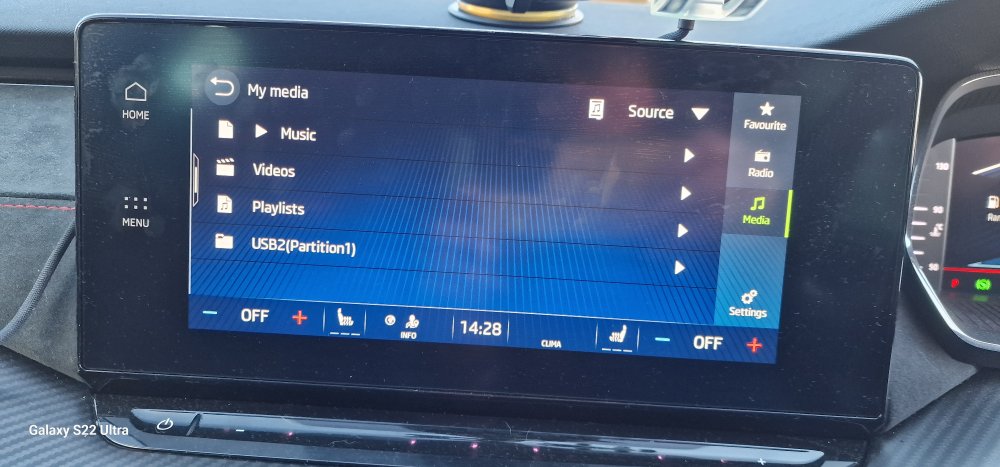
I'm even more confused when I put the existing usb stick in and the system shows a thing about a partition 1.
-
As SCOTT is blacklisted I can't see the response, however if I get the gist of what he's said is correct I find it quite odd as it can detect two separate sticks in the sockets, yet not deal with partitions.
-
It checks that the levelling is correct, and the only one's who don't like it are BMW "drivers". I select the auto full beam and I've driven from Worcestershire to Surrey via M5, M42, M40, M25 & A3 (Thanks Highways Agency) and it adjusted itself perfectly and no one flashed me.
-
I tend to think that the only way to do it is get a high capacity usb stick and partition it into two volumes and put music on one Sat Nav data on the other. The power cable may have to be fed from the rear usb sockets for passenger use. The removal of the 12v accessory socket is the worst thing about the car as I can't use many things now.
-
I'm just prioritising stuff at the moment, especially as HMRC are being complete 🤬 and taxing my pension hard which is my only income now.
-
I've reformatted the drive now I have lost interest at the moment, It takes the best part of 30' to transfer all of my music to the USB drive, it takes 35' to transfer the mapping data to the USB drive, the USB drive is 64Gb, so to try anything different will require a larger USB drive which I can partition, so you're on about a 256, 512 or 1Tb USB drive and I haven't got the money at the moment as I'm expecting a major hike in insurance after that a**e with the SORN'd Ferrari hit me earlier in the year, even though I was exonerated by the dashcam footage + other evidence, although I do have protected NCB. It's all going wrong at the moment so this can go on the backburner until later.
-
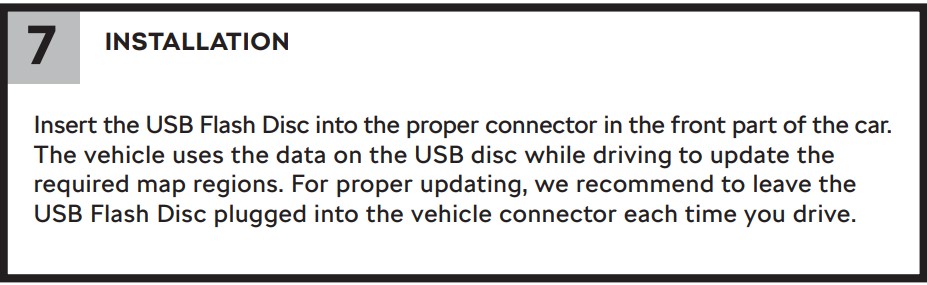
This is what's confusing me... Now confused as there's no option to update it. 😕
-
OK I'll have to find a drive and try it, I downloaded & extracted the latest one's last night they're currently sitting on an external SSHD unit.
-
So if I plug in a USB stick with the latest maps it'll update the whole system then?
-
Most of them seem to be quite innocuous, dealing with graphical and infotainment system tweaks, like the shop etc. It will tell you if it's a major system update. I think I'm on about the 5th or 6th minor update so far.
-
Tried similar and the infotainment system instantly rejects them. 🙁
-
I mean I want Waze on the Cockpit display but can't have it seems. That would save my £44 pa, Care Connect is useful, just checking the car now with it that's £36 pa, which is peanuts, but when you have gone from £73k pa, to £28.8k pa, things and attitude change a bit.
-
Yes, I do, it's just my phone charger & holder are located above the infotainment screen and I was trying to actively avoid doing long cable runs without using adhesive cable clips. I've already had to resort to an adhesive disc on the dashboard to avoid the dreaded suction cup circle on it. I don't want to start putting sticky cable tidy clips to the console.