pab567
FREEDOMTech
-
Joined
-
Last visited
Everything posted by pab567
-
-
Your unit 5Q0035842A support RVC, despite mechanical installation you have to adjust coding in infotainment (5F) and parking distance control (10) units.
-
You're welcome
-
What part do you need?
-
Share VIN in PM and I will check part number
-
When upgrading: enter service menu (requires developer mode enabled in adaptations) select manual SWDL select all unmark cpu/emergencu and main/emergnecy start
-
@oabraldes sent in PM
-
Sorry, I was away, has just returned home, too late to drive to workshop now, will send you tomorrow.
-
ok
-
OK, I knnow wher ethe problem is but I am not able to help you, pls drop me reminder in PM in the evening (9 PM CET).
-
RequiredVersionOfDM must be modified as well
-
Yes, you go directly from 253T to 480T now. Just keep in mind metainfo2.txt from 480T must be modified to (check for "RequiredVersion" tags and change non-zero values to 0.
-
Use tools menu to patch SWDL
-
All you need is MIB STD2 Toolbox and google
-
@Vladimir2708 I'm sorrry but I don't know the solution to patch your unit.
-
@oabraldes what is part number of your infotainment unit?
-
sent in PM
-
Sure, I sent you request to share VIN in PM
-
I sent you download link for MEN2_EU_SKGPx_P0080L_8755 in PM.
-
-
It's possible but it requires unit to be patched first, also the metainfo2.txt file must be modified. Is it worth? There are no new features, just new skins.
-
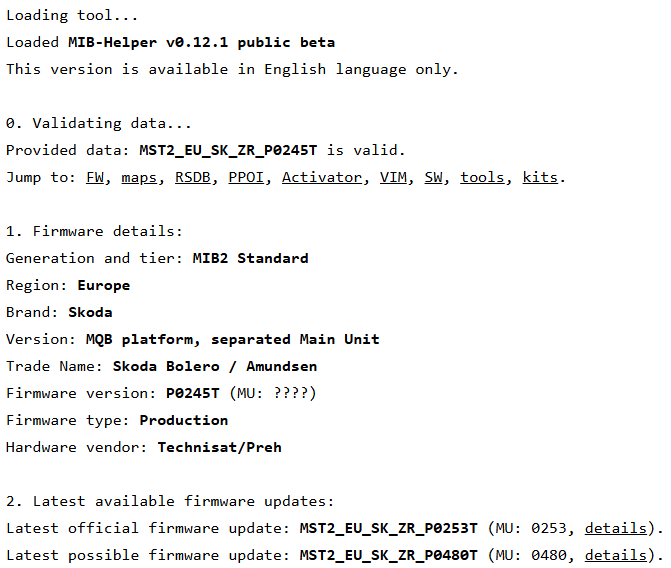
I can see I sent you link to SEAT version instead of SKODA, sorry. have just resent the right one MST2_EU_SK_ZR_P0253T. Of course you can upgrade to , you entered your train incorrectly (MST2_EU_SK_ZRP0245T, the right one is MST2_EU_SK_ZR_P0245T):
-
1800? There is no such firmware, for sure not for your unit. I sent you link to download MST2_EU_SE_ZR_P0253T which is thsn't help pls let me know.e most recent firmware for your unit, if it doe
-
-