langers2k
Resident Member
-
Joined
-
Last visited
Everything posted by langers2k
-
Looks to be in the right place and connects to a fuel rail so I'd say yes Might be worth logging the value it returns over a drive with VCDS? It could be the sensor, wiring or an actual fuel issue. I assume the fuel filter has been changed at least once? I'd probably double check the wiring and connector for damage and then check the fuel filter for any signs of swarf on the off-chance the HPFP has an issue. Plenty of threads mention similar faults, none go as far as a resolution that I've seen edit: Over on an Audi forum, a similar issue is fixed by a ECU update: https://www.audirs3oc.com/topic/7573-g247/ There does seem to be a newer software version for your ECU that still pre-dates the emissions fix updates. Might be worth looking on erwin for an TSB/TPI related to SW:6890.
-
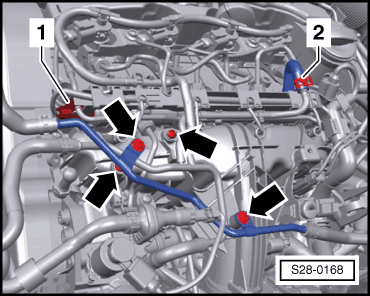
This looks more like your engine: https://workshop-manuals.com/skoda/yeti/power_unit/2.0/81;_103;_125_kw_tdi_cr_engine_(2nd_generation)/ignition_system_glow_plug_system/glow_plug_system/ Which suggests the connector is labelled #1 here:
-
But you're (purposefully?) missing the point that they are dual use. Therefore, they will be classed as either a fog lamp or cornering lamp depending how it is being used at that point in time. If someone is sitting waiting to reverse into a drive, although it's the same light source/fixture as the fog lamp, for that manoeuvre it's technically a cornering lamp so completely fine in the eyes of the Police and highway code. Although the highway code doesn't mention cornering lamps, that doesn't mean they can't be used. It might look, swim and quack like a fog lamp, but rightly or wrongly, it's a cornering lamp when used as such... I'm not trying to persuade you they are a good idea, suitable for use or even to like them, only that given the current (mess?) of regulations, they are perfectly legal to use on UK roads. If they weren't, then I would expect to see people getting prosecuted for their use and then taking action against the manufactures. It's like the situation around dual use sidelight/DRL lamps. Plenty of MK2 FL vRS owners had MOT issues as both functions were combined into the LED strip despite them working correctly. It is either a DRL or sidelight depending how it's being used, it's more obvious as the brightness changed but a similar issue where one lamp performs multiple functions and causes confusion 👍 Agreed, nor do I expect them to any time soon.
-
The EU allows dual use cornering and fog lamps, the UK agreed to the same regulations, if the lamp meets the those regulations and is marked as such, then it's perfectly legal to use as a cornering lamp - even if you disagree with the premise or don't like it. Assuming the Yeti also had type approved cornering lights, then it's fine to use them. If someone is enabling the cornering function on fog lamps that aren't type approved as cornering lamps - that's where you might be falling foul of the law.
-
The lamp will be homologated for dual use so when used for cornering and reversing, it's a 'cornering' lamp rather than a 'fog' lamp and perfectly fine...
-
There will be a part number stamped on it somewhere, for example:
-
It'll depend on the engine code... Quick google example, its number 25: https://workshop-manuals.com/skoda/yeti/power_unit/2.0/103;_125_kw_tdi_cr_engine_(1st_generation)/fuel_preparation_system_diesel_injection/diesel_direct_injection_system_fitting_location_system_overview/
-
Maybe take a look at Außenlicht_uebergreifend-Coming Home Leuchte in the BCM
-
Ross-tech have a few ideas: http://wiki.ross-tech.com/wiki/index.php/16575/P0191/000401
-
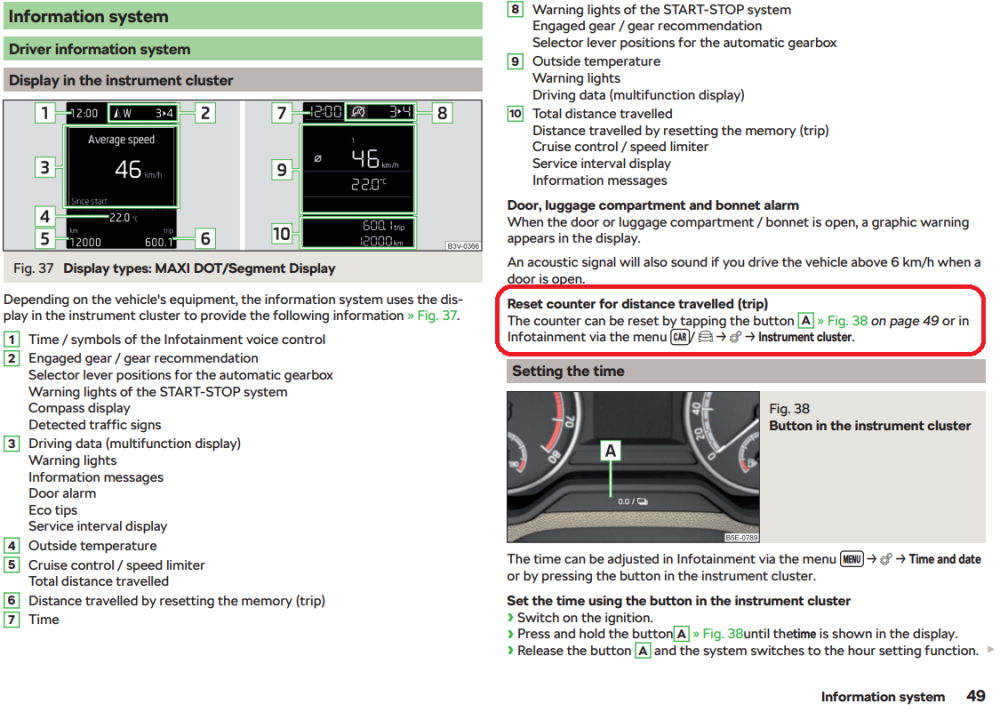
Welcome! From the owners manual:
-
Your car is full of software and there will be bugs/issues within that code. Some of these might be rare and only occur under very specific circumstance so yes, it's entirely plausible that an update *could* fix your issue despite it being fine for four years... Just for example, I had a error on my power steering module at around three years old stating "Mechanical Failure" and yet this was fixed for free by a software update: That being said, it's nigh on impossible to guess what the issue is without fault codes. Once you have the fault codes, you can check the TPI/TSB for any that might be relevant
-
-
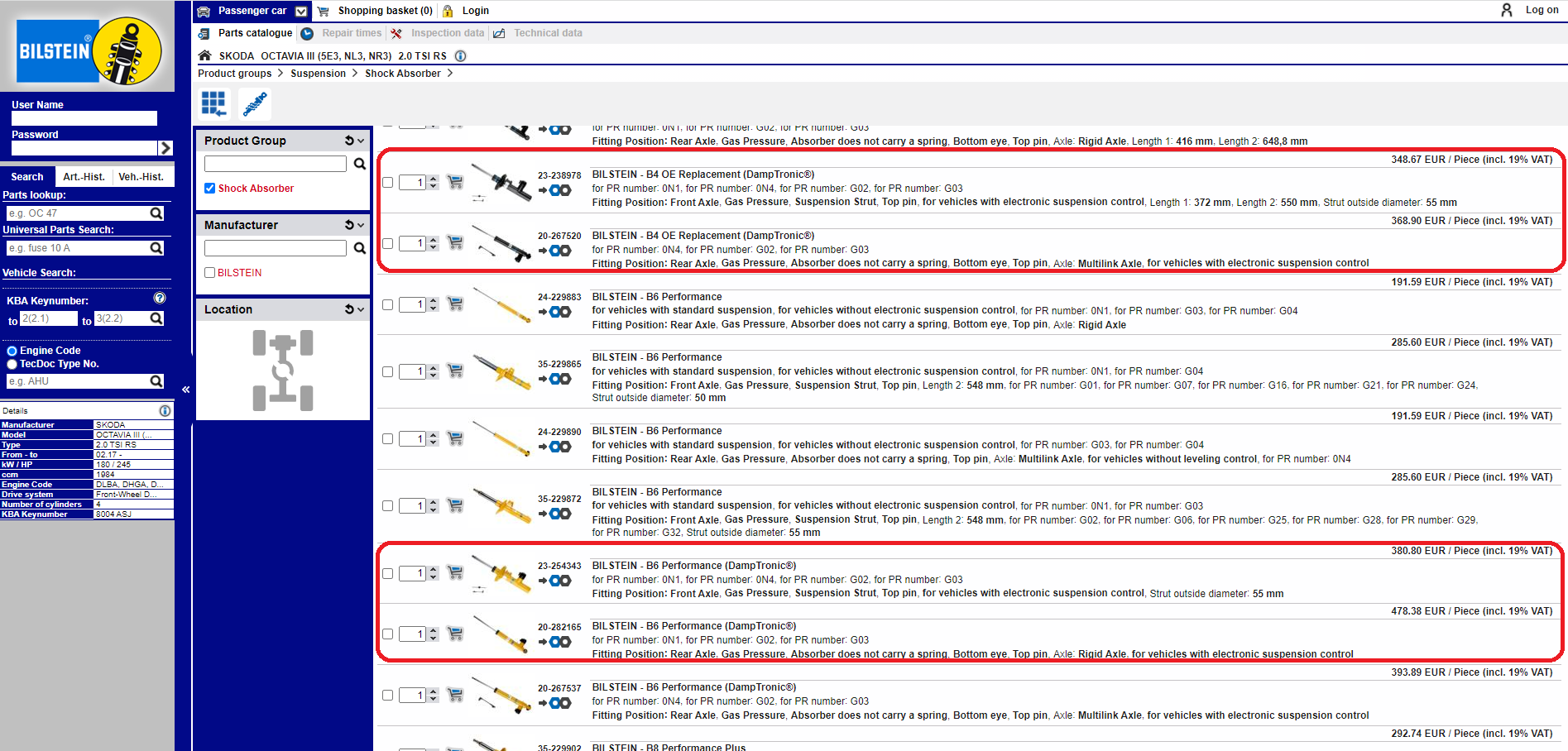
Bilstein do both a B4 and B6 damptronic which I believe is a direct replacement for the stock DDC damper. Still not cheap though
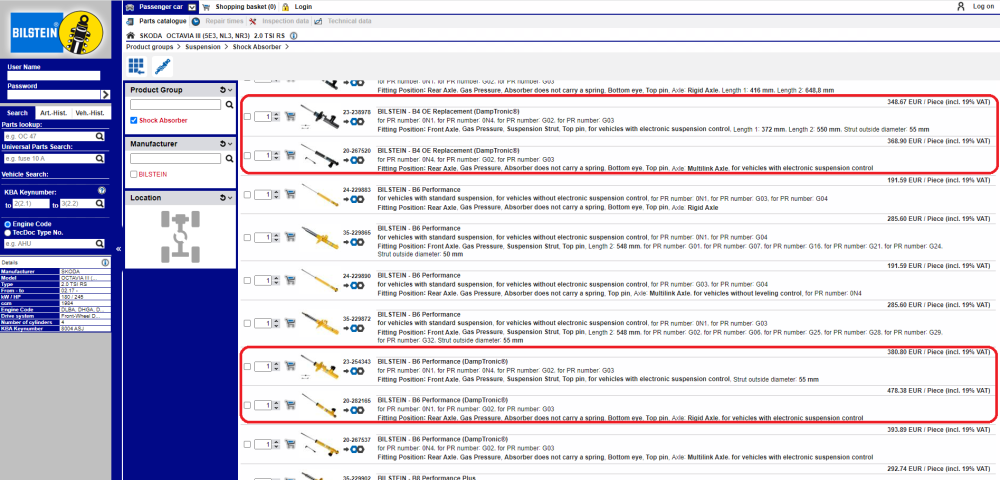
-
Once a VIN is used, you can't remove it to add another VIN in it's place I'm afraid. The full FAQ is here: https://forums.ross-tech.com/index.php?threads/8869/ Personally, I'd suggest a HEX-V2 10-VIN edition, they should be around £299 and should cover your 3 cars along with a few extra. It's also only one upgrade ($169 ~£125) from being unlimited. Just for example: https://www.gendan.co.uk/product_VCV210.html As for alternatives, many people use OBDeleven or Carista but I don't have any direct experience with either I'm afraid. edit: Seems some of this may have been answered whilst I typed
-
The latest is G12evo and is fully compatible with the G13 your car had from factory. Just for example: https://www.seatmotorparts.co.uk/seat-shop/genuine-seat-g12-evo-ready-mixed-coolant-5-litres/
-
I've no idea how they've done it or if it's in a VAG approved fashion It's also possible that it's a loophole which VAG might prevent in the future.
-
OBD11 can do retime SFD unlocking according to their blog: https://obdeleven.com/fr/latest-news/post/45_sfd-unlocked-with-obdeleven-.html?page_type=post VCDS can also unlock SFD modules, however, they aren't in a position to get the unlock code so you'd need a 3rd party source to find it. That being said, I believe TSR requires SWaP/FeC codes which I don't believe either can add
-
It should be on the label... Anywho, the ratios (screenwash : water) are: - Protection to -70°C, undiluted - Protection to -40°C, 2:1 - Protection to -35°C, 1:1 - Protection to -16°C, 1:2 - Summer use: 1:4 Taken from these images:
-
The 80g oil ash limit likely only applies to some EA288 engines and not the EA189 you have J.R. I believe the 80g figure comes from the VAG DPF app on Android as the screenshots typically suggest 80g as a max. Not sure where it's developer got the figure from. As to roll back stuff, I haven't got any suggestions I'm afraid. It'll depend if you're a simple or complex case - I'm sure we've spoken about it before, if there is a pre-fix update for your ECU then I believe roll-back is just flashing the older version. - If there is no such update, then it's harder as you'll need a tuner who has a backup of a pre-fix version.
-
It'll work without calibration although the lines will be more accurate after correct calibration
-
The camera in the first post is indeed a Chinese plug and play solution. This won't have the extra buttons/modes... If you look at the second post, it's where I fitted a OEM highline version from AuDU Auto, much like the one you linked: This does have the buttons/modes although installation is more involved
-
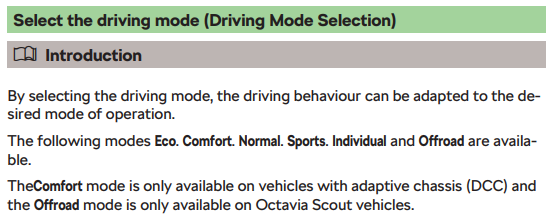
Exactly - it selects the drive (driving?) mode
-
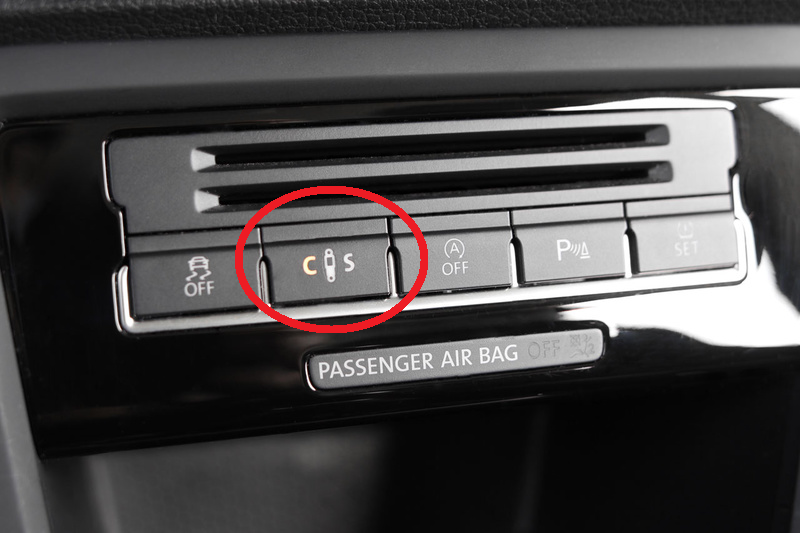
Pretty sure that's just for drive mode selection. Given @BPL has no comfort mode or option to change DCC, I'd say they don't have DCC Some VW's get a button for DCC but I've never seen one in a Skoda:
-
I fitted a very similar camera on my '18 plate vRS with a factory fitted MIB2 and it works perfectly. You should check the boot handle dimensions though, earlier cars have a smaller cutout so the OEM camera may not fit without cutting the boot lid. You might want to see this thread, it covers both Chinese and OEM installation including a wiring diagram for a OEM highline camera:
-
I would definitely use an extension loom or similar to avoid cutting the original wires. Some amplifiers need a remote line to turn on. Others will turn on automatically when audio is detected on the input, this is auto-sense but may have other marketing names.