




langers2k
Resident Member
-
Joined
-
Last visited
Everything posted by langers2k
-
The fusion mode is a setting in the A5 front facing camera rather than the headunit It also worked as expected with a MIB STD2 PQ Amundsen (from a Yeti) with an appropriate camera in my MK2 Octavia. I think it's only the Bolero and below (non satnav) that can't deal with fusion mode.
-
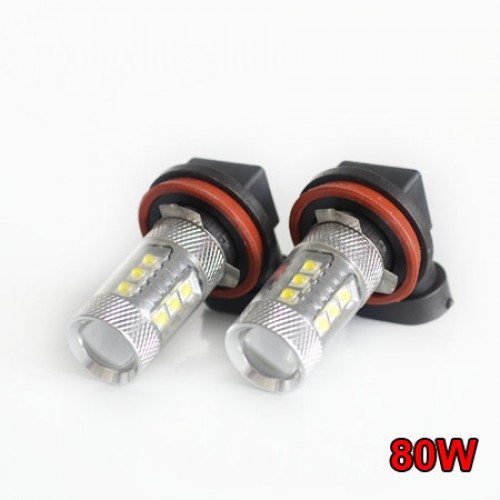
I don't think they sent a H8 It could be a 9006 (HB4?) based on the listing? I think the H8/H11 version should look like these:
-
The 'essential' versions are slightly cheaper on eBay at ~£65 https://www.ebay.co.uk/itm/224314963244 the fan might put you off though. There used to be cloned versions of the Philips X-treme Ultinon which were fanless and cheap. I had a set on my FL MK2 Octavia which were great, think they are sat in the garage somewhere now... H8, H11 and H16 are basically the same bulb with different wattages. The three tangs are slightly different shapes but with a quick trim can be made to fit in either fitting
-
@newbie69 - how much would you like to spend Powerbulbs have a selection of branded bulbs: - https://www.powerbulbs.com/product/osram-ledriving-fl-led-h8-h11-h16-twin - https://www.powerbulbs.com/product/philips-ultinon-essential-led-h11-twin - https://www.powerbulbs.com/eu/product/x-tremeultinon-gen2-led-fog-lights-h8-h11-h16-twin - https://www.powerbulbs.com/product/philips-ultinon-pro9000-led-h8-h11-h16-twin
-
Completely, different countries get different spesc so things can get confusing. Example brochure attached for UK models... I wanted a highline front camera, heated seats and auto folding mirrors so it was either a L&K or vRS 245 edition. There were no used L&K's so I 'had' to get the vRS 245 Luckily the original owner had spec'ed DCC and I've added a VC + highline RVC. Next up is direct TPMS and RGB footwell lights and hopefully that'll be it for now. Octavia Brochure Nov 2017.pdf
-
Retrofits tend to be personal preference as to what's important and how much it's costs. It'll also depend what spec your car has to what's just software tweaks rather than hardware changes, For example: - a vRS gets lane assist, satnav and fogs as standard which means that high beam assist, traffic sign assist and cornering fogs are trivial software tweaks - on your 1.6TDi (not sure of the trim?) you can probably only enable cornering fogs as it probably doesn't have a highline front camera A good starting point is to find a local member with VCDS or similar to find out exactly what modules you have to make an informed decision about what's possible Simple things like reversing cameras tend to be a popular first mod.
-
Normally it's caused by sitting on the keys and pressing down the unlock button 😂 Could anything have been pressing on them?
-
I had my VC coded remotely using a vas5054a. It was the immobiliser, key pairing, odometer and component protection. I tweaked the lcode and adaptions afterwards to get things working perfectly using VCDS. It'll depend who does it but I'd expect it to be less than €100... As my car is a MY18, I only needed to add the MOST optical cable, replace the under dash trim and replace the steering wheel buttons (view button) to get the factory fitted feel 👍
-
Any battery that'll physically fit and matches the existing technology should be fine. As mentioned above, you can update the capacity in the battery monitoring to match Much like tyres, spares or anything else, everyone will have their own preferred batteries. I've used Bosch and Varta previously without issue.
-
The radio has a long coding and some adaption channels. Ideally you need to copy the long coding and all adaption channels from the old radio to the new. This is pretty easy with VCDS assuming you have an autoscan and adpmap. However, I've never used OBDeleven so I can't add any specific steps I'm afraid
-
TSR works perfectly with my Amundsen (MIB2.5) Well, aside from it thinking some stretches of dual carriageway are 60 rather than 70...
-
If it's the same unit, copy the entire coding...
-
You can potentially have the same issues with any incorrectly coded unit... Maybe check your OBDeleven history for previous scans..?
-
I've been tempted but I'll give it six months from release to iron out teething issues 👍
-
It's the current driving mode. Cogs mean individual
-
You should have a few adaption channels like this: [19 - CAN-Gateway] [Adaptation - 10] Battery adaptation - Size (this may be something like IDE03256-MAS04490 Battery adaptation - Size) Select the battery Ah rating from the drop-down menu followed by [Do It!] and confirm [Yes] Battery adaptation - Manufacturer (this may be something like IDE03256-MAS03159 Battery adaptation - Manufacturer) Select the battery manufacturer from the drop-down menu followed by [Do It!] and confirm [Yes] Battery adaptation - Serial number (this may be something like IDE03256-IDE00010 Battery adaptation - Serial number) Type the serial number code from the replacement battery followed by [Do It!] and confirm [Yes] The Ah should be set correctly. The manufacturer and serial number don't matter too much, as long as the serial is different to the previous battery For example, mine are currently: IDE03256-MAS06105-Battery adaptation-Rated battery capacity,69 Ah IDE03256-MAS06106-Battery adaptation-Battery technology,EFB IDE03256-MAS06107-Battery adaptation-Battery manufacturer,JCB IDE03256-MAS06108-Battery adaptation-Battery Serial Number,1111111111 You can either set them manually if the tool allows, or try and use the guided function with made up data (apart from Ah!)...
-
After a quick google: 1) U110100 seems to be component protection active 2) B201200 seems to be implausible dataset 3) B201A00 seems to be SVM update 4) U111100 seems to be missing message 1) is probably due to it being hacked 2) needs ODIS or VCP to upload the correct dataset 3) can be cleared get generating a XOR'ed code 4) is likely coding related I'd suggest you contact the person you bought it from for support. Without the original coding and adaptions, it's hard to suggest an corrective action
-
Never come across a UK socket version. EU version seems to be available as a kit, part number: 000 063 826
-
If you're replacing like for like, you don't need a unlocked/hacked unit. Have a dealer remove component protection, re-enable the SWaP/FeC codes and revert to factory coding/adaptions. If you do want a hacked unit, you should copy the coding and adaptions from your old unit
-
At a guess, check "Road sign detection fusion mode" in A5 is set to "Road sign fusion"... Otherwise, you'll need to find out how to add an autoscan and adaption maps from OBDeleven
-
The manufacturer and codes aren't that important. It's just so the battery management system knows it's a new battery... As long as the capacity is right, it should be fine. Assuming the old battery and new are similar, just add one to the serial number
-
Sounds like someone has mess the lock up previously. It should work regardless of the car battery. I think there was another thread recently where they were able to connect the jump leads to the starter power feed and ground which allowed them to unlock it.
-
Bi-xenon were never an option on a pre-FL or FL MK2 Octavia. So it seems unlikely
-
Yeah, just bad spacing on the part. 1Z2941015B looks to be a RHD xenon based on this: https://www.ebay.co.uk/itm/363097468110
-
Yup, the remote fob can be done with VCDS. It's just the remote unlock/locking for the doors. No code is needed as it'll learn the new fobs when you press the buttons on them I remember now, if you have some light config issues, let me know and we can sort something out to fix them.

